
You are on the phone with a parent, trying to help them log into a retirement portal, but the password they wrote on a sticky note no longer works. As panic sets in, you realize their backup tax documents are scattered across an old, failing laptop. We have all experienced this digital chaos. Embracing zero knowledge passwords changes this dynamic, keeping sensitive information perfectly secure yet easily accessible. At WhiteVault, we help everyday people save, remember, and protect what matters, replacing stressful password emergencies with calm, manageable security.
Quick Answer
A zero-knowledge system ensures that only you hold the keys to your private information. Even the service storing your passwords cannot see, read, or share them, giving you complete confidentiality and peace of mind.
Why This Topic Matters for Everyday Security
Every day, we trust online services with our most sensitive details: banking logins, medical records, family documents, and financial files. When you create an account, you assume the company on the other end is keeping your credentials safe. Unfortunately, that is not always the case. If a company stores your passwords in a way their internal systems or employees can read, a data breach at that organization puts your personal accounts at immediate risk. This is where zero knowledge passwords change the game.
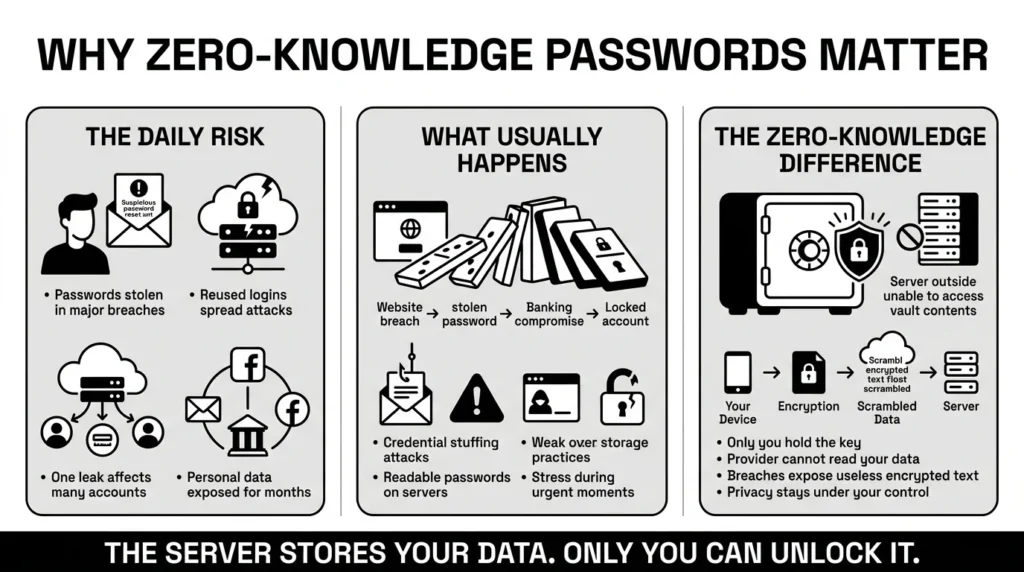
To understand why this matters, we have to look at how often passwords fall into the wrong hands. According to the 2025 Verizon Data Breach Investigations Report (DBIR), stolen or compromised credentials remain the most common initial access vector, used in 22% of all confirmed breaches. Passwords are the most persistent and successful attack vector in digital security. When hackers get a database of readable passwords, they do not just stop at one account. They use those credentials to try and unlock your email, your financial portals, and your social media profiles.
The fallout from these breaches is not just a brief inconvenience; it is a long, stressful process. The 2025 IBM Cost of a Data Breach Report highlights that the average breach lifecycle is 241 days, with 53% of breaches involving the compromise of customer personal information (often called PII). That is nearly eight months of unauthorized access, during which attackers can carry out reconnaissance or compromise other connected accounts. The scale of this issue is massive. The Identity Theft Resource Center (ITRC) notes that recent mega-breaches have resulted in billions of victim notices, meaning everyday data is constantly under threat. For everyday people, this translates to the panic of receiving a password reset email you did not request, or suddenly finding yourself locked out of an account during a critical moment.
You might be wondering what this has to do with your personal setup. When you rely on traditional password management systems or basic cloud storage that are not zero-knowledge, you are trusting a company’s servers to keep your digital life intact. You are handing them the master key. If a hacker breaches their system, your credentials and important documents could be exposed. A zero-knowledge architecture ensures you never hand over the master key. It removes the burden of hoping a company has perfect security, because even if their servers are breached, your data remains completely unreadable to anyone but you.
What Usually Goes Wrong
We have all reused passwords. It is human to want something familiar. According to a 2026 Bright Defense analysis of password statistics, a staggering 94% of leaked passwords were reused or duplicated across multiple accounts. When you rely on memory, you naturally gravitate toward a handful of familiar phrases, rotating them across dozens of accounts. But what happens when you reuse a login across your shopping, streaming, and banking accounts? If a small, seemingly unimportant website gets hacked, attackers will take your email and password combination and run it through automated software to test it on hundreds of other sites. This is known as credential stuffing, a threat so prevalent that the Open Worldwide Application Security Project (OWASP) lists it as a top automated threat, and it is incredibly common.
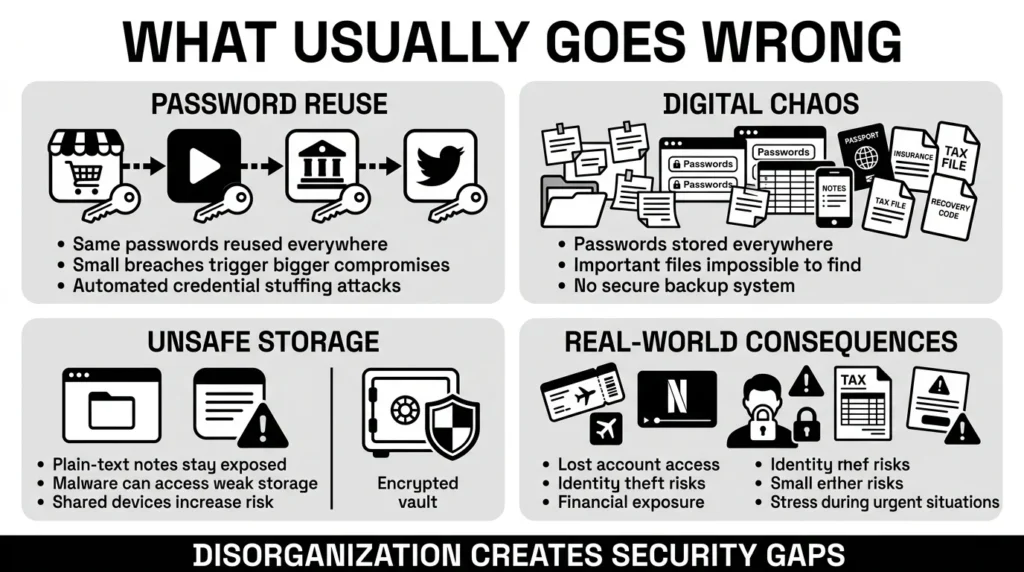
Beyond password reuse, our systems for tracking information are often chaotic. Think about the last time you were locked out of your Netflix account during family movie night. The scramble to reset the password, find the right email, and log back in ruins the evening. Or consider a more stressful scenario: your laptop crashes, and the only scan of your passport is buried in an old, unbacked-up folder right before an international flight. What about filling out an urgent application and being stopped dead in your tracks because you cannot recall the security response you made eight years ago?
Many people try to solve this by keeping passwords in phone notes, sticky notes stuck to monitors, spreadsheets, or built-in browser storage. While these methods feel convenient at the moment, they lack true confidentiality. If someone borrows your phone, or if malicious software gets onto your computer, those unencrypted notes are wide open. Furthermore, scattered physical and digital notes mean a parent might ask where the health insurance card is, and nobody knows which device holds the latest copy.
The Federal Trade Commission (FTC) recently processed over 6.4 million consumer reports, with identity theft making up a massive 18% of those cases, frequently warning that disorganized personal records are primary gateways for fraud. Furthermore, the FBI’s Internet Crime Complaint Center (IC3) reports that potential losses to cybercrime have skyrocketed to over $16.6 billion, highlighting the severe financial risk of poor digital hygiene. When your tax files, insurance papers, and IDs are scattered across random folders, securing them becomes an impossible chore. Furthermore, if you are using online storage where the provider holds your encryption keys, you are not using zero knowledge passwords, meaning you are still vulnerable to inside threats or server breaches. You need a system that brings order to the chaos without exposing your data to third parties.
The Safer Way to Handle It
The safer approach is simple: keep your information in an encrypted format where only you hold the decryption key. Think of it like renting a physical safe in a very secure bank. The bank provides the reinforced steel building, security cameras and guards. However, only you possess the specific key that actually opens your individual box. Even the bank manager cannot look inside to see whether you are storing family heirlooms, important documents, or nothing at all.
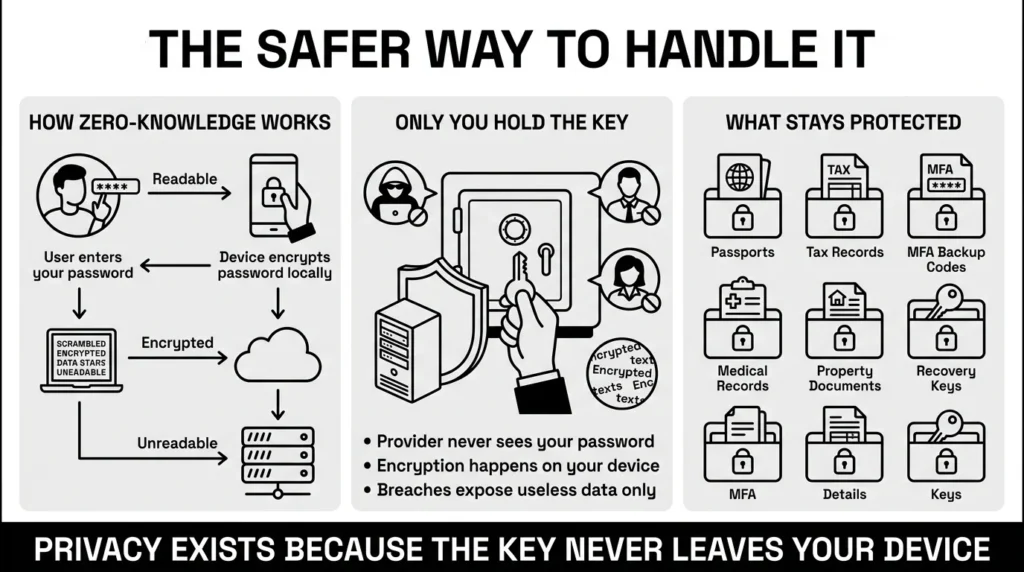
Organizations like the Electronic Frontier Foundation (EFF) have long advocated for encryption architectures that give the user ultimate control over their digital footprint. In the digital world, this concept relies on strong cryptography to lock your data before it ever leaves your computer or smartphone. When you enter a password into a zero-knowledge system, the software uses advanced encryption to scramble your private information into an unreadable string of random characters. This scrambled text is all that gets sent to the server. Because the server only receives this encrypted data, it has absolutely no way to read your files or know your actual passwords.
When it comes to logging in, the system handles user verification through a clever mathematical process. It can verify your identity proof without ever requiring you to send your actual master password over the internet. The server essentially issues a mathematical challenge that your device solves using your secret key. If the answer is correct, the server knows you are the authorized user, allowing a secure login without ever seeing the password itself.
By embracing zero knowledge passwords, you ensure that even if the server storing your data is completely compromised by hackers, the attackers only walk away with useless, scrambled text. They cannot decrypt it because the key never existed on the server in the first place. This architecture protects your privacy without requiring you to become a cybersecurity expert or understand complex coding. It simply works in the background, ensuring that your digital life remains your own.
This level of privacy is not just for passwords; it applies to all your sensitive files. From your recovery codes and multi-factor authentication backup keys to digital copies of your property documents and medical records, zero-knowledge encryption ensures that your life’s most critical details remain confidential. It turns a vulnerable digital footprint into a fortified, private vault.
Step-by-Step: What To Do Next
Securing your digital life does not have to be a confusing or overwhelming project. By breaking the process down into simple, manageable steps, you can drastically improve your security posture over a single weekend. Here is how you can take control:
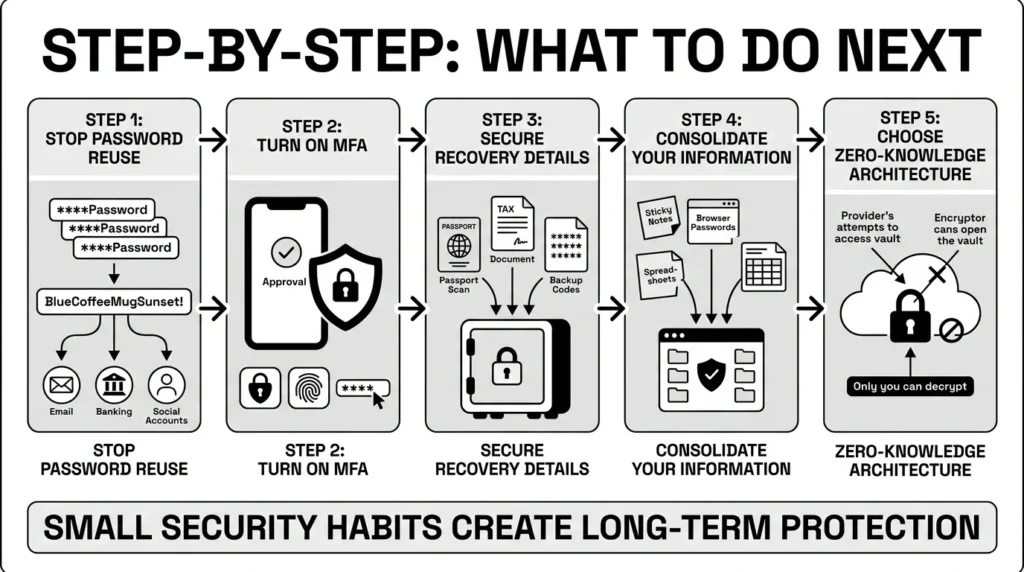
Step 1: Stop the password reuse cycle
Begin by identifying your most critical accounts. This usually includes your primary email, your banking and financial portals, and your main social media accounts. Update these with unique, strong passphrases. The National Institute of Standards and Technology (NIST) Special Publication 800-63B guidelines emphasize that password length is the primary factor in password strength. Instead of a short word with confusing symbols like “P@ssw0rd1!”, use a long, memorable passphrase like “BlueCoffeeMugSunset!”. It is easier to remember and much harder for computers to crack.
Step 2: Turn on multi-factor authentication (MFA)
Add a second step to your most important logins. The Cybersecurity and Infrastructure Security Agency (CISA) strongly advocates for MFA because it provides a critical safety net. Even if a hacker manages to steal your password, they cannot access your account without the second factor—like a prompt sent to your phone or a code generated by an authenticator app.
Step 3: Secure your recovery details and important documents
When you set up MFA, services will give you backup codes or recovery keys. Do not just leave these in your downloads folder or email inbox. A professional locked out of a work-related account because the recovery code was saved in an inaccessible email is a stressful, common scenario. Move your recovery codes, along with digital scans of passports, tax records, and insurance papers, into secure storage. The Privacy Rights Clearinghouse emphasizes the importance of proactively securing sensitive files and limiting exposed data before a breach occurs.
Step 4: Consolidate into a secure personal vault
Move your passwords from physical laptops and built-in browser storage. Browser storage is often vulnerable if someone obtains physical access to your unlocked computer. Consolidating your credentials into one encrypted place gives you a single, organized dashboard for everything important.
Step 5: Adopt the right architecture
When you choose a vault for your consolidation, make sure it is built on the right foundation. This means choosing a tool that explicitly supports zero knowledge passwords. By doing so, you establish a system where your master password acts as the sole key to your digital life, establishing true privacy. Set a strong, memorable master passphrase, and never share it with anyone. This step alone eliminates the vast majority of risks associated with third-party data breaches.
How WhiteVault Helps Keep This Manageable
At WhiteVault, we understand that modern account overload is exhausting. Between managing school forms, health insurance cards, family passwords, and work credentials, it is easy to let security slip. We built WhiteVault because everyday people need one secure, organized place for the information they rely on most.
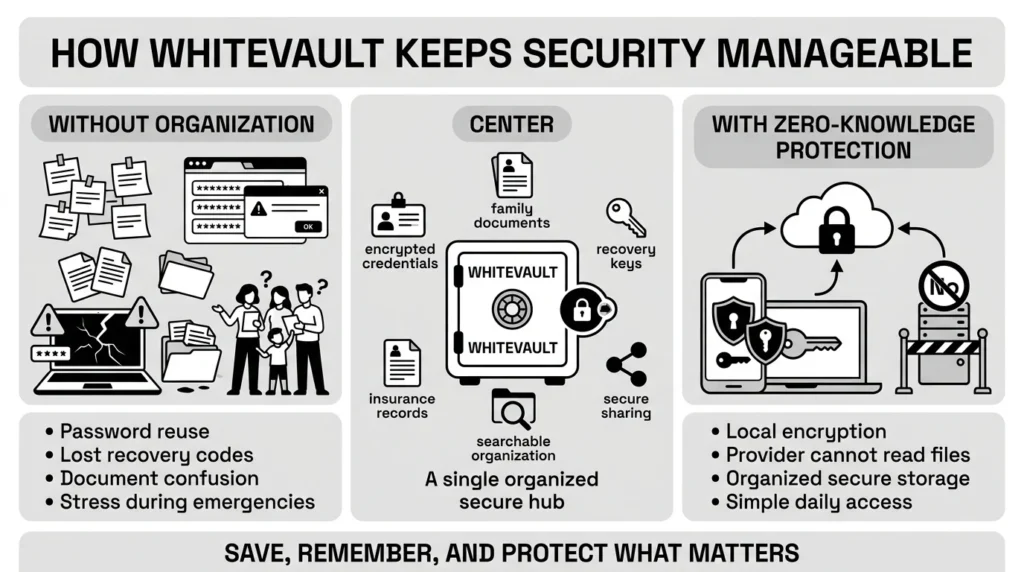
Consider the alternatives. Versus trying to remember everything, WhiteVault allows you to store credentials, recovery details, and important information securely in one encrypted place. Instead of relying on memory and inevitably resorting to password reuse, you only need to remember one strong master passphrase.
Versus sticky notes and built-in browser storage, we provide stronger protection with easy access exactly when you need it. A browser might autocomplete a password, but it does not securely store your family’s tax records or the backup codes for your banking app.
Versus document chaos, WhiteVault keeps your important files organized, searchable, and available. Imagine a family trying to find the latest copy of a will, policy, tax record, or ID scan. Instead of frantic searching through old emails or hoping a hard drive has not failed, everything is instantly accessible to authorized family members.
Versus security complexity, we offer a simple interface backed by strong protection. We believe robust digital security should not require a computer science degree. By utilizing an architecture centered entirely on zero knowledge passwords, WhiteVault ensures you have top-tier protection without daily friction. When you log in, all encryption and decryption happen locally on your device. We never see your master password, we cannot read your private notes, and we have no access to your sensitive files.
WhiteVault is your secure personal vault. We are a trusted place to store what matters most, built for people who want peace of mind through simple, strong protection. We help you save, remember, and protect what matters, keeping your digital life organized and safe from prying eyes.
Habits That Keep You Safer Over Time
Better security rarely comes from one dramatic overhaul. It usually comes from a few simple, sustainable habits repeated consistently. Unrealistic perfection is the enemy of practical security. You do not need to change all your passwords every thirty days—in fact, modern security guidance recommends against frequent, forced password changes unless a breach has occurred, as it simply leads to people using weaker, predictable variations.
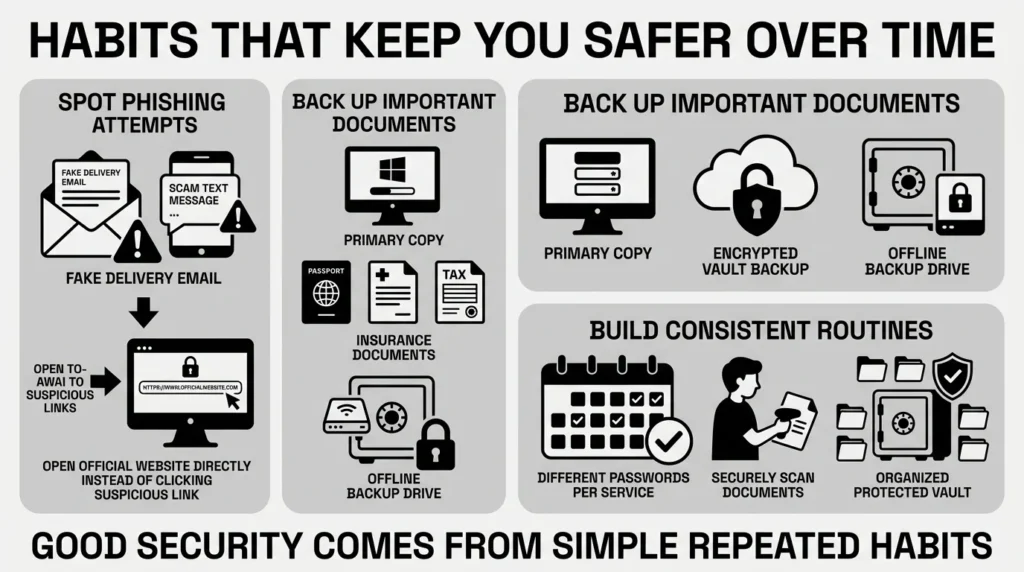
Instead, build habits that protect you from common threats. Start by keeping an eye out for phishing emails and scam texts. Attackers frequently send messages that look exactly like real delivery updates, bank alerts, or subscription renewal notices. They hope to induce panic so you will click a link and hand over your login details. If you ever receive an alarming message, do not click the link. Open your browser, go directly to the service’s official website, and log in securely to check your account status.
Another excellent habit is practicing digital hygiene with your documents, a concept heavily promoted by CISA’s Secure Our World initiative. Adopt a version of the 3-2-1 backup rule for your most critical family records. Keep your primary copies organized, maintain a secure digital backup in an encrypted vault, and ensure you have an offline backup of irreplaceable items. Whenever you receive a new important document—like an updated insurance policy or a renewed passport—make it a habit to immediately scan and store it in your encrypted vault.
Finally, make a habit of generating unique passwords for every single new account you create. It takes only a few extra seconds when signing up, but it completely nullifies the threat of credential stuffing. The peace of mind you get from using zero knowledge passwords grows exponentially as you slowly migrate your scattered, vulnerable accounts into one secure, organized space. Over time, these small actions compound, turning you from an easy target into someone whose digital life is resilient and secure.
Conclusion
Security should always feel practical, calm, and manageable. You do not need to memorize dozens of complicated passwords, stress over where your passport scan is hiding, or worry about every new data breach on the news. By taking small, deliberate steps—like using long passphrases, enabling multi-factor authentication, and consolidating your private information—you can reclaim control over your digital identity.
The right tools do the heavy lifting for you. Relying on zero knowledge passwords means you never have to trust a third party with your most sensitive information, protecting you even when big companies fail. Better security is about making your life easier, not harder. WhiteVault was built for exactly that purpose. Enjoy peace of mind for your digital life. Save, remember, and protect what matters, all in your secure personal vault.
Frequently Asked Questions (FAQ)
1) What is a zero-knowledge architecture?
In simple terms, zero knowledge passwords mean the service storing your data does not know what your password actually is. The service only verifies that you hold the correct key to unlock your encrypted vault locally on your device, ensuring total privacy and preventing the company from ever reading your data.
2) How do I know if my password manager actually uses this?
You can usually tell by checking the provider’s security whitepaper or privacy policy. A clear indicator is the account recovery process. If a company explicitly states that they cannot recover or reset your master password if you forget it, that is a strong sign they cannot see your data and are using a zero-knowledge framework.
3) How long does it take to set up a secure vault?
Setting up the vault itself takes just minutes. However, migrating your life into it is best done gradually. Spend ten minutes setting up the vault and adding your five most important accounts (like email and banking). Then, add other accounts naturally as you log into them over the next few weeks.
4) Are browser-saved passwords as safe as a dedicated password management tool?
While web browsers offer a convenient way to store passwords, they often lack the strict confidentiality of a dedicated secure vault. If someone gains access to your unlocked computer, they can often view or export your browser-saved passwords. A dedicated vault requires separate authentication and provides a much safer environment for both credentials and documents.
5) Is it safe to store digital copies of my ID and Social Security card online?
Yes, provided you are using a vault with strong, zero-knowledge encryption. Storing sensitive documents like tax records, property documents, and ID scans in random desktop folders or standard cloud drives is risky. A secure personal vault encrypts these files so that even if the storage server is compromised, your documents remain completely unreadable.
6) How does this affect my daily privacy and security?
It gives you complete control over your digital identity. Since the service provider cannot read your data, a server breach on their end will not expose your plain-text passwords or private documents to hackers. It minimizes the risk of identity theft and eliminates fear of insider threats.
7) What happens if I forget the master password to my vault?
Because the system is mathematically designed so that the provider cannot see your key, they cannot reset it for you. If you lose your master password, you could lose access to your data. This is why creating a secure emergency access plan or printing a recovery kit and storing it in a physical safe is a mandatory step in your setup.
8) How does WhiteVault help organize and protect my digital life?
WhiteVault uses this exact secure architecture to serve as your secure personal vault. We locally encrypt your credentials, recovery codes, and important documents on your device before they ever reach our servers. We never have access to your private information, giving you a simple, manageable way to protect everything important in one secure place.


