
We have all had that moment of panic. You get an email saying a website you use was hacked, or your phone warns you that a saved login was found in a data leak. Suddenly, you are scrambling to remember where else you used that exact same password. Having a clear password breach response matters because these small moments can quickly turn stressful. At WhiteVault, we help people save, remember, and protect what matters, so dealing with a compromised account feels manageable instead of overwhelming.
A personal password breach response means staying calm, confirming the alert is real, immediately changing the compromised password, updating any other accounts where you reused it, and turning on two-factor authentication to block attackers.
Why This Topic Matters for Everyday Security
For most of us, internet security is not a full-time job. You are just trying to pay a bill, check your email, or log into a streaming service to unwind. But the reality is that companies with our private information are under constant attack. According to the Identity Theft Resource Center’s 2025 Annual Data Breach Report, the U.S. set a new record with 3,322 tracked data breaches—representing a massive 79% jump in data breaches over the last five years. When these corporate defenses fail, your daily routine is suddenly interrupted by a security warning.
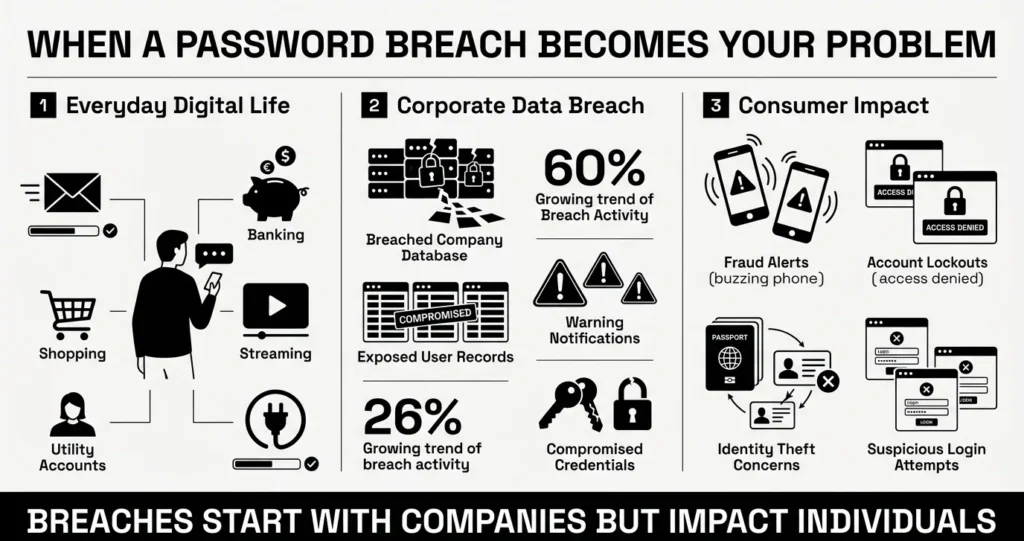
The gap between a corporate data leak and your personal security is significant. The 2025 IBM Cost of a Data Breach Report found that the global average cost of a breach reached $4.44 million, but perhaps more concerning for consumers is the timeline. It takes organizations a global average of 241 days just to identify and contain a data breach. That means by the time you finally receive an email apologizing for a leak, your credentials or private details may have been exposed for months.
During that invisible window, everyday people face very real risks. The Federal Trade Commission (FTC) reported that consumers lost a staggering $12.5 billion to fraud in 2024, a 25% increase from the previous year. However, because so many scams go unreported, true losses are estimated to be closer to $196 billion annually. It is easy to feel helpless when reading these statistics, but you are not powerless. This is why having a personal password breach response is so important. By understanding what happens when data leaks and knowing exactly what steps to take, you can protect your digital life without feeling like you need a degree in computer science.
What Usually Goes Wrong
When an everyday user finds out their information was involved in a breach, the immediate reaction is usually a mix of frustration and panic. A panicked password breach response usually leads to mistakes, like rapidly clicking links in a warning email without verifying if the email itself is a scam. The 2025 Verizon Data Breach Investigations Report (DBIR) highlights that the “human element”—such as falling for social engineering or making simple errors—was a factor in 60% of all breaches.
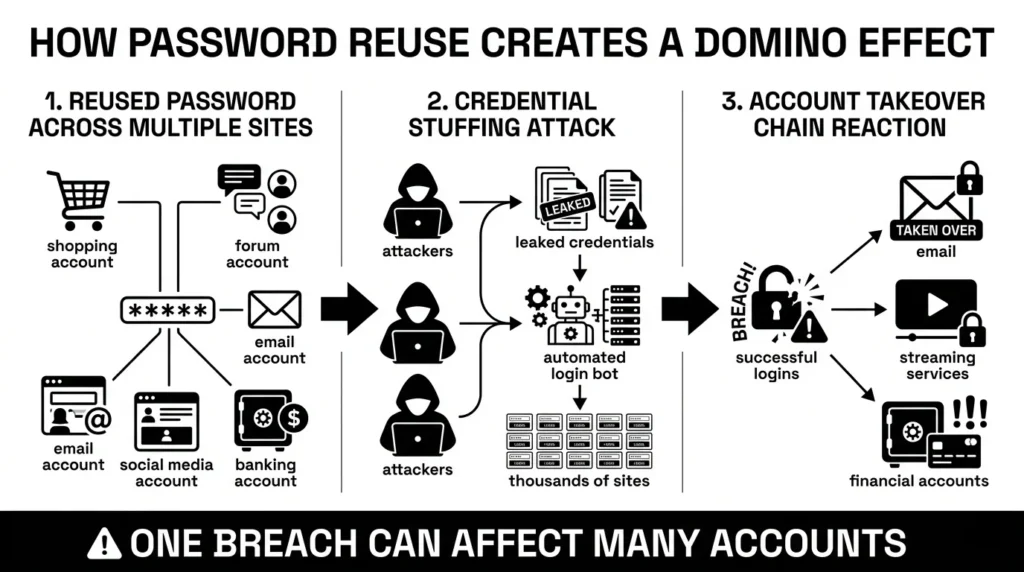
But the biggest problem that surfaces during a cybersecurity incident is something almost all of us are guilty of: password reuse. It is entirely human to want something familiar and easy to type, especially when we are forced to create dozens of accounts. Unfortunately, recent 2025 research indicates that between 85% and 90% of users still reuse at least some of their passwords.
Relying on the same login creates a dangerous domino effect. The 2025 DBIR revealed that stolen credentials are the single most common initial access vector for attackers, used in 22% of all breaches. Worse, 88% of basic web application attacks involved using stolen credentials.
Here is what goes wrong in the real world. You use the same password for a minor forum, your favorite clothing brand, and your main email address. The clothing brand gets hacked. Cybercriminals do not just break into your shopping account. They take your email and password combination and run it through automated software against thousands of other websites. This tactic is called credential stuffing. Within minutes, they have achieved unauthorized access to your email, your streaming services, and potentially your bank.
The Safer Way to Handle It: Creating Your Personal Plan
To handle a breach effectively, it helps to understand what is happening behind the scenes. When a major business suffers a cybersecurity incident, they have entire teams dedicated to fixing it. They must adhere to strict regulatory compliance laws that dictate how and when they have to tell you about the problem.

The company will conduct an extensive internal breach investigation. Once they know what was stolen, they issue a public communication—this is the user notification that lands in your inbox or hits the evening news.
For you, the goal of a healthy password breach response is simply to isolate the damage and secure your accounts. You do not need to perform a massive corporate system audit. You just need to practice a bit of user account monitoring. Think of it as putting out a small kitchen fire before it spreads to the rest of the house. By shifting from a state of fear to a state of calm, methodical action, you can lock down your accounts quickly and safely.
Step-by-Step: What To Do Next When Your Password Leaks
When initiating your password breach response, always start by taking a deep breath. You do not need to fix everything in five minutes. Follow these simple steps to secure your credentials based on Secure Our World guidance from the Cybersecurity and Infrastructure Security Agency (CISA).
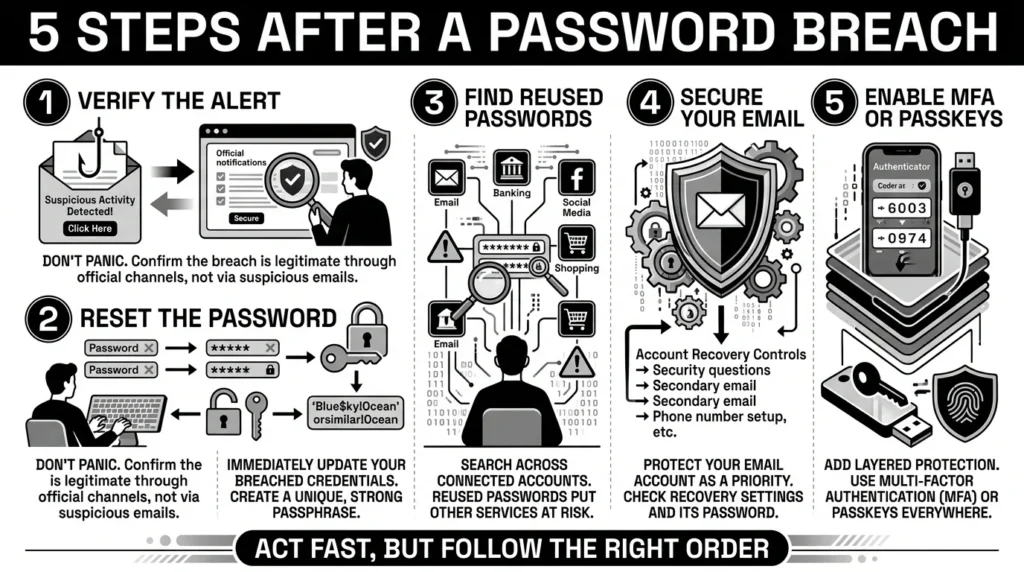
Step 1: Verify the Alert
Scammers know data breaches make people nervous. They frequently send fake text messages and emails that look like legitimate security warnings, hoping you will click their link and type in your current password. Never click the “Reset Now” link in an unexpected email or text. Instead, open your web browser, navigate directly to the company’s official website, log in, and check your account settings or messages for official alerts.
Step 2: Isolate the Damage with a Password Reset
Once you confirm the breach is real, go directly to the affected service and perform a password reset immediately. Create a brand-new, completely unique password for this account. Make it long—a phrase made of four or five random words is much better than a short word with a symbol.
Step 3: Hunt Down Reused Passwords
This is the most critical step. Ask yourself: Where else did I use that exact password or a slight variation of it? Did you use it for your bank, social media or email? You must immediately log into those other sites and change those passwords to unique ones as well.
Step 4: Protect Your Master Key (Your Email)
Your primary email address is the master key to your digital life. If an attacker gets into your email, they can request password resets for almost any other service you use. Always ensure your email account has the strongest, most unique password you can create.
Step 5: Turn on Multi-Factor Authentication (MFA) or Passkeys
Whenever possible, enable multi-factor authentication (MFA). This means that even if a hacker steals your password, they cannot log in without the secondary code sent to your phone or an authenticator app. Better yet, look into upgrading to passkeys where available. The FIDO Alliance reports that over one billion people have already activated at least one passkey, making it a rapidly growing, highly secure alternative to traditional passwords.
Protecting Your Important Documents After a Leak
Sometimes, a security event involves more than just a leaked password. You might discover that a company lost copies of your private information, such as your tax records, identity documents, or financial files. Or, an attacker who gained access to your email might now have access to the random attachments you have emailed to yourself over the years.
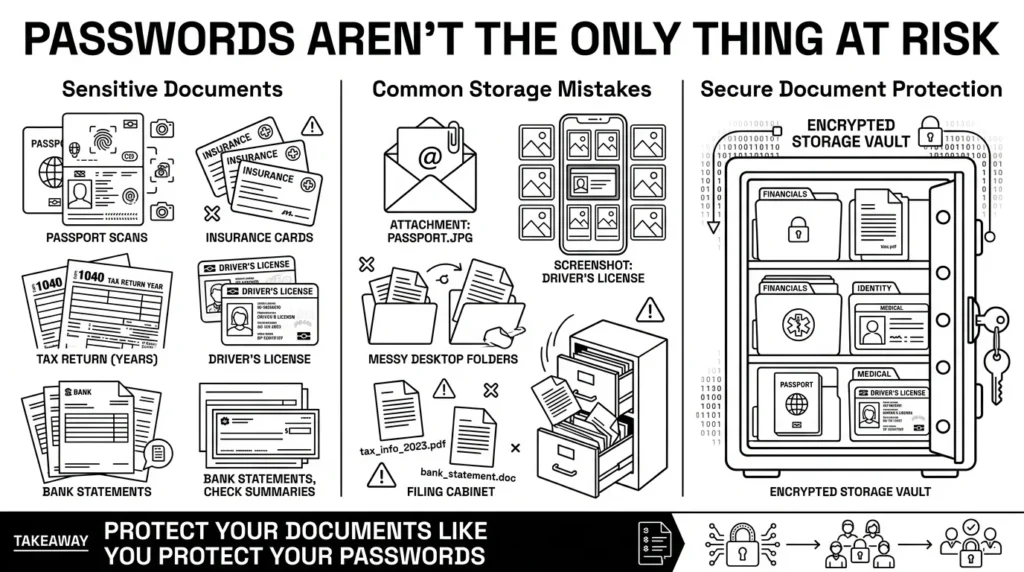
Many everyday users keep their most vital records—like a scan of a passport, a health insurance card, or old tax returns—scattered across email folders, desktop folders, and phone photo galleries. If a laptop crashes, or if an account is locked, the only scan of a passport you need for a sudden trip might be gone. Worse, if an account is compromised, those scattered documents become easy targets for fraudsters.
Good data security means taking digital documents as seriously as physical documents. Instead of leaving important documents floating in your inbox, you need a single, encrypted place to keep them. When a breach happens, you should only have to worry about changing a password, not wondering if a stranger just downloaded a picture of your driver’s license.
How WhiteVault Helps Keep This Manageable
An effective password breach response relies on knowing exactly what you have stored and where. Better security rarely comes from trying to memorize complex strings of characters. It comes from having the right tools to do the heavy lifting for you. In fact, 99% of enterprise users report that utilizing a dedicated credential management vault significantly improves their overall security posture.
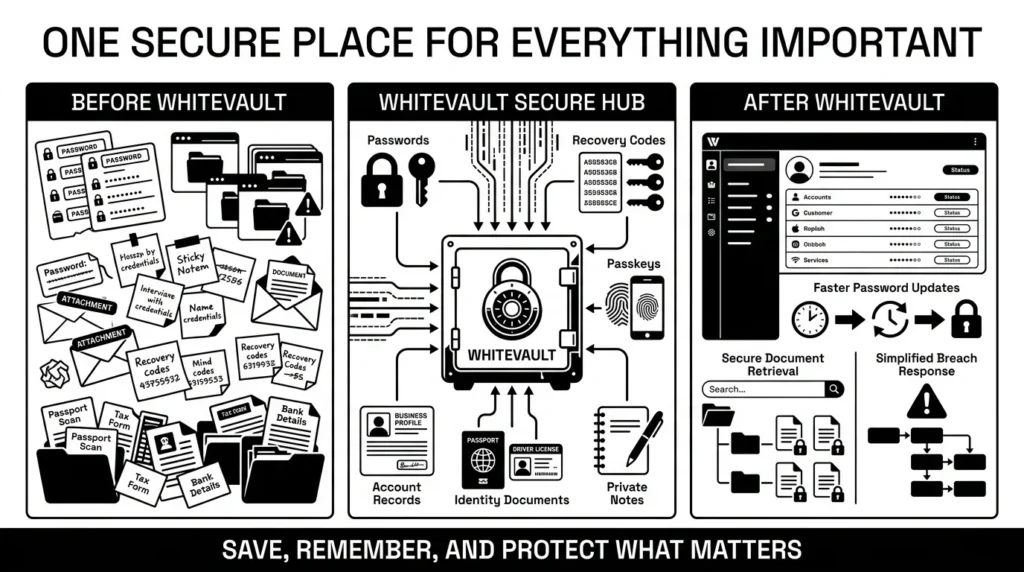
This is exactly what WhiteVault is built for. We created WhiteVault because people need a secure personal vault that makes managing digital life simple, not exhausting.
- Versus trying to remember everything: Instead of recycling the same password out of convenience, you can generate and store completely unique credentials for every website in one encrypted place.
- Versus sticky notes and browser storage: Browsers can be compromised, and sticky notes get lost. WhiteVault provides stronger protection with easy access right when you need it.
- Versus document chaos: Keep your important documents, like passport scans, insurance files, and tax records, organized, searchable, and available only to you.
- Versus scattered recovery details: Save your multi-factor backup codes, recovery keys, and old security answers where you can actually find them when you are locked out.
With WhiteVault, you only need to remember one strong master password. Everything important is in one secure place, allowing you to save, remember, and protect what matters with total peace of mind for your digital life.
Habits That Keep You Safer Over Time
You do not have to be perfect to be secure. The goal is simply to build habits that make you a hard target. Modern security protocols are actually shifting to make things easier on the user. For example, the updated National Institute of Standards and Technology (NIST) 800-63 guidelines officially emphasize password length and uniqueness, dropping outdated advice that forced people to use complex special characters or periodically change their passwords every 90 days.
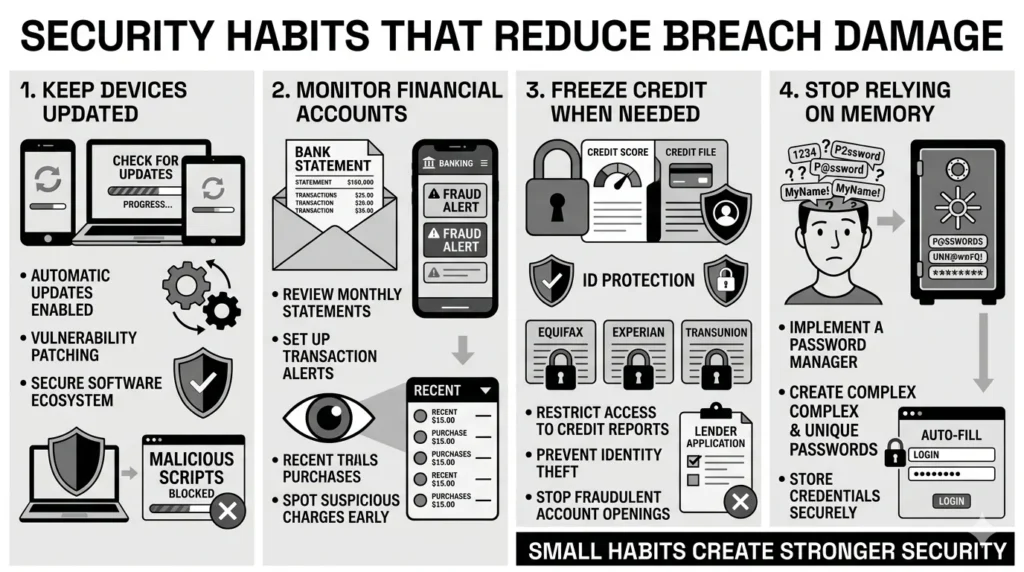
Here are the sustainable habits that will protect you over time:
- Embrace Updates: Keeping your phone, computer, and apps updated is essentially automatic vulnerability patching. Companies release updates to fix the holes that hackers try to sneak through.
- Freeze Your Credit: If a data leak involves your Social Security number or financial details, take advantage of simple incident reporting. Contact the major credit bureaus and freeze your credit. It is free, and it stops anyone from opening new accounts in your name.
- Check Your Accounts: You do not need to be paranoid, but simple threat mitigation means glancing at your bank and credit card statements weekly to ensure there are no strange charges.
- Stop Trying to Memorize: Let go of the stress of memory-based security systems. Rely on a secure vault to hold your private information.
Conclusion
Better data security rarely comes from one dramatic change or a sudden crash course in computer science. It usually comes from a few simple habits repeated consistently: using unique passwords, keeping safer recovery details, organizing your important documents, and finding a reliable place to keep what matters.
Ultimately, a good password breach response is about preparation and peace of mind. When you know where your credentials are and how to update them, a data leak becomes a minor chore instead of a major emergency. WhiteVault was built for exactly that. Save, remember, and protect what matters, all in your secure personal vault.
Frequently Asked Questions (FAQ)
1) What exactly is a password breach?
A password breach happens when cybercriminals successfully break into a company’s database and steal the private information stored there, which often includes usernames, email addresses, and passwords. This stolen data is commonly sold or shared online, allowing unauthorized people to try and log into your accounts.
2) How do I know if my password was involved in a leak?
You will typically find out in one of three ways: the company that was breached will send you an official email notification, your phone or web browser will send you a built-in security alert warning you that a saved password was found in a leak, or you can manually check your email address using reputable cybersecurity monitoring websites.
3) How long does it take to secure my accounts after a breach?
If you have a plan, securing your most critical accounts takes less than 15 minutes. The immediate priority is changing the password on the breached website and checking your main email account. Updating other accounts where you reused the password may take a bit longer, but utilizing a secure personal vault makes the ongoing process much faster.
4) What is the difference between a password reset and account recovery?
A password reset is a proactive step you take when you still have access to your email or account, simply changing the password to a new one. Account recovery is the harder process you have to go through when you are completely locked out of an account (often because an attacker changed the password first) and you have to prove your identity using recovery codes or security answers.
5) I’m not good at technology. What is the safest beginner step I can take?
The single best step for a beginner is to stop reusing the password you use for your main email account. Your email is the doorway to everything else. Create a long, unique passphrase (like four random words strung together) just for your email, and write it down somewhere safe in your home until you are comfortable using a digital vault.
6) If my password leaks, does that mean my identity will be stolen?
Not necessarily. If only your password and email leaked, the immediate risk is to your online accounts, not your physical identity. However, if the breach included your Social Security number, financial records, or important documents, the risk of identity theft increases, and you should consider placing a freeze on your credit.
7) Where is the best place to keep my recovery codes and document scans?
The safest place is in an encrypted digital environment, rather than loose in your physical wallet, your phone’s photo gallery, or a random desktop folder. Using a dedicated storage solution ensures your recovery details and important documents are organized, searchable, and shielded from anyone who happens to pick up your device.
8) How does WhiteVault help with my password breach response?
WhiteVault makes the entire process faster and less stressful. Instead of panicking and trying to remember every website where you reused a leaked password, WhiteVault stores all your unique credentials in one place. If a breach happens, you can easily generate a new, strong password, update the specific account, and get back to your day knowing your private information is secure.


