
You just bought a new phone or cleared your browser history, and now you have to log back into everything. Instantly, you hit a wall: an app rejects your password, demanding an arbitrary symbol or an uppercase letter you forgot you used. This frustrating roadblock is the direct result of developer password security—the backend rules companies build to guard your data. At WhiteVault, we help everyday people save, remember, and protect what matters, ensuring that keeping your private accounts secure feels highly practical and totally manageable.
Quick Answer
Good security behind the scenes means an application uses strong encryption, checks for breached passwords during account creation, and supports long passphrases without forcing confusing character rules. This protects your credentials from being stolen, even if the company experiences a data breach.
Why This Topic Matters for Everyday Security
We entrust a massive amount of private information to the applications we use every day. Think about your daily routine: you log into a banking app to check a balance, use a portal to review medical records, and open a work dashboard to handle financial documents. We assume that the people who built these systems know exactly how to keep our data locked down tight.
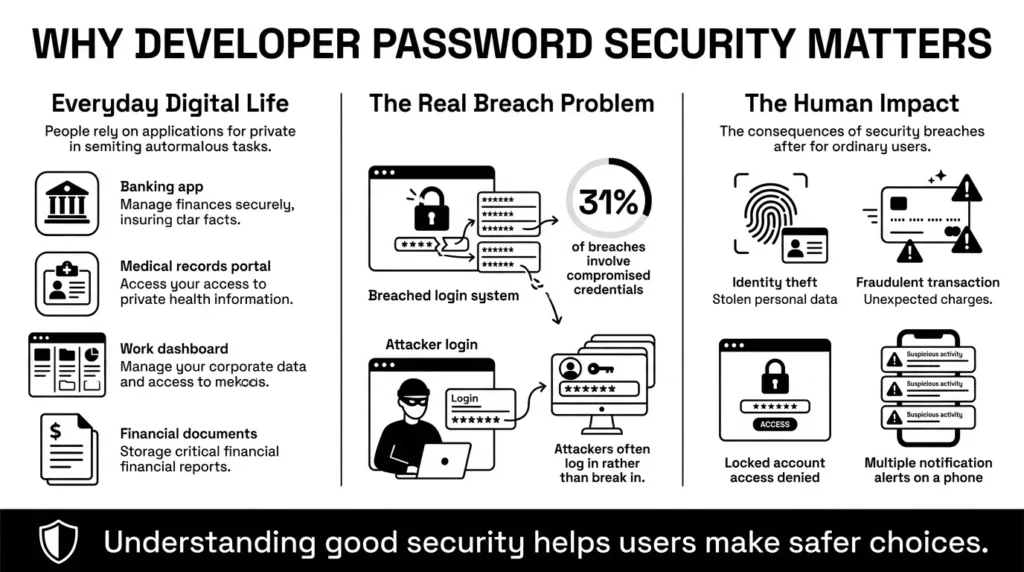
However, the reality is that the digital landscape is highly complex, and mistakes happen. When you read about a massive data leak in the evening news, the root cause often comes down to a failure in developer password security. It is not necessarily that a master hacker broke through an impenetrable firewall; often, it is because an application failed to properly protect user logins, leaving the front door unlocked.
The latest threat intelligence data proves this. According to the Verizon Data Breach Investigations Report, compromised credentials are a factor in 31% of all cyber breaches. Attackers do not need to break the system if they can simply log in. Furthermore, the IBM Cost of a Data Breach Report 2025 revealed that the average cost of a breach in the US has reached an all-time high of $10.22 million. Perhaps more concerning for everyday users, IBM also found that breaches involving stolen credentials take an average of 292 days to resolve.
This matters to you because even if you are not a software engineer, you are the one dealing with the fallout of an account lockout, a fraudulent charge, or a stolen identity. In fact, 62% of attacks not involving human error are driven by stolen credentials, phishing, or brute force. Understanding what good security looks like helps you choose better services and handle your own accounts with confidence, rather than fear.
What Usually Goes Wrong Behind the Scenes
For decades, the standard advice for securing accounts was based on habits that actually made us less safe. If you have ever felt annoyed by an application demanding you change your password every 90 days, you are not alone.
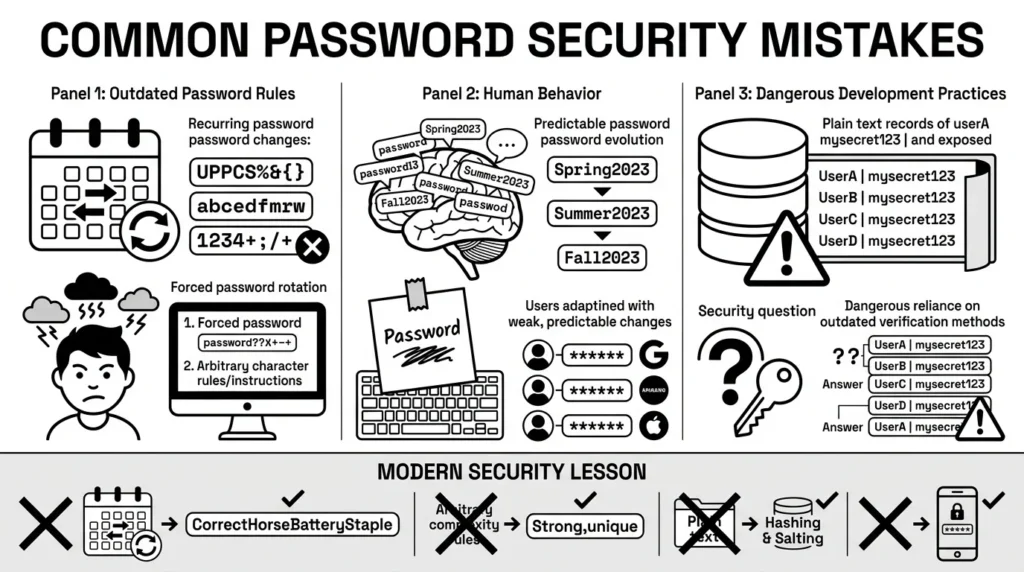
When forced to create complex combinations or change passwords frequently, human nature takes over. A 2024 Bitwarden consumer survey found that 51% of users still rely solely on their own memory to manage passwords. To cope with this cognitive overload, a person might change “Spring2025!” to “Summer2025!”. We rely on predictable patterns just to get through the workday.
Government and cybersecurity experts have finally caught up to this reality. In their updated guidelines, the National Institute of Standards and Technology (NIST SP 800-63B) officially banned mandatory 90-day password rotations and prohibited those frustrating complexity rules that require specific symbols. They also banned security questions—like “What was the name of your first pet?”—because those answers are easily found on social media.
Unfortunately, poor developer password security persists on older websites that have not updated their systems to reflect these modern best practices. They still rely on outdated rules, or worse, they store passwords in “plain text” (exactly as you typed them). When a database like that is compromised, the attackers get every single password perfectly intact.
The Safer Way: How Modern Apps Should Protect You
If forcing people to use symbols and 90-day resets does not work, what does proper developer password security actually look like? Modern applications are built on a concept of layered defense. Organizations publish robust frameworks—like the OWASP Application Security Verification Standard—to give engineers a strict checklist for protecting user data.
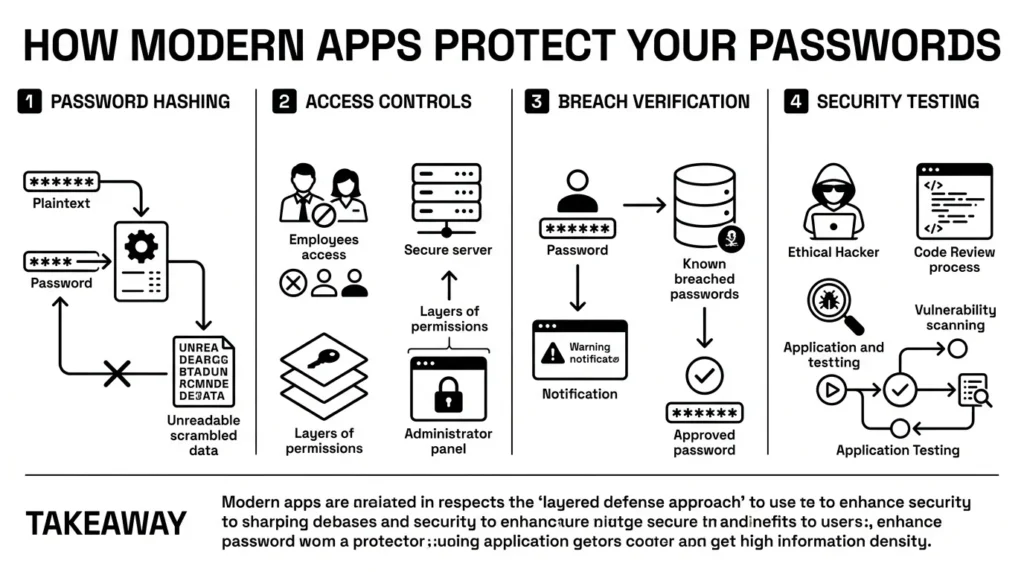
When you type your login details into a well-built application, several crucial things happen in the background:
First, your password undergoes password hashing. Hashing is not the same as encryption. If encryption is like putting your password in a digital safe with a key, hashing is like putting your password into a blender. It turns your password into a long, irreversible string of scrambled letters and numbers. If a hacker breaches the database, they just find the “mashed potatoes”—they cannot mathematically reverse it back into your original password.
Second, modern applications use strict access controls. This means that even the employees who work at the company cannot see your password. Customer service representatives can help you reset your account, but they can never actually view your current login.
Third, developers now integrate real-time breach verification. A secure application will quietly check the password you are trying to create against a known list of compromised passwords, such as the widely respected Have I Been Pwned database. If the password you chose was exposed in a previous breach, the application will warn you to pick a different one.
Finally, proactive teams rely heavily on vulnerability testing and rigorous code review. Before an update is ever released to your phone or computer, the company pays ethical hackers to try and break into it.
Step-by-Step: What To Do Next to Protect Your Accounts
Even if an application features flawless developer password security, your account remains vulnerable if you reuse a weak password from another site that was already hacked. You cannot control how a company writes its code, but you have complete control over your own credential management.
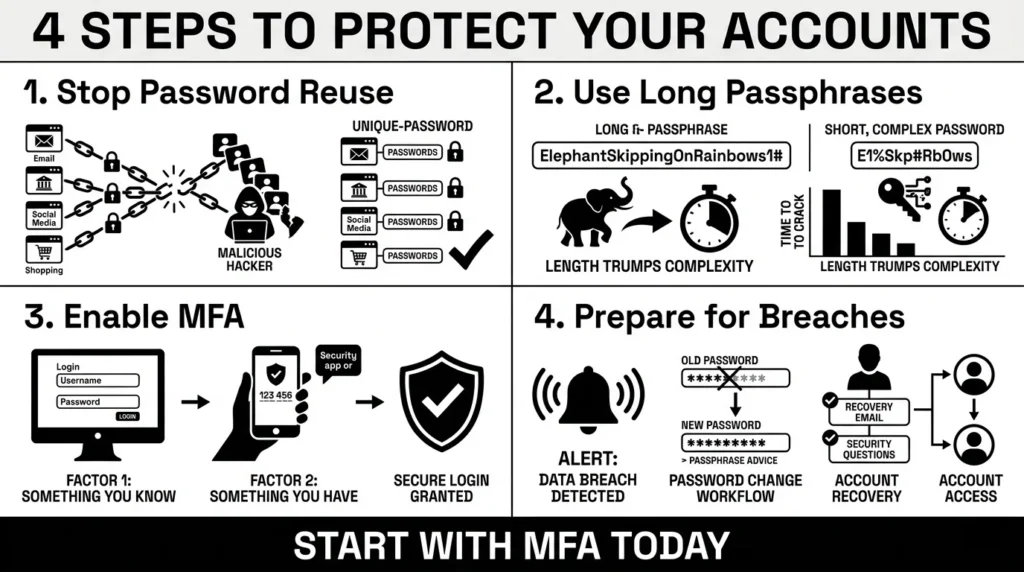
Here are the practical steps you can take today to protect yourself, without turning security into a stressful project:
1) Stop the Reuse Cycle
We have all reused passwords. It is human to want something familiar. But when you use the same login for a small hobby forum and your primary bank, you create a massive risk. If the small forum is hacked, attackers will take your email and password combination and use automated bots to test it across banking and shopping sites. You must use a unique password for every important account.
2) Embrace Long Passphrases
Because secure sites now support passwords up to 64 characters long, you can stop relying on confusing symbols. Instead, use a passphrase. A passphrase is a string of random, simple words (for example: “coffee window purple guitar”). It is mathematically much harder for a computer to crack, but significantly easier for a human brain to type and remember.
3) Turn On Multi-Factor Authentication (MFA)
If you only do one thing after reading this article, make it this: follow the guidance from CISA and enable multi-factor authentication. MFA means that even if a hacker guesses your password, they still need a second piece of evidence to log in, like a temporary code. According to the Microsoft Digital Defense Report 2025, implementing strong MFA blocks over 99% of identity-based attacks.
4) Prepare for the Worst
Data breaches are a reality of modern life. You cannot stop a company from being hacked, but you can limit the damage by keeping your own information organized. If a service you use is breached, change that specific, unique password immediately.
Beyond Passwords: Your Important Documents Are Also At Risk
While we spend a lot of time talking about logins, the contents of your digital life go far beyond passwords. A freelancer might be juggling client portals and tax files; a parent might be managing health insurance cards; a traveler needs quick access to passport scans.
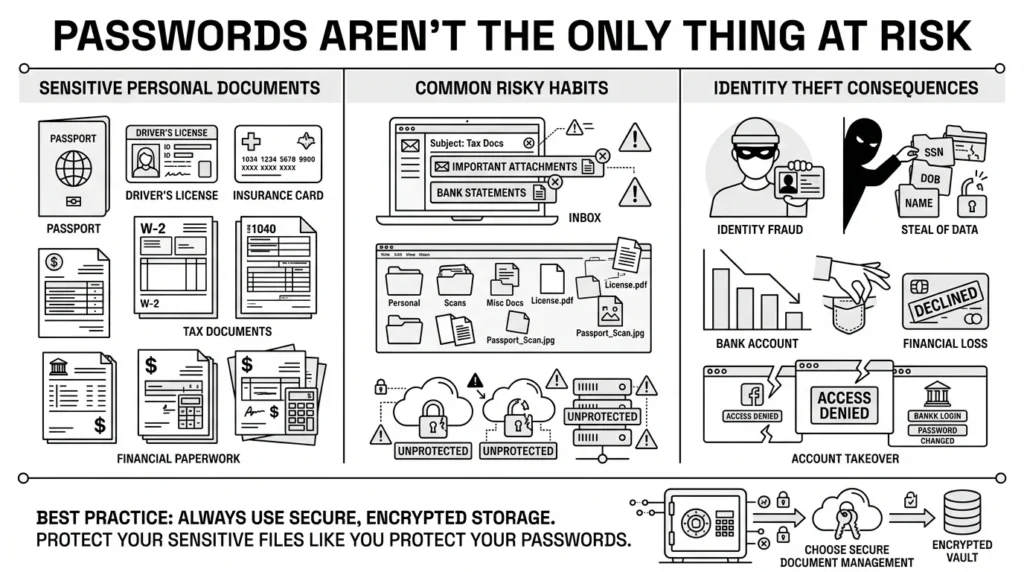
When people do not have a system, they default to messy habits. You might leave an unencrypted picture of your driver’s license sitting in your email inbox, or save your backup recovery codes in a random desktop folder.
The risks of these scattered habits are incredibly high. The Federal Trade Commission (FTC) reported 1.15 million cases of identity theft in just the first three quarters of 2025 alone, outpacing the entirety of 2024. According to a 2025 OmniWatch survey, 66% of Americans cite identity theft as their top fear, yet only 21% take active steps to protect themselves. Furthermore, reported fraud losses topped $12.5 billion last year, and AARP data indicates that 41% of adults have experienced having their money or sensitive information stolen.
If an attacker gains access to your email because of a reused password, they will immediately search your inbox for words like “passport,” “tax,” or “recovery.” Secure storage for your files is just as critical as having a strong password. You need a dedicated, encrypted place to hold the sensitive documents that prove your identity.
How WhiteVault Helps Keep This Manageable
We understand that developer password security can sound highly technical, and you should not need a computer science degree just to safely log into your bank or find a tax document. The goal of personal security is not to perfectly memorize dozens of passphrases. The goal is peace of mind.
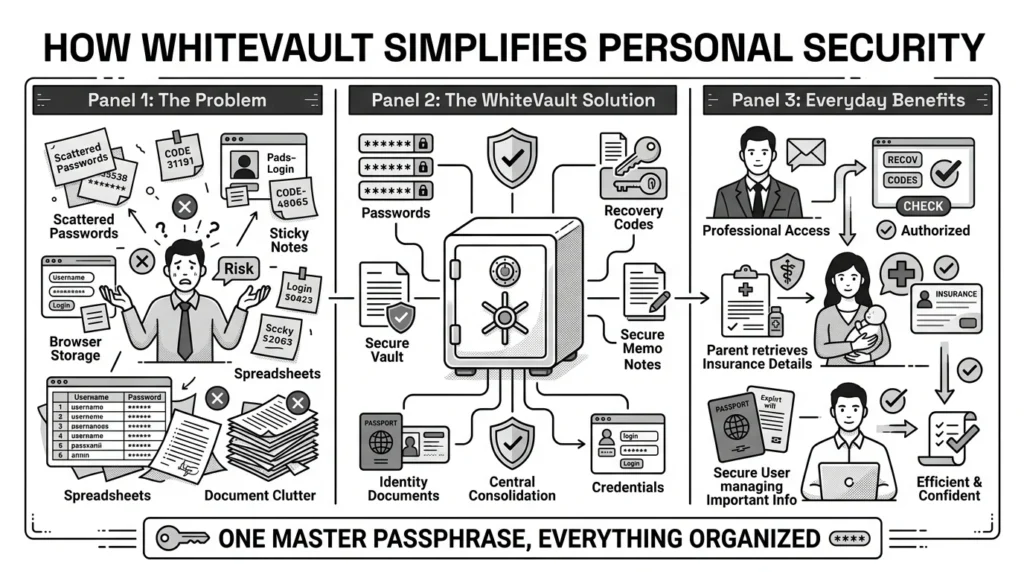
This is why we created WhiteVault. WhiteVault is your secure personal vault for credentials, passwords, recovery details, private notes, and important documents.
Instead of relying on scattered sticky notes, messy spreadsheets, or the built-in browser storage that anyone using your laptop can access, WhiteVault gives you one trusted place to store what matters most. It acts as the bridge between the complex security happening behind the scenes and the simple interface you need to get through your day.
If you are a professional locked out of a work account, WhiteVault is where you find your saved recovery codes. If you are filling out a school form and need your insurance details, WhiteVault is where you keep the scanned document, neatly organized and readily available. You just need to remember one strong master passphrase, and WhiteVault takes care of protecting the rest.
Habits That Keep You Safer Over Time
Better security rarely comes from one dramatic overhaul of your digital life. You do not need to be a cybersecurity expert to build strong daily habits.
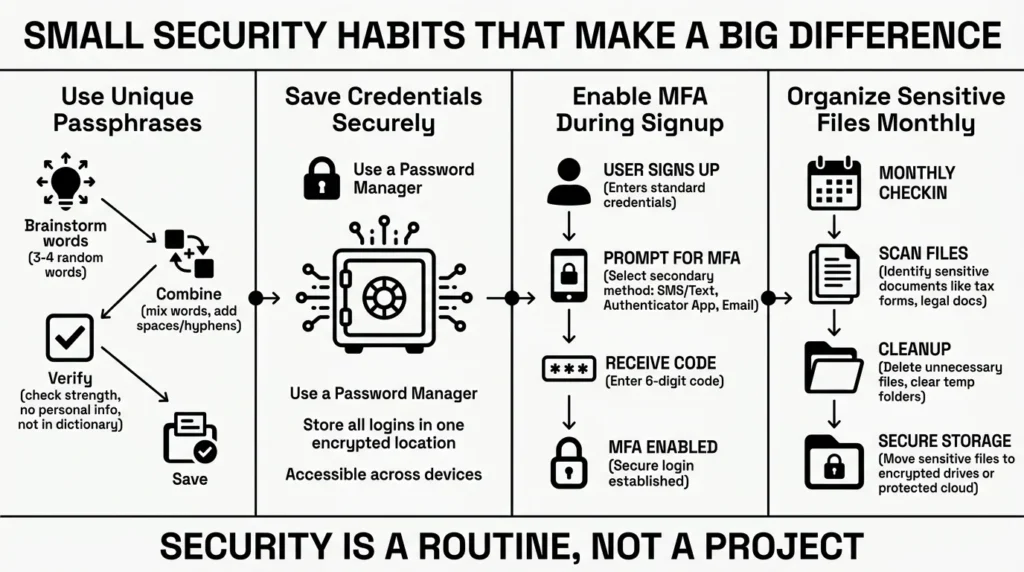
Start small. The next time you are forced to reset a password, use a strong, unique passphrase and save it in your secure vault. When you sign up for a new service, take the extra sixty seconds to turn on multi-factor authentication. Once a month, take ten minutes to clean out your download folder, moving any sensitive medical or financial PDFs into secure, encrypted storage.
Security should feel practical, calm, and manageable. By relying on a secure personal vault and moving away from memory-based systems, you take the pressure off yourself and put the heavy lifting back on the technology where it belongs.
Conclusion
The internet can feel like a chaotic place, but securing your corner does not have to be overwhelming. Ultimately, strong developer password security is the foundation of the apps we trust, but your personal habits are the roof and walls. By using unique passphrases, enabling multi-factor authentication, and keeping your sensitive files organized, you make yourself an incredibly difficult target for scammers and hackers. Better security is simply having the right tools and habits. Save, remember, and protect what matters, all in your secure personal vault with WhiteVault.
Frequently Asked Questions (FAQ)
1) What is developer password security?
It refers to the technical rules, coding practices, and storage methods that software engineers use to protect your login information behind the scenes. It includes things like how an app scrambles your password in its database, how it verifies your identity, and the rules it enforces when you create an account.
2) How do I know if a website has good security?
While you cannot see a company’s database, you can look for outward signs of good security. A modern, secure site will allow long passphrases (up to 64 characters), offer multi-factor authentication (MFA), skip forcing you to change your password every 90 days, and avoid asking outdated security questions like the name of your first pet.
3) Why are websites stopping the 90-day password reset rule?
The National Institute of Standards and Technology (NIST) updated its guidelines to ban arbitrary password expiration. Research proved that forcing people to change their passwords constantly actually weakens security, because users resort to simple, predictable patterns just to remember them.
4) What is the difference between password hashing and encryption?
Encryption is a two-way process; data is locked with a key, and if you have the key, you can unlock and read it. Password hashing is a one-way mathematical process. It scrambles a password into a unique string of characters that cannot be reversed. Good applications hash passwords so that even if the database is stolen, the passwords remain unreadable.
5) Do I still need to use special characters like an exclamation point?
Under the latest security guidelines, websites are strongly discouraged from forcing you to use specific special characters or numbers. Instead, security experts recommend using a “passphrase”—a longer string of random, easy-to-remember words. Length is much more effective at stopping automated hacking tools than complexity.
6) What is multi-factor authentication and why is it so important?
Multi-factor authentication (MFA) requires you to provide two or more pieces of evidence to log in. Usually, this is something you know (your password) and a temporary code sent to your phone or generated by an app. It blocks over 99% of identity-based attacks, making it essential even if a hacker steals your password.
7) Where should I store my backup recovery codes?
When you set up MFA, websites often give you a list of backup recovery codes to use if you lose your phone. You should never store these in your email inbox or in a plain text file on your desktop. They should be treated like passwords and kept in a secure, encrypted digital environment so you can access them safely during an emergency.
8) How does WhiteVault help me manage secure credentials?
WhiteVault acts as your secure personal vault, eliminating the need to memorize dozens of complex passwords or scatter your sensitive documents across unsecure folders. By remembering just one master passphrase, you can save, remember, and protect what matters. It organizes your unique passwords, stores your recovery codes, and safely houses important documents like ID scans, all behind strong encryption.


