
The year 2026 has brought incredible convenience to remote work, but the threat of a high-tech visual eavesdropping attack is closer than you think. You are sitting in an airport lounge, finalizing a last-minute wire transfer before a flight. You assume the person seated behind you is engrossed in a movie on their phone. In reality, their high-resolution smartphone camera, equipped with 100x optical zoom, is casually recording every keystroke and account number on your screen. This silent, non-technical threat is shoulder surfing, and it turns modern multitasking into a serious vulnerability. At WhiteVault, we help people save, remember, and protect what matters, giving you peace of mind even when you cannot control who is watching.
Quick Answer This threat happens when someone secretly watches your screen or keyboard to steal passwords, PINs, or private information. You can prevent it by using privacy screen filters, relying on password managers to autofill logins, and physically shielding your devices in public.
Why This Topic Matters for Everyday Security
The phrase shoulder surfing sounds a bit silly, like a relic from the early days of the internet when hackers were depicted wearing ski masks in dark rooms. But in our modern, hyper-connected world, this low-tech security threat remains remarkably effective. It does not require complex coding, malware, or sophisticated hacking tools. It simply requires an observer, a clear line of sight, and a moment of distraction.
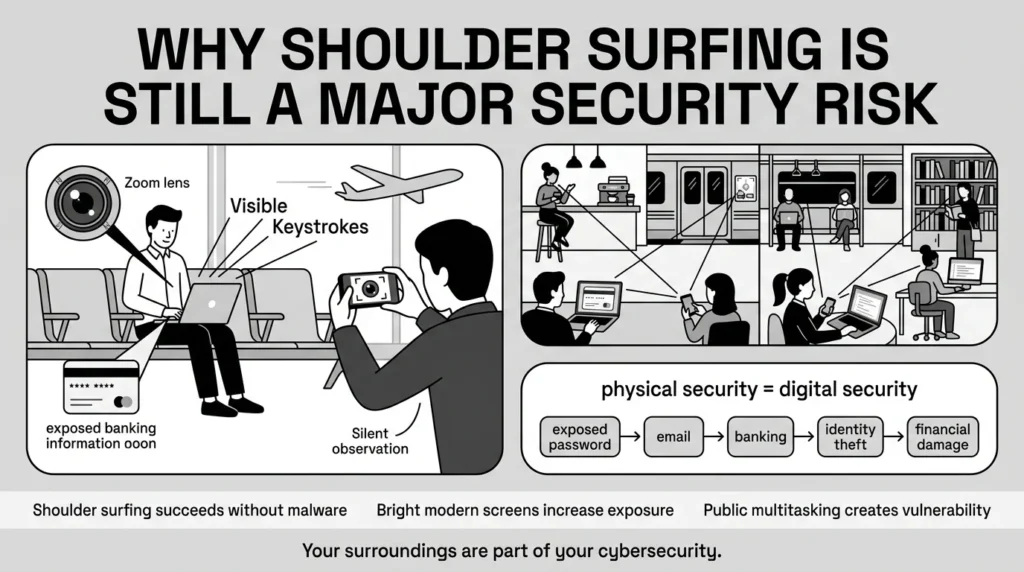
Everyday users—busy parents managing school portals, freelancers working from cafes, retirees checking their investments, and students studying in public libraries—are the most frequent targets. We live in a world of account overload. We are constantly logging into apps, authenticating our identities, and reviewing documents on the go.
While much of our focus is on complex cyberattacks, the Cybersecurity and Infrastructure Security Agency (CISA) emphasizes in its 2025-2026 strategic plans that physical security resilience is inextricably linked to digital safety. When we focus purely on online threats, we create a public space vulnerability. We forget that the physical space around our devices is the first line of defense. A stolen password or an exposed Social Security number from a tax form can quickly lead to an identity theft nightmare, all because someone simply looked over your arm while you were focused on your screen.
At Team WhiteVault, we understand that you cannot stay hidden in a windowless room every time you need to check your email or pay a bill. You have a life to live. The goal is not to become paranoid, but to build practical, calm habits that let you use your devices securely, wherever you happen to be.
What Usually Goes Wrong: Common Real-World Scenarios
Security mistakes are rarely made out of ignorance. They are usually made out of convenience or distraction. When we are rushed, we prioritize getting the task done over keeping the process secure. Validating these common habits is the first step toward building better ones. Here are a few ways everyday people accidentally expose themselves to visual eavesdropping.
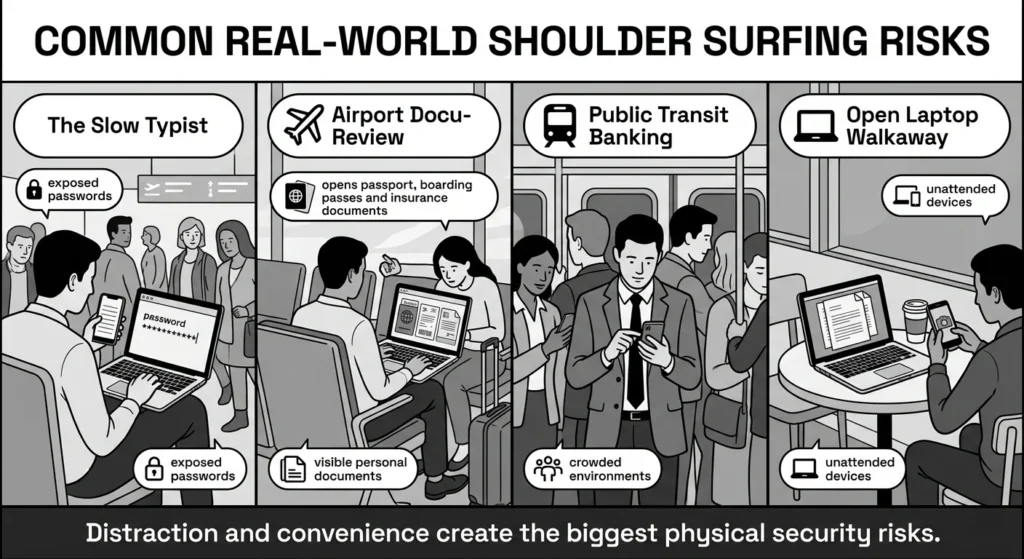
1) The Slow Typist in a Crowded Space
You are trying to log into a new app, but the password is one of those complex, randomly generated strings you saved in a digital note. Because you cannot remember it, you switch back and forth between your notes app and the login screen, slowly typing each character. According to ZipDo’s 2026 Password Hacking Research Report, shoulder surfing reveals roughly 10% of passwords even within office settings, let alone highly trafficked public spaces. Anyone sitting nearby has ample time to watch your fingers or read the password directly from your note app before you hit enter.
2) The Airport Waiting Area Review
You are heading out on an international trip and decide to double-check your digital documents while waiting at the gate. You open a full-screen, high-resolution scan of your passport, boarding pass, and travel insurance details. While you are verifying your flight number, a person sitting behind you has a clear, unobstructed view of your most sensitive identity documents. The 2025-2026 Identity Fraud Report by Sumsub notes that identity theft remains a primary threat, often fueled by the exposure of these exact types of physical and digital documents.
3) The Public Transit Multitasker
You are on a packed bus or subway, standing shoulder-to-shoulder with commuters. You receive a text from your bank about a suspicious charge. Panicked, you immediately log into your banking app, entering your PIN while navigating the swaying train. The close quarters make unauthorized observation almost unavoidable for anyone glancing in your direction.
4) The Open Laptop Walkaway
You are working from a local coffee shop. Nature calls, or you just need to grab your order from the counter. You leave your laptop open and unlocked on the table. Even if it is just for thirty seconds, that is more than enough time for someone to snap a photo of the private work emails, financial spreadsheets, or family records displayed on your screen. In fact, Blancco’s 2025 State of Data Sanitization Report found that stolen devices or drives with sensitive data accounted for 41% of data loss incidents, highlighting the severe risk of leaving physical endpoints unattended.
The Evolution of Visual Eavesdropping
It is important to understand that the nature of this digital security risk has changed dramatically over the last decade. Historically, a bad actor had to be physically close to you, relying on their memory to capture your password or credit card number. Today, technology has inadvertently given onlookers a massive advantage.
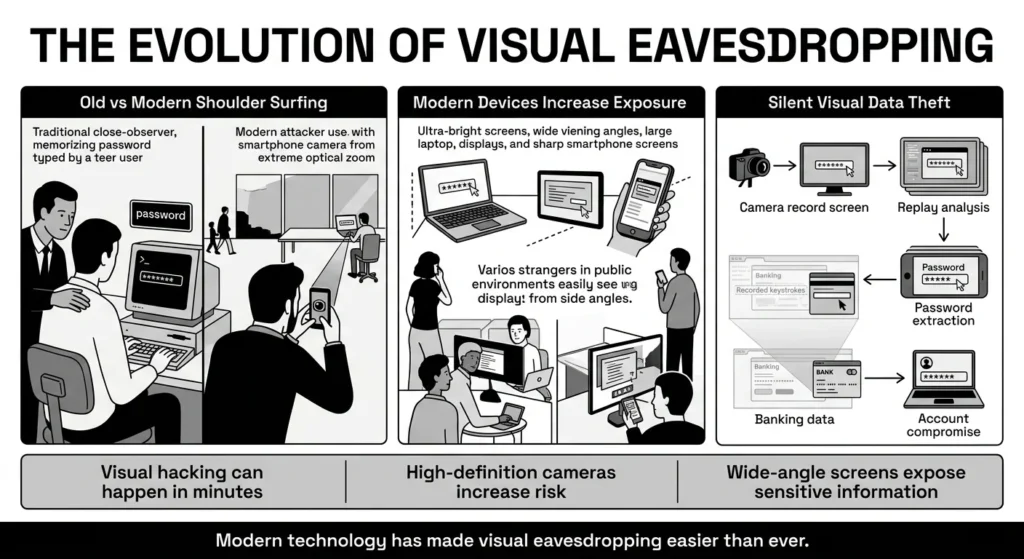
High-definition smartphone cameras are the biggest game-changer. A person does not need to awkwardly hover right behind you to steal your credentials. As noted in recent endpoint security analyses, visual hacking happens astonishingly fast, with nearly half of simulated visual hacks occurring in under 15 minutes. Attackers can sit across a café or a few rows back on an airplane, pretend to text or take a selfie, and instead use their camera’s optical zoom to record your screen or keyboard. This means shoulder surfing doesn’t even require the person to be immediately next to you. They can capture high-resolution video of your keystrokes and play it back later to extract your password.
Furthermore, our device screens have become incredibly bright, large, and crisp. Modern laptops and smartphones are designed to have wide viewing angles so you can share content with friends. Unfortunately, a screen that looks great from a 45-degree angle to your friend also looks great to the stranger sitting diagonally from you on a park bench.
When malicious actors combine these tools—powerful cameras and bright, wide-angle screens—they can easily execute password theft without you ever realizing you were being watched. The Verizon 2026 Data Breach Investigations Report indicates that while vulnerability exploitation is rising, stolen credentials still account for 13% of reported incidents, and physical compromise remains a direct pathway to obtaining those credentials. Understanding this dynamic is crucial, but it shouldn’t cause panic. It simply means our prevention strategies need to evolve alongside technology.
The Safer Way to Handle It: Core Principles
Protecting your private information in public is not about buying expensive hardware or learning complex cybersecurity protocols. It is about shifting your mindset and making small, manageable adjustments to how you interact with your digital life.
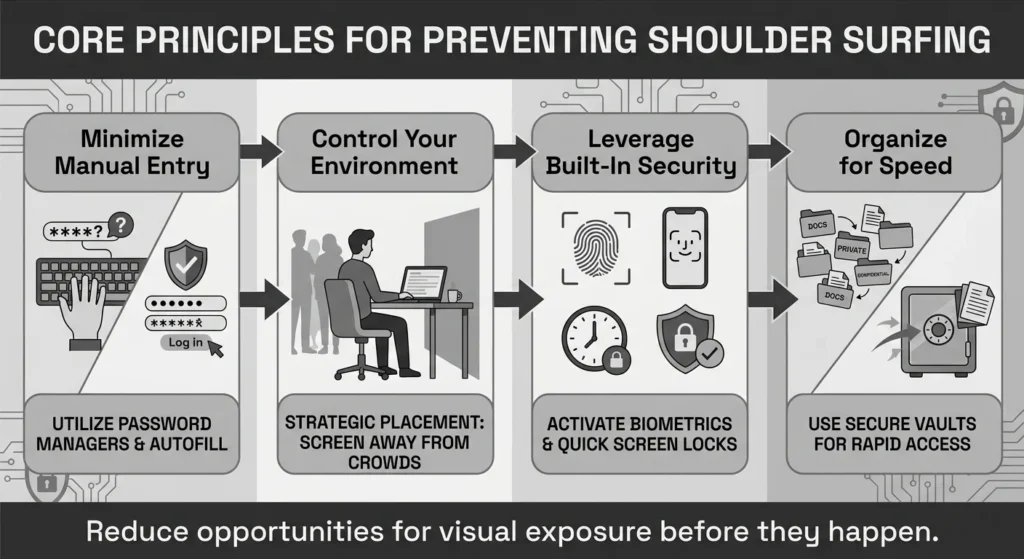
Protecting against shoulder surfing comes down to minimizing the opportunity for thieves to gather your information in the first place.
Here are the core principles to keep in mind:
- Minimize Manual Entry: Every time you type a password or a PIN in public, you create an opportunity for someone to watch your fingers. The less you type, the less you expose. The ZipDo 2026 report highlights that 81% of hacking-related breaches involve weak, default, or stolen passwords, often captured during manual entry or reused across sites.
- Control Your Environment: You cannot control who is in a coffee shop, but you can control where you sit and which direction your screen faces.
- Leverage Built-In Security: Your devices have tools designed to protect you, like biometric scanners and screen timeout settings. Use them to your advantage.
- Organize for Speed: If you need to access a sensitive document, you should be able to find it, view it, and close it in seconds. Digging through messy folders keeps your private data on screen far longer than necessary.
By applying these principles, you drastically reduce your exposure to a privacy breach, keeping your digital life secure without sacrificing convenience.
Step-by-Step: Practical Prevention Techniques
Now that we understand the risks and the core principles, let’s break down exactly what you can do to protect your accounts and important documents from prying eyes. These are practical steps anyone can implement today.
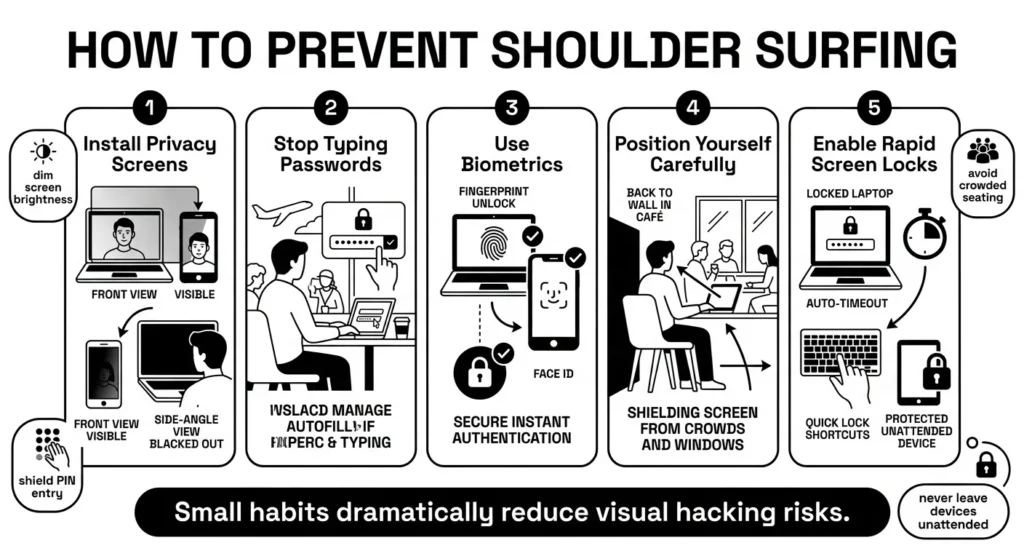
Step 1: Install Privacy Screen Filters
A physical privacy screen is perhaps the most effective physical tool against shoulder surfing. These are thin, dark films that you apply directly over your laptop, tablet, or smartphone screen.
They work using micro-louver technology—essentially microscopic vertical blinds. As highlighted by privacy filter manufacturers, when you look at the screen straight on, the image is clear. But if someone tries to look at your screen from an angle (usually past 30 to 60 degrees), the screen appears completely black or gold.
- For Laptops: You can buy magnetic privacy screens that easily pop on and off. Use them when you are at a cafe, and remove them when you are safe at home and want to share your screen with family.
- For Phones: Many tempered glass screen protectors now come with privacy filters built-in. This means your phone is protected from drops and from snooping eyes at the same time.
Step 2: Stop Typing Your Passwords
Typing a password out character by character is risky in public, especially if you use long, secure passwords. Instead of typing, use a secure credential manager to autofill your logins.
When you use a system that automatically fills in your username and password with a single tap or a Face ID scan, there are no keystrokes for an onlooker to memorize or record. The National Institute of Standards and Technology (NIST) in their SP 800-63 guidelines strongly advocates against forcing complex, hard-to-remember passwords (which users tend to write down or type slowly) and instead encourages the use of longer passphrases or password managers. A manager not only enables you to use complex, unique passwords for every site, but it also prevents you from typing them out where they can be observed.
Step 3: Embrace Biometric Authentication
Whenever possible, replace PINs and passwords with biometric logins. This includes Apple’s Face ID, Touch ID, Windows Hello, or Android fingerprint scanners.
Opening an app with your fingerprint takes a fraction of a second and leaves zero visual clues for a bystander. If you must use a PIN in public, use one hand to shield your device while the other hand types, just like you would at an ATM.
Step 4: Master Situational Positioning
Before you open your laptop or pull out your phone to do something sensitive, take three seconds to assess your surroundings.
- Put Your Back to the Wall: If you are sitting in a restaurant, library, or coffee shop, choose a seat where your back is against a solid wall. This ensures no one can walk behind you or sit behind you.
- Mind the Windows: Be careful about sitting with your back to a large street-facing window, as people outside could easily see your screen.
- Dim Your Screen: If you cannot find an ideal seat, turn your screen brightness down as low as comfortably possible. A dim screen is much harder to read from a distance or capture on a smartphone camera.
Step 5: Enable Rapid Screen Locks
Never leave your device open and unattended, even for a moment. Get into the habit of manually locking your screen the second you step away.
- On Windows, hit Windows Key + L.
- On Mac, press Control + Command + Q.
- On smartphones, just tap the power button.
Additionally, go into your device settings and reduce the auto-lock timeout. If your phone or laptop currently stays awake for five minutes of inactivity, change it to 30 seconds or one minute. If you accidentally leave your device on a table, it will quickly lock itself, preventing a potential privacy invasion.
How WhiteVault Helps Keep This Manageable
We know security management can feel like a heavy burden. You have dozens of accounts, endless recovery codes, and important documents scattered across different devices. When things are unorganized, you spend more time searching for information, which means more time displaying sensitive data on your screen in public.
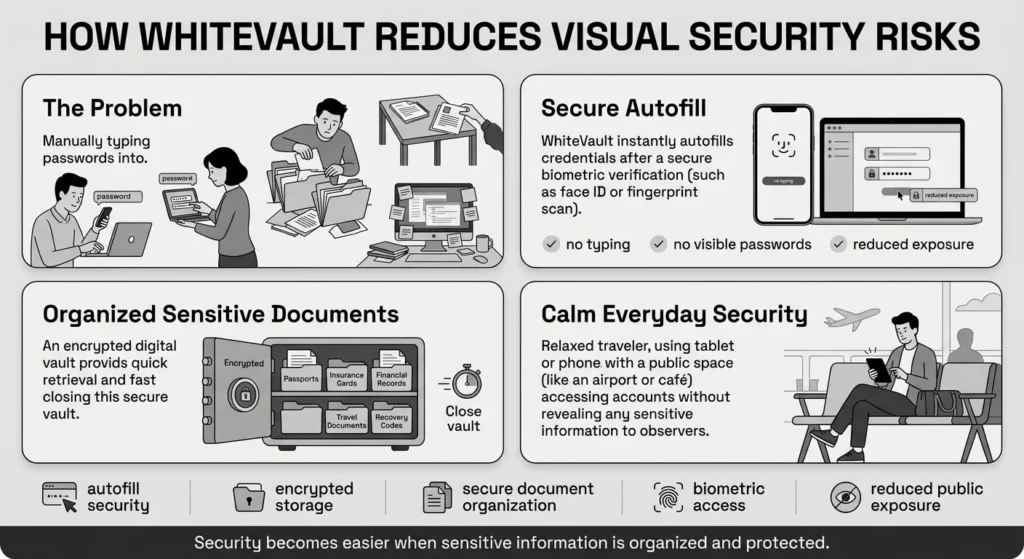
This is where WhiteVault comes in. We built WhiteVault to be your secure personal vault—a single, encrypted place to save, remember, and protect what matters most.
When it comes to preventing visual eavesdropping, WhiteVault removes the biggest risk factor for shoulder surfing: manual data entry. Instead of typing your complex passwords in a crowded airport or coffee shop, WhiteVault securely stores your credentials and allows you to use seamless autofill. You simply verify your identity (usually with a quick biometric scan), and WhiteVault logs you in instantly. No typing, no struggling to remember, and nothing for an onlooker to steal.
Beyond passwords, WhiteVault is designed to securely organize your important documents. If you need to access your digital insurance card at a busy doctor’s office, or pull up a passport scan for a travel agent, you do not have to scroll through a messy, unencrypted camera roll for five minutes while everyone around you watches. You simply open your secure personal vault, retrieve exactly what you need in seconds, and close it just as fast. It is simple security for everyday life, built to protect you from both digital hackers and fraudulent access in the physical world.
Habits That Keep You Safer Over Time
Better security rarely comes from buying the perfect gadget or adopting a flawless, paranoid lifestyle. It comes from establishing sustainable, everyday habits that you can maintain without feeling exhausted. You do not need to be perfect; you just need to be consistently careful.
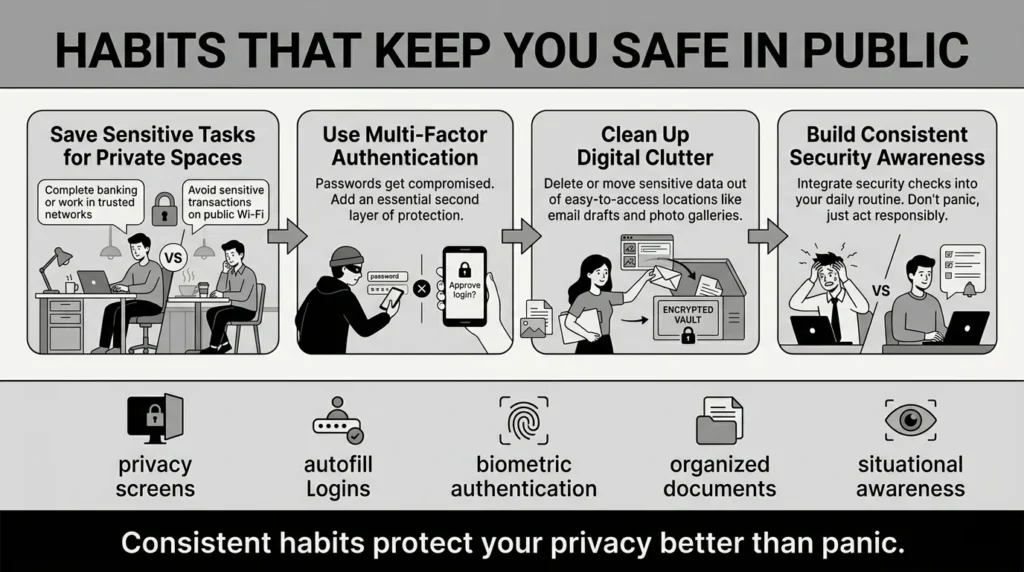
Here are a few long-term habits that will significantly lower your digital security risk without driving you crazy:
1) Compartmentalize Your Tasks
Save your most sensitive digital tasks for when you are in a private, secure location. Do your taxes at your home desk. Review your medical test results in your living room. Update your master passwords when you are alone. Use your time in public spaces for low-risk activities like reading the news, listening to podcasts, or watching videos.
2) Embrace Multi-Factor Authentication (MFA)
Even if an observer manages to see you type your password, MFA ensures they cannot access your account. Whether it is an authenticator app, a hardware security key, or a push notification to your phone, MFA means the thief needs both your password and your physical device to get in. Security researchers widely agree that MFA is a critical defense, often blocking the vast majority of automated account compromise attempts.
3) Clean Up Your Digital Clutter
Stop keeping your Social Security number in a draft email, and delete the photo of your credit card from your phone’s general gallery. When your private information is scattered, it is much easier to accidentally open it in front of the wrong person. Move all these sensitive items into an encrypted space.
By practicing situational awareness, keeping your screen guarded, relying on autofill, and organizing your digital life, you can enjoy the convenience of modern technology without worrying constantly about shoulder surfing. You have the power to protect your privacy; it just takes a few small, deliberate choices.
Conclusion
At the end of the day, protecting your information in public spaces shouldn’t feel like a spy movie. It is about recognizing that your physical surroundings are just as important as your antivirus software. By making simple changes—like using a privacy screen, sitting with your back to a wall, and relying on biometric logins instead of typing out passwords—you take massive steps toward securing your digital life.
Better security usually comes from a few simple habits repeated consistently: unique passwords, safer recovery details, organized documents, and a secure place to keep what matters. WhiteVault was built for exactly that. Say goodbye to sticky notes, messy folders, and the stress of logging in while people are watching. Save, remember, and protect what matters, all in your secure personal vault.
Frequently Asked Questions (FAQ)
1) What exactly is shoulder surfing?
It is a type of privacy breach where someone secretly watches your screen, keyboard, or physical documents to steal sensitive information. This can happen when they are standing right behind you or when they use a smartphone camera to zoom in on your screen from across a room.
2) How do I know if someone is watching my screen?
Unless you catch them looking, it is very difficult to know for sure. That is why prevention is so important. If you feel like someone is standing too close, leaning in your direction, or pointing a phone camera toward your workspace, trust your instincts. Adjust your screen, dim your brightness, or simply lock your device until you have more privacy.
3) How often should I update my passwords if I think someone saw me type one?
If you have any suspicion that a stranger, a colleague, or an untrusted acquaintance saw you enter a password or PIN, you should change it immediately. It only takes a few minutes to update a password, but recovering from an account takeover or identity theft can take months or years.
4) Are privacy screen protectors better than just turning down brightness?
Yes, privacy screens are much more effective. While dimming your brightness helps make your screen harder to read from a distance, a privacy filter physically blocks the light from exiting at wide angles. It turns your screen completely dark to anyone who isn’t sitting directly in front of the device, offering a much stronger layer of protection.
5) As a beginner, what is the most important step I can take to protect myself in public?
Stop typing your passwords. The easiest way for someone to steal your login credentials is to watch your fingers move across a keyboard or a touchscreen. Use biometric logins (like Face ID or fingerprint readers) and rely on a password manager to automatically fill in your details for you.
6) If I use Multi-Factor Authentication (MFA), do I still need to worry about people watching my screen?
Yes. While MFA is incredibly important and will stop an attacker from logging into your account from a different device, it does not protect the information currently displayed on your screen. Someone could still photograph an open tax document, read your private emails, or steal your credit card number while you are viewing it.
7) How should I organize my digital documents so I don’t accidentally expose them?
Keep sensitive files out of your phone’s main camera roll and out of disorganized computer desktop folders. Move copies of your IDs, insurance cards, tax files, and financial documents into a dedicated, encrypted digital vault. This ensures you can access them intentionally when needed, rather than stumbling across them by accident in public.
8) How does WhiteVault help prevent shoulder surfing and stop people from stealing my passwords in public?
WhiteVault acts as your secure personal vault, storing your passwords and credentials behind strong encryption. Instead of slowly typing out a password where onlookers or cameras can see it, you can use WhiteVault to automatically fill in your login details. This drastically reduces the time your sensitive information is exposed and eliminates the risk of someone visually capturing your keystrokes.


