
We have all been there: you are working at a coffee shop, leaving a dozen browser tabs open—your email, a banking portal, a school form, and a shopping cart. It is convenient to stay logged in while you multitask. But closing your laptop does not mean your accounts are securely locked. If a malicious network intercepts the invisible digital “key” keeping you logged in, an attacker can bypass your password entirely. Session hijacking prevention matters because it protects the critical accounts you leave open every day. At WhiteVault, we help people save, remember, and protect what matters, keeping everyday security practical and calm.
Quick Answer Session hijacking prevention means stopping cybercriminals from stealing the temporary digital keys (authentication tokens) that keep you logged into websites. You can protect yourself by routinely logging out of accounts, avoiding unsecured public Wi-Fi, and keeping your credentials in a secure personal vault.
Why This Topic Matters for Everyday Security
When we think about internet security, we usually worry about someone guessing our password. We imagine a hacker trying millions of combinations until they break in. But modern cybercriminals often skip passwords entirely. Instead, they aim for your active session.
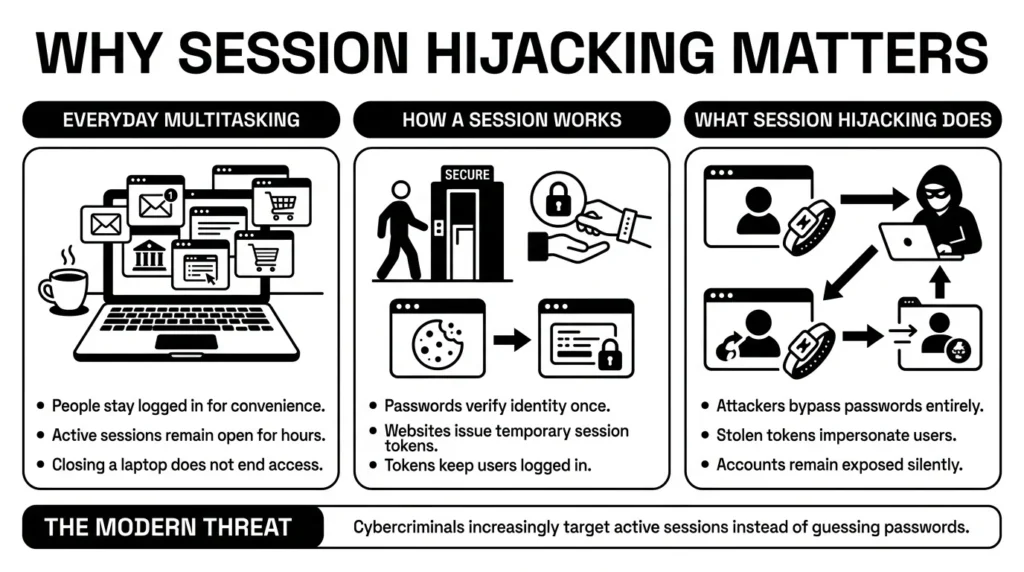
Think of user authentication like going to an exclusive event. Your username and password are the ticket you show at the door. Once you are inside, the security guard gives you a wristband. That wristband is an authentication token. As long as you wear it, you can leave the main room and come back in without showing your ticket again. This is exactly how websites use session security to keep you logged in as you move from page to page.
Session hijacking occurs when someone secretly cuts off your digital wristband and wears it themselves. They do not need your password because the website already believes they are you. For everyday people, understanding the basics of session hijacking prevention is no longer just for security experts. It is essential for anyone who manages daily life online.
Consider a freelancer juggling client portals, tax files, banking credentials, and contracts from a shared workspace. If a bad actor intercepts their active session, the attacker can access invoices or client data without ever triggering a password alert. Or consider a parent trying to manage health insurance portals and school forms; a hijacked session could expose their family’s most sensitive medical and financial data.
The risk of account takeover is higher than ever, and attackers are shifting their strategies. The 2025 Verizon Data Breach Investigations Report (DBIR) reveals that stolen credentials remain the number one entry point for data breaches, accounting for 22% of all incidents. However, criminals are increasingly stealing active session tokens alongside traditional passwords to bypass newer security measures.
Furthermore, the Identity Theft Resource Center (ITRC) 2025 Data Breach Report noted a record 3,322 data compromise events in 2025. Alarmingly, 80% of consumers surveyed received at least one breach notice in the past year, and 88% of those individuals experienced negative consequences like account takeovers.
This is compounded by enterprise data. The Sift Q3 2025 Digital Trust Index highlights that 83% of organizations experienced account takeover incidents recently, surpassing ransomware as a top concern. Finally, the IBM Cost of a Data Breach Report 2025 notes that stolen or compromised credentials take an average of 186 days to identify. If a cybercriminal is silently riding on your active session, it can take months before anyone realizes something is wrong.
What Usually Goes Wrong With Active Logins
We have all left accounts logged in for weeks at a time. It is human to want something familiar and easy. However, the biggest hurdle in session hijacking prevention is simple convenience. When we prioritize speed over security, we accidentally leave doors open.
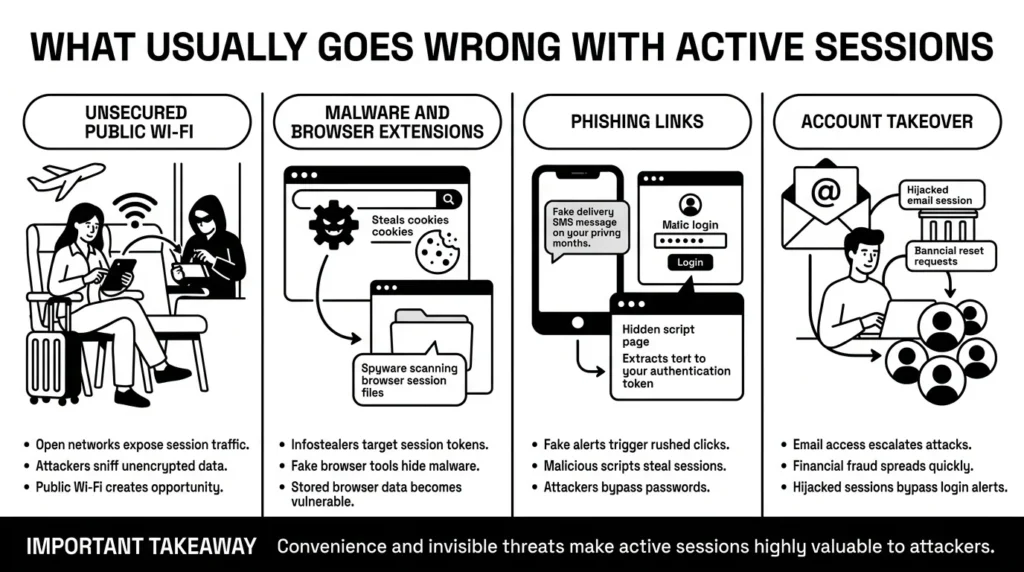
Here are a few common ways things go wrong without us noticing:
Using Unsecured Public Wi-Fi Imagine a traveler needing quick access to passport scans, visa documents, and booking details while sitting in an airport terminal. They connect to the free airport Wi-Fi and log into their email. Cybersecurity and Infrastructure Security Agency (CISA) guidance on public Wi-Fi frequently warns that unencrypted networks allow hackers sitting nearby to “sniff” internet traffic. If the data is not scrambled, the hacker can capture the session token as it travels through the air, giving them instant access to the traveler’s email and linked documents.
Malware and Malicious Browser Extensions Sometimes, the threat is already inside your computer. The Recorded Future H1 2025 Malware Trends report found that infostealer malware compromised 30% of corporate and unmanaged devices. These malicious programs do not just log keystrokes; they specifically scan your web browser’s local files to steal stored cookies and active sessions. Additionally, Electronic Frontier Foundation (EFF) warnings on browser extensions point out that seemingly harmless tools—like coupon clippers or PDF converters—can sometimes harbor hidden code designed to quietly harvest your secure session ID storage.
Falling for Phishing and Tricky Links The Federal Trade Commission (FTC) consumer guidance frequently alerts consumers about the dangers of phishing texts that mimic real delivery alerts, bank notices, or subscription issues. Often, these messages try to trick you into clicking a link that runs hidden code in your browser. Without proper cross-site scripting protection on the website’s end, this malicious code can command your browser to hand over your authentication token to the attacker.
The Financial Cost of Compromised Sessions When a session is hijacked, the fallout can be devastating. Attackers often use hijacked email sessions to launch secondary attacks or intercept financial transactions. The FBI Internet Crime Complaint Center (IC3) routinely reports that business email compromise and personal account takeovers lead to billions of dollars in losses annually. An attacker does not need to guess your banking password if they can hijack your active email session and simply request a password reset link.
The Safer Way to Handle It: How Sessions Actually Work
You do not need to be a software engineer to understand how to stay safe. A core part of session hijacking prevention relies on the websites themselves, but knowing what to look for puts you in control.
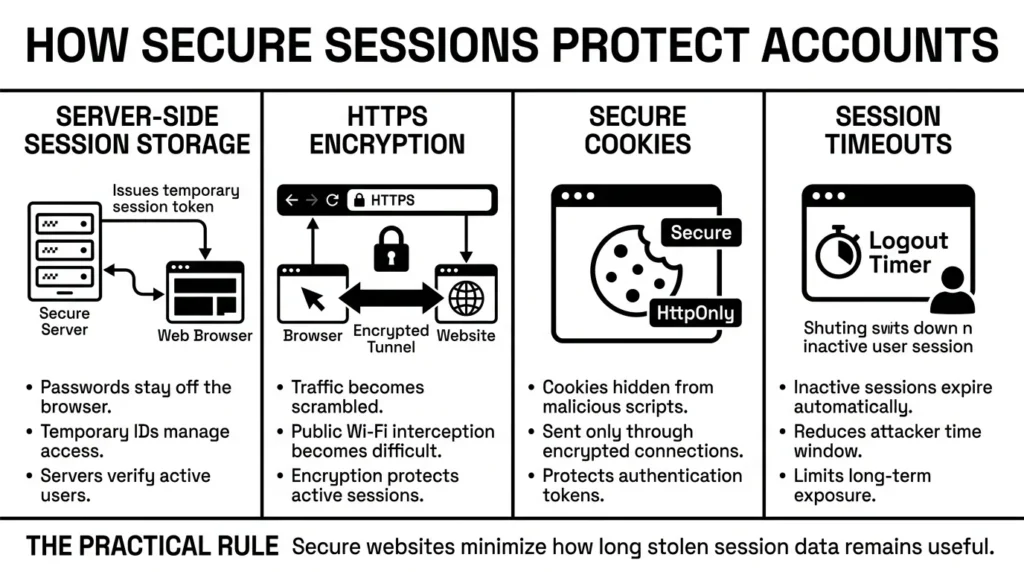
When you log into a well-built website, the server handles session management carefully. Instead of keeping your actual password floating around in your browser, the website uses server-side session storage to verify who you are, handing your browser a temporary ID.
The latest NIST 2025 Digital Identity Guidelines (SP 800-63-4) emphasize that organizations must move away from basic username and password setups. NIST champions phishing-resistant authentication and automated threat protections to ensure that attackers cannot easily hijack accounts using stolen session data.
For your daily browsing to be safe, the website must use SSL/TLS encryption. You recognize this as the small padlock icon next to the web address, ensuring the address starts with “HTTPS”. This encryption acts like an armored truck for your data, ensuring that even if someone intercepts your connection on public Wi-Fi, all they see is scrambled noise.
Websites also use secure cookies to store digital wristbands. Good developers apply specific cookie attributes to keep you safe. The Open Worldwide Application Security Project (OWASP) Session Management Cheat Sheet advises web developers to always use the “Secure” attribute to ensure the cookie is only sent over encrypted connections, and the “HttpOnly” attribute to hide the cookie from malicious scripts.
Finally, responsible websites enforce a strict session timeout. This is why your banking website automatically logs you out after ten minutes of inactivity. It minimizes the window of opportunity for an attacker. They also implement session fixation prevention, which ensures that a hacker cannot force your browser to use a specific, pre-known session ID before you even log in.
Step-by-Step: What To Do Next to Secure Your Accounts
You cannot control how a bank codes its website, but you have immense control over your own devices. When looking at your own daily habits, session hijacking prevention comes down to a few simple, repeatable steps.
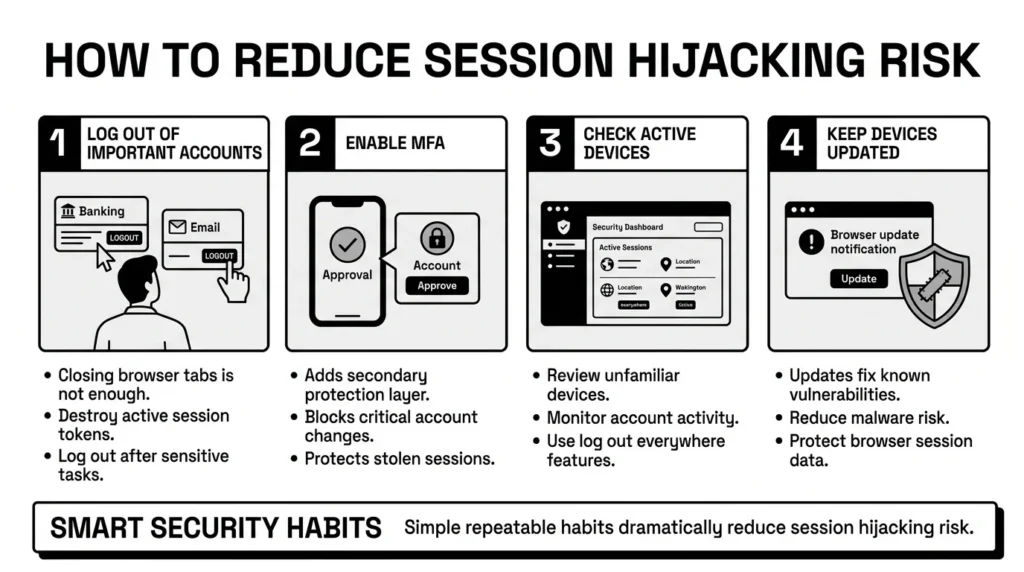
Step 1: Get in the Habit of Logging Out
Closing your browser window does not always close your session. For any account that holds sensitive financial, medical, or private information, physically click the “Log Out” button when you are done. This instantly destroys the digital wristband, making it useless to attackers.
Step 2: Turn on Multi-Factor Authentication (MFA)
Whenever possible, enable multi-factor authentication. Cybersecurity and Infrastructure Security Agency (CISA) multi-factor authentication guidelines constantly champion MFA as one of the most effective security steps you can take. If a hacker steals your session, they might try to change your password or transfer money. Many secure sites will pause and demand a secondary code sent to your phone or authenticator app before allowing major account changes.
Step 3: Monitor Your Active Sessions
Many major platforms, like Google, Facebook, and Microsoft, offer user activity logging in their security settings. You can check a page usually called “Devices” or “Active Sessions” to see exactly where you are logged in. Because these platforms use IP address monitoring, they can tell you if a device in another country is currently using your account. If you see a device you do not recognize, you can click “Log out everywhere” to instantly sever the connection.
Step 4: Keep Your Browser and Devices Updated
Software updates often contain patches for the exact vulnerabilities that allow malware to steal your session tokens. National Cybersecurity Alliance (NCA) software update guidance reminds users that delaying updates leaves known security holes wide open. Never ignore the “Update Browser” notification; it takes only a few seconds but provides massive protection.
How WhiteVault Helps Keep This Manageable
We know that keeping track of unique passwords, logging out of every device, and managing recovery codes can feel exhausting. A parent managing school forms, health insurance cards, and family passwords does not have time to become a full-time security analyst.
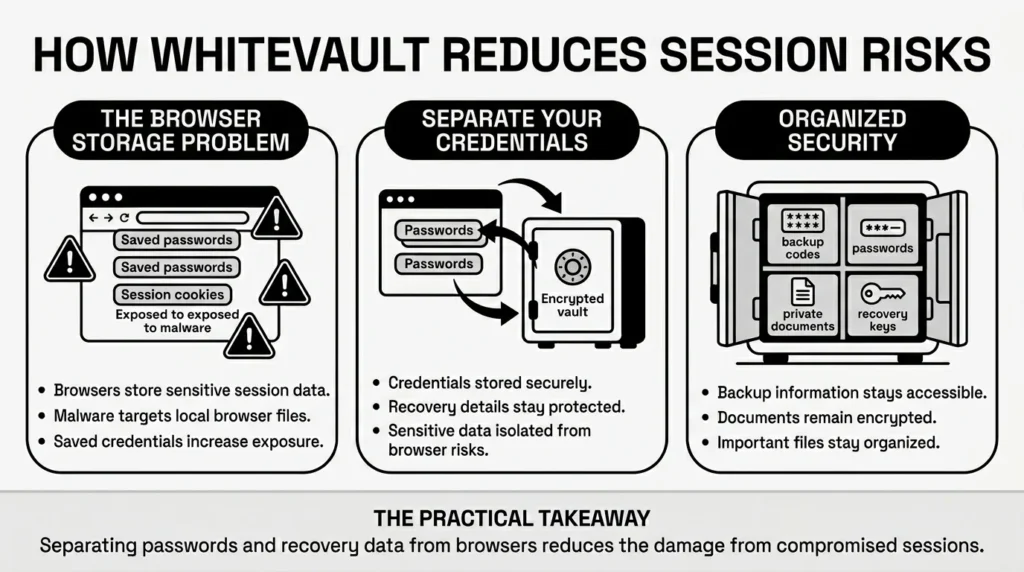
While good browser habits matter, session hijacking prevention also requires a better way to manage the credentials themselves. Letting your web browser store all your passwords might seem easy, but if infostealer malware infects your browser or a session is compromised, those saved passwords and local files are at massive risk.
This is where WhiteVault makes a difference. WhiteVault is a secure personal vault for credentials, passwords, recovery details, private notes, and important documents. We help everyday people save, remember, and protect what matters without turning personal security into a confusing project.
- Versus trying to remember everything: Instead of relying on browser-saved passwords that are vulnerable to local malware, store credentials, recovery details, and important information securely in one encrypted place.
- Versus scattered recovery details: If a hijacked session forces you to reset your accounts, you will need your backup codes. Save backup codes, recovery keys, and security answers where you can find them later, rather than buried in an old email inbox that might also be compromised.
- Versus document chaos: If your laptop crashes or gets compromised on a public network, you do not want your tax records and ID scans sitting in random, unencrypted folders. Keep important files organized, searchable, and available in your secure personal vault.
When you separate your most important credentials and documents from your daily web browser, you drastically reduce your risk. WhiteVault provides simple security for everyday life, giving you peace of mind even if a single web session goes wrong.
Habits That Keep You Safer Over Time
Better security rarely comes from one dramatic change or buying a magical software program. Sustainable protection is not about achieving perfection; it is about building a few simple habits repeated consistently.
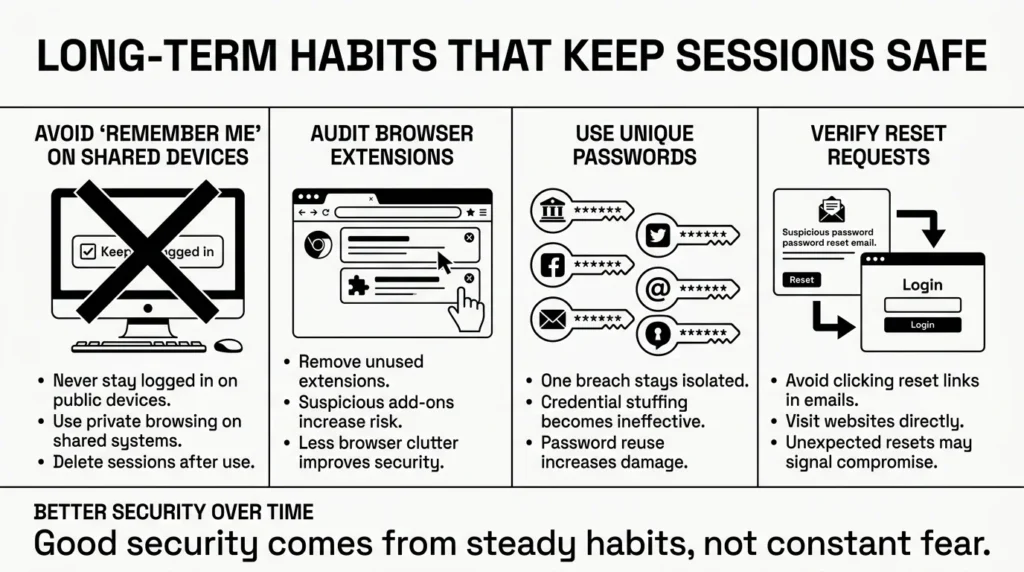
1) Stop Clicking “Remember Me” on Shared Computers
If you are using a library computer, a hotel business center, or even a friend’s iPad, never check the “Keep me logged in” box. Always use a private browsing window (Incognito mode) on shared devices, as this automatically deletes cookies and session data the moment you close the window.
2) Audit Your Browser Extensions
Take five minutes every few months to look at the extensions installed on your web browser. If you see a toolbar, a coupon clipper, or an extension you do not remember installing, delete it. Less clutter means fewer chances for malicious software to snoop on your active sessions.
3) Do Not Reuse Passwords
As advocacy groups like the Privacy Rights Clearinghouse consistently point out, password reuse turns a minor inconvenience into a major disaster. If a hacker hijacks your session on a minor website, they might look at your account details, figure out your password, and try it elsewhere. Using a secure credential manager to generate and store unique passwords ensures that one compromised account does not compromise your entire digital life.
4) Do Not Panic Over Reset Emails
If you get a password reset email you did not request, do not panic, but do not click the link inside the email. A hacker may have hijacked a session elsewhere and is trying to test your defenses. Instead, open a fresh browser window, navigate directly to the website yourself, log in securely using your credentials, and check your account security settings.
Conclusion
Approaching session hijacking prevention does not have to be a confusing project filled with technical jargon. It simply means understanding that active logins are like open doors—they are convenient for you, but they can also let unwanted guests inside. By logging out of important accounts, being careful on public Wi-Fi, and setting up multi-factor authentication, you take control of your digital boundaries.
The best way to stay calm in the face of modern digital threats is to have a reliable system. When you use unique passwords, keep your recovery details organized, and store important files safely, you take the power away from cybercriminals. WhiteVault was built for exactly that. Save, remember, and protect what matters, all in your secure personal vault.
Frequently Asked Questions (FAQ)
1) What is session hijacking in simple terms?
Session hijacking is when a cybercriminal steals the temporary digital “cookie” or “key” that a website gives your browser after you log in. By stealing this key, the criminal can trick the website into thinking they are you, allowing them to access your account without ever needing to guess your actual password.
2) How do I know if my session was hijacked?
You might not notice immediately, which is why it is dangerous. However, clear warning signs include finding items in your shopping cart you did not add, seeing sent emails you did not write, receiving alerts that your password or recovery email was changed, or spotting unfamiliar locations in your account’s “Active Devices” or user activity logging settings.
3) How often should I log out of my accounts?
For high-risk accounts—like your online banking, health insurance portals, or main email inbox—you should log out immediately after you finish your task. For low-risk accounts, like a daily news website or a streaming service on your personal home television, staying logged in is generally an acceptable balance of convenience and risk.
4) What is the difference between password theft and session hijacking?
Password theft happens when someone steals your actual login credentials (username and password), often through a data breach or by tricking you into typing them into a fake site. Session hijacking happens after you have already logged in safely; the attacker steals the temporary approval the website gave you, bypassing the password completely.
5) Is it safe to click “Remember Me” on websites?
It is only safe to click “Remember Me” on your own private, password-protected personal devices (like your home computer or smartphone). You should never use this feature on a shared computer, a work device that others can access, or a public terminal, as it leaves your session wide open for the next user.
6) Does clearing my browser history stop session hijacking?
Clearing your browser history deletes the list of websites you visited, but it does not log you out. To protect against hijacked sessions, you need to clear your browser’s “Cookies and Site Data.” Doing this will destroy all active session tokens, effectively logging you out of all websites at once.
7) Where should I keep my recovery codes if I get locked out of an account?
Never keep your recovery codes in your email inbox. Your email is often the central hub for all your accounts. Instead, store backup codes, recovery keys, and security answers in a dedicated, encrypted space, like a secure credential manager or a private digital vault, where they cannot be accessed by browser malware.
8) How does WhiteVault help with session hijacking prevention?
While WhiteVault cannot control how your web browser handles cookies, it protects your foundation. By acting as your secure personal vault, WhiteVault keeps your passwords, recovery codes, and important documents encrypted and separate from your vulnerable web browser. If a session is hijacked, attackers cannot access your entire digital life, and you have the secure backup information you need to quickly regain control of your accounts.


