
You open your email on a busy Tuesday morning to find an urgent message: a small hobby forum you registered for five years ago has suffered a data breach. You might not panic right away because you know responsible companies scramble your passwords in their databases. Unfortunately, cybercriminals routinely use a rainbow table attack to instantly unscramble those codes and expose your actual password. If you reused that exact same login for your primary email, your banking app, or your family’s health portal, one forgotten account suddenly puts your entire digital life at risk. At WhiteVault, we help people save, remember, and protect what matters, so your security feels manageable instead of overwhelming.
Quick Answer
A rainbow table attack is a method hackers use to instantly crack stolen passwords using a massive list of precalculated guesses. You protect against it by using long, unique passphrases and relying on a secure personal vault.
Why This Topic Matters for Everyday Security
Every time you log into a website—whether it is your bank, a streaming service, or a portal for your child’s school—you type your password into a box and hit enter. But responsible websites do not actually store your real password in their systems. Instead, they use a cryptographic process called password hashing to scramble your password into a long, unrecognizable string of random letters and numbers.
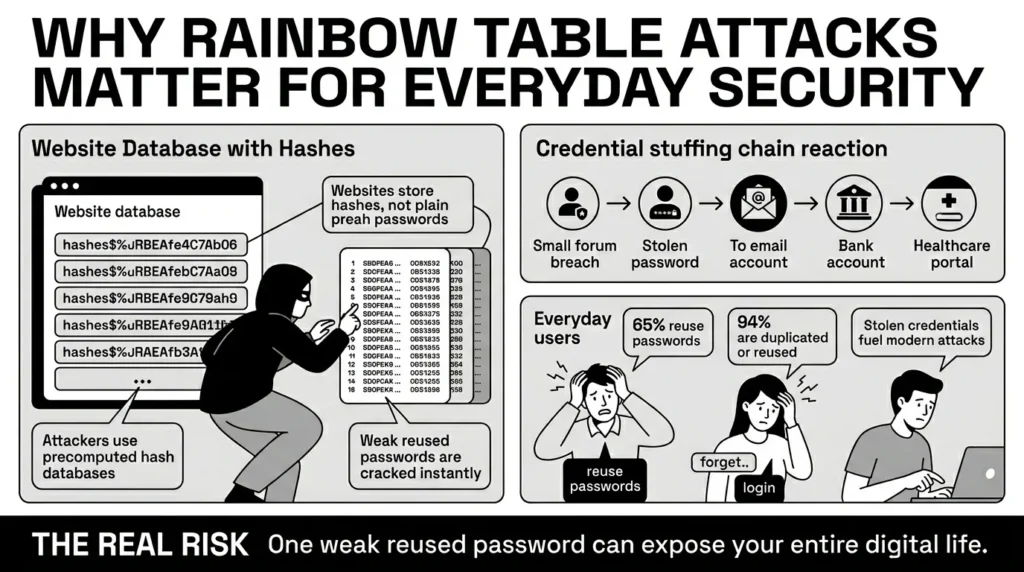
If a hacker breaches the website’s servers, they steal a hash database, not the passwords themselves. To the average person, a database full of scrambled letters might sound like a solved problem. It seems useless. Unfortunately, attackers use advanced hash cracking tools to rapidly reverse-engineer these codes and figure out what your original password was.
The financial and personal impact of this invisible, behind-the-scenes threat is staggering. According to the 2026 IBM Cost of a Data Breach Report, the global average cost of a data breach has soared to $4.44 million, with stolen or compromised credentials standing out as the single most expensive initial attack vector at $4.50 million per incident.
Breaches are also happening with alarming frequency. The Identity Theft Resource Center’s 2025 Data Breach Report tracked a record-breaking 3,322 U.S. data breaches, representing a massive 79% jump over the past five years. Further analysis of this threat landscape by the Cybersecurity and Infrastructure Security Agency (CISA) shows that attackers are increasingly moving away from random, complex hacking toward highly targeted attacks on financial, educational, and healthcare services by simply logging in with stolen credentials.
When you understand how a rainbow table attack works, you begin to understand why the backend security of the random websites you use matters to your everyday life. Consider a freelance graphic designer juggling a dozen different client portals, online tax software, and business banking credentials. If just one small, outdated client portal with weak backend security is breached, hackers will steal those scrambled passwords. They will rapidly unscramble them and then try that exact username and password combination on thousands of other high-value websites, directly threatening the freelancer’s livelihood.
The Human Element: What Usually Goes Wrong
We have all reused passwords. It is incredibly human to want something familiar. When you are locked out of your Netflix account during family movie night, or you are trying to pay an overdue utility bill on your phone while rushing to work, you just want a password you can easily type from memory. Memory anxiety—the fear that you will lock yourself out of your own life—is a powerful force.
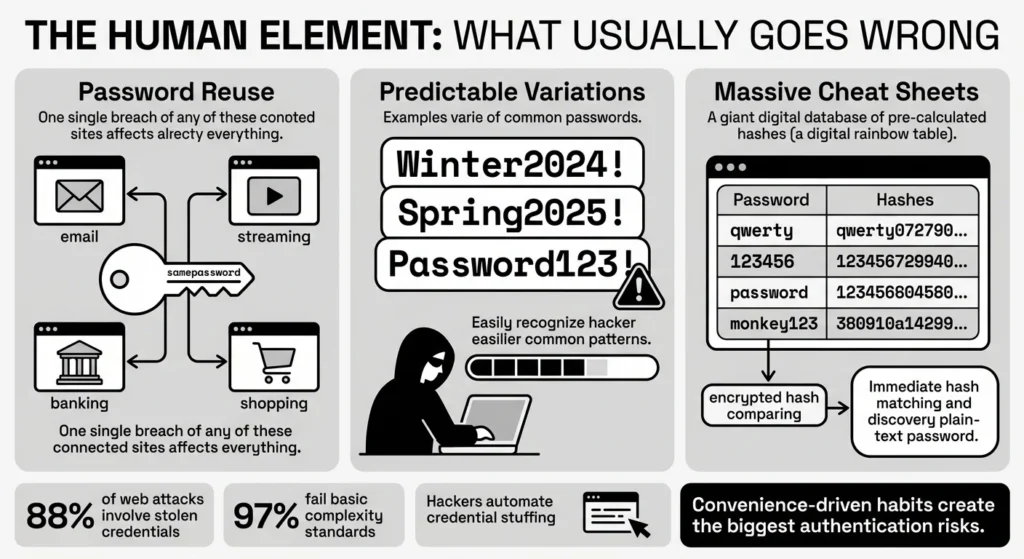
However, a 2026 Enzoic Threat Analysis notes that roughly 65% of everyday people admit to actively recycling their passwords across multiple sites. Worse, a 2026 Guardz study of over 19 billion newly exposed passwords found that an astonishing 94% of them are reused, duplicated, or simple variations of a base word (like adding “2025!” to the end of a pet’s name).
Password reuse is the exact behavior that fuels a successful rainbow table attack against your accounts. When you use the same login everywhere, you create a massive authentication vulnerability. You are relying on the weakest link in your digital chain to protect your most valuable assets.
According to the highly respected 2025 Verizon Data Breach Investigations Report (DBIR), compromised credentials are the number one threat in cybersecurity today. The DBIR reveals that 88% of attacks against basic web applications involve stolen credentials, and a staggering 97% of compromised passwords fail to meet basic complexity requirements.
When a hacker downloads a massive list of scrambled passwords from a weakly secured web forum, they attempt a process called hash inversion. Because calculating the mathematical reverse of a hash takes a lot of computing power, they cheat. They use massive digital cheat sheets containing millions, sometimes billions, of precomputed hashes. A 2026 Huntress threat analysis shows that simple sequences like “123456”, “qwerty”, and “password” remain the most breached credentials worldwide. If your reused password is on their massive cheat sheet, they can instantly look for the matching scrambled code, connect it to your email address, and unlock your digital life.
The Mechanics: How Hackers Crack the Code
To fully grasp why this is dangerous, it helps to understand the difference between how hacking works in movies and how it works in reality.
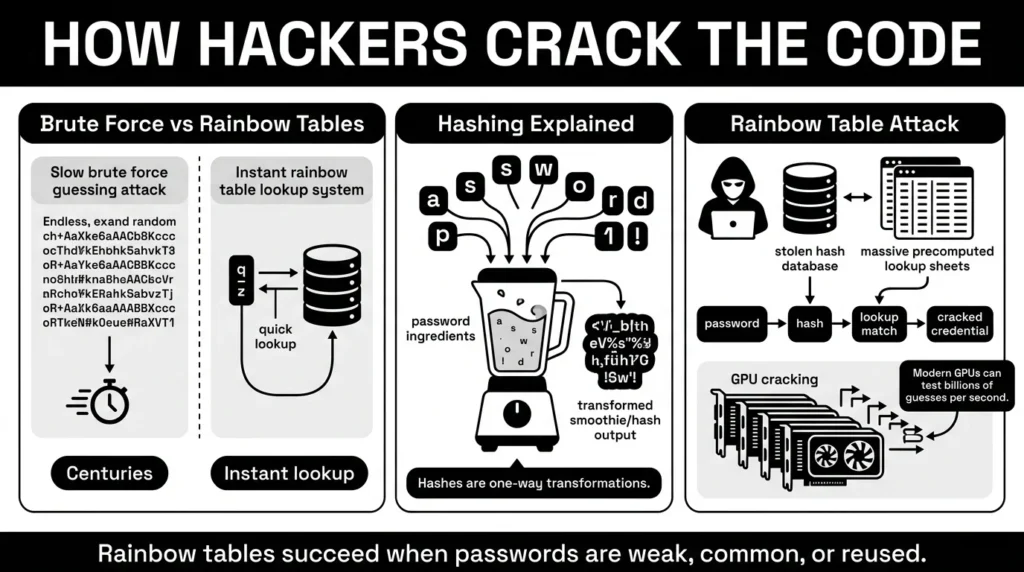
In a traditional brute force scenario, a computer program tries to guess a password by randomly generating every possible character combination one by one (A, B, C… AA, AB, AC…). For a long, complex password, this process could mathematically take a standard computer hundreds or even thousands of years.
Hackers do not have time for that. Instead, they use precomputed hashes. Think password hashing like a fruit smoothie. If you put strawberries, bananas, and a splash of apple juice into a blender, you get a distinct pink smoothie. You cannot mathematically “un-blend” that smoothie back into a whole strawberry and a whole banana. It is a one-way street.
However, if a hacker knows exactly what a strawberry-banana smoothie looks, smells, and tastes like, they can blend their own exact copy in their own kitchen, compare the two, and confidently guess your secret recipe.
Imagine a rainbow table attack as a hacker bringing a massive, digitized menu of millions of pre-made smoothies to a blind taste test. They have already done the hard work of blending every common password on earth and recording what the resulting “smoothie” looks like. When they steal a database, they don’t guess; they just compare your hash against their massive, pre-calculated hash tables. If they find a perfect match, they instantly know what ingredients you used.
The speed of this process is terrifying. Hive Systems’ 2025 Password Threat Table highlights that modern hardware setups using multiple high-end, commercially available Graphics Processing Units (GPUs) can test billions of combinations per second. In fact, Bitdefender security researchers recently proved that a modern graphics card rig can brute-force a fully randomized eight-character password in just 48 minutes, and crack common dictionary words in fractions of a second.
The Safer Way to Handle It: Hashing, Salting, and Peppering
To stop this specific type of cybersecurity attack, software engineers rely on advanced cryptography techniques. While this sounds highly technical, the core concept is actually quite easy to understand. Engineers essentially ruin the hacker’s cheat sheet.
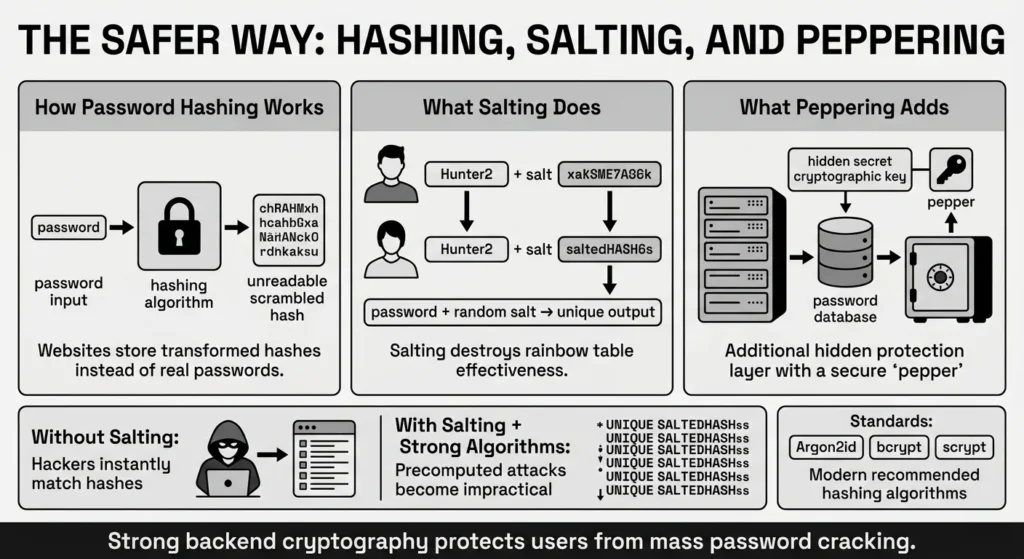
To prevent instant cracking, secure websites add a “salt” to your password. A salt is a random string of unique characters (like “x9B!qLz”) automatically attached to your password behind the scenes before it is hashed.
Going back to our smoothie analogy, salting is like throwing a handful of completely random, unlisted, and highly specific spices into your blender right before you hit the button. Even if two different people use the exact same terrible password (like “monkey123”), their final hashes will look entirely different in the database because they received completely different random salts.
Because the salt changes the final look of the hash entirely, the hacker’s pre-made menu of smoothies is suddenly useless. They would have to generate a brand new, massive cheat sheet for every single unique salt in the database, which requires more time and computing power than is physically possible.
According to 2025 recommendations from OWASP (the Open Worldwide Application Security Project), modern websites must use strong, slow algorithms like Argon2id, bcrypt, or scrypt alongside unique salts. These specific algorithms are designed to be intentionally slow and resource-heavy, making automated guessing financially impossible for criminals. Some systems even add a “pepper”—a secret cryptographic key added to all passwords that is stored on a completely separate, highly secure server, adding yet another layer of defense.
Step-by-Step: What To Do Next to Protect Your Accounts
You cannot control whether your favorite online shoe store uses modern salting techniques or outdated hashing. But you are entirely in control of the passwords, data, and recovery methods you give them.
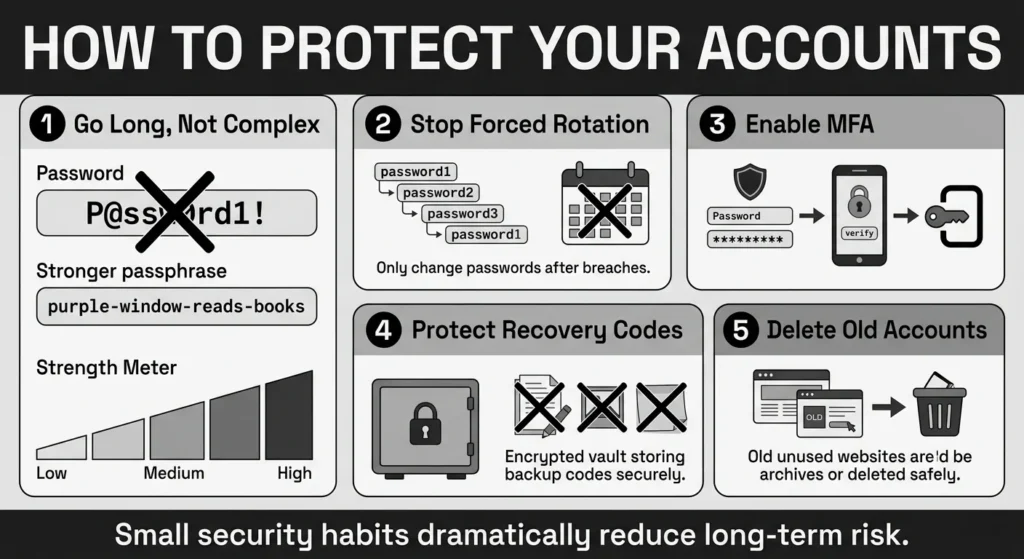
The National Institute of Standards and Technology (NIST) updated its federal digital identity guidelines in 2025 (NIST SP 800-63B Rev 4) with highly practical, revised rules for modern password security. Advice has changed significantly over the last decade.
Here is exactly how you can align your daily habits with the latest expert advice to protect your private information:
1) Go Long, Not Complex
For years, IT departments told us to use uppercase letters, numbers, and special symbols, resulting in passwords like “P@ssw0rd1!”. NIST guidance now officially prioritizes sheer length over complex composition. A 15-character password made of random words (like “purple-window-reads-books”) is significantly harder for a computer to crack during a rainbow table attack than a short, highly complex password. Embrace passphrases. They are easier for humans to remember and incredibly difficult for machines to break.
2) Stop the 90-Day Rotation
If your workplace or bank still forces you to change your password every 90 days, they are behind the times. NIST guidelines state that periodic rotation should be strictly prohibited unless a known breach has actively occurred. Forcing people to change passwords simply leads to predictable, dangerous habits, like changing “Winter2024!” to “Spring2025!”. Set a strong, incredibly long password and keep it forever, unless you are notified of a security incident.
3) Turn on Multi-Factor Authentication (MFA)
Passwords are no longer enough to protect yourself. As the Cybersecurity and Infrastructure Security Agency (CISA) MFA Guidance repeatedly stresses, enabling MFA makes you 99% less likely to have your accounts compromised. This is critical because the FBI Internet Crime Report 2025 showed cybercrime losses hitting an unprecedented $20.9 billion, with phishing and credential-theft losses jumping three-fold. MFA stops attackers in their tracks by requiring a second piece of evidence—like a secure app code or a hardware key—before letting them in, even if they know your password.
4) Secure Your Recovery Codes
When you set up MFA, websites will give you a list of emergency backup codes in case you lose your phone. The Federal Trade Commission (FTC) Identity Theft Guidelines advise consumers to treat sensitive digital access information exactly like a physical passport or a Social Security card. Do not leave these codes in your downloads folder. Do not email them to yourself. Do not take a screenshot and leave it in your phone’s camera roll. Store these recovery details in a secure, encrypted digital location immediately.
5) Digitally Declutter Old Accounts
Hackers love old, forgotten accounts. If you created a login for a pizza delivery site in 2018 and haven’t used it since, delete it. Every active account you leave floating on the internet is a potential entry point. Take time to audit your digital footprint, close accounts you no longer use, and request that those companies delete your personal data.
How WhiteVault Helps Keep This Manageable
We know reading about advanced cyber threats can feel overwhelming. We also know that the standard advice—”create a unique, 15-character passphrase for every single one of your 150 online accounts”—is physically impossible to do from memory.
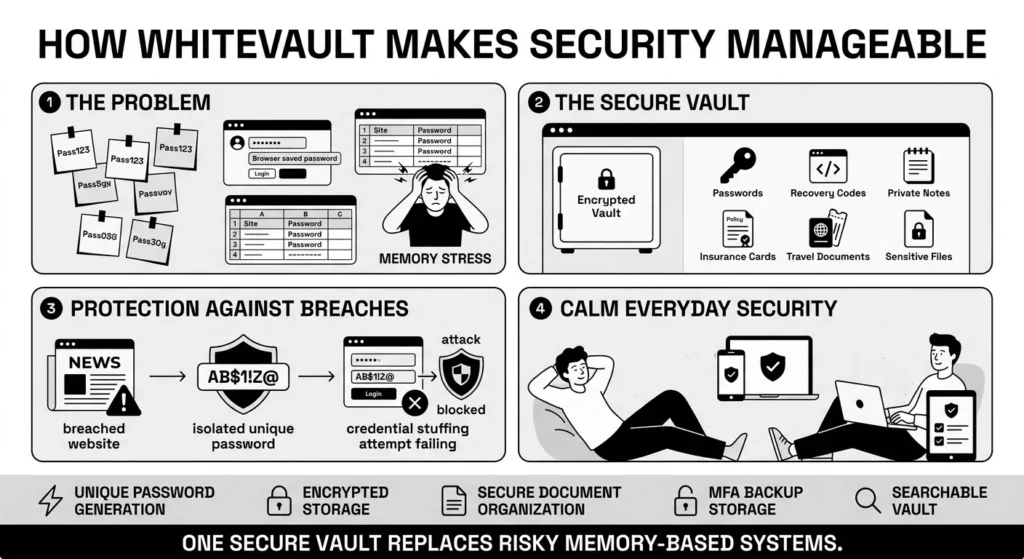
We also know that trying to hack your own system by writing passwords on sticky notes, keeping them in a physical notebook on your desk, typing them into an Excel spreadsheet, or saving them in a web browser leaves your digital life incredibly vulnerable to physical theft and malware.
This is exactly where your secure personal vault comes in. WhiteVault is a simple, elegant way to organize passwords, recovery details, private notes, and highly sensitive files. Instead of trying to remember everything or scattering your life across different folders, you store credentials and important documents securely in one heavily encrypted place.
If a hacker targets a random website you use with a rainbow table attack, they might successfully steal that specific site’s backend data. But because WhiteVault helped you automatically generate and save a totally unique, uncrackable 20-character password specifically for that one account, the hackers hit a dead end. They cannot use that stolen password to breach your email, your banking app, or your family records, because every single account has its own unique lock.
WhiteVault acts as a trusted, digital safe to store what matters most. Whether you need to save 2FA backup codes for your work email, keep a digital copy of your family’s health insurance cards, or organize your travel documents before a big trip, you can use a simple interface backed by military-grade protection. It is a safer, calmer alternative to memory-based systems and scattered folders, built specifically for people who want strong security without daily friction.
Habits That Keep You Safer Over Time
Better security does not require you to become a cybersecurity expert overnight. It is not about achieving absolute perfection; it is simply about building sustainable, practical habits that keep you safer over time.
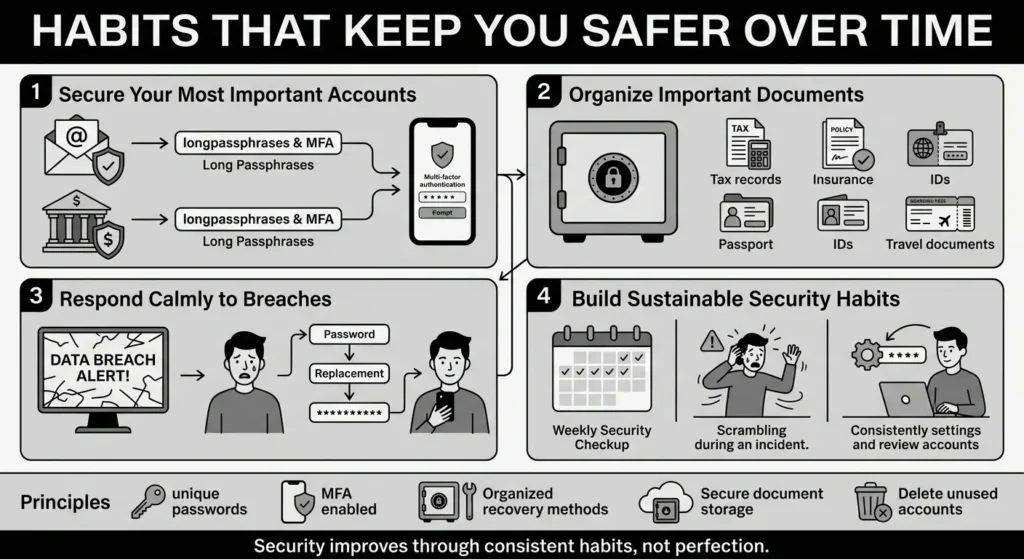
Start small by tackling your most important accounts first. Update the passwords for your primary email address and your primary bank to long, unique passphrases, and save them in your secure vault. Your email account is the master key to your entire digital life—it is where password reset links go. If your email is secure, everything else is much easier to recover.
Next, start organizing your important documents. If your laptop suddenly crashes, or you are traveling abroad and urgently need a specific file, having your tax records, identity documents, and family medical papers stored securely in your searchable vault saves you from panic.
Finally, learn to respond calmly to data breaches. If you receive an alert from a monitoring service or an email from a company stating they have been compromised, you do not need to panic. Simply log into that specific service, let your vault generate a brand new, highly secure password, and save it. You can sleep peacefully knowing that the stolen password was not reused elsewhere.
Conclusion
Better security rarely comes from one dramatic, stressful change. It usually comes from a few simple habits repeated consistently over time: using unique passphrases, setting up safer recovery details, keeping your important documents organized, and finding a secure place to keep what matters. Whether you are avoiding a rainbow table attack on a forgotten forum or just trying to help a parent find their insurance logins without stress, having the right tools makes all the difference. WhiteVault was built for exactly that purpose. Save, remember, and protect what matters, all in your secure personal vault.
Frequently Asked Questions (FAQ)
1) What is a rainbow table attack?
It is an advanced cracking technique where cybercriminals use massive, pre-calculated lists of scrambled passwords (hashes) to rapidly guess and unlock stolen account data. By comparing a stolen database of scrambled data to their massive digital cheat sheet, they can instantly figure out your real password if it is weak, short, or commonly used.
2) How do I know if my online accounts are vulnerable?
If you currently use short passwords (under 12 characters), common dictionary words, keyboard walks (like “qwerty”), or if you reuse the exact same password across multiple websites, you are highly vulnerable. If a poorly secured website is breached, hackers can instantly crack your reused password and deploy automated bots to try it on your more important accounts, like your bank or primary email.
3) How often should I change my passwords to stay safe?
According to the latest federal guidelines from the National Institute of Standards and Technology (NIST), you only need to change your password if you are explicitly notified that a website has suffered a data breach, or if you suspect someone has unauthorized access to your account. Regularly forcing yourself to change passwords every 90 days actually reduces security, because human psychology dictates that you will start using weaker, easier-to-guess variations just to remember them.
4) What is the difference between a brute force approach and using precomputed lists?
A brute force attack is a slow, methodical process that tries to guess a password by randomly generating every single possible character combination one by one. For a 15-character password, this can literally take centuries. The precomputed list method bypasses this by using a massive, multi-terabyte database of already-calculated answers. It is incredibly fast, instantly cross-referencing billions of hashes, unless the targeted website uses a security feature called “salting” to ruin the math.
5) Does two-factor authentication (MFA/2FA) actually stop hackers?
Yes, it is one of the most effective tools. Even if a hacker successfully cracks your password from a stolen database, multi-factor authentication acts as a physical roadblock. It requires them to provide a second, separate piece of evidence—like a time-sensitive code sent to your authenticator app or a physical security key plugged into your laptop. Without access to your physical device, they cannot complete the login process, rendering the stolen password useless.
6) What actually happens to my private data during a web breach?
When a breach occurs, hackers usually steal a database file containing usernames, email addresses, and scrambled passwords. They then use automated tools and powerful graphic cards to unscramble those passwords. Once unscrambled, they do not manually log into accounts. They deploy software bots to execute “credential stuffing” attacks, which rapidly test your exact email and password combination across thousands of banking, retail, and streaming sites per minute to steal your identity, drain accounts, or access personal files.
7) Where is the safest place to store my 2FA backup recovery codes?
You should treat backup recovery codes with the same level of care as highly sensitive physical documents, such as a birth certificate or a property deed. Do not leave them in an email draft, a random desktop folder, or your phone’s photo gallery, as these are easily compromised if your device is lost or hacked. Keep them in an encrypted, searchable digital vault so you can find them easily and securely during a stressful account lockout.
8) How does WhiteVault protect me from such threats?
WhiteVault acts as your secure personal vault, providing an intuitive system to generate, save, and autofill incredibly long, unique passwords for every single online account you own. By removing the burden of memorization and ensuring you never reuse passwords, WhiteVault severely limits the blast radius of any single website breach. It keeps your overall digital life secure, your private documents organized, and your daily internet usage stress-free.


