
You are at the checkout counter of a busy store, and your card is unexpectedly declined. A line is forming behind you, and there is zero cell service inside the metal building. To fix it fast, you connect to the store’s free Wi-Fi to log into your banking app and transfer funds. In a stressful, rushed moment like this, public wifi password safety is the absolute last thing on your mind. At WhiteVault, we help people save, remember, and protect what matters, ensuring these everyday moments do not turn into a digital disaster.
Quick Answer: Protect your accounts on open networks by treating the connection as inherently untrusted. Never log into sensitive portals without a VPN, use a secure vault instead of browser storage for your credentials, and consistently rely on multi-factor authentication.
Why This Topic Matters for Everyday Security
Understanding the basics of public wifi password safety is not a niche topic meant only for experts in cybersecurity. It is a fundamental, critical skill for busy professionals, students, freelancers, and parents who are just trying to manage their daily lives on the go. Today, we rely on the internet for almost every aspect of our personal and financial administration. We check bank balances while waiting at the airport, sign school permission slips from the library, and review medical test results from a hotel lobby.
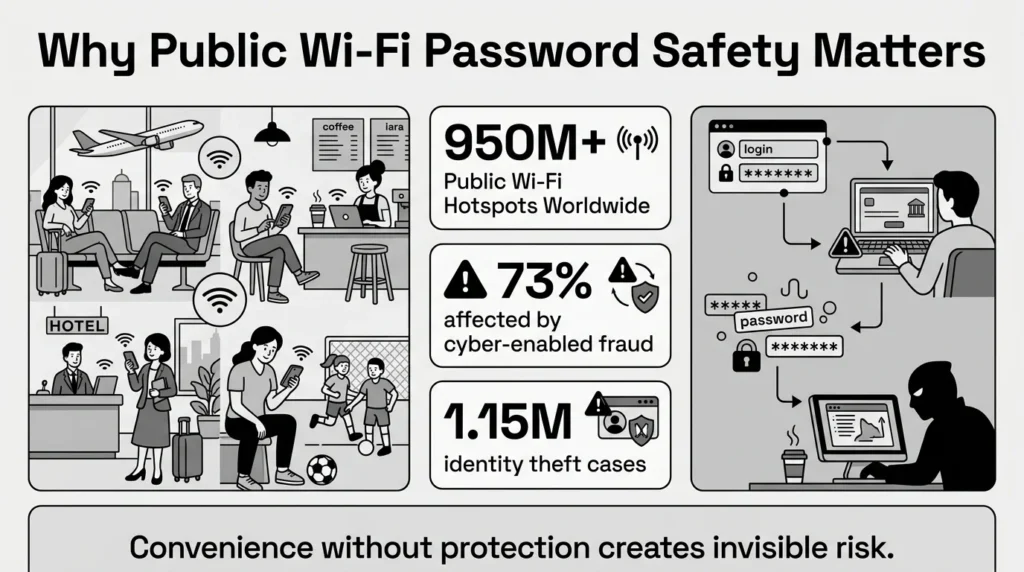
The sheer volume of open networks makes this a universal issue that affects nearly everyone. According to 2025 industry research, there are over 950 million public Wi-Fi hotspots available worldwide. When people connect, they almost always underestimate the risks present in their environment. A 2026 BroadbandSearch report highlights that users actually feel most at risk in crowded places like airports (46%) and cafes (45%), which are, in fact, prime targets for interception by malicious actors.
Consider a parent who is managing school enrollment forms, family health insurance cards, and endless passwords while waiting for their child’s sports practice to end. If they connect to a municipal park network to upload a medical document, they are broadcasting private information over a shared airspace. The risks of this behavior are incredibly common; a 2026 World Economic Forum report found that 73% of survey respondents were personally affected by cyber-enabled fraud in the past year.
It is easy to assume that cybercriminals only target massive corporations or high-net-worth individuals. In reality, everyday users bear the heaviest, most stressful burden when identity theft occurs. A 2026 Motley Fool report noted over 1.15 million cases of identity theft reported in the U.S. in just the first three quarters of 2025 alone. By understanding how public networks operate, you can take simple, empowering steps to keep your accounts locked down and your family’s data private.
The Different Types of Public Networks & Their Hidden Risks
To truly master public wifi password safety, it helps to understand that not all free networks are created equal. Different environments present entirely different types of risks, and recognizing these can help you make smarter decisions about when and where to connect.
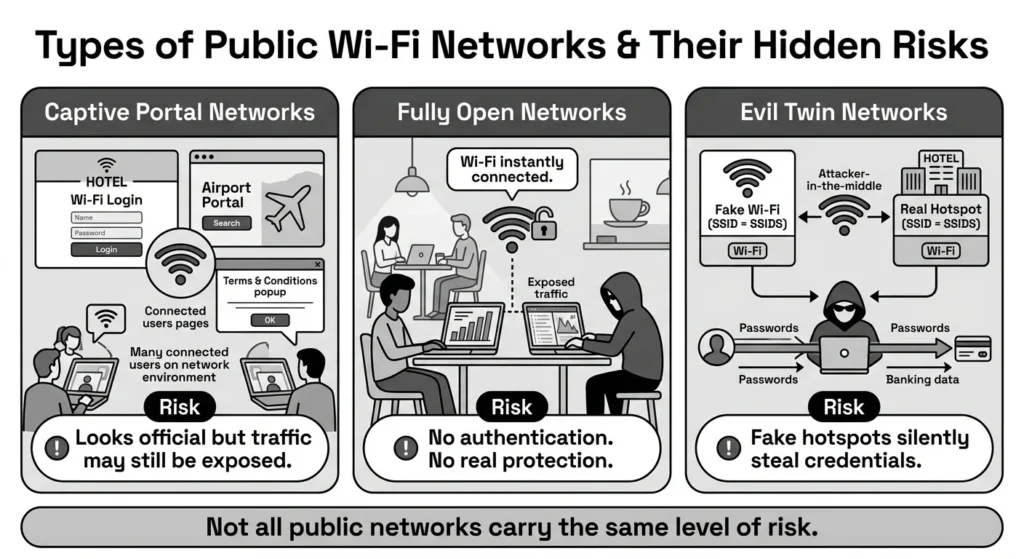
The first type is the Captive Portal Network, commonly found in hotels, airports, and large coffee shop chains. You know you are on one of these when you are redirected to a web page asking you to accept terms and conditions, enter your room number, or provide an email address before browsing. While these portals feel official, they do not inherently encrypt your traffic. They simply act as a gatekeeper to grant internet access. Once you click “I Agree,” you are often sharing the same unencrypted airspace as hundreds of other travelers, making your data privacy vulnerable to anyone using basic interception software nearby.
The second type is the Fully Open Network, typically seen in municipal parks, independent cafes, or small retail stores. These networks require zero authentication to join. You simply tap the network name, and you are instantly connected. These are often the most dangerous because they lack even baseline security protocols. If a student sits in an independent cafe and logs into their financial aid portal over a fully open network, someone sitting a few tables away can easily capture their credentials.
The third and deceptive type is the Evil Twin Network. This is a malicious hotspot intentionally set up by an attacker to mimic a legitimate network. For example, if a hotel’s real network is named “Marriott_Guest,” an attacker might set up a stronger Wi-Fi signal in the lobby named “Marriott_Free_Guest.” When tired travelers connect to the fake network, the attacker sits in the middle of the connection, silently capturing passwords, banking details, and emails. This targeted deception proves why public network risks are so high when users prioritize convenience over verification.
What Usually Goes Wrong on Open Networks
A major reason why public wifi password safety is frequently compromised is the illusion of security provided by familiar settings. We often assume that because we are in a reputable hospital waiting room or a high-end business lounge, the network must be heavily guarded. However, recent data on cybersecurity trends shows that 25% of public hotspots have no encryption at all, leaving traffic completely exposed.
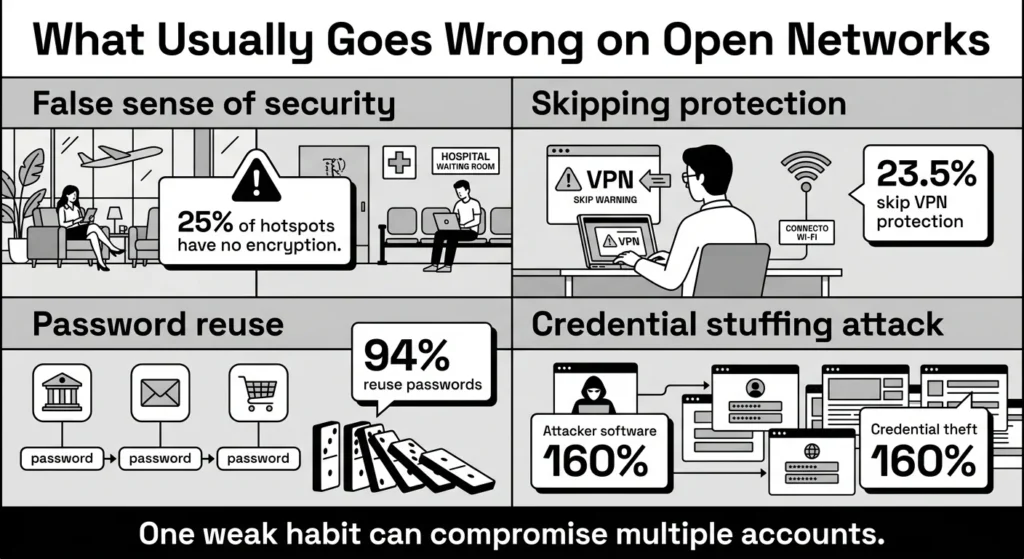
Despite being somewhat aware of these dangers, people frequently prioritize speed and convenience. A 2025 Panda Security survey found that nearly 1 in 4 Americans (23.5%) skip basic protective measures like VPNs when using open Wi-Fi. As a direct result of these casual browsing habits, 36% of Americans suspect they have experienced a security incident after using a public connection.
This problem becomes infinitely worse if you reuse the same password across multiple platforms, which most people do. We have all reused passwords at some point; it is human to want something familiar and easy to type. However, an estimated 94% of passwords are used across multiple accounts, and shockingly, 13% of users rely on the exact same password for every single login.
If an attacker intercepts your email password on a fake cafe network, they do not just stop at your email. They will immediately use automated software to try that exact same email and password combination on thousands of banking, shopping, and streaming platforms. This tactic, known as credential stuffing, is a massive threat. According to 2026 security analysis, stolen credentials drove 22% of all confirmed data breaches globally in 2025. Furthermore, credential theft surged by 160% in just the first half of 2025. What starts as a minor mistake on a public network can rapidly turn into a stressful, multi-account takeover.
The Safer Way to Handle It: Core Concepts Explained
To genuinely improve your daily public wifi password safety, you have to think about how data travels through the air. You do not need a computer science degree to understand this; you just need to grasp a few foundational, plain-language concepts.
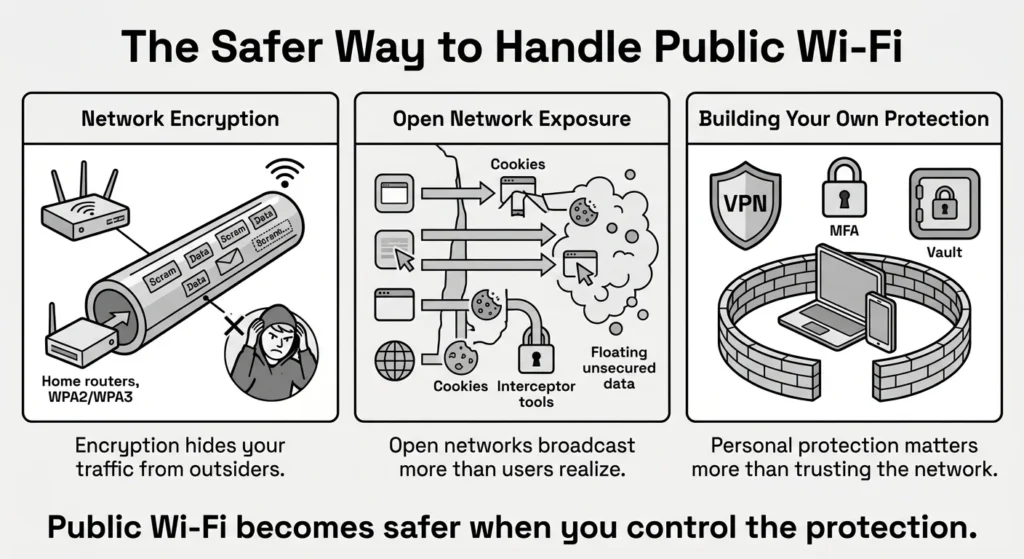
The most important concept is network encryption. Think of network encryption as a secure, windowless tunnel for your internet traffic. When you connect to a trusted home network, the router uses modern Wi-Fi security protocols (like WPA2 or WPA3) to establish this private tunnel. Anyone trying to look at your traffic from the outside sees only scrambled, unreadable data.
However, open networks—the ones where everyone shares the same connection or password—do not build these private tunnels for individual users. This means your data is effectively broadcast outdoors. While most reputable websites use their own encryption (indicated by the HTTPS padlock icon in your browser), this only protects the data going to that specific website. It does not protect the apps running in the background of your phone, your email client syncing in real-time, or your browser extensions.
This lack of comprehensive protection directly threatens your overall data privacy. If an attacker is lurking on the network, they can intercept unencrypted app data, capture cookies, or hijack your active browsing sessions. The ultimate goal of learning these concepts is unauthorized access prevention. By understanding that public Wi-Fi is inherently broken from a privacy standpoint, you stop relying on the cafe or the airport to protect you. Instead, you build your own protective barriers, transforming personal security from a complex technical chore into a series of calm, practical choices.
Step-by-Step: What To Do Next to Protect Your Accounts
Here are clear, actionable steps you can take today to elevate your public wifi password safety. These steps are designed to be practical and achievable, whether you are a university student working in a busy library or a freelancer answering client emails from a train.
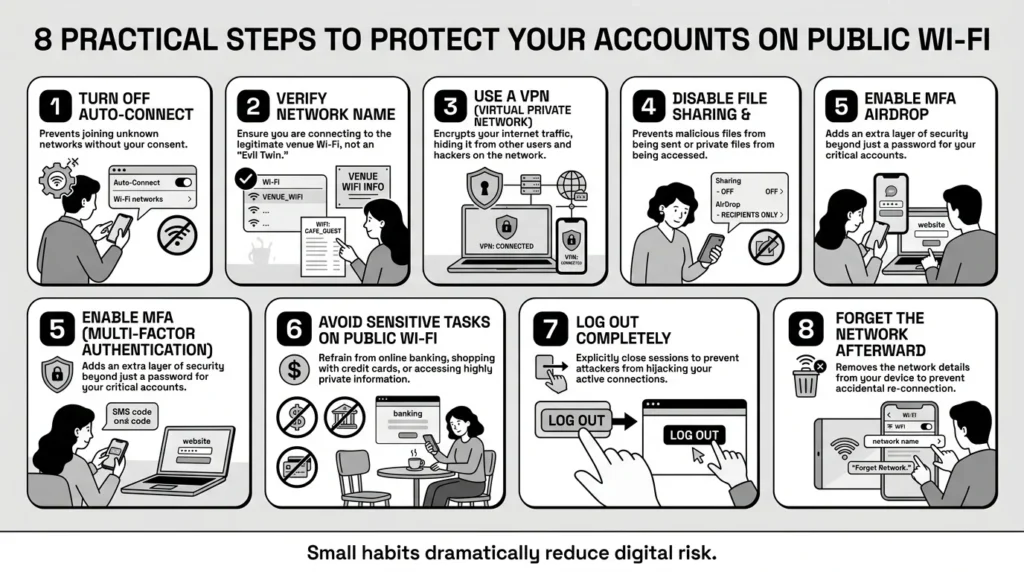
1) Turn Off Auto-Connect on All Devices
Smartphones and laptops are designed to be “helpful” by automatically reconnecting to any open network you have used before. Disable this feature in your device’s Wi-Fi settings. You want to make a conscious, deliberate choice every time your device joins a new network, rather than letting your phone connect to a sketchy hotspot while sitting in your pocket.
2) Verify the Network Name (Avoid Evil Twins)
If you are at a clinic or hotel, never guess the network name. Always ask a staff member for the exact network spelling and current password. As mentioned earlier, attackers frequently set up fake “Evil Twin” networks with names that are just one letter off from the legitimate business to trick you into connecting.
3) Always Set Up a Virtual Private Network
Consistent VPN usage is one of the most powerful and accessible tools for everyday users. A Virtual Private Network creates a secure, heavily encrypted tunnel between your device and the internet, completely bypassing the security flaws of the local Wi-Fi router. A paid, trusted VPN app on your phone and laptop is a highly worthwhile investment for anyone who travels or works remotely.
4) Turn Off File Sharing and AirDrop
When you connect to a public network, you are suddenly sharing a digital space with strangers. Go into your laptop settings and turn off “Network Discovery” and “File Sharing.” If you use an Apple device, ensure your AirDrop is set to “Contacts Only” or “Receiving Off” so malicious users cannot send you unwanted files or attempt to access your folders.
5) Rely on Modern Authentication Methods
No matter how careful you are, you must operate under the assumption that a password could eventually be exposed. This makes multi-factor authentication (MFA) absolutely essential, yet 65% of consumers still do not use MFA on their most valuable accounts. Turn on MFA to require a second piece of evidence, like a code from an authenticator app, before a website grants access.
6) Wait to Perform Sensitive Tasks
Sometimes the best security is simply patience. If you are sitting in a crowded airport terminal, it is absolutely not the right time to file your taxes, review medical records, or pay a large credit card bill. Wait until you are on a trusted home network or securely connected via your mobile carrier’s cellular data.
7) Log Out Completely When Finished
When you are done browsing on a public network, do not just close your laptop lid or close the browser app on your phone. Actively click “Log Out” on any banking, email, or shopping portals you were using. This invalidates your session, ensuring that if an attacker captured your session cookie over the network, they cannot use it to hijack your account after you leave.
8) Forget the Network
Once you leave the coffee shop or airport, go into your Wi-Fi settings and select “Forget This Network.” This ensures your device will not silently attempt to reconnect to it if you walk past the location again next week, keeping you in total control of your connections.
Emergency Steps: What to Do If You Suspect a Wi-Fi Compromise
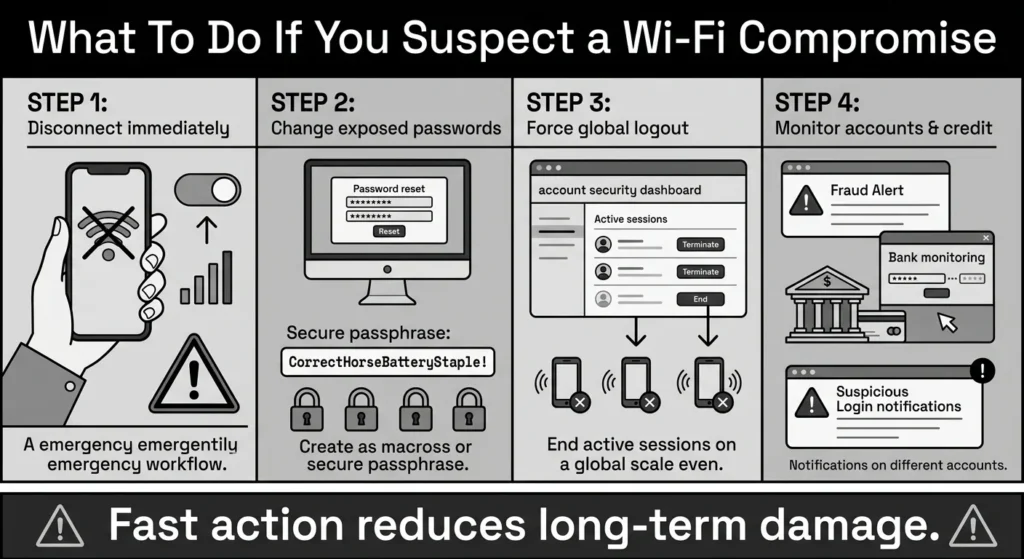
Even with the best intentions, mistakes happen. If you realize you just logged into your primary bank account over a highly suspicious public network without a VPN, or if you immediately start receiving strange login alerts, you need a calm plan of action. Panic leads to poor decisions; following these emergency public wifi password safety steps will help you regain control.
First, disconnect from the Wi-Fi network immediately. Do not stay connected to try and figure out what happened. Turn off Wi-Fi on your device entirely and switch to your mobile carrier’s cellular data. Cellular networks have built-in encryption protocols managed by your telecom provider, making them vastly safer than open Wi-Fi for emergency recovery tasks.
Second, change the exposed password right away. Using your cellular data connection, navigate to the service you just logged into (like your bank or email) and change the password. If you were reusing that same password on other sites, you must change it on those platforms immediately to prevent a credential stuffing attack.
Third, force a global logout. Many major platforms, including Google, Microsoft, and most banking apps, have a security setting that allows you to “Sign out of all other devices” or “End all active sessions.” Trigger this feature immediately. This will sever any connection an attacker might have hijacked using the insecure network.
Finally, monitor your accounts and credit. Keep a close eye on your bank statements and email “Sent” folders for the next several days. If you suspect your identity data (like a Social Security number or passport scan) was intercepted, consider placing a temporary fraud alert or credit freeze with the major credit bureaus. Being proactive in the first 24 hours drastically reduces the long-term stress of a potential breach.
How WhiteVault Helps Keep This Manageable
We built our secure personal vault because navigating public wifi password safety shouldn’t require an advanced IT degree. The reality is that trying to follow best practices can quickly feel entirely overwhelming. Recent data indicates the average person now maintains nearly 170 online accounts requiring a password. You simply cannot memorize that safely.
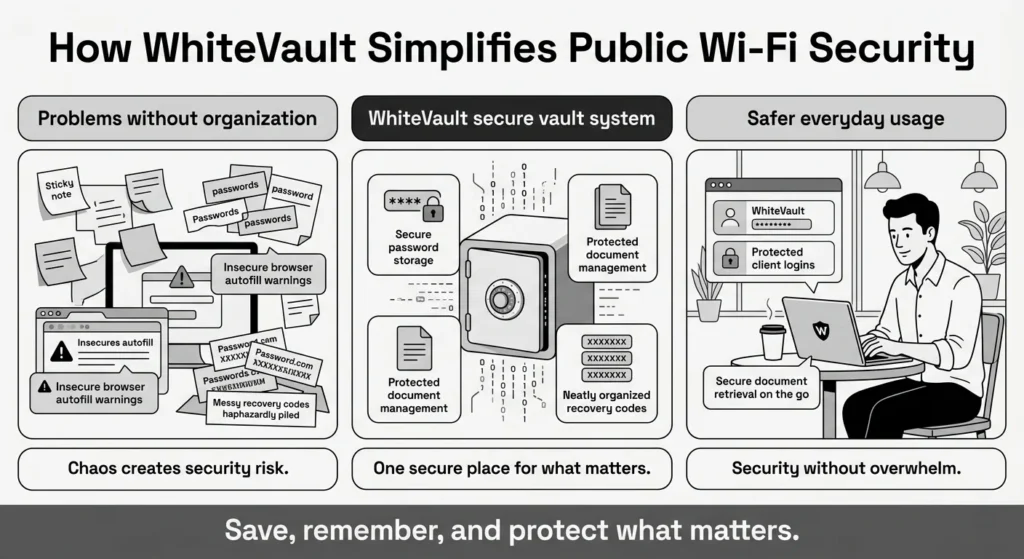
If a freelancer relies on their browser to auto-fill their passwords, they run a massive risk. If those browser extensions sync insecurely over an open cafe network, or if an attacker intercepts the session, their credentials are in danger. If they use sticky notes or unencrypted spreadsheets on their desktop, one lost device or compromised connection could expose their entire digital life. WhiteVault provides a much safer alternative through strong, user-friendly password management.
Versus trying to remember everything, you can store your credentials, recovery details, and important information securely in one encrypted place. When you need to log into a client portal on a cafe network, you do not have to type your passwords from memory or risk them being sniffed over an unencrypted connection. You can retrieve them directly from your secure personal vault.
Beyond just passwords, WhiteVault is designed for comprehensive document management. You might find yourself dealing with a lost passport scan right before an international flight, forcing you to search through old emails on airport Wi-Fi. Versus dealing with document chaos across random folders, WhiteVault allows you to keep important files organized, highly searchable, and securely available when you actually need them.
Finally, WhiteVault helps you manage the messy, stressful reality of account recovery. If a public Wi-Fi network flags your login as suspicious and suddenly locks your email account, you will need your backup codes to get back in. Versus relying on scattered recovery details buried in old notebooks or saved in the very email you are locked out of, WhiteVault lets you save backup codes and security answers where you can actually find them. We help you save, remember, and protect what matters.
Habits That Keep You Safer Over Time
Building sustainable, long-term habits is the ultimate goal of true public wifi password safety. Security is not a one-time setup that you configure and forget; it is a way of operating digitally. Over time, these small habits become second nature, allowing you to use the internet with confidence rather than constant fear.
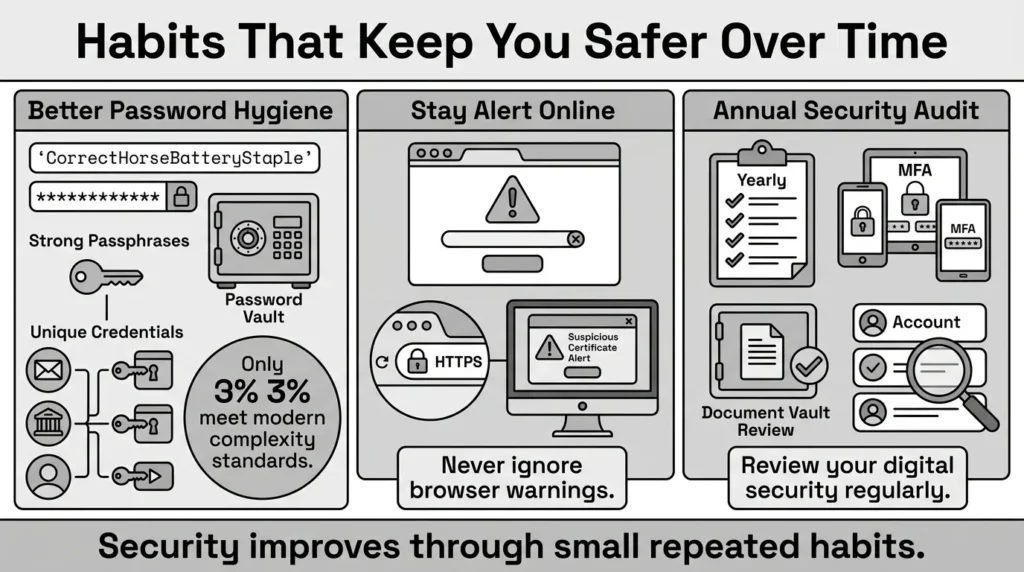
The most foundational habit you can build is better password hygiene. Start practicing strong password creation by generating unique, complex passphrases for every single account you own. This is absolutely vital, considering that only 3% of user passwords actually meet modern complexity requirements. A passphrase—a string of random words like “Purple-Coffee-Window-Desk”—is incredibly difficult for computers to crack but much easier for you to type accurately.
Another essential habit is staying alert to how websites handle your data. Never dismiss security warnings from your browser, especially if it tells you a site’s security certificate is invalid while on public Wi-Fi. Sadly, over 80% of websites still allow people to create easy-to-guess, weak logins, meaning you have to enforce your own exceptionally high standards even if the website does not force you to.
Finally, make it a habit to audit your personal security posture at least once a year. The 2025 IBM Cost of a Data Breach Report notes that the average cost of a corporate data breach globally is now $4.44 million. While these massive numbers reflect corporate losses, they highlight a harsh truth: massive companies are constantly losing consumer data. Your personal habits—like keeping your recovery documents locked in a secure vault and using MFA—are your absolute best defense when corporate security fails you.
Conclusion
Mastering public wifi password safety is about taking small, deliberate steps rather than aiming for absolute, impeccable perfection. We know that dealing with modern account overload can be incredibly stressful, especially when you are just trying to do normal things on the go. But by understanding how open networks function and utilizing protective tools like VPNs, you can take back control of your digital privacy.
Better security rarely comes from one dramatic change. It usually comes from a few simple habits repeated consistently: using unique passwords, creating safer recovery details, keeping organized documents, and finding a secure place to keep what matters. WhiteVault was built for exactly that purpose. Save, remember, and protect what matters, all in your secure personal vault.
Frequently Asked Questions (FAQ)
1) What exactly does public wifi password safety mean?
It refers to the deliberate practices and security tools you use to protect your login credentials, private personal data, and overall digital identity from being intercepted, tracked, or stolen when you connect your devices to shared, open internet connections like those found in cafes, airports, parks, and hotels.
2) How do I know if a public Wi-Fi network is actually safe to use?
You should treat all public Wi-Fi networks as inherently untrusted. Even if a network requires a password to join and displays a padlock icon, if that exact same password is shared with everyone else in the building, the network is not truly private. The safest, most practical approach is to always assume someone else is monitoring the network and use a VPN to protect your data.
3) How often should I update my passwords if I use public Wi-Fi daily?
You do not need to change your passwords on a rigid, stressful monthly schedule unless you suspect they have been compromised in a specific data breach or you accidentally logged in on a highly suspicious network. Instead of focusing on frequent, exhausting changes, put your energy into ensuring that every single account has a strong, unique password or passphrase stored in a secure vault.
4) Is using cellular data on my phone safer than using a public Wi-Fi network?
Yes, absolutely. Cellular networks (like 4G and 5G) have robust, built-in encryption protocols that are strictly managed by your telecom provider. While no network in the world is perfectly immune to highly sophisticated, nation-state attacks, cellular data is significantly harder for local cybercriminals sitting in a coffee shop to intercept compared to an open, shared Wi-Fi router.
5) What is the absolute easiest way for a beginner to protect their private information on public networks?
The absolute easiest step is to simply turn off your Wi-Fi entirely and use your phone’s cellular data connection for any highly sensitive tasks, such as banking, reviewing medical test results, or logging into your primary email. If you must use a laptop on Wi-Fi to get work done, subscribing to and turning on a reputable, paid VPN app is the best, most impactful beginner-friendly step you can take.
6) Can someone really see my passwords if I do not use a VPN?
If the public network is completely unencrypted and the specific website or app you are visiting does not use a secure, HTTPS connection, yes. Attackers use readily available, highly automated software to capture data traveling through the air. While most modern, reputable websites encrypt their own login pages, a VPN is necessary because it protects all your other background data, apps, and browsing habits.
7) How does keeping my credentials organized actually help protect me on public Wi-Fi?
When your credentials, passwords, and recovery codes are disorganized, you are much more likely to panic during a sudden account lockout. This panic often leads you to recklessly reset passwords over open, risky networks just to get access back quickly. Keeping them perfectly organized ensures you have exactly what you need, securely stored, preventing stressful and risky security decisions.
8) How does WhiteVault help with this topic?
WhiteVault provides a highly secure, heavily encrypted environment to store your passwords, recovery codes, and important personal documents. Instead of awkwardly typing credentials from memory in a crowded space or relying on easily intercepted browser autofill, WhiteVault ensures your most sensitive information remains locked safely away from unauthorized access on any network, giving you total peace of mind.


