
Picture this: you are sitting in a busy pediatrician’s waiting room, frantically trying to log into a health portal on your phone to find a medical record. You guess three different passwords, and the account locks. We have all experienced the sudden panic of being blocked from our own information at the worst possible time. Relying on password vault encryption matters because it prevents these stressful bottlenecks. At WhiteVault, we help people save, remember, and protect what matters, turning personal security from a frustrating hurdle into quiet peace of mind.
Quick Answer A secure vault uses strong encryption to scramble your passwords, recovery codes, and sensitive documents. It locks your private information behind one master key, ensuring that only you can read, manage, and access your digital life.
Why Digital Security Matters for Everyday Life
Modern life requires us to manage an incredible number of accounts. Between banking, streaming services, healthcare portals, school forms, and work logins, the sheer volume of credentials we need to remember is staggering. For most of us, digital security is not about fighting off sophisticated hackers in a darkened room; it is about keeping our daily lives running smoothly without losing access to the things that matter most.
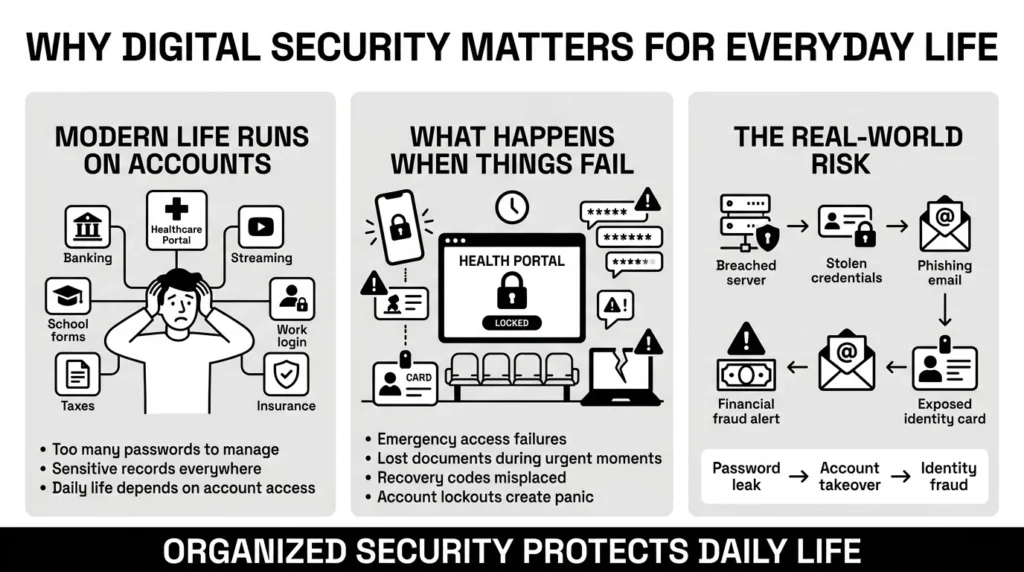
Yet, the stakes are very real and growing. Stanford University research highlights that 88% of all data breaches are caused by human error, meaning simple mistakes can have massive consequences. According to 2025 consumer data tracking from the Federal Trade Commission (FTC), identity theft and fraud are accelerating, putting us on pace for billions in losses. This aligns with the Sumsub 2025-2026 Identity Fraud Report, which notes the global identity fraud rate is heavily driven by account takeovers. With 2026 projections estimating global cybercrime will reach $10.5 trillion, everyday people are losing money, time, and peace of mind simply because their private information falls into the wrong hands.
When you are juggling daily responsibilities, data protection can easily feel like a secondary concern or a chore for tomorrow. A student trying to store passport scans and university financial aid documents just wants them accessible for the deadline. A freelancer juggling client portals, contracts, and tax files just wants to get paid on time. A parent managing school forms, pediatric health records, and family passwords just wants to get through the day without a tech headache.
But when an emergency strikes, disorganized security becomes a massive problem. Picture this: a parent asks where the insurance card is, and nobody knows which device has the latest copy. You might find yourself locked out of a critical work-related account because the multi-factor recovery code was saved in an old email you no longer have access to. You might need to send a copy of your passport for a last-minute visa application, only to realize the latest scan is buried in an old, broken laptop’s hard drive.
This is where cybersecurity stops being an abstract technical concept and becomes a practical household necessity. Organizing your sensitive information protects you against sudden lockouts, frantic searches for essential documents, and the rising tide of account takeovers.
What Usually Goes Wrong With Our Accounts and Documents
Most security problems do not happen because people do not care. They happen because people are overwhelmed by an unrealistic system. When faced with the impossible task of memorizing dozens of complex, uniquely generated logins, we naturally look for shortcuts. It is no wonder we feel overwhelmed; recent data from Precedence Research found that the average person manages about 191 passwords across their work and personal accounts.
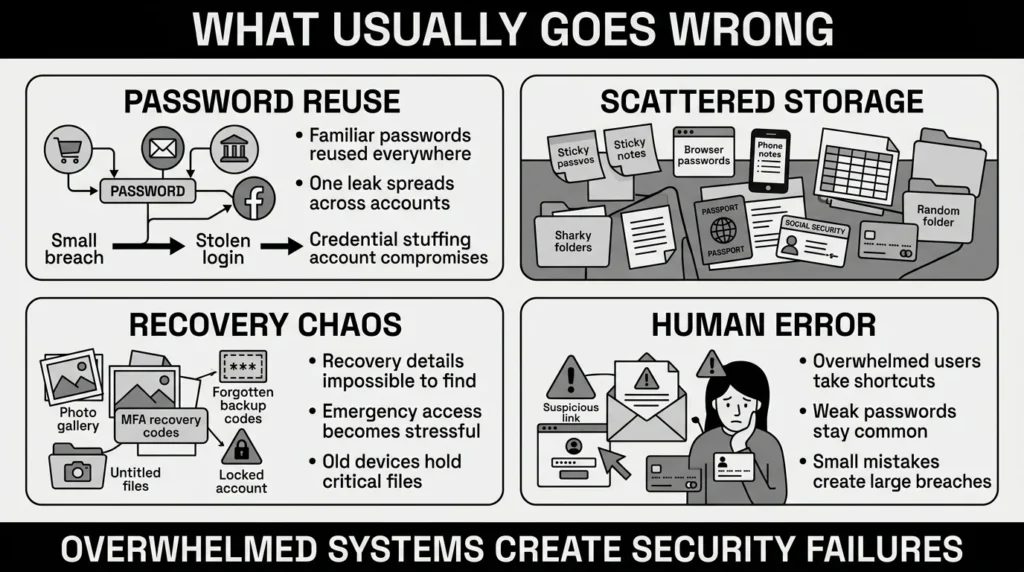
We have all reused passwords. It is human to want something familiar, like a pet’s name followed by a birth year. You might use one password for your email, another for your bank, and a third for absolutely everything else. But 2026 data from DeepStrike reveals that 84% of people reuse passwords across multiple sites. This is exactly why Spacelift’s 2026 analysis shows that 49% of all data breaches directly involve compromised passwords. When one reused password leaks from a minor shopping site breach, attackers use automated programs to try it everywhere. Furthermore, Huntress threat analysis confirms that easily guessed passwords like “123456” are still used by millions and can be cracked in under a second.
Another common mistake is how we store our data. Many of us keep our most private information completely scattered. You might have banking passwords written on a sticky note tucked under your keyboard, your social security number saved in an unencrypted phone note, and your credit card details stored in your default web browser. While these methods offer quick convenience, they completely lack essential authentication safeguards. If someone borrows your laptop, or if your phone is stolen while traveling, they instantly have access to your entire digital life.
Even modern recovery details are often mismanaged. When you set up multi-factor authentication (MFA) for your email, you are usually given a list of one-time backup recovery codes. Most people take a quick screenshot and leave it in their photo album, or paste it into a blank digital document named “Untitled.” Finding that specific code three years later when you upgrade your phone and get locked out is nearly impossible.
Without relying on password vault encryption, we leave our most critical information exposed to both physical loss and digital theft. The 2026 IBM Cost of a Data Breach Report reveals the global average cost of a security incident is now $4.44 million. Furthermore, IBM notes it takes organizations an average of 241 days to just identify and contain a breach. This is deeply tied to user habits, as Verizon’s Data Breach Investigations Report confirms that 68% of breaches involve a human element like falling for phishing or recycling stolen credentials.
The Safer Way to Handle It: Understanding the Technology
Instead of trying to memorize an impossible list or scattering sensitive files across random, unprotected folders, there is a safer, calmer approach. Fortunately, people are starting to realize this. According to 2026 data from PasswordManager.com, over 30% of users now rely on a dedicated password manager to handle their credentials. A dedicated personal vault uses modern technology to protect your data, ensuring that you do not have to choose between strong security and everyday convenience.
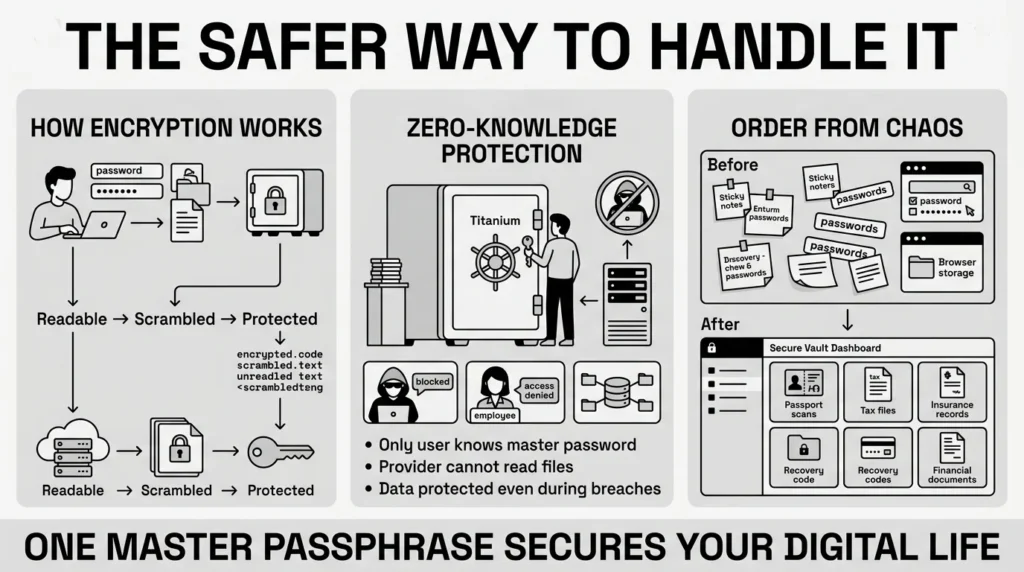
At the heart of this protection is password vault encryption. If you are not a security engineer, encryption might sound intimidating or overly complex, but the underlying concept is actually quite simple. Imagine you write down your most sensitive passwords, attach your annual tax documents, and place them inside a heavy-duty titanium lockbox. Encryption is the digital version of that unbreakable lockbox.
When you enter your private information into a secure vault, advanced encryption algorithms instantly scramble your plain text notes and clear document scans into an unreadable, chaotic string of random characters. Even if a cybercriminal were to intercept the data over public Wi-Fi, or steal the physical server it lives on, they would just see meaningless gibberish.
This scrambled data can only be unlocked and read by specific cryptographic keys. In a strongly designed system, this key is derived entirely from your master password—a password known only to you. Because the company hosting the vault never stores or knows your master password, they cannot read your files, hand them over, or lose them in a breach. This “zero-knowledge” architecture is what sets a true secure storage environment apart from just typing a list of passwords into a standard online document or saving them in an email draft.
Going for this kind of system completely changes how you manage your digital life. You no longer need to know 50 different passwords, nor do you need to hunt for your physical filing cabinet when you need an insurance policy number. You only need to remember one strong master passphrase. The vault handles the rest, bringing permanent order to the chaos of modern account overload.
Step-by-Step: What To Do Next to Secure Your Information
Moving to a safer system does not have to happen all at once. In fact, trying to fix everything in one afternoon is exactly why people get frustrated and give up. You can take control of your accounts and records steadily, without panic. Here are the practical steps to organize your digital life.
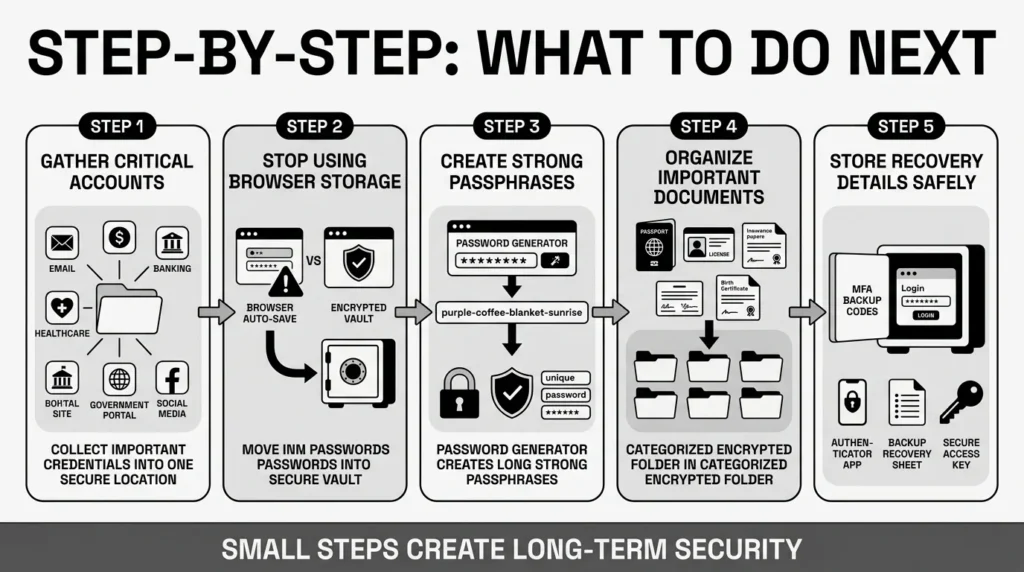
First, gather your most critical credentials. Never mind the random newsletter you signed up five years ago. Start with your primary email account, your bank, your main social media, and your healthcare or government portals. These are the accounts that matter most. Move these logins into a dedicated manager, prioritizing strong protection for your financial and identity-related accounts.
Second, stop letting your browser save your passwords. Browser storage is incredibly convenient, but it is often tied directly to the device itself and can be highly vulnerable to malware that specifically targets hidden browser files. Turn off the auto-save feature in your browser settings, and make sure to securely delete the old passwords stored there once you have migrated them to your vault.
Third, generate strong, unique passwords for each account. The National Institute of Standards and Technology (NIST) updated its digital identity guidelines, heavily recommending long passphrases instead of short passwords filled with annoying, hard-to-type symbols. A string of random, memorable words, like “purple-coffee-blanket-sunrise,” is actually much harder for a computer program to guess than “P@ssw0rd1!” and much easier for you to type on a phone. Using password vault encryption means your manager can generate and store these long, secure strings for you automatically.
Fourth, secure your important documents. Spend twenty minutes going through your phone’s photo album and your computer’s download folder. Find those scattered scans of your passport, driver’s license, birth certificates, and auto insurance policies. Move them into your encrypted digital space where they are searchable and neatly organized. After moving them, permanently delete the unencrypted copies from your downloads folder.
Finally, secure your recovery details. Whenever you set up multi-factor authentication, save the backup codes right next to the login entry in your vault. When you are filling out a form and cannot recall the security answer you made 8 years ago, having it stored safely eliminates all the frustration and prevents you from getting permanently locked out.
How WhiteVault Helps Keep This Manageable
We built WhiteVault because we believe security should feel practical, calm, and manageable. We know from experience that trying to balance daily life with complex, demanding security advice often leads to giving up entirely.
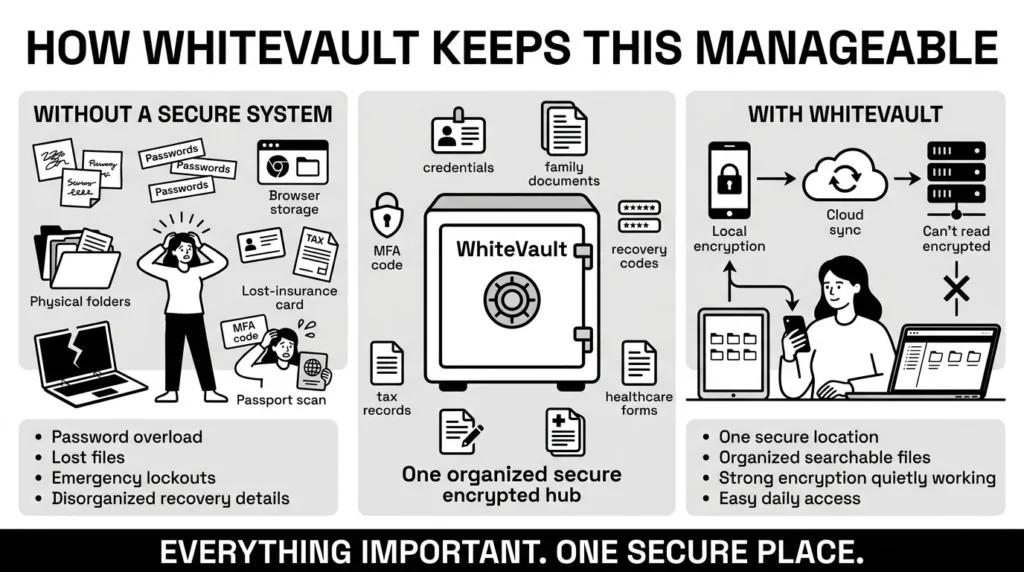
WhiteVault is your secure personal vault for credentials, recovery details, private notes, and sensitive files. We help everyday people save, remember, and protect what matters without turning personal security into a confusing, exhausting project.
Think about the traditional alternatives. Versus trying to remember everything, WhiteVault lets you store credentials, recovery details, and important information securely in one encrypted place. Versus writing on sticky notes and trusting browser storage, you gain much stronger protection while keeping easy access right when you need it.
Versus document chaos, WhiteVault keeps your important files—like tax records, property documents, and medical forms—organized, searchable, and always available. Versus scattered recovery details, you can save backup codes, recovery keys, and old security answers exactly where you can find them years later.
You do not have to understand the complex math behind password vault encryption to benefit from it. WhiteVault handles all the heavy lifting in the background. We provide a simple, clean interface backed by strong protection, giving you peace of mind for your digital life without any daily friction. Everything important, one secure place.
Habits That Keep You Safer Over Time
Better security rarely comes from one dramatic, overnight change. It usually comes from a few simple habits repeated consistently. Now that you understand the tools, building sustainable routines will protect your user privacy for years to come without adding stress to your day.
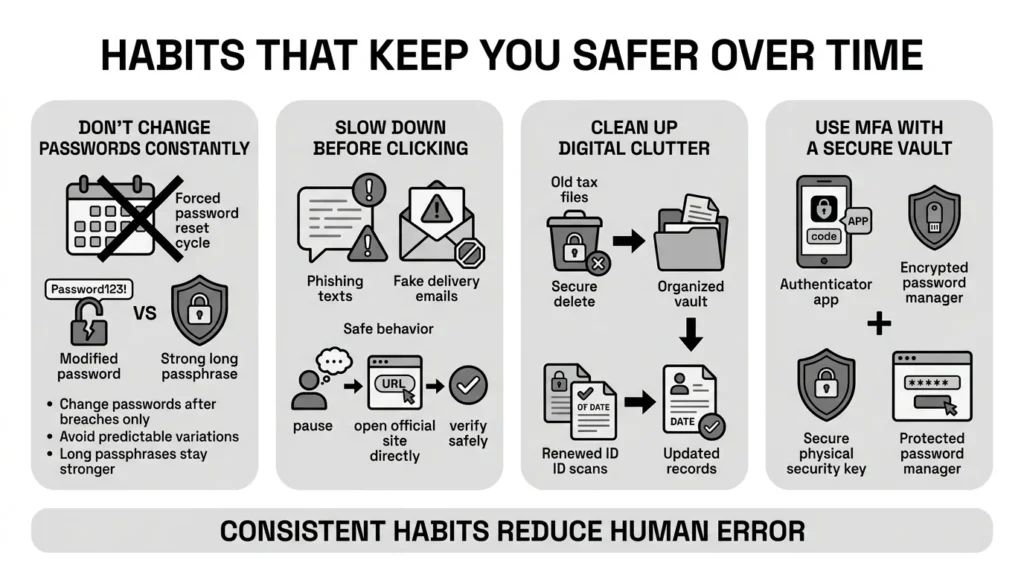
One of the most important habits is changing your response to password expiration. For years, workplaces forced people to change their passwords every 90 days. We now know this is a bad idea. As the NIST guidelines explicitly point out, forced resets encourage people to use weaker passwords or simply add a number to the end of their old one. You should only change your passwords if you suspect a compromise or if a service notifies you of a data breach.
Another crucial habit is slowing down when you receive urgent messages. Phishing texts, scam emails, and social engineering attacks are more convincing than ever. Kymatio’s 2026 Phishing Benchmarks note that roughly 3.4 billion malicious emails are distributed daily. Worse, Hoxhunt’s 2026 Phishing Trends Report tracked a massive 14x surge in AI-generated phishing attacks. You might receive a text that looks exactly like a real delivery alert, a streaming subscription cancellation, or a bank fraud warning. Before clicking any link, pause. Log directly into your account using your saved credentials or check your vault instead of following the text message link.
You should also practice regular digital cleanups. Once a year, review the documents you have stored. Securely delete old tax files you no longer need to keep, and ensure your current ID scans, like a renewed driver’s license, are up to date. Good password management extends to good overall file management.
Furthermore, embrace multi-factor authentication (MFA) wherever it is offered. MFA adds an essential layer of access control, requiring not just your password, but a temporary code from your phone or an authenticator app. However, be aware that attackers are adapting. Recent data shows that 60% of phishing-related breaches now use bypass techniques that traditional MFA cannot stop. This is why coupling MFA with a secure vault—where you don’t even know your own passwords to accidentally give them away to a fake site—is so critical.
By relying on robust password vault encryption, you take the human error out of remembering all these specific details. You create a centralized, highly secure location that grows with you, keeping your family documents and financial records safe across new devices, new jobs, and life changes.
Conclusion
Getting your digital life in order does not have to be a major source of stress or anxiety. You do not need to be a cybersecurity expert to protect your personal information, and you certainly do not need to live in fear of the next big data breach. By understanding the basics of password vault encryption, you can take confident, steady steps toward organizing your accounts and critical documents.
Better security always comes down to making simple, sustainable choices over time: unique passwords, organized documents, safer recovery details, and finding a trusted place to keep what matters most. WhiteVault was built for exactly that purpose. We invite you to save, remember, and protect what matters, all in your secure personal vault.
Frequently Asked Questions (FAQ)
1) What is password vault encryption?
It is a security method that scrambles your saved credentials, private notes, and documents into unreadable text. It acts like a digital lockbox. Only your unique master password can unscramble the data, ensuring that no one else, not even the vault provider, can read your private information.
2) How do I know if my stored information is actually safe?
You can trust a storage system if it uses “zero-knowledge” architecture. This means the scrambling happens on your device before the data is ever sent to the cloud. Because the company never holds the key to unlock your files, your data remains secure even if their servers are targeted by hackers.
3) How long does it take to organize my digital life?
Moving everything at once can be overwhelming, so we recommend doing it in phases. Setting up your safe space takes under five minutes. Moving your top ten most important accounts (like banking and email) takes about twenty minutes. You can add the rest naturally as you log into them over the next few weeks.
4) Why should I use a dedicated vault instead of my web browser?
While browser-saved passwords are easy to use, they are often less secure. If someone accesses your computer, they can easily view or export your browser passwords. A dedicated app provides much stronger access control, scrambles your data more thoroughly, and safely syncs across all your different devices and browsers.
5) Is this technology safe and easy for beginners to use?
Absolutely. You do not need to understand complex algorithms or coding to be safe. Modern tools are for everyday people. The app does complicated math in the background. Your only job is to remember one strong master passphrase and use the app to log into your daily services.
6) What happens to my privacy if the company gets hacked?
If you are using a reputable, zero-knowledge tool, your privacy remains protected. Because your information is scrambled using strong cryptographic keys before it leaves your device, hackers would only steal useless, encrypted code. Without your specific master password, they cannot read or use any of your files.
7) How should I organize my sensitive documents inside the app?
Treat your digital storage like a well-organized physical filing cabinet. Create simple, searchable categories or folders. Have one space for family health records, one for financial and tax documents, and one for travel IDs like passport scans. Always give your files clear, descriptive names so you can find them instantly during an emergency.
8) How does WhiteVault help with password vault encryption?
WhiteVault makes this protection accessible to everyone without the technical headache. We provide a simple, friendly interface where you can store your credentials, recovery codes, and important documents. We apply bank-level security quietly in the background, giving you peace of mind and one secure place for everything important.


