
You type your banking password—the one you use for everything—and hit enter. “Account Locked.” You try again, but the screen freezes. You did not forget your login; an automated bot just triggered a security freeze by testing popular passwords against your email. This quiet, frustrating disruption is the hallmark of a password spraying attack. It relies entirely on our human habit of reusing convenient passwords across multiple sites. At WhiteVault, we help everyday people save, remember, and protect what matters, replacing the stress of sudden lockouts with simple, practical security for everyday life.
Quick Answer
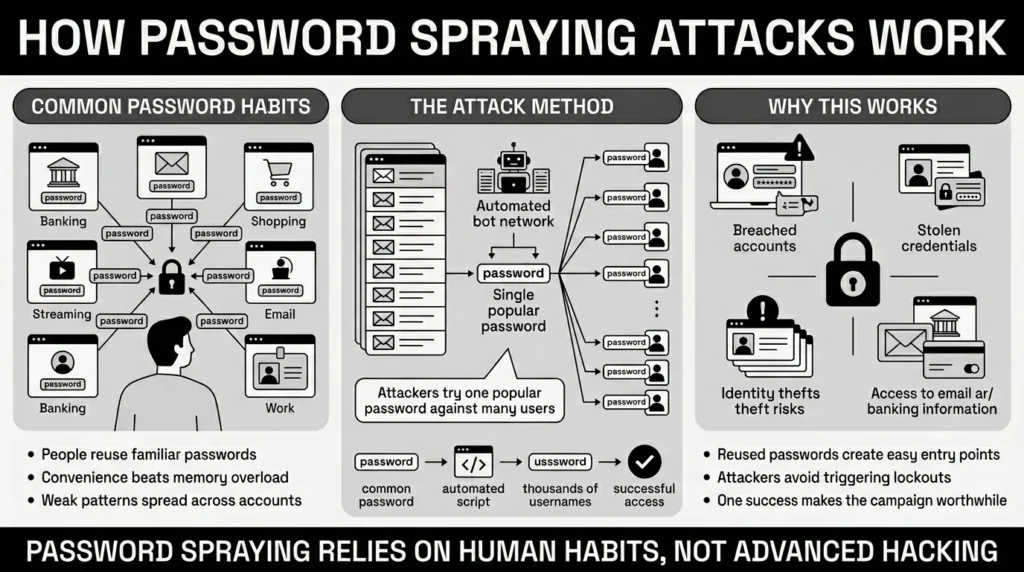
A password spraying attack is a cyber threat where hackers test one common password against thousands of different user accounts. Instead of guessing many passwords to break into one account, they try one popular password on many people.
Why This Topic Matters for Everyday Security
When you hear about major corporate hacks or cybersecurity incidents on the news, it is easy to assume criminals are using highly advanced coding to break through firewalls. We picture hackers in dark hoodies typing furiously to crack complex mainframes. The reality is much simpler, much less dramatic, and relies heavily on everyday human behavior.
The consequences of this behavior are incredibly expensive. According to IBM’s 2025 findings, the average cost of a data breach reached $4.44 million globally, with costs in the United States soaring even higher. These breaches are happening at an unprecedented rate, with the Identity Theft Resource Center tracking a record-breaking 3,322 data breaches in 2025, a 79% jump over the last five years.
You might wonder how many systems are being breached. The answer is usually a forgotten password or a reused login. The 2025 Verizon Data Breach Investigations Report (DBIR) notes that stolen credentials are the primary entry point for 22% of all breaches, making human logins the single most common way attackers gain initial access to networks. Hackers are no longer “hacking” into systems; they are simply logging in.
This matters to everyday users because you do not have to be a high-profile target to become a victim. We all have digital lives spread across dozens of platforms. Your account could be compromised simply because you chose a popular password for convenience during a busy workday. The sheer volume of credential theft is staggering, meaning one small breach on a forum or retail site can suddenly put your main email, family records, or banking accounts at risk.
The Scale of Reused Passwords and Stolen Credentials
We all want to remember our logins. As a result, millions of people use the same handful of familiar phrases, like “Welcome2025!” or the name of a local sports team followed by a number. We know we are not supposed to do it, but the friction of remembering dozens of passwords often wins out over security.
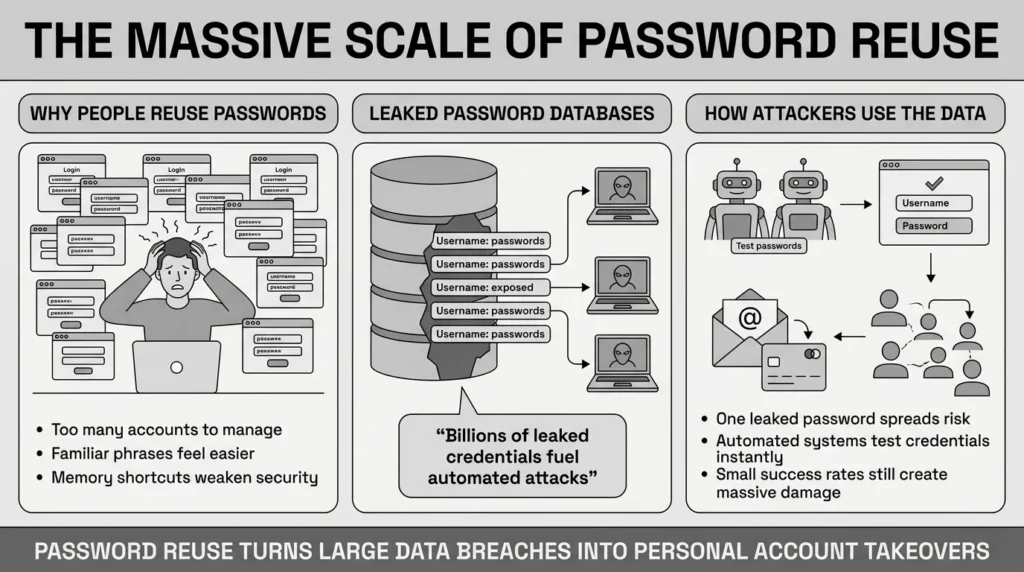
Recent data highlight how common this is. In early 2025, security researchers analyzed 19 billion leaked passwords and discovered that a staggering 94% of exposed passwords were reused across multiple accounts. When surveyed directly, 78% of people openly admit to reusing passwords across their personal and professional lives.
This habit creates a massive vulnerability. Imagine an attacker with a list of ten thousand email addresses gathered from public websites or previous leaks. Because they know people reuse passwords, they do not need to guess uniquely. In fact, the 2025 Verizon DBIR confirmed that this exact tactic is devastatingly effective, meaning 88% of all basic web application attacks now involve stolen login information.
A password spraying attack relies entirely on these massive lists of leaked credentials. Instead of trying to guess every possible password for your specific email address, an attacker simply writes an automated script to test “Summer2025!” against all ten thousand accounts at the exact same time. They only need a tiny fraction of those attempts to work to consider the entire campaign a success.
What Usually Goes Wrong: The “Low and Slow” Approach
If you have ever accidentally typed your banking password wrong three times and gotten locked out, you might wonder why bank security systems do not catch these massive automated attacks. That three-attempt lockout is designed to stop traditional brute force attacks—a noisy method where an attacker aggressively tries millions of different passwords against a single account.
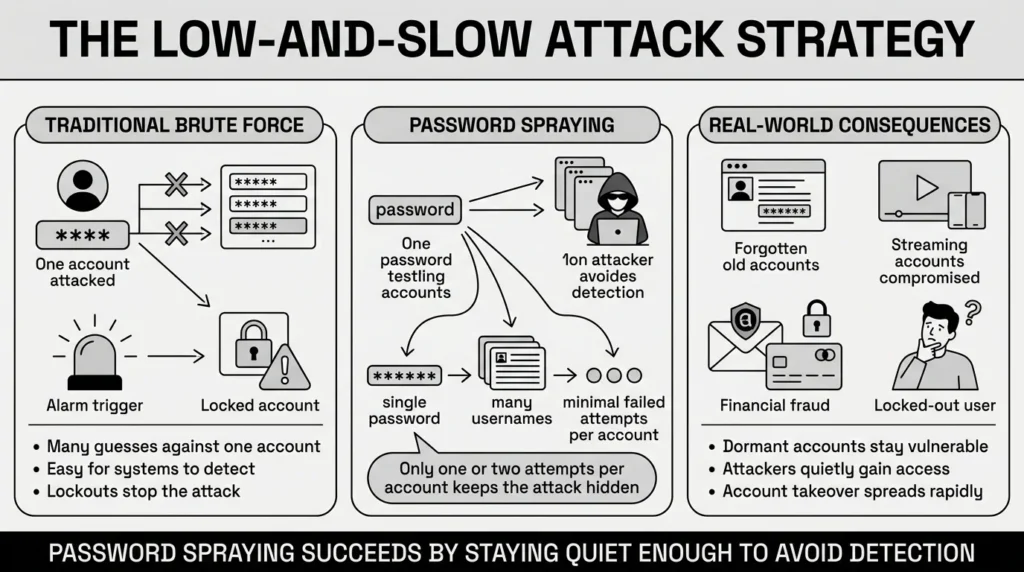
Unlike a noisy guessing spree, a password spraying attack is designed to slip under the radar. The criminal only tries one or two common passwords on your account before quietly moving on to the next person’s account. Because your specific account only registers a single failed login attempt, the security system never sees the five failed login attempts required to trigger an automatic lockout or send you a warning email.
This technique is incredibly stealthy, continuous, and effective. Global infrastructure is currently defending against over 193 billion automated credential stuffing attempts annually. Once these automated bots slip past the login screen, the resulting crime is known as Account Takeover (ATO) fraud.
In 2025, account takeover has surpassed ransomware as the top enterprise security concern, projected to cost $17 billion. This is not just a corporate problem; it directly affects everyday people. Recent threat reports indicate that an alarming 14% of consumers experienced account takeover in the past year, with social media and digital subscriptions being the primary targets.
This is where things usually go wrong for everyday users. We all have “legacy” accounts—old logins for a streaming service we canceled, a retail store we bought from once, or a school portal from five years ago. We forget these accounts exist, but the accounts remain active online. When attackers use password guessing software against these forgotten accounts, they often find a way in. This is highly lucrative for criminals, with the FBI reporting over $262 million in losses linked directly to account takeover schemes in early 2025 alone.
The Safer Way to Handle It: Removing Human Memory
We have all reused passwords. It is human to want something familiar, especially when we are juggling dozens of different logins for work, school, and family life. But when one reused password leaks, malicious activity can spread rapidly across your entire digital footprint.
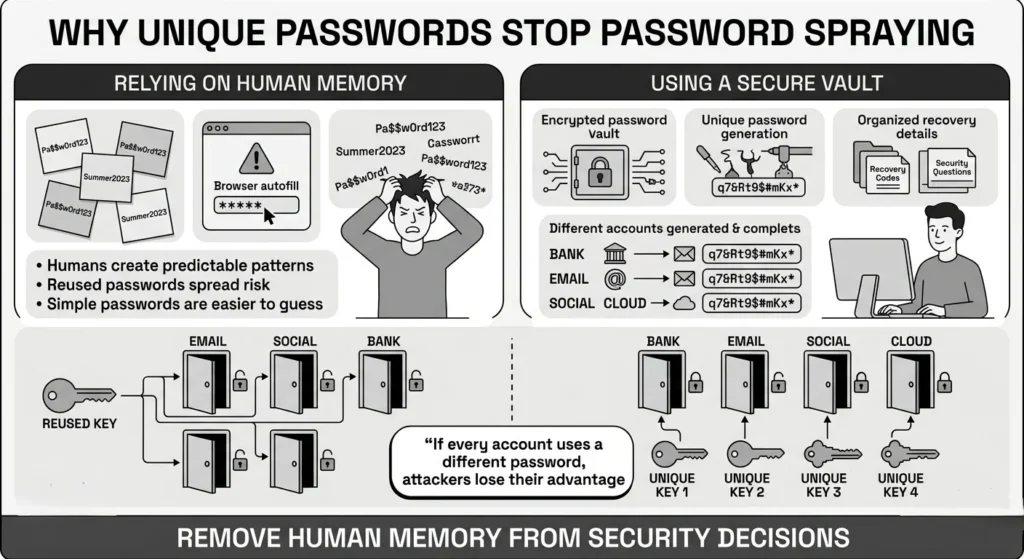
The most reliable defense against a password spraying attack is removing human memory from the equation entirely. You need a unique, random password for every account you own. If every lock uses a completely different key, an attacker finding one key does not help them open any other doors.
Unfortunately, human memory is fundamentally flawed when it comes to creating strong security keys. A 2025 analysis of breached credentials revealed that only 3% of compromised passwords actually met basic security and complexity requirements. We naturally gravitate toward simple patterns that are easy to remember, which makes them incredibly easy for a computer to guess.
However, memorizing a hundred different complex passwords is impossible. This is why having a secure personal vault is essential. WhiteVault gives you a simple, encrypted way to organize passwords, recovery details, private notes, and sensitive files without the daily friction of trying to remember complex strings of letters and numbers.
Versus trying to remember everything, you can store your credentials and important information securely in one encrypted place. Versus relying on sticky notes hidden under your keyboard or browser-saved passwords that anyone using your device can access, a vault provides stronger protection. It brings peace of mind to your digital life by giving you everything important in one secure place, accessible exactly when you need it.
Step-by-Step: What To Do Next
Protecting yourself and your family does not require an IT degree. Official guidance from the Cybersecurity and Infrastructure Security Agency (CISA) and the National Institute of Standards and Technology (NIST) focuses on practical, simple steps that significantly improve your personal privacy and network security.

Here is how to take control of your accounts today without feeling overwhelmed:
Step 1: Turn on Multi-Factor Authentication (MFA)
This is your strongest shield. MFA means that even if an attacker guesses your login, they still need a secondary code from your phone or an authenticator app to gain access. Industry data from Microsoft reports that enabling multi-factor authentication can block over 99.9% of account compromise attacks.
Step 2: Stop changing passwords for no reason
NIST’s latest guidelines advise against forcing yourself to change passwords every 90 days. Forced, arbitrary changes simply lead to predictable patterns, like changing “Summer1!” to “Summer2!”. You only need to change a password if you know the service has suffered a data breach.
Step 3: Embrace long passphrases
A long passphrase made of normal, random words (such as “blue-coffee-mug-sunny-desk”) is mathematically stronger against automated password guessing than a short, confusing string of symbols (like “P@ssw0rd1”). Passphrases are much easier to type on a phone and incredibly difficult for computers to crack.
Step 4: Centralize your recovery details
When you set up MFA on important accounts, the website will often give you backup “recovery codes” to use if you ever lose your phone. Do not leave these in random folders, print them out and lose them, or leave them sitting in your email inbox. Save them in your secure personal vault so you always know exactly where they are.
Step 5: Audit your most critical accounts
You do not need to fix everything in one afternoon. Start by updating the password and security settings for your primary email account. Because your email controls the password resets for everything else, securing it cuts off the majority of your risk.
Protecting Important Documents from the Fallout
While we usually think of stolen passwords as a threat to our bank accounts, the reality of account compromise is often much messier. Once an attacker breaches an email account or a cloud storage drive, their first step is often to search your digital files for keywords like “passport,” “tax,” “SSN,” or “insurance.”
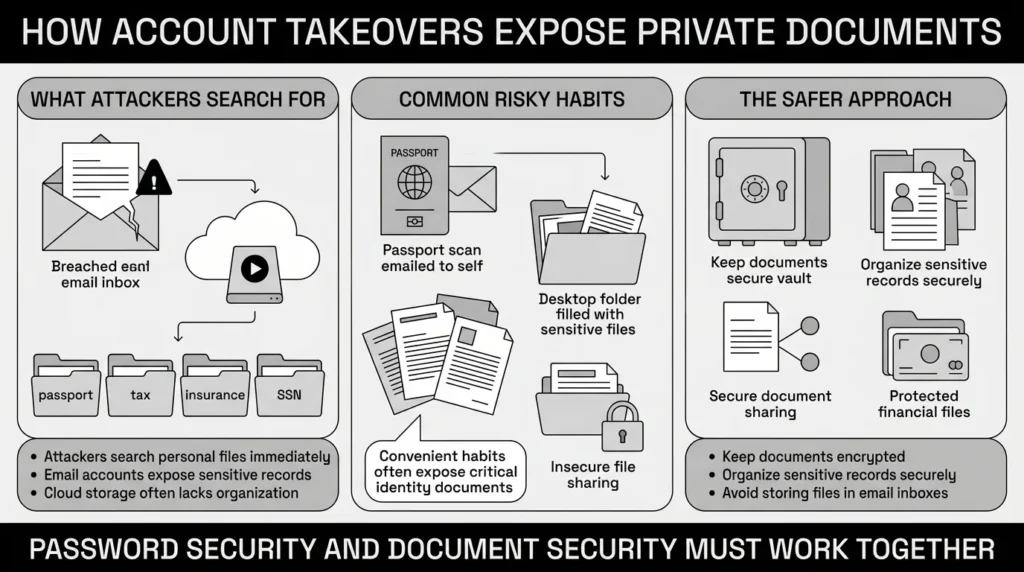
If it manages to succeed, a password spraying attack often leads to secondary problems like document exposure and identity theft. The sheer volume of this crime is staggering, projected to surpass 1.54 million identity theft reports by the end of 2025. The Federal Trade Commission (FTC) frequently warns consumers that storing unencrypted scans of Social Security cards or medical records in standard email folders is a major privacy risk, resulting in a record $15.9 billion in consumer fraud losses.
Think about the last time you traveled or applied for a loan. Did you email a scan of your ID to yourself just to have a backup? Did you save your family’s insurance cards in a random folder on your desktop? These are incredibly common habits, but they leave your private information exposed if an attacker slips past your login screen.
Versus document chaos, a secure vault allows you to keep important files organized, searchable, and available. Just as you should use a vault for your credentials, you should also use it to store digital copies of your passport, tax records, birth certificates, and financial files. WhiteVault protects these documents with the same strong encryption used for your passwords. If you ever need to share a medical record with a doctor or a tax file with an accountant, you can do so securely, rather than sending sensitive files through easily intercepted emails.
Habits That Keep You Safer Over Time
Better security rarely comes from one dramatic overhaul. It usually comes from a few simple habits repeated consistently over time. You do not need to achieve absolute perfection to be safe online. You just need to make yourself a harder target than the automated scripts are looking for.
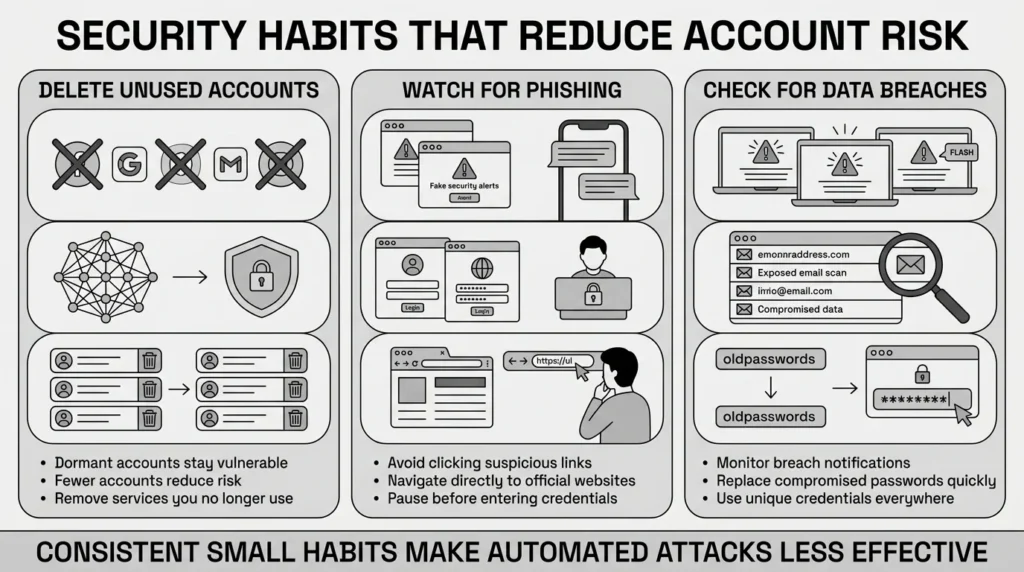
Make it a habit to close old, unused accounts. If you no longer use a service, delete your account entirely rather than letting it sit dormant. This reduces the number of doors an attacker can try to open.
Stay vigilant against phishing text messages and emails. Cybercriminals often send fake security alerts claiming your account has been compromised, hoping you will panic and type your actual password into their fake website. This threat is evolving rapidly, with social media becoming the primary contact method for fraudsters trying to steal information. Always pause, breathe, and navigate directly to the service’s official website rather than clicking a link in an unexpected message.
Finally, occasionally check free security tools like HaveIBeenPwned to see if your email address was included in any recent public data breaches. If you see an alert, simply log into that specific service, generate a new unique password in your vault, and move on with your day.
Conclusion
We built WhiteVault because people need one secure, organized place for the information they rely on most. Juggling modern account overload is frustrating, but protecting yourself does not have to be complicated. By setting up multi-factor authentication, embracing unique passphrases, and organizing your sensitive files securely, you take control of your digital footprint. You do not have to let the fear of a password spraying attack overwhelm your digital life. Simple security for everyday life is entirely within your reach. Save, remember, and protect what matters, all in your secure personal vault.
Frequently Asked Questions (FAQ)
1) What is the simple definition of this type of threat?
It is a method where hackers take a handful of extremely common passwords—like “Password123” or “Summer2025″—and test them against millions of different usernames across various websites. They are hoping to find a few people who used weak, predictable logins.
2) How do I know if my account is being targeted?
Because attackers spread their login attempts out slowly to avoid triggering security alarms, you often will not know it is happening. However, you might receive unexpected password reset emails you did not request, or you might notice alerts from a website about a failed login attempt from an unusual location.
3) How often should I change my passwords to stay safe?
According to current NIST guidelines, you only need to change your password if you suspect it has been compromised in a data breach or if you notice suspicious activity. Regularly forcing yourself to change passwords every 90 days actually leads to weaker, more predictable passwords.
4) How is this different from traditional brute force?
In a traditional brute force scenario, an attacker aggressively tries millions of different complex passwords against one single account, which usually triggers an automatic account lockout. In the method discussed here, they gently try one popular password against millions of different accounts to slip past those lockout defenses, making a password spraying attack much harder to detect.
5) I’m no tech expert. What is the easiest way to protect myself?
The two simplest and most effective steps are turning on multi-factor authentication (MFA) for your important accounts, and never reusing passwords. Even if a hacker guesses your login, MFA requires a secondary code from your phone, stopping them in their tracks.
6) If my password is leaked, does that mean my identity is stolen?
Not necessarily. A leaked login means someone could access that specific online account. However, if that account is your main email address, an attacker could request password resets for your bank, view your tax documents, and steal personal details, which can eventually lead to identity theft. Fast action is key.
7) Where is the safest place to keep my backup recovery codes and documents?
Never keep them in your email inbox, in a plain text document on your desktop, or on a physical sticky note that can be easily lost. Recovery codes and important documents should be stored in an encrypted digital environment where only you hold the keys to unlock them securely.
8) How does WhiteVault help me survive a password spraying attack?
WhiteVault acts as your secure personal vault. By securely storing a unique, complex passphrase for every single account you own, you ensure that even if attackers test the world’s most common passwords against your username, they will never get a match. You get peace of mind through simple, strong protection without the stress of memorization.


