
You get a frantic Slack message at 8:15 AM: “Who changed the admin password for the CRM?” A critical client presentation is in 30 minutes, and the account executive is locked out. You check the master spreadsheet—it hasn’t been updated since last quarter. You text the former marketing director who originally set it up, but she’s unreachable. Panic sets in as you realize no one actually knows who holds the keys. Safe password sharing matters because these small moments of friction can quickly turn into major operational crises. At WhiteVault, we help people save, remember, and protect what matters, so security feels manageable instead of overwhelming.
Quick Answer
Safe password sharing means giving team members access to shared accounts through secure, encrypted tools rather than vulnerable methods like emails or chat messages, ensuring you retain control without exposing the underlying credential.
Why Safe Password Sharing Matters for Everyday Teams
When a team works together, they inevitably share tools. Social media accounts, software subscriptions, vendor portals, and shipping services often require shared access. Individual accounts are always the most secure option, but many software providers charge prohibitive per-user fees, forcing small businesses, freelancers, and everyday teams to share a single login. If a company does not have a clear, sanctioned system for password management, employees will invent their own out of sheer necessity.
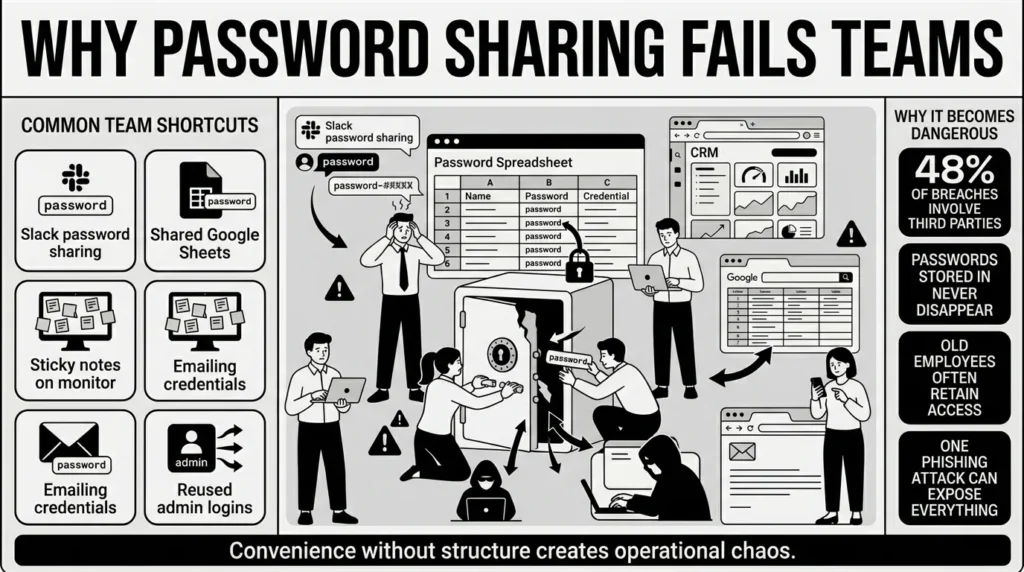
Usually, this means convenience wins over security. A marketing team might drop the company Twitter password into a generic Slack channel so everyone can see it. An office administrator might email the FedEx login to a newly hired assistant. A department manager might keep a master spreadsheet of all software passwords on a shared Google Drive. We have all resorted to these methods when in a hurry. It is entirely human to want the fastest path to getting your work done.
However, the threat landscape has evolved drastically, making these casual workarounds incredibly dangerous. According to the 2026 Verizon Data Breach Investigations Report (DBIR), the speed of attacks is accelerating rapidly, with AI shrinking the window for defense from months to mere hours. Furthermore, the report highlights that third-party and supply chain breaches jumped 60%, now accounting for 48% of all breaches. If you are sharing passwords insecurely with vendors or contractors, you are directly exposed to this massive risk.
The volume of these attacks is also rising to unprecedented levels. The Identity Theft Resource Center (ITRC) reported a record high of 3,322 data compromise events in 2025, marking a staggering 79% increase over just five years. When you share passwords via text, email, or chat, you are leaving a permanent, searchable record of your most sensitive keys. If an attacker gains access to just one team member’s inbox through a phishing attack, they instantly gain access to every account ever shared there.
What Usually Goes Wrong
Most people do not want to put their company or their family at risk. They simply want to collaborate and finish their tasks. When safe password sharing is too difficult, people find workarounds.
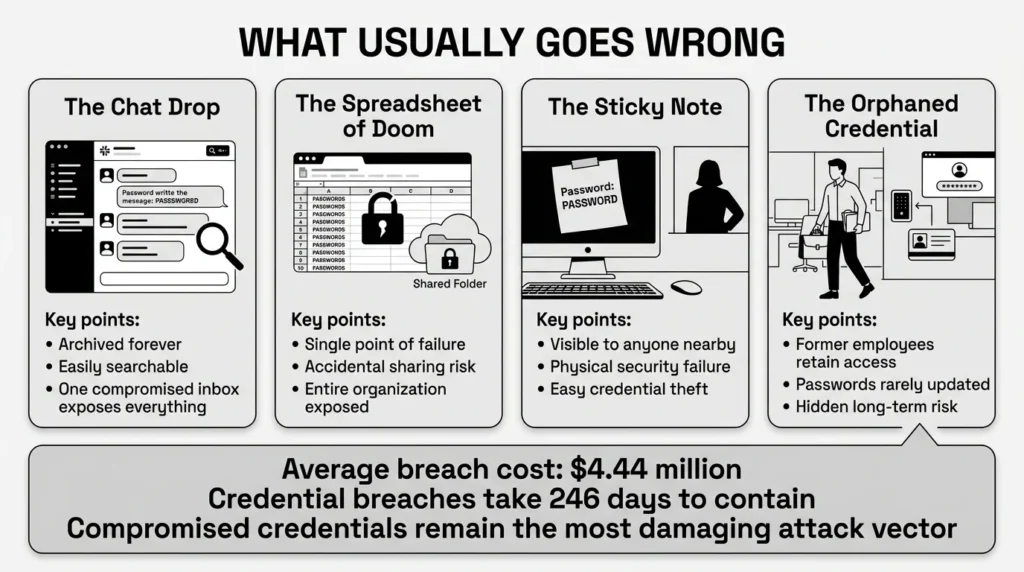
Here is a closer look at the common habits that lead to compromised accounts, and why they are so heavily targeted by cybercriminals:
- The Chat Drop: Sending a password via Slack, Microsoft Teams, or text message feels instantaneous and private. However, these messages are often archived forever. If a threat actor breaches the chat application, they can simply use the search bar to look for the word “password” and harvest hundreds of active credentials.
- The Spreadsheet of Doom: Keeping a master list of passwords in Google Sheets or Microsoft Excel is a common but dangerous practice. Even if the file is password-protected, it represents a massive single point of failure. If the spreadsheet is accidentally shared with the wrong person, or if a laptop containing the file is stolen, the entire organization is compromised in one fell swoop.
- The Sticky Note: Writing passwords down and leaving them on monitors, under keyboards, or pinned to physical bulletin boards is a classic security failure. Anyone walking through an office—from delivery personnel to cleaning staff to visitors—can easily capture this information.
- The Orphaned Credential: When someone leaves a team, the shared passwords they knew are rarely updated. Changing a password requires notifying everyone else who uses it, which creates friction. As a result, former employees often retain secure access to critical company systems months or even years after leaving.
The financial and operational fallout from these simple mistakes is staggering. According to IBM’s 2025 Cost of a Data Breach Report, the global average cost of a data breach reached $4.44 million.
Worse still, breaches that specifically involve stolen or compromised credentials are among the most damaging and time-consuming. IBM’s research indicates that incidents involving compromised credentials take an average of 246 days to identify and contain and cost an average of $4.31 million. That is over eight months of an unauthorized person having access to your sensitive files, client data, and financial records.
The Safer Way to Handle It
The goal of safe password sharing is to grant access without giving away control. You want your team to be able to log into the tools they need, but you also want to be able to revoke that access instantly if they leave the company or switch to a different project.
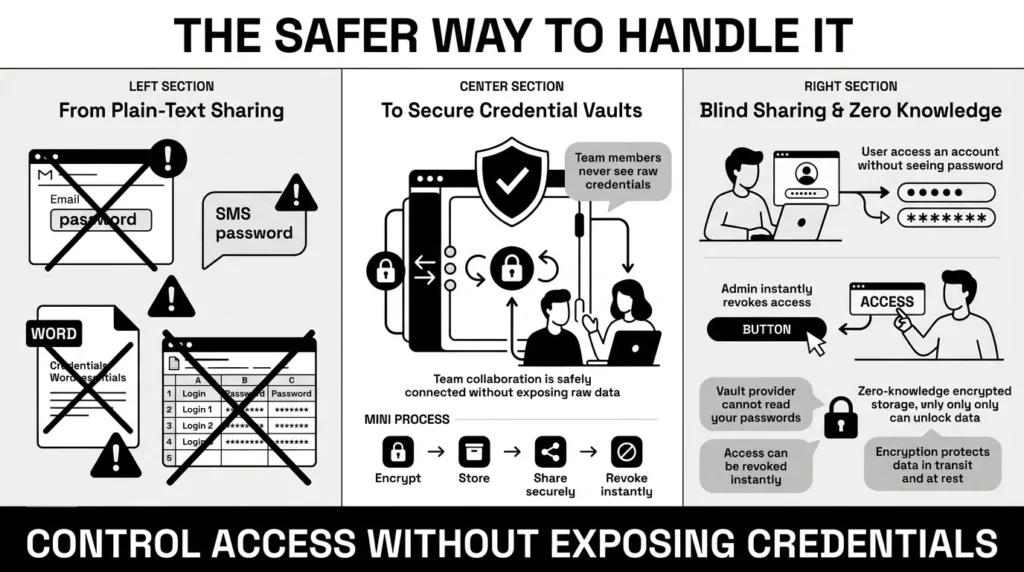
The most effective way to do this is to stop treating passwords like secrets to be whispered in the hallway, and start treating them like keys to be managed systematically. This requires moving away from plain-text sharing (like emails, texts, and Word documents) and moving toward sophisticated password vaults.
When using a dedicated credential manager, you are relying on strong encryption to protect your data. Encryption scrambles your readable passwords into a complex, unreadable format. The only way to unscramble the data is with a unique key that only you possess. Reputable vaults use “zero-knowledge” architecture, meaning even the company hosting the software cannot see your passwords.
Furthermore, modern security tools allow for “blind sharing.” This means you can grant a team member the ability to log into a website without ever letting them see the actual password. The system auto-fills the credential for them. If they leave the team, you revoke their user rights control, and they immediately lose access. They cannot write the password down or take it with them because they never knew what it was in the first place.
This level of control is vital because modern business ecosystems are deeply interconnected. The OWASP Top 10 for 2025 lists “Software Supply Chain Failures” as a critical new category, reflecting how interconnected risks have become. If you share an insecure spreadsheet with a vendor or contractor, and their system is hacked, your company becomes the victim.
To facilitate safer habits, official cybersecurity guidance is evolving to make secure tools easier to use. For example, the updated NIST SP 800-63B guidelines finalized in 2025 strictly require software to allow passwords up to at least 64 characters and accept all printable characters (including spaces) so that password managers and passphrases can function smoothly without frustrating users.
Step-by-Step: What To Do Next
If your team is currently sharing passwords via text message, keeping them in a physical notebook, or relying on a giant Excel file, do not panic. Moving toward better security is a process. You can dramatically improve your privacy protection with a few deliberate, measured steps.
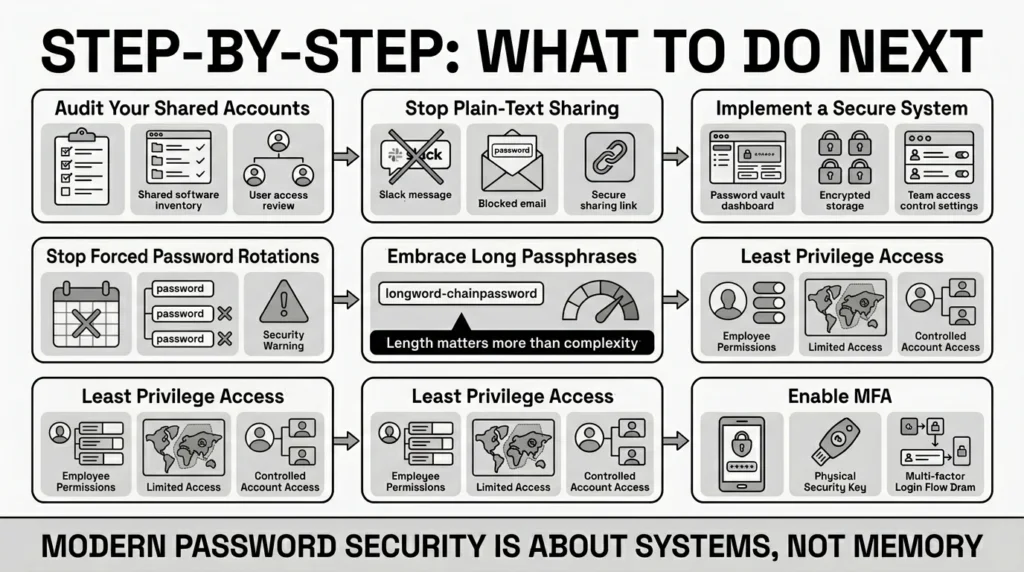
1) Audit Your Shared Accounts
You cannot protect what you do not know you have. Make a comprehensive list of every software tool, portal, social media profile, and service your team shares. Identify exactly who currently has access to each. You might be surprised to find that interns from three years ago still have access to your primary marketing accounts.
2) Stop Plain-Text Sharing Immediately
Establish a clear team rule: passwords will no longer be sent via email, SMS, or direct messaging apps. The Federal Trade Commission (FTC) strongly cautions against transmitting sensitive identifying data, including passwords, via unencrypted email. When a coworker asks for a password over Slack, the answer should no longer be the password itself, but a link to the secure location where the credential is appropriately stored.
3) Implement a Secure System
You must implement a tool designed for safe password sharing. This is where an encrypted vault becomes essential. Moving your credentials from a messy spreadsheet into a secure, searchable vault takes an afternoon of administrative work, but it prevents months of crisis management down the road.
4) Stop Forced Password Rotations
Historically, IT departments forced employees to change their passwords every 30 or 90 days. We now know this actually harms security because it forces people to create weak passwords (like changing “Password123!” to “Password124!”). The 2025 NIST SP 800-63B update strictly prohibits forced periodic password rotation unless there is evidence that the specific password has been compromised. Change your shared passwords when someone leaves the team, or if a breach occurs, but stop forcing unnecessary monthly resets.
5) Embrace Long Passphrases
When you do create new shared credentials, prioritize length over complexity. A long string of random words is much harder for a computer to crack than a short, complex string of symbols. The 2025 NIST guidelines now recommend a 15-character minimum for user-chosen passwords as a baseline for strong protection. Instead of a difficult-to-type password like x&7Bq!p, use a memorable passphrase like purple-coffee-desk-sunset. Furthermore, NIST explicitly prohibits enforcing complex composition rules (like requiring uppercase, numbers, and symbols), as these just lead to predictable, weak passwords.
6) Implement the Principle of Least Privilege
Do not give everyone on your team access to everything. A graphic designer does not need access to the payroll portal, and a copywriter does not need the backend server credentials. Carefully limit access so that if one employee’s device is compromised, the attacker only gains access to a small portion of your tools. Good systems will maintain access logs, allowing you to see exactly who logged into which account and when.
7) Enforce Multi-Factor Authentication (MFA)
Wherever possible, turn on multi-factor authentication for shared accounts. The Cybersecurity and Infrastructure Security Agency (CISA) stresses that MFA is a high-priority goal for all organizations, noting that “phishing-resistant” MFA (like security keys or passkeys) is the “gold standard.” If an attacker steals your shared password, they still cannot log in without the secondary code.
How WhiteVault Helps Keep This Manageable
Trying to enforce safe password sharing without the right tools is frustrating. You end up policing your team’s behavior rather than enabling their best work. When security is annoying, people bypass it. This is where a secure personal vault changes the entire dynamic.
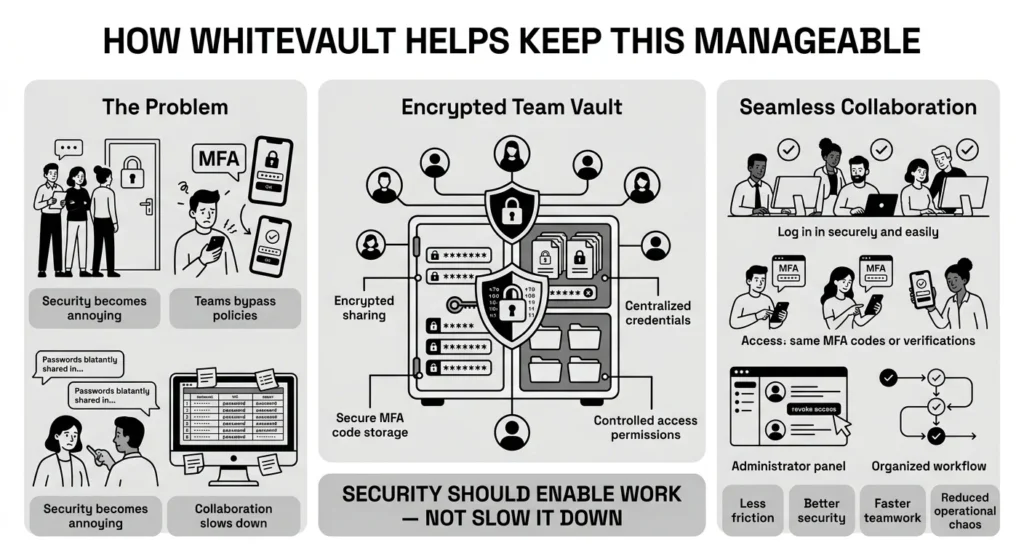
With WhiteVault, you can organize credentials, important documents, and private notes in one heavily encrypted place. Instead of texting a password to a coworker and hoping they delete the message later, you can securely share access directly through the vault. This ensures the information is protected by strong encryption during transit and while at rest on our servers.
Furthermore, sharing accounts often creates a bottleneck when multi-factor authentication is involved. If the Twitter login sends a text message code to the manager’s phone, the rest of the team cannot log in while the manager is in a meeting. WhiteVault helps solve this by allowing you to store and securely share the rotating MFA codes right alongside the passwords. Your team gets seamless access, and you retain total control. It provides a safer alternative to sticky notes and browser-saved passwords, giving your team peace of mind and simple security for their digital workflows.
Habits That Keep You Safer Over Time
Security is not a one-time project you complete and then forget about. It is a series of habits. Cultivating a security-conscious mindset within your team is just as important as the software you choose to use.
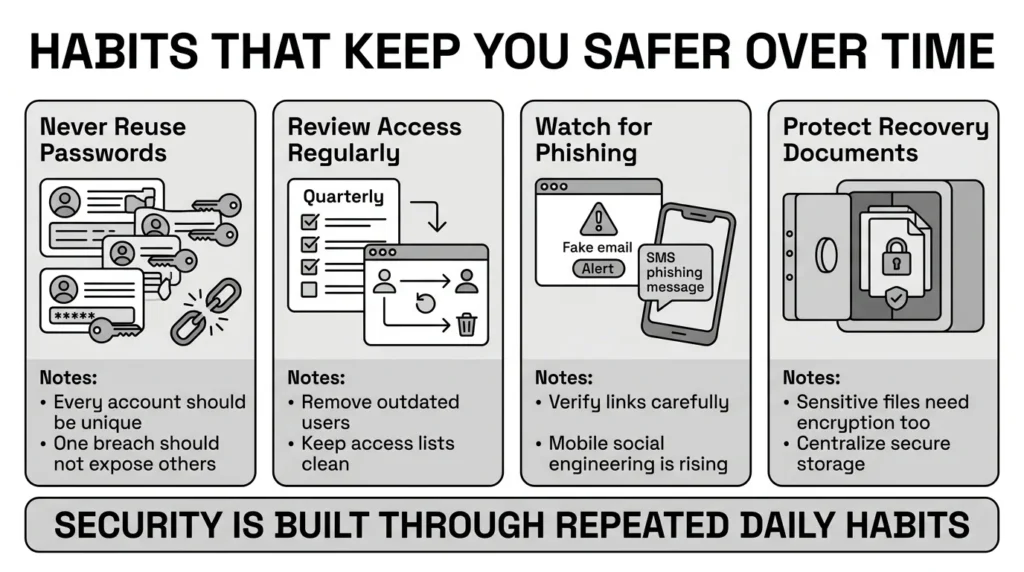
- Never Reuse Passwords: This is especially critical for shared accounts. If your team uses the same password for your project management tool and your email marketing software, a breach at one company compromises both of your accounts. Every single login must be unique.
- Regularly Review Access: Make it a habit to check who has access to your shared accounts once a quarter. Remove anyone who has moved to a different department, changed projects, or left the company. Keeping your access lists clean reduces your exposure.
- Watch for Phishing Scams: Attackers often steal shared credentials by sending fake emails that look like legitimate alerts from services like Google Workspace or Microsoft 365. The 2026 Verizon DBIR found that interactive, mobile social engineering (fake text messages and voice calls) is rising rapidly, with a success rate 40% higher than traditional email phishing. Train your team to verify links before clicking.
- Secure Your Recovery Documents: Credential security goes beyond passwords. Your team likely handles tax documents, client contracts, health insurance details, or identity scans. If these are scattered across desktops and email folders, they are highly vulnerable. Ensure identity verification documents are stored in your encrypted vault right alongside your passwords.
Conclusion
Better security rarely comes from one dramatic, stressful overhaul. It usually comes from a few simple habits repeated consistently: generating unique passwords, securing your recovery details, keeping your digital documents organized, and finding a reliable place to keep what matters. Transitioning to safe password sharing takes a little effort upfront as you move away from old spreadsheets and chat messages, but it prevents massive operational headaches and catastrophic data breaches down the road. WhiteVault was built for exactly that purpose. Save, remember, and protect what matters most, all in your secure personal vault.
Frequently Asked Questions (FAQ)
1) What exactly is safe password sharing?
It is the practice of giving someone access to an account using encrypted, purpose-built tools rather than sending the password in plain text via email, chat messages, or unsecured spreadsheets.
2) How do I know if my team is sharing credentials unsafely?
If you can open your email inbox or your company communication app (like Slack or Teams), search for the word “password,” and immediately find actual login credentials, your team is practicing highly vulnerable security habits.
3) How long does it take to transition to a secure credential system?
Setting up a secure vault tool usually only takes minutes. The time-consuming part is auditing your existing accounts and gathering passwords from sticky notes and spreadsheets to move them into the secure system. Depending on how many accounts you share, this might take an afternoon of focused work.
4) Is sharing passwords securely better than just making everyone use their own individual accounts?
Individual accounts with unique logins for every team member are always the safest option. However, many software services charge expensive per-user licensing fees, making individual accounts too costly for small teams. Using a secure vault to share a single login is the best compromise when individual accounts are not feasible.
5) I accidentally texted a sensitive password to a coworker. What should I do?
Do not panic, but act immediately. Log into that specific account and change the password right away to a strong, 15-character passphrase. Then, ask your coworker to manually delete the text message from their device to remove the permanent record.
6) If we use an encrypted vault, what happens if the vault company gets hacked?
Reputable credential managers use zero-knowledge encryption architecture. This means the company hosting the vault does not possess the key to unscramble your data. Even if their servers are breached by attackers, the criminals would only walk away with scrambled, mathematically unreadable ciphertext, not your actual passwords.
7) How should we handle multi-factor authentication (MFA) on accounts multiple people use?
This is a notoriously common challenge that often leads to teams turning off MFA entirely. However, many secure vaults now allow you to store the underlying MFA authenticator seed. This allows the vault to generate and share the rotating 6-digit codes alongside the password, so anyone with authorized access can log in without needing a specific person’s smartphone.
8) How does WhiteVault help organize digital access?
WhiteVault provides a secure, encrypted environment where you can organize both credentials and sensitive documents. It allows you to manage and grant access to important tools without relying on risky workarounds, keeping your private information safe while ensuring your team can still collaborate seamlessly.


