
You are at the airport, luggage in hand, when your travel app suddenly demands a login you haven’t used in months. In a panic, you try three variations of a familiar password before the account completely locks. According to the Microsoft Digital Defense Report, automated tools launch attempted attacks at a staggering rate of 4,000 per second. These high-stress, everyday moments are what make us vulnerable to various password attack types. At WhiteVault, we believe security should feel calm, not chaotic. We help everyday people save, remember, and protect what matters, ensuring your digital life stays safe without turning privacy into a confusing, overwhelming project.
Quick Answer Attackers steal passwords using automated guessing, tricking you into handing them over, or buying credentials from older data breaches. You can defeat most of these threats by using unique passphrases, enabling multi-factor authentication, and securing your recovery details.
Why This Topic Matters for Everyday Security
In 2026, we are managing more accounts than ever before. From streaming platforms and banking apps to medical portals and tax software, your login credentials serve as the keys to your entire personal life. While technology companies are continually pushing for passwordless options, the reality is that millions of websites and services still rely on traditional text-based passwords. A 2026 report by Huntress revealed that nearly 46% of internet users had their passwords stolen or exposed in recent years, proving just how common this issue is for the average person.
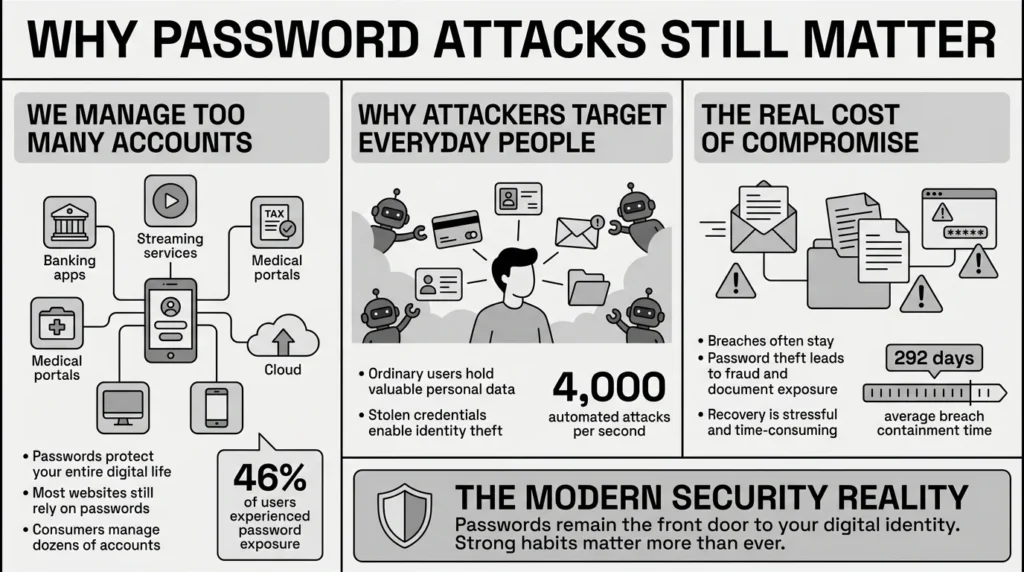
When everyday people think about hackers, they often picture a shadowy figure targeting massive corporations or billionaires. However, ordinary consumers are the most frequent targets because our accounts hold valuable private information, payment methods, and identity documents. The Identity Theft Resource Center’s 2024 Data Breach Report highlighted that compromises surged to near-record highs, impacting over 1.7 billion victims in a single year. Furthermore, according to the 2024 IBM Cost of a Data Breach Report, compromised credentials were the most common initial attack vector used by cybercriminals. Even more concerning, the report found that breaches involving stolen credentials took an average of 292 days to identify and contain. That is nearly ten months where an unauthorized person could have silent access to an account.
Understanding how criminals gain this access—specifically the various password attack types—is not about becoming a cybersecurity expert. It is about learning where your digital front door might be unlocked. The National Institute of Standards and Technology (NIST) has updated its consumer guidelines in recent years to emphasize that relying on human memory for complex passwords is a failing strategy. By recognizing how attackers operate, you can confidently adopt safer habits that protect your family’s digital life without adding daily frustration.
What Usually Goes Wrong: The Human Side of Login Mistakes
When an online account is compromised, we tend to blame ourselves. We feel foolish for falling for a trick or forgetting a security answer. But the truth is, the human brain is simply not built to memorize eighty different, complex strings of random characters. We are all dealing with password fatigue.
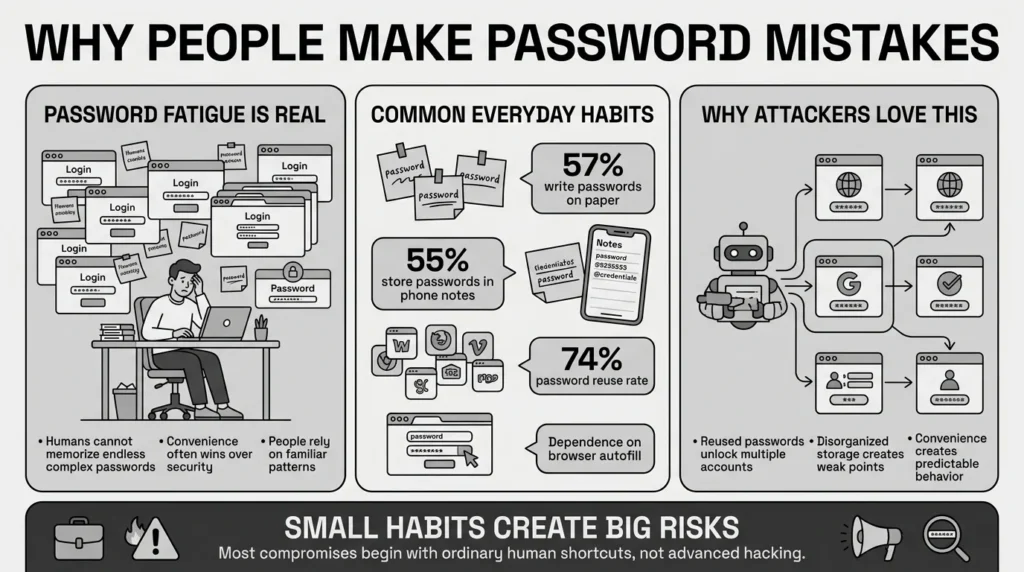
What usually happens? We compromise. A survey highlighted by Market.us found that 57% of individuals resort to writing passwords on sticky notes to keep track of them, and of those, 67% confess to losing those notes entirely. The same data revealed that 55% of people store passwords directly in their mobile phone’s unencrypted notes.
A freelancer juggling multiple client portals, tax files, and banking credentials might use the same favorite password for all of them just to get through a busy workday. In fact, the SpyCloud 2024 Identity Exposure Report found a massive 74% password reuse rate for users who were exposed in multiple data breaches. We reuse passwords because it is human to want something familiar, but that familiarity is exactly what attackers exploit.
We rely on our memory, scattered browser storage, or unencrypted phone notes because it is convenient. Unfortunately, when we use these disorganized systems, we unknowingly leave ourselves highly vulnerable to even the simplest password attack types.
The financial and emotional toll of these simple mistakes is significant. The Federal Bureau of Investigation (FBI) and Federal Trade Commission (FTC) tracked a surge in cybercrime complaints in 2024, with potential total losses ballooning to $16.6 billion, heavily driven by identity theft and fraud. Scammers know we are overwhelmed and they rely on our desire for convenience to bypass our security.
How Criminals Gain Access: The Tactics Explained
To protect your accounts, it helps to know exactly what you are defending against. Here is a plain-language breakdown of the most common password attack types you face today.
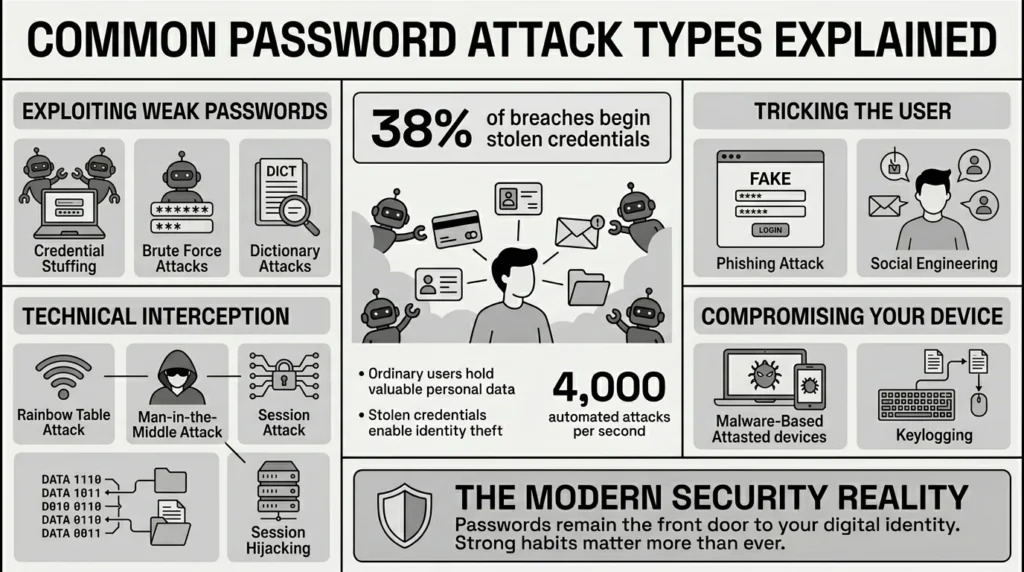
Exploiting Reused and Weak Passwords
- credential stuffing: This is currently the most prevalent threat on the internet. Hackers take massive lists of usernames and passwords leaked from one website’s past data breach and use automated bots to test them across thousands of other sites. If you reuse the same login for your email and your favorite clothing store, a breach at the store gives attackers the master key to your email. Security guidelines from the Open Worldwide Application Security Project (OWASP) emphasize that credential stuffing often bypasses basic security simply because people recycle logins. Verizon’s 2024 Data Breach Investigations Report (DBIR) noted that credential theft was the initial access vector in 38% of all data breaches, making it the dominant entry point for hackers.
- brute force attack: Attackers do not sit at a keyboard guessing your pet’s name. They use powerful software to rapidly guess millions of random character combinations per second until they force their way into your account. Recent 2026 statistics from PasswordManager.com show that “123456” is still the most-used password in the world, with millions of accounts actively relying on it. If your password is short or common, a computer can crack it instantly.
- dictionary attack: A smarter variation of brute force guessing. Instead of trying random characters, the software runs through massive lists of common words, phrases, and predictable substitutions (like replacing the letter “O” with a zero, or adding “123!” at the end of a word).
Tricking the User
- phishing attack: You receive an urgent email or text message that looks perfectly legitimate—perhaps claiming your streaming account will be suspended. The link takes you to a fake website designed to steal your password the moment you type it in.
- social engineering: This is the broader psychological manipulation behind phishing. Scammers create a false sense of urgency, fear, or excitement to trick you into breaking your own security rules, such as calling you and pretending to be your bank’s fraud department.
Technical Interception
- rainbow table attack: Sometimes, attackers hack a company’s server directly and steal the entire database of passwords. Responsible companies scramble these passwords using a mathematical process called hashing. However, attackers use massive, pre-calculated cheat sheets called rainbow tables to rapidly reverse-engineer and unscramble weak passwords from the stolen data.
- man-in-the-middle attack: Often occurring on unsecured public Wi-Fi networks (like at a coffee shop or airport), an attacker secretly intercepts the communication between your device and a website. They steal your login credentials while the data is in transit.
- session hijacking: Similar to a man-in-the-middle exploit, here the attacker waits for you to log in successfully, then steals the temporary “session cookie” from your browser. This allows them to impersonate you on the website without ever actually needing your password.
Compromising Your Device
- malware-based attack: You accidentally click a malicious link or download a fake app, which silently installs malicious software on your computer or phone to monitor your activity.
- keylogging: A specific, highly invasive type of malware that secretly records every single keystroke you make. Even if you have the strongest password in the world, a keylogger will capture it as you type and send it directly to the attacker.
The Connection Between Passwords and Private Documents
Why are cybercriminals working so hard to break into your accounts? It is rarely just to hijack your social media profile. Your login credentials are the gateways to your most sensitive personal information.
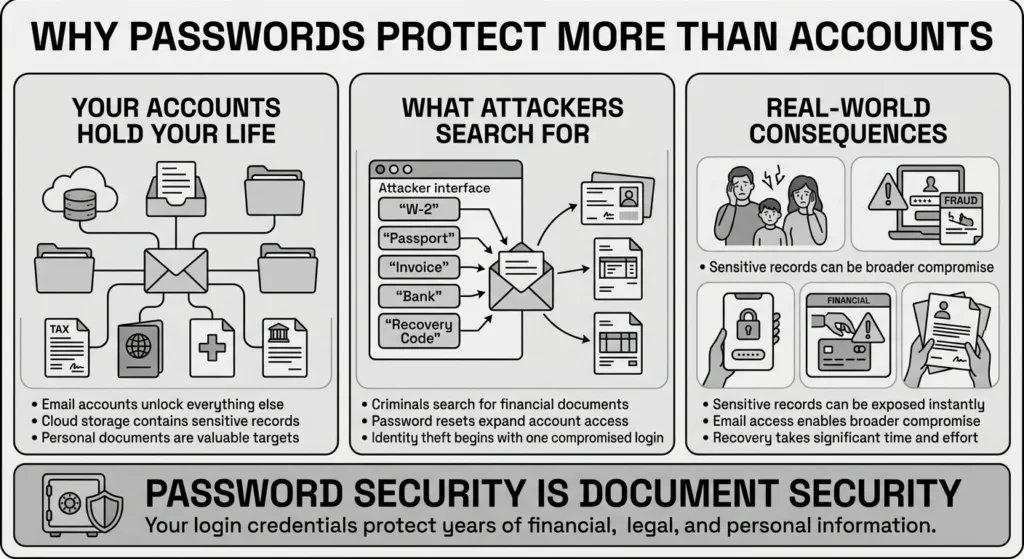
Consider what lives inside your primary email account or cloud storage drive. You likely have digital copies of tax records, medical bills, property documents, and ID scans scattered across random folders. A student might be storing university logins, financial aid documents, and passport scans in a forgotten desktop folder. A retiree might have medical records, life insurance policies, and estate planning documents saved directly in their email inbox.
If a criminal accesses your email, they can simply search your inbox for terms like “W-2,” “passport,” or “invoice.” They can also request password resets for your banking and retirement accounts, using your compromised inbox to approve the changes. Defending against advanced password attack types is not just about keeping a hacker out of your streaming service; it is about protecting the sensitive financial files, family records, and identity documents that represent your life’s work.
Step-by-Step: What To Do Next
Reading about cyber threats, it is easy to feel overwhelmed. But you do not need expensive software or a computer science degree to stop these password attack types. You just need a practical, reliable system. By taking a few simple steps, you can secure your digital life.
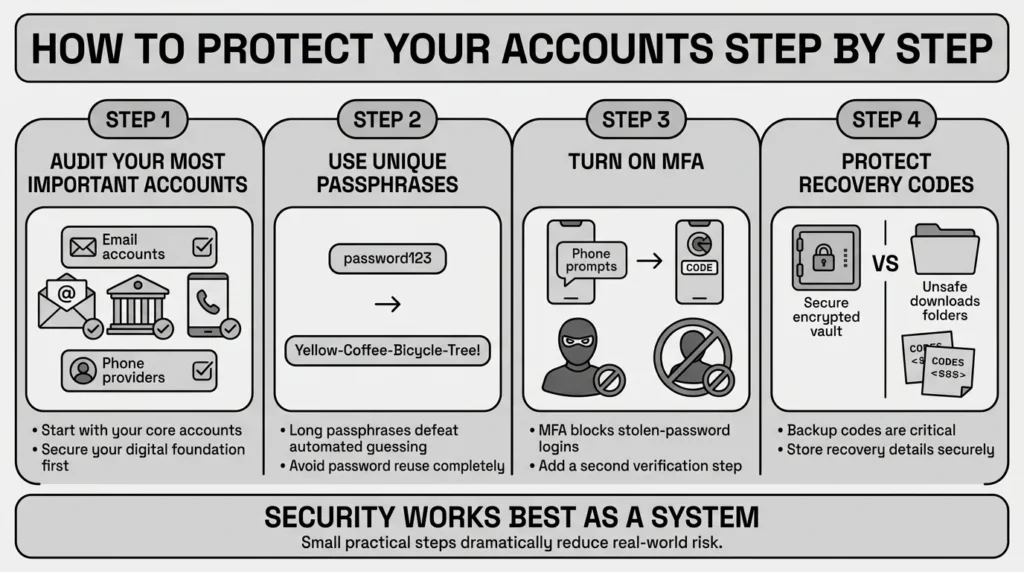
Step 1: Audit Your Most Critical Accounts
You do not need to fix everything today. Start with the most important accounts: your primary email, your bank, and your cell phone provider. If these three are secure, your digital foundation is strong.
Step 2: Upgrade to Unique Passphrases
Never use your email password on any other website. Instead of trying to invent complicated passwords with symbols you will forget, use passphrases for the accounts you must memorize. A passphrase is a string of random words (like “Yellow-Coffee-Bicycle-Tree!”). It is long enough to defeat automated guessing, but simple enough for a human to type.
Step 3: Turn on Multi-Factor Authentication (MFA)
The Cybersecurity and Infrastructure Security Agency (CISA) heavily advocates for MFA because it is highly effective at stopping unauthorized access. By requiring a second step to log in—such as a prompt on your phone or a code from an authenticator app—you stop attackers in their tracks, even if they have stolen your password. This step is incredibly important for everyday users, especially given that the Cyber Readiness Institute reports 54% of small businesses still do not implement MFA, meaning you cannot rely solely on the companies holding your data to protect you.
Step 4: Secure Your Recovery Routes
When you set up MFA, services often give you backup recovery codes in case you lose your phone. A professional locked out of a work-related account because their recovery code was saved in an old, deleted email knows exactly how stressful this can be. Never leave these codes in your downloads folder or an unprotected phone note.
How WhiteVault Helps Keep This Manageable
We built WhiteVault because following all these security steps purely from memory can feel exhausting. Versus trying to remember everything, store credentials, recovery details, and important information securely in one encrypted place.
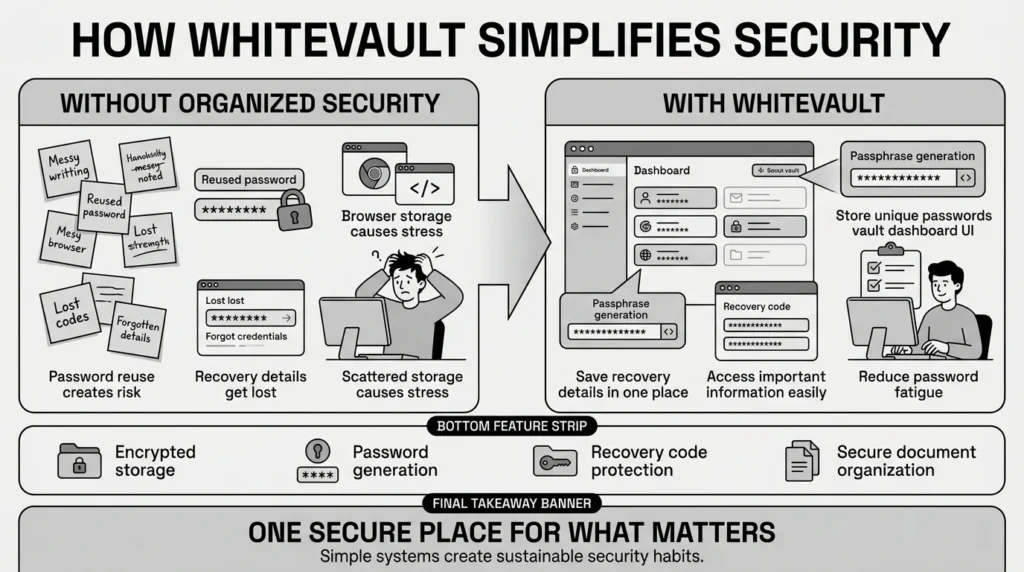
Versus sticky notes and browser storage, use stronger protection with easy access when you need it. WhiteVault allows you to generate and store unique passwords for every site, meaning you never have to reuse a login again. Versus scattered recovery details, save backup codes, recovery keys, and security answers where you can easily find them later. It is simple security for everyday life, ensuring that you handle one secure master login, and your secure personal vault remembers the rest.
Habits That Keep You Safer Over Time
Better security is about building sustainable habits, not aiming for unrealistic perfection. Your goal is to make yourself a difficult target so attackers move on to easier opportunities.
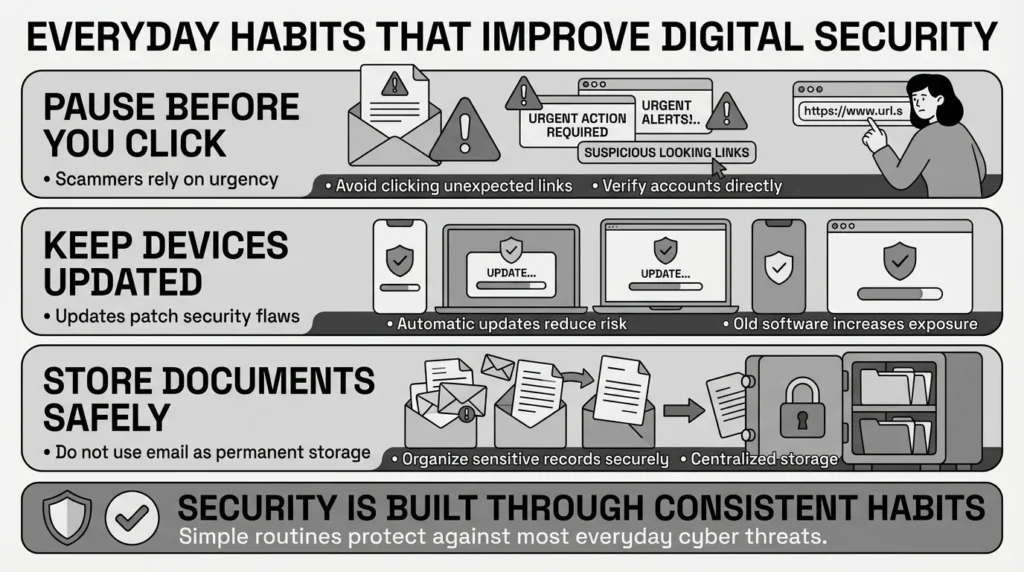
1) Pause Before You Click
Scammers rely entirely on urgency. If you receive an unexpected message demanding immediate action—like a warning that your account will be closed or an alert about a suspicious charge—take a breath. Do not click the link in the message. Open your web browser, navigate directly to the company’s official website, and log in there to check your account status.
2) Keep Your Devices Updated
Software updates often include critical security patches that protect against malware and session hijacking. Turn on automatic updates for your phone, computer, and web browser.
3) Practice Safe Document Storage
Do not use your email inbox as a filing cabinet for sensitive documents. Once you receive an important tax file or insurance document, move it to your encrypted vault and delete the original email so it cannot be found if your inbox is ever compromised.
Staying safe from evolving password attack types means practicing good digital hygiene consistently. Security is a journey, not a one-time setup.
Conclusion
Protecting your digital identity does not have to be a source of daily anxiety. Better security rarely comes from one dramatic change. It usually comes from a few simple habits repeated consistently: using unique passwords, setting up multi-factor authentication, keeping a skeptical eye on urgent messages, and organizing your documents safely. As new password attack types emerge, having a reliable system in place will give you peace of mind for your digital life. WhiteVault was built for exactly that. Save, remember, and protect what matters, all in your secure personal vault.
Frequently Asked Questions (FAQ)
1) What are password attack types?
They are the various techniques and tools cybercriminals use to steal, guess, or bypass your login credentials. Common examples include using automated software to guess millions of combinations, tricking you into handing over your details via fake emails, or reusing old passwords stolen in previous corporate data breaches.
2) How do I know my account has been compromised?
You might notice unexpected password reset emails, receive multi-factor authentication codes you did not request, or see logins from unfamiliar devices and locations in your account settings. If a family member tells you they received a strange message from your email or social media account, that is a strong indicator of a breach.
3) How long does it take to secure my main accounts?
Securing your most important digital assets—such as your primary email and banking accounts—usually takes less than 20 minutes. It simply involves changing the password to something unique, turning on two-factor authentication, and saving your backup recovery codes securely.
4) What is the difference between credential stuffing and brute force guessing?
A brute force attack is an automated attempt to crack your password by trying millions of random character combinations until one works. Credential stuffing is much more targeted; attackers take your actual, old password that was leaked in a past website data breach and try to use it to log into your other accounts.
5) Is it safe to write my passwords in a notebook?
Writing passwords in a physical notebook kept in a safe place at home is generally much safer than storing them in an unprotected digital note or spreadsheet. However, physical notebooks cannot be easily searched, backed up, or accessed when you are traveling. A digital, encrypted vault provides both strong security and everyday convenience.
6) If a major company gets hacked, am I still protected?
If a company’s database is breached, the passwords stored on their servers may be stolen. However, if you use a unique password for every single website, the hackers cannot use that stolen password to access your email, bank, or other accounts. This is why eliminating password reuse is your strongest privacy defense.
7) Where should I store my multi-factor authentication (MFA) recovery codes?
Never store recovery codes in your email inbox, in your computer’s unencrypted downloads folder, or on scattered sticky notes. A family trying to find the latest copy of an insurance policy or a recovery code during an emergency needs a central system. You should save them in a searchable, encrypted tool so they are available immediately if you lose access to your device.
8) How does WhiteVault protect against these threats?
WhiteVault provides a secure environment where you can organize credentials, passwords, and private notes without trying to memorize them all. By making it easy to store unique, complex passwords for every account, WhiteVault directly neutralizes the threat of credential stuffing. It offers everything important, one secure place, acting as your secure personal vault so you can navigate the web with confidence.


