
You are rushing to submit a time-sensitive form, but your account suddenly locks you out due to “too many failed attempts.” You haven’t even typed your password yet, but an automated bot has been guessing it all morning. This invisible frustration is exactly why brute force prevention matters. At WhiteVault, we help you save, remember, and protect what matters. We believe that locking the digital doors to your personal life should be simple and stress-free, so your information is ready the moment you need it.
Quick Answer Brute force prevention stops automated software from repeatedly guessing your passwords to break into your accounts. You can protect yourself by using long, unique passwords, enabling multi-factor authentication, and storing everything safely in a secure personal vault.
Why This Topic Matters for Everyday Security
When most of us picture a cyberattack, we imagine a shadowy hacker manually typing code to break into a high-security bank. In reality, modern attacks are mostly automated, invisible, and aimed at everyday people just like us.
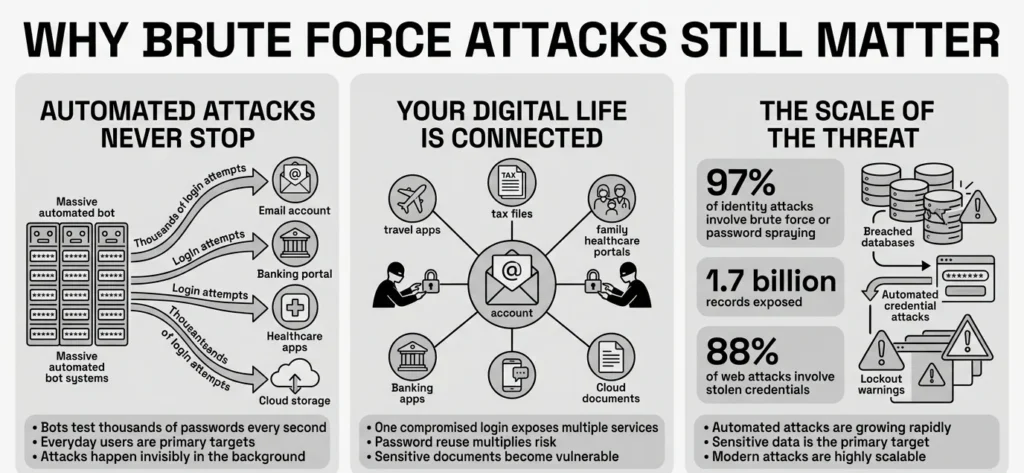
A brute force attack is essentially a numbers game. Instead of a human trying to guess your password, attackers use powerful computers and automated scripts to test thousands of username and password combinations every second. Think of it as a thief with a massive, heavy keyring, rapidly trying every single key in your front door until one eventually turns the lock.
Effective brute force prevention is not just for corporations; it is vital for everyday families, freelancers, and professionals. According to the 2025 Verizon Data Breach Investigations Report, 88% of all web application attacks now involve using stolen credentials. These automated credential attacks have nearly tripled over the last year, jumping to 60% of all basic web app incidents. Furthermore, the Microsoft Digital Defense Report 2025 highlights that an astonishing 97% of identity attacks involve password spraying or brute force methods.
Attackers are not necessarily looking for your bank account right away. In 80% of these incidents, attackers are specifically aiming to steal sensitive data—like a saved credit card, a forgotten tax document, or the ability to reset passwords for your more sensitive accounts. The scale of this threat is massive; the Identity Theft Resource Center’s 2025 Annual Data Breach Report revealed that the number of victims affected by data breaches skyrocketed by 312%, exposing over 1.7 billion records.
When your account security is compromised, it is rarely just an inconvenience. Imagine being locked out of your email while traveling and trying to access a digital boarding pass, or trying to log into a family healthcare portal during a medical emergency only to find the password has been altered. Proper user verification and defense systems ensure that your digital doors stay locked against these relentless automated systems, keeping your private information safe.
What Usually Goes Wrong
We have all reused passwords. It is entirely human to want something familiar and easy to remember. But when it comes to staying safe online, human habits are often exactly what automated attackers rely on. A major hurdle in brute force prevention is our reliance on memory.
The Problem with Password Reuse
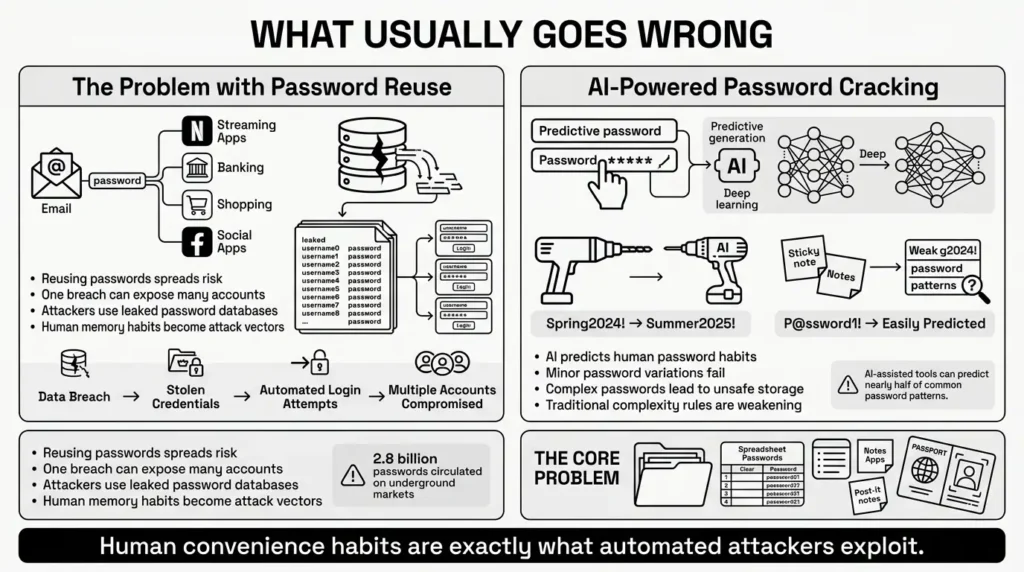
When a website you use is compromised in a data breach, your email and password combination is often leaked onto the dark web. Attackers take these massive lists of stolen credentials—like the 2.8 billion passwords posted for sale in 2024 underground markets—and feed them into automated programs. They then “spray” these known passwords across hundreds of other popular websites, hoping you reused the same login, a technique the OWASP Foundation identifies as credential stuffing.
A 2025 Security Impact Report by Bitwarden revealed a stark reality: 1 in 3 IT leaders say user resistance—employees wanting to rely on memory or browser storage—is their biggest challenge. However, the same report noted that 68% of enterprise customers attributed their massive security improvements directly to eliminating at-risk or reused passwords. We reuse passwords because the alternative—memorizing dozens of unique logins—feels impossible. However, when you reuse one password for Netflix, your personal email, and your bank, a breach at any single service puts everything else at immediate risk.
AI and Password Cracking
Another common issue is relying on slight variations of the same password, like changing “Spring2024!” to “Summer2025!”. We believe this provides good login protection, but attackers are adapting.
Modern brute force tools now utilize artificial intelligence. Tools like PassGAN analyze leaked passwords and predict the likely patterns humans use, such as appending birth years to names or using culturally common phrases. Recent research showed that AI-assisted cracking could accurately guess nearly half of all passwords in major breach datasets.
Relying on traditional password complexity—forcing yourself to remember a confusing string of random symbols—is no longer enough to stop these tools. In fact, complex passwords often lead people to write them down on sticky notes, save them in unsecured spreadsheets, or store them in your phone’s notes app.
Picture this: your laptop crashes, and the only scan of your passport, along with the passwords to your insurance portals, is buried in an unencrypted folder. If an attacker gains access to your device or cloud storage through a weak, reused password, all of those sensitive documents are instantly exposed.
The Safer Way to Handle It
Thankfully, the cybersecurity industry has realized that asking everyday people to act like computers is a failing strategy. The smartest minds in security have completely updated their guidance to make staying safe much easier and far less frustrating.
Modern brute force prevention has moved away from forcing users into confusing, stressful habits. In 2025, the National Institute of Standards and Technology (NIST)—the gold standard for cybersecurity guidelines—finalized Revision 4 of their Digital Identity Guidelines, which drastically changes how we should approach account safety.
Length Over Complexity
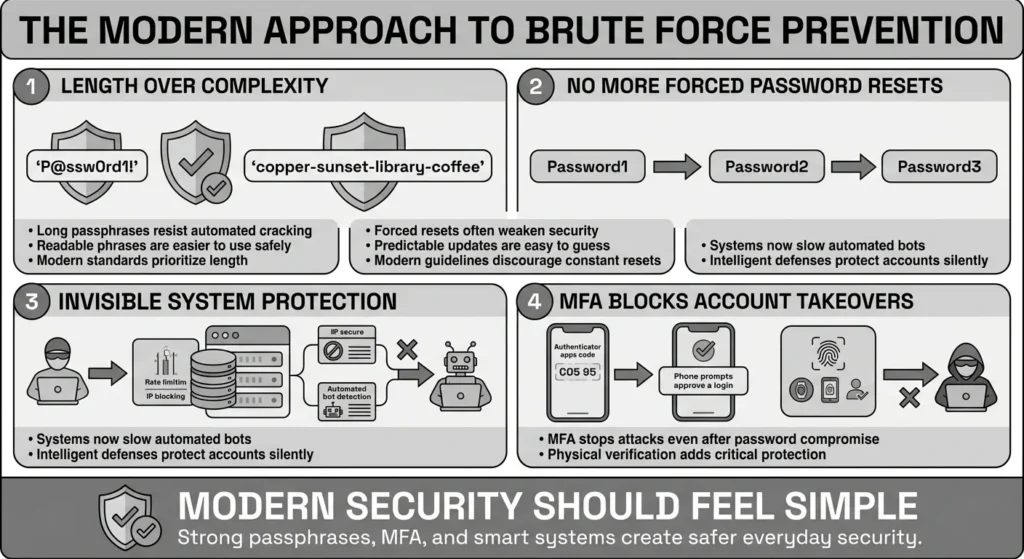
For years, we were told to create passwords with at least one uppercase letter, one number, and one special character. The latest 2025 NIST guidelines strongly recommend dropping these forced character rules, as they lead to frustrating passwords that are easy for AI to guess.
Instead, the new focus is length. NIST now recommends a baseline minimum of 8 characters, but strongly encourages 15 or more. A long “passphrase” made of random, unrelated words (like “copper-sunset-library-coffee”) is mathematically much harder for a computer to crack than a short, complex password (like “P@ssw0rd1!”), and it is infinitely easier for you to type.
No More Forced Resets
Remember the annoying prompt at work telling you to change your password every 90 days? NIST has officially advised against forced regular password resets. Research showed that forcing regular password changes actually weakens security, as people just change a “1” to a “2” at the end of their existing password. You only need to change your password if there is concrete evidence of a data breach.
How Systems Protect You Behind the Scenes
While you control your passwords, the websites you use also have a responsibility to defend against attacks. Security guidelines from platforms like OWASP highlight the importance of rate limiting, which deliberately slows down automated bots. Backend protections include:
- Rate limiting: This limits how many times someone can attempt to log in within a specific timeframe (e.g., allowing only 5 attempts per minute).
- IP blocking: If a website sees thousands of failed login attempts coming from a single computer or network, it will block that specific IP address entirely.
- Session management: This ensures that if you log in securely, your session is protected and will automatically time out if left unattended on a public computer.
While account lockouts (where your account freezes after 3 wrong guesses) used to be popular, OWASP notes they can be abused by attackers to intentionally lock you out of your own life. Therefore, backend delays and secure session management are becoming the preferred invisible shields.
Step-by-Step: What To Do Next
Understanding the risk is the first step, but taking action is where you regain your peace of mind. Your personal brute force prevention strategy should start with a few manageable, high-impact changes. You do not need to fix everything in one afternoon. Take it step by step.
Step 1: Audit Your Most Important Accounts
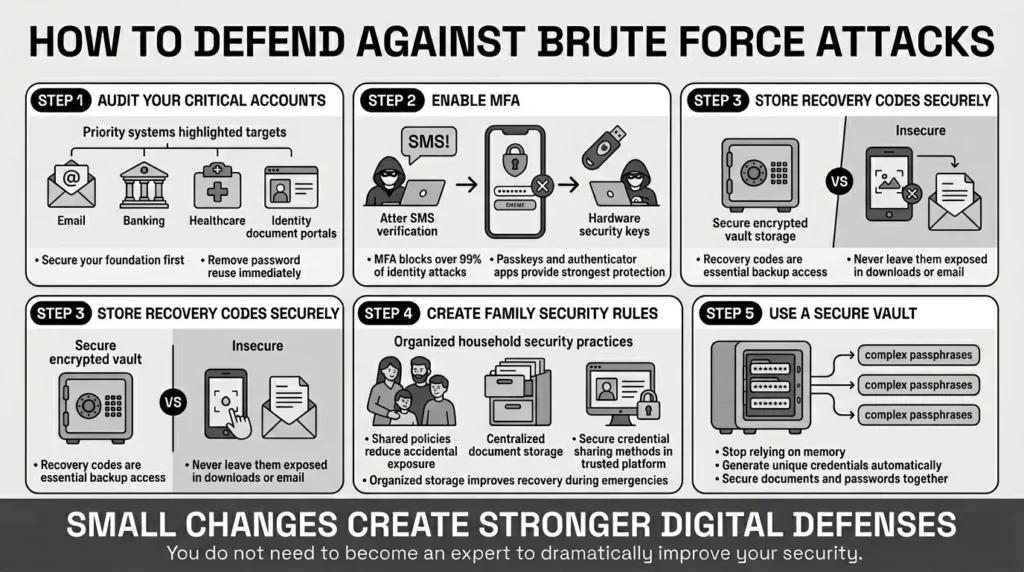
Start with the accounts that matter most: your primary email, your bank, and any portal holding medical or identity documents. Ensure these foundational accounts do not share a password with any other service. If an attacker breaches your primary email, they can request password resets for almost every other digital service you use.
Step 2: Turn on Multi-Factor Authentication (MFA)
Multi-factor authentication is arguably the most effective tool against automated credential attacks. Even if a bot correctly guesses your password, it cannot access your account without the second factor. In fact, according to the Microsoft Digital Defense Report 2025, over 99% of identity attacks are blocked by modern multi-factor authentication.
- The Good Option: Receiving a temporary code via SMS text message.
- The Better Option: Using an authenticator app (like Google Authenticator or Authy) which generates codes locally on your phone and cannot be intercepted by SIM-swapping scams.
- The Best Option: Using physical security keys or built-in device passkeys where available.
Step 3: Secure Your Recovery Codes
When you set up MFA, platforms usually give you a list of “backup codes” or “recovery codes.” These are essential if you ever lose your phone. Do not take a screenshot and leave it in your camera roll, and do not email them to yourself. Move these codes immediately into a secure, encrypted storage space.
Step 4: Establish Personal Security Policies
Create clear security policies for your household. For example, agree that no one will share streaming passwords over unencrypted text messages, and that all sensitive family documents (like tax returns and birth certificates) will be stored in one central, encrypted location rather than scattered across various laptops.
Step 5: Embrace a Secure Vault
To truly utilize strong authentication safeguards like 15-character passphrases, you need a place to put them. The human brain is not designed to remember forty different long phrases. Transitioning from a memory-based system to a secure digital vault is the biggest leap you can make in your personal security journey.
How WhiteVault Helps Keep This Manageable
We believe brute force prevention should not require you to become an IT expert. Everyday people are juggling busy lives—managing school forms, paying bills, planning travel, and looking after family members. You need tools that work seamlessly in the background. This is where WhiteVault comes in.
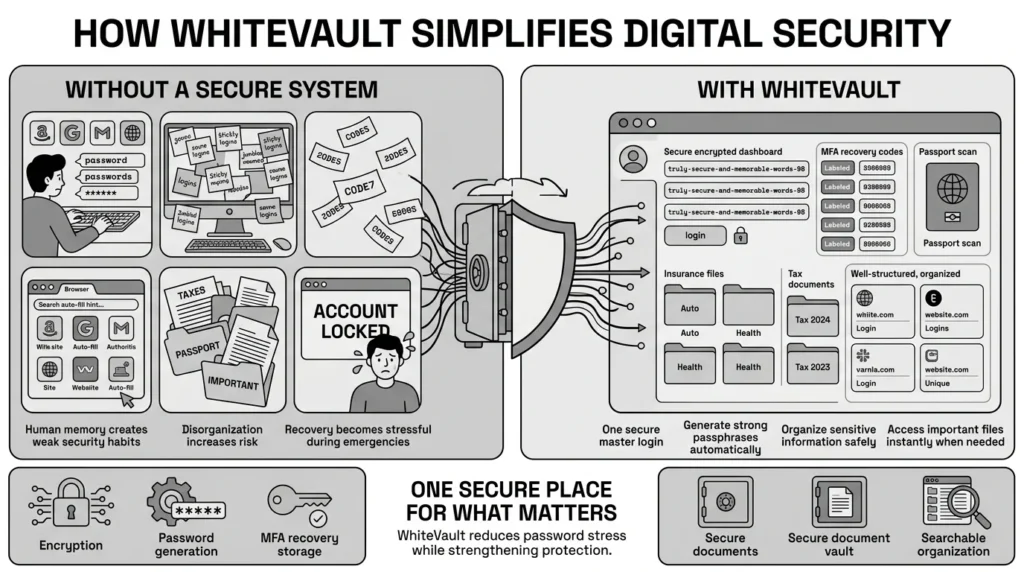
WhiteVault is your secure personal vault. It is built for people who want strong security without the daily friction of traditional password management. Here is how we help you protect what matters:
- Versus trying to remember everything: Instead of recycling the same weak password out of convenience, you can generate and store incredibly strong, long passphrases for every single account. You only need to remember one strong Master Password to unlock your vault.
- Versus sticky notes and browser storage: Browsers are easily compromised by malware, and sticky notes can be lost or stolen. WhiteVault uses strong encryption, ensuring that your data is unreadable to anyone but you.
- Versus scattered recovery details: When you turn on multi-factor authentication, you can store your vital recovery codes directly alongside your passwords in WhiteVault. If you ever lose your phone, you will not be permanently locked out of your life.
- Versus document chaos: WhiteVault is not just for logins. It is a secure place to store your digital identity. Keep organized, encrypted scans of your passports, insurance cards, tax files, and property records. If your laptop crashes or you face a family emergency while traveling, you have everything important, one secure place.
Simple security for everyday life means giving you the tools to easily adopt NIST’s best practices without the headache.
Habits That Keep You Safer Over Time
Better security is a marathon, not a sprint. Once you have established a secure personal vault and turned on multi-factor authentication for your major accounts, maintaining your safety becomes much easier.
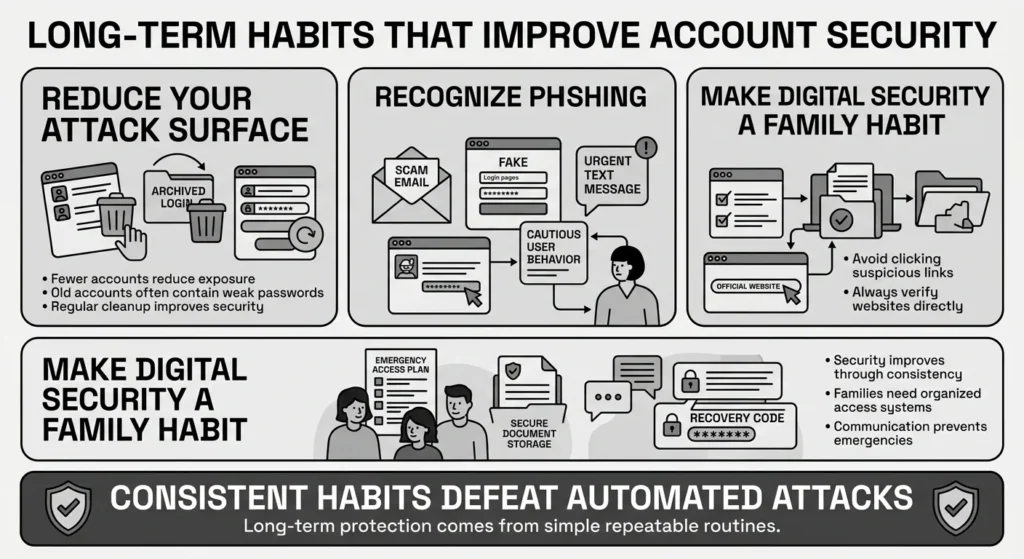
First, treat your digital hygiene like regular housework. Set aside twenty minutes every few months to clean up old accounts you no longer use. The fewer accounts you have floating around the internet, the smaller your attack surface becomes.
Second, stay alert for phishing. Brute force bots try to guess your password, but phishing scammers try to trick you into handing it over. Be deeply suspicious of urgent text messages or emails claiming your account will be suspended unless you click a link and log in. Attackers often use these fake alerts to bypass your new, stronger passwords. Always navigate to a website directly through your browser or your secure vault, rather than clicking links in unexpected messages.
Finally, normalize talking about digital safety with your family. Ensure your spouse, aging parents, or college-bound children know where the family’s important documents and recovery codes are stored.
Conclusion
The thought of automated bots constantly testing your digital defenses can feel unnerving. However, you are far from powerless. By stepping away from the burden of memorization, utilizing long passphrases, and turning on multi-factor authentication, you can effectively shut the door on these automated threats.
Ultimately, brute force prevention comes down to a few simple habits repeated consistently: stopping the reuse of weak passwords, safeguarding your recovery details, and keeping your sensitive documents organized. WhiteVault was built for exactly that. We invite you to save, remember, and protect what matters, all in your secure personal vault. You deserve peace of mind for your digital life, and we are here to help you achieve it.
Frequently Asked Questions (FAQ)
1) What is the simplest definition of brute force prevention?
Brute force prevention is the combination of tools (like long passwords and multi-factor authentication) and habits that stop automated computer programs from repeatedly guessing your login details until they break into your accounts.
2) How do I know if someone is trying to guess my passwords?
You might receive unexpected email alerts about “failed login attempts,” or you might get multi-factor authentication codes texted to your phone when you are not actively trying to log in. In some cases, a service might temporarily lock your account for your protection due to suspicious activity.
3) How often should I change my passwords to stay safe?
According to the latest 2025 NIST guidelines, you do not need to change your passwords on a regular schedule (like every 90 days). You only need to change a password if you know or suspect the account has been breached, or if the company announces a data leak.
4) What is the difference between this kind of attack and credential stuffing?
While both use automated software, a traditional attack guesses completely random passwords or dictionary words. Credential stuffing specifically uses a list of real usernames and passwords stolen from a previous data breach, relying on the fact that many people reuse the same login across multiple websites.
5) I am not a tech person. What is the easiest way to improve my safety today?
The single easiest and most effective step is to turn on multi-factor authentication (MFA) for your primary email account and your banking apps. Even if a hacker perfectly guesses your password, they will be blocked without the secondary code sent to your device.
6) Is it safe to store my Social Security number and tax files digitally?
Yes, but only if they are stored correctly. You should never store sensitive files in an unencrypted folder on your desktop, in a draft email, or on a standard cloud drive without extra protection. They should be stored in a dedicated, encrypted digital vault designed specifically for sensitive information.
7) How should I organize my recovery codes and backup logins?
When a website gives you backup codes, save them immediately into the secure notes section of your encrypted vault, clearly labeled with the account name. Never leave them in your email inbox. Your email is the first place an attacker will look if they compromise your account.
8) How does WhiteVault help everyday people manage all these passwords and documents?
WhiteVault acts as your encrypted, digital filing cabinet. Instead of relying on your memory or scattered sticky notes, WhiteVault securely stores your unique passwords, generates strong new ones, and organizes your most critical documents—like passport scans and recovery codes—so they are instantly available to you, and securely hidden from everyone else.


