
Imagine your phone buzzing at 6 AM. Your email password was just changed. You did not do it, but an automated bot did, guessing the name of your first pet. Effective dictionary attack prevention matters because hackers test millions of words in seconds, turning small vulnerabilities into stressful lockouts. With cybercrime costing an estimated $10.5 trillion globally in 2025, automated threats are everywhere. At WhiteVault, we help people save, remember, and protect what matters. Securing your digital life feels manageable, not overwhelming.
Quick Answer To protect against dictionary attacks, use long, unique passphrases that do not rely on common words. Turn on multi-factor authentication (MFA) and use a secure personal vault to remember credentials without relying on your memory alone.
Why This Topic Matters for Everyday Security
When we hear terms like “hacker,” it is easy to picture a shadowy figure in a dark room flipping through a physical dictionary, trying to guess your login one word at a time. The reality is far more automated, and frankly, a bit more invisible. Hackers do not manually type anything. Instead, they use automated software loaded with massive lists of words, common phrases, pop culture references, and previously leaked passwords. This software rapidly tests these combinations against your accounts in fractions of a second.
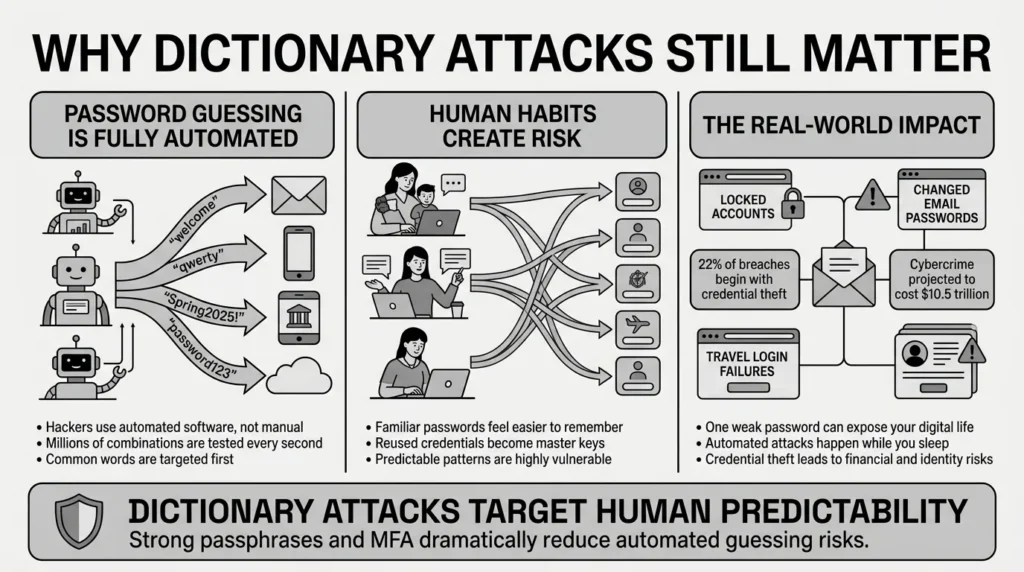
According to the 2025 Verizon Data Breach Investigations Report, credential theft remains a dominant threat across the digital landscape. It serves as the initial access vector in 22% of all confirmed data breaches. This means that before attackers ever bother trying to exploit complex technical vulnerabilities or bypass firewalls, they simply log in. They use stolen passwords, or they guess them using automated tools. A recent 2026 report by Specops analyzed over 6 billion malware-stolen credentials and found that simple keyboard walks like “qwerty” and common base terms like “welcome” are still incredibly prevalent.
Everyday users—busy parents, retirees, students, and freelancers—are caught in the crossfire of these automated scripts. You might just be a parent managing school forms, health insurance cards, and family passwords. If your login is a common word, an automated bot might guess it while you are sleeping. This is why proper dictionary attack prevention is not just for large corporations or security engineers; it is a necessary, practical shield for your personal digital life.
Consider a freelancer juggling a dozen client portals, tax files, and banking credentials. If they use a simple, predictable password for a minor project management tool, a dictionary attack can easily compromise it. When your credentials are secure, you do not have to worry about a sudden lockout during a family emergency, a missed freelance payment, or a travel day disaster. Taking control of your password security gives you peace of mind.
What Usually Goes Wrong
We have all reused passwords at some point in our lives. It is entirely human to want something familiar and easy to remember. When you are rushing to create an account for a new streaming service, a school portal, or a one-time purchase, your brain naturally reaches for the path of least resistance. You want to finish the task, not invent a new cryptographic key.
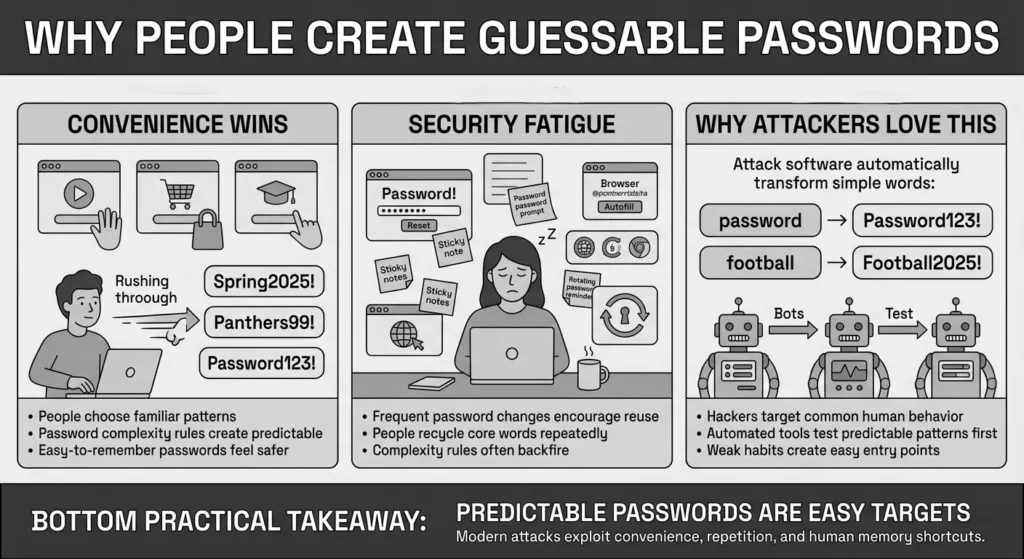
What usually goes wrong is that we mistake predictable patterns for genuine security. For years, websites demanded that we include an uppercase letter, a number, and a special symbol. So, what did everyone do? They capitalized the first letter of a familiar word, added a number at the end, and threw in an exclamation point. Words like “Spring2025!” or “Panthers99!” might satisfy a basic website requirement, but they are entirely predictable to attack software. These predictable substitutions are the exact patterns that hacking software is programmed to test first.
The IBM Cost of a Data Breach 2025 report found that stolen or compromised credentials account for a massive 10% of all data breaches globally. Worse, these specific types of breaches are incredibly expensive and damaging, costing organizations an average of $4.67 million to remediate. But the cost to the individual is just as steep: identity theft, stolen funds, and days spent on the phone trying to recover locked accounts.
The National Institute of Standards and Technology (NIST) recently finalized their SP 800-63-4 digital identity guidelines for 2025, specifically noting that forcing arbitrary complexity often backfires. When people are forced to use special characters or change their passwords every 90 days, they suffer from security fatigue. They rely on the same core words over and over, just changing the number at the end from a 1 to a 2. Incorporating dictionary attack prevention means acknowledging these normal human habits and choosing a system that works with us, not against us.
Imagine a person who reuses one familiar password across shopping, streaming, and email accounts. If a small, poorly secured shopping site experiences a data breach, that one reused password leaks to the dark web. Attackers then take that known password and automatically test it against major bank portals and email providers. Without strong passwords that are unique to every single site, that one leaked credential becomes a master key to your digital life.
The Mechanics of Automated Guessing
To truly protect yourself, it helps to understand exactly what you are protecting against. A dictionary attack is not just a random sequence of letters. It is a highly calculated, algorithmic process designed to exploit human psychology. Attackers know that humans are not random; we use sports teams, children’s names, seasons, and years.
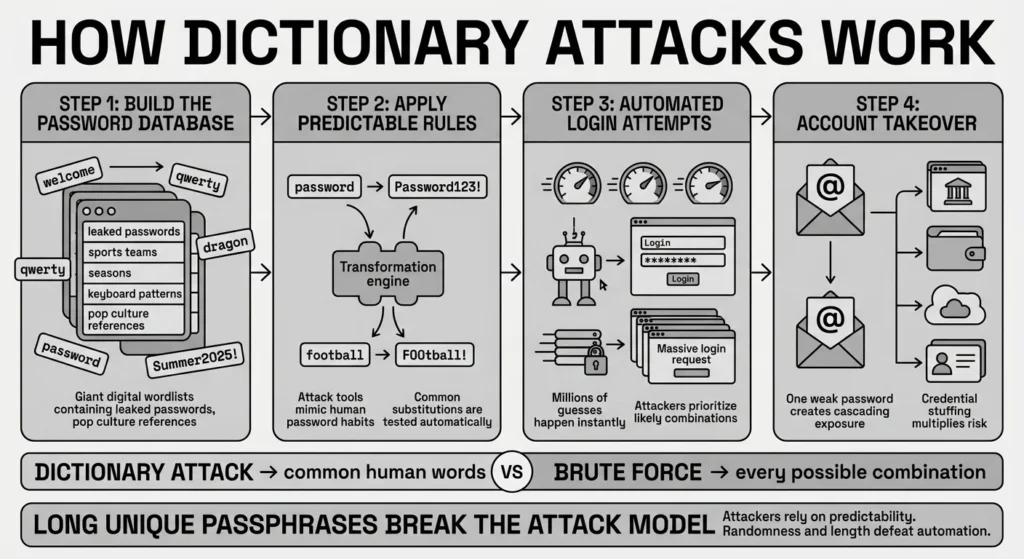
Hackers use powerful computers that can process billions of guesses per second. They start with a digital “dictionary.” This is not just a Webster’s dictionary, but a compiled list of the millions of most commonly used passwords ever leaked. They apply rules to this list. If the word is “password,” the software automatically tests “Password123!”, “P@ssword!”, and “P4ssw0rd.”
This is fundamentally different from brute force defense scenarios where an attacker tries every single combination of letters (A, B, C, AA, AB, AC). Brute force takes an incredibly long time for long passwords. Dictionary attacks, however, skip the unlikely combinations and go straight for the phrases humans actually use. The core goal of dictionary attack prevention is to ensure your password is not on that list, and cannot be easily created by applying those predictable rules to a common word.
When a dictionary attack is combined with “credential stuffing”—the act of taking a password breached from one site and trying it on hundreds of others—the threat multiplies. This is why user account monitoring alerts from your bank or email provider are so crucial. If you get a text saying someone in another country just tried to log in, it is highly likely your credentials were part of an automated sweep.
The Safer Way to Handle It
The safest way to handle your logins requires a fundamental shift in how we think about passwords. Instead of focusing on complicated, unreadable symbols, we need to prioritize sheer length. The longer a password is, the exponentially harder it is for automated software to guess it. This concept is the absolute foundation of modern credential protection.
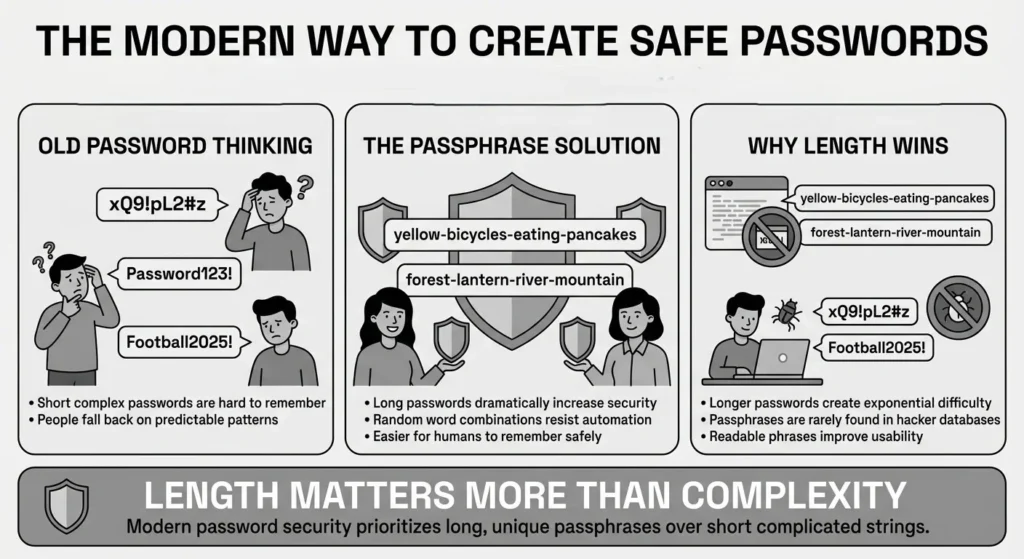
NIST guidelines now recommend that systems allow passwords to be at least 15 characters long, and ideally up to 64 characters. But how is a normal person supposed to remember a 15-character string of random letters and numbers? The practical answer is passphrases.
A passphrase is a sequence of random, completely unrelated words strung together. For example, “yellow-bicycles-eating-pancakes” is an excellent passphrase. It is incredibly long, meaning the mathematical combinations required to guess it are astronomically high. It does not exist in any standard hacker database as a single phrase, which naturally aids in dictionary attack prevention. Yet, it is infinitely easier for a human brain to visualize, remember, and type than a random string like “xQ9!pL2#z”.
When you use a long, unique passphrase for your most sensitive accounts, you are essentially wrapping your private information in a layer of strong encryption that attackers simply cannot break through guessing. If an automated script tries to hit your account with a list of the one million most common passwords, your passphrase will not be anywhere on that list. You gain the benefit of enterprise-grade security using words you can actually read.
Furthermore, a passphrase protects you from “shoulder surfing”—where someone watches you type. Typing real words quickly is much easier to obscure than hunting and pecking for obscure symbols on a mobile keyboard. This simple switch from complex, short passwords to long, readable passphrases is the biggest favor you can do for your digital identity.
Step-by-Step: What To Do Next
Better security does not mean you have to fix your entire digital life by tonight. It means taking clear, practical steps to lock down your most important information first, and building from there. Here is how you can systematically secure your accounts without feeling overwhelmed by the process.
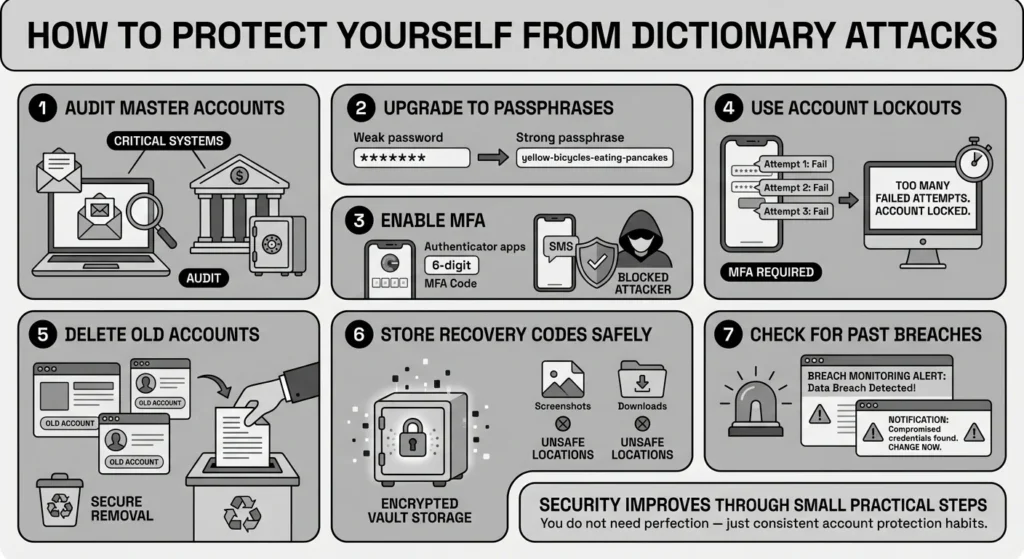
- Step 1: Audit Your Master Key Accounts. Start with the accounts that hold the keys to everything else. This usually means your primary email address and your primary bank account. Your email is the master key to your digital life. If someone gets into your email, they can request password resets for almost any other service you use.
- Step 2: Upgrade to Long Passphrases. Change passwords for these critical accounts immediately. Aim for at least 15 characters using random, unrelated words. Avoid using song lyrics, famous quotes, local sports teams, or familiar phrases, as these are heavily featured in hacker databases. This step alone is a huge leap in dictionary attack prevention.
- Step 3: Enable Multi-Factor Authentication. Multi-factor authentication (MFA) adds a vital, non-negotiable second layer of security. The Cybersecurity and Infrastructure Security Agency (CISA) recently issued their 2025 Four Cybersecurity Essentials guidance, strongly recommending phishing-resistant MFA for all critical accounts. Even if an attacker perfectly guesses your passphrase, they still cannot access your account without the secondary code sent to your physical device.
- Step 4: Check for Account Lockout Mechanisms. Look at the security settings of your important platforms to ensure they feature account lockout features. If someone tries to guess your password five times and fails, the account should temporarily lock. This simple feature stops automated guessing bots dead in their tracks, preventing them from trying thousands of words a minute.
- Step 5: Consolidate and Close Old Accounts. Attack surface reduction is a key part of security. Think about those old forums, forgotten shopping sites, or legacy email addresses you haven’t used in six years. They likely still use an old, weak password. If that site is breached, that password is exposed. Take a weekend to log in, delete your personal data, and permanently close accounts you no longer need.
- Step 6: Secure Your Recovery Codes. When you set up MFA, platforms often give you “recovery codes” to use in case you lose your phone. Do not screenshot these and leave them in your camera roll, and do not email them to yourself. Treat these codes with the same respect as a passport. They need to be stored in a dedicated, encrypted environment.
- Step 7: Check Past Breaches. Use a reputable, free tool like “Have I Been Pwned” to check if your primary email addresses have been caught in historical data breaches. If you see that an old service was breached, ensure you are no longer using that specific password anywhere else in your digital life.
The Role of Document Security
While we often focus on online accounts, dictionary attacks are also used to break into local files. If you keep a compressed ZIP file on your desktop labeled “2025_Tax_Returns” and protect it with a simple password like “Taxes2025!”, you are at risk. If your laptop is ever stolen or compromised by malware, automated tools can crack that local password in seconds.
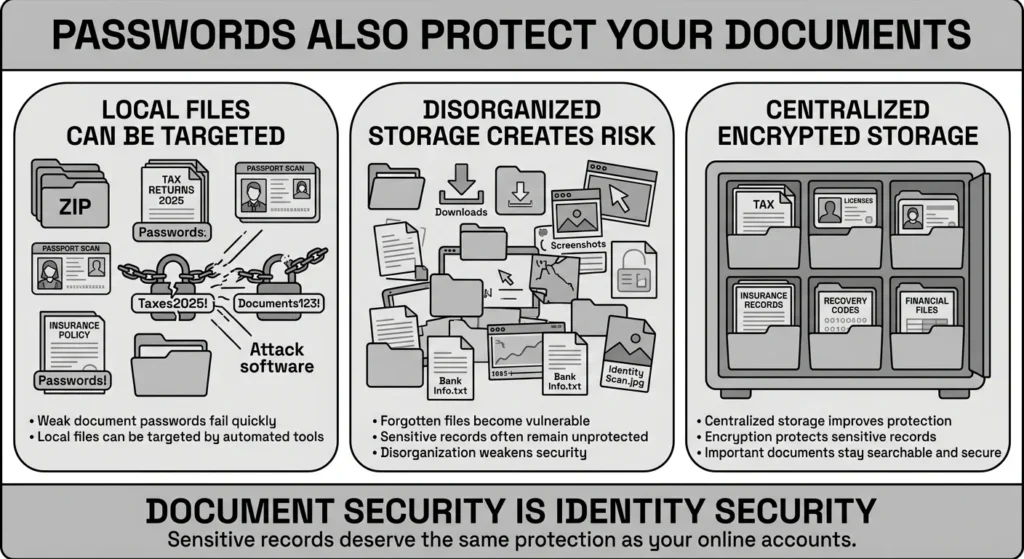
Everyday users frequently store passport scans, university logins, financial aid documents, and medical records in random, unencrypted folders. This scattered approach makes it incredibly difficult to protect sensitive files. If you do not know where your files are, you cannot properly secure them.
The same rules apply here: if you are going to password-protect a document or a folder, you must use a long, unique passphrase. Better yet, avoid relying on basic folder passwords entirely. Important identity documents, insurance papers, and family records deserve the same level of centralized credential management as your banking logins. Keeping them in a disorganized computer folder is the digital equivalent of leaving your social security card sitting on the kitchen counter.
How WhiteVault Helps Keep This Manageable
We know that asking you to create unique, 15-character passphrases for every single account is unrealistic if you have to memorize them. You might be a freelancer juggling dozens of client portals, or a traveler needing quick access to booking details while standing at a chaotic airport gate. This is where WhiteVault comes in.
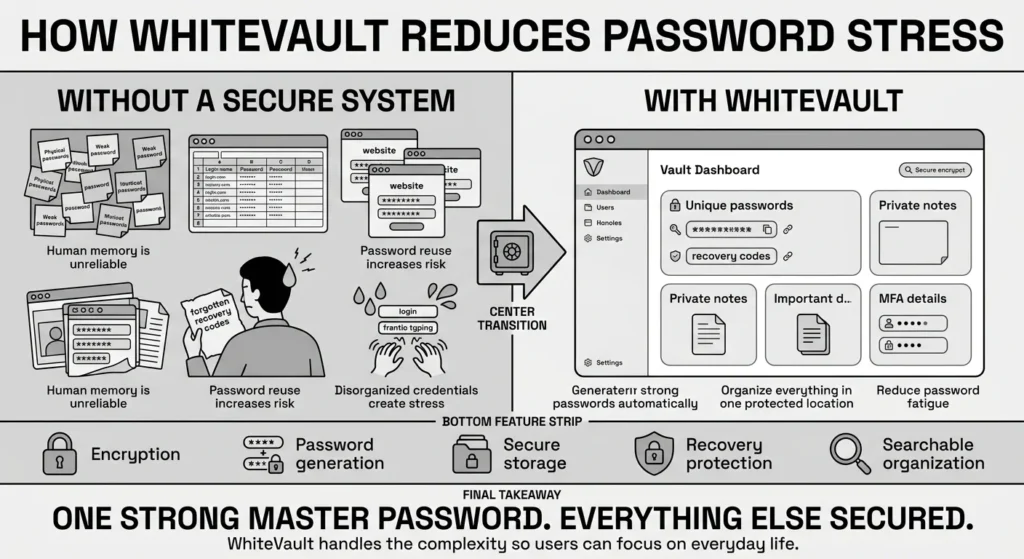
Instead of relying on your memory, sticky notes hidden under a keyboard, or a messy spreadsheet, you only need to remember one incredibly strong Master Password. We act as your secure personal vault for credentials, recovery codes, private notes, and important documents.
By generating and storing complex, entirely unique passwords for every site you visit, WhiteVault eliminates the risk of password reuse entirely. We provide a simple, clean interface backed by strong encryption, so you can save, remember, and protect what matters. You do not have to be a security expert to keep your information safe. You just need a tool that does the heavy lifting for you.
Habits That Keep You Safer Over Time
Security is a marathon, not a sprint. Once you have secured your main accounts and set up your passphrases, the goal is to build sustainable habits that protect your family and your private information over the long term. Solid dictionary attack prevention relies on consistency, not perfection.
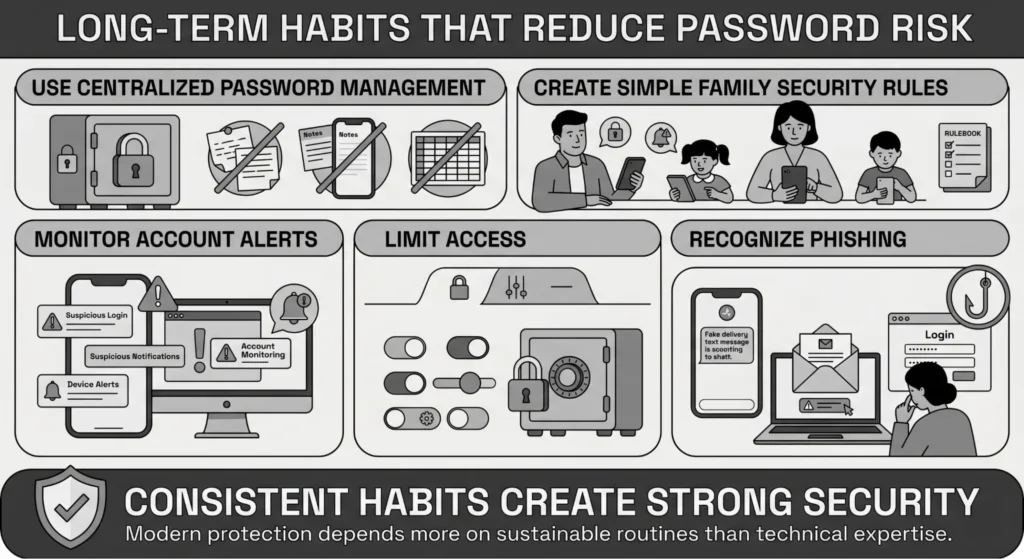
First, fully embrace centralized management. Stop writing passwords in your phone’s default notes app, on physical sticky notes, or in a shared family text thread. Verizon’s 2025 data shows that infostealers compromised 46% of unmanaged devices precisely because people leave credentials exposed in unsafe, unencrypted places. Good management means using a dedicated tool built specifically to store your logins and recovery codes securely.
Second, establish simple, common-sense security policies for your family. You do not need to write a corporate handbook, but setting basic guidelines at home helps everyone stay safe. For instance, agree as a family that nobody reuses the Wi-Fi password for their personal email or banking. Teach teenagers that simply adding the current year to their favorite band’s name does not magically make a password secure.
Third, practice basic, vigilant monitoring of your digital footprint. Keep an eye on your digital surroundings. Consider that the average data breach takes 194 days to identify globally, and it takes up to 88 days just to resolve a credential-based incident. If you receive an alert from Google, Apple, or your bank about a new login from a device you do not recognize, do not ignore it. That is your immediate cue to log in directly to the service (do not click links in the alert email) and change your password.
Fourth, fiercely guard your access control. Not every app on your phone needs access to your contacts, camera, or location. Similarly, not every family member needs the master login to the primary bank account or the shared tax portals. Only give out the access that is absolutely necessary for the task at hand. The fewer places your highly sensitive passwords exist, the lower your overall risk.
Finally, learn to recognize phishing attempts. Dictionary attacks are often preceded or followed by phishing. If an attacker cannot guess your password, they might just send you a fake text message claiming your package is delayed, asking you to “log in” to confirm. Always navigate to websites directly rather than clicking links in unexpected emails or texts.
Conclusion
Better security rarely comes from one dramatic, overnight change. It usually comes from a few simple habits repeated consistently over time: using long and unique passphrases, enabling multi-factor authentication on critical accounts, organizing your important documents, and having a secure place to keep what matters most. Dictionary attack prevention is entirely possible when you stop relying on your memory and start using the right tools to outsmart automated threats.
You do not have to be a cybersecurity engineer to keep your digital life safe, nor do you need to live in fear of hackers. You just need a practical system that works for your everyday routine, giving you peace of mind instead of daily friction. WhiteVault was built for exactly that purpose. Save, remember, and protect what matters, all in your secure personal vault.
Frequently Asked Questions (FAQ)
1) What is a dictionary attack in simple terms?
A dictionary attack is a method hackers use to break into an account by running automated software that guesses thousands of common words, phrases, and leaked passwords every second. It is a digital guessing game that relies on people using predictable words like seasons, sports teams, or common names. Good dictionary attack prevention involves using long, unpredictable passphrases instead of single common words, ensuring your login is not on their list.
2) How do I know my account is being targeted by one of these attacks?
You might receive multiple unexpected emails containing password reset codes you did not request. You might also get notifications from your bank or email provider that your account has been temporarily locked due to too many failed login attempts. If you see this, do not panic. It actually means the platform’s security features are working. Log in directly to the site and ensure your password is secure and MFA is turned on.
3) How often should I change my passwords to stay safe from hackers?
Interestingly, the latest NIST guidance strongly advises against forcing regular password changes, such as resetting them every 90 days. Changing passwords too often leads to “security fatigue,” where people choose weaker, highly predictable variations of their old password just to get it over with. You only need to change strong passwords if you suspect they have been compromised in a data breach or if you notice suspicious activity on your account.
4) What is the exact difference between a dictionary attack and a brute force attack?
While they are very similar concepts, a dictionary attack uses a predefined, curated list of likely words, phrases, and known leaked passwords to save time. A traditional brute force attack is far more exhaustive; it tries every possible mathematical combination of letters, numbers, and symbols sequentially (A, B, C… AA, AB). Because dictionary attacks use likely human words, they are often much faster and more successful against normal, human-created passwords.
5) I am not very tech-savvy. What is the absolute easiest way to protect myself today?
The simplest, most effective step you can take today—without buying any software or learning complex tech—is to turn on multi-factor authentication (MFA) for your primary email and your main bank account. Even if a hacker perfectly guesses your password using a dictionary attack, MFA stops them dead in their tracks because they do not have your physical phone to receive the necessary secondary code.
6) Can a dictionary attack compromise my locally saved private documents on my computer?
Yes. If your computer, a compressed ZIP folder, or a sensitive tax document is protected only by a weak, common password, automated tools can certainly be used to guess that password and unlock the files if your device is stolen or infected. This is why using strong passphrases and keeping important documents in a dedicated, encrypted space is vastly superior to relying on basic folder passwords.
7) How should I organize my passwords and recovery codes so I do not lose them during an emergency?
You should completely avoid keeping them in a physical notebook, spreadsheet, or standard phone note app. These methods are easily lost, accidentally deleted, or copied by unauthorized applications. You should use a dedicated, encrypted vault that allows you to organize your credentials, securely attach recovery codes, and search for them easily exactly when you need them, without compromising their safety.
8) How does WhiteVault help me avoid these types of automated attacks?
WhiteVault acts as your secure personal vault. Instead of trying to mentally juggle dozens of complicated passwords—which usually leads to weak, guessable choices—WhiteVault can generate and store incredibly strong, entirely random passwords for all your accounts. You only ever need to remember one strong Master Password. We handle the complex encryption, giving you peace of mind and significantly reducing your risk of being hacked.


