
You have a brief layover, and your phone battery is dying. You grab a coffee, find a seat by an outlet, and connect to the airport’s free “Guest Wi-Fi” to check a banking alert. It feels routine, but with consumers having reported losing more than $12.5 billion to fraud in 2024, this exact scenario is where mitm password safety is most critical. At WhiteVault, we help people save, remember, and protect what matters, so personal security feels manageable instead of overwhelming.
Quick Answer A man-in-the-middle attack happens when a cybercriminal secretly intercepts your digital connection to steal logins or data. You can protect yourself by using secure Wi-Fi, turning on two-factor authentication, avoiding reused credentials, and using a password manager.
Why This Topic Matters for Everyday Security
When we hear the word “cyberattack,” we often picture complex code and hackers breaking through massive corporate firewalls. In reality, many everyday security risks happen during completely normal activities, like checking your bank balance at an airport or logging into a streaming service at a hotel. The first step when thinking about mitm password safety is understanding how these invisible interceptions actually work.
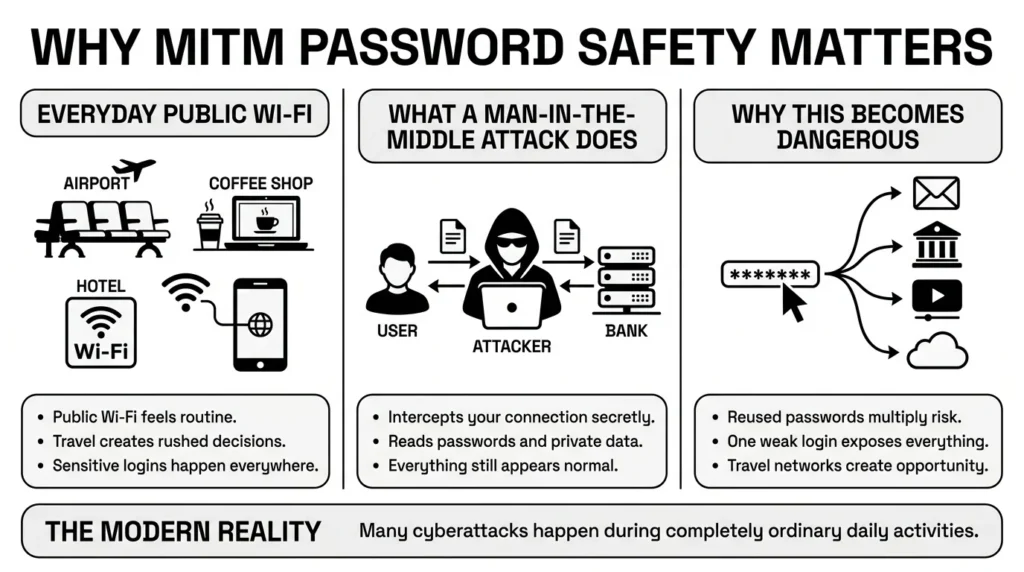
A man-in-the-middle attack (often abbreviated as MitM) is exactly what it sounds like. Imagine you are writing a highly confidential letter to your bank and handing it to a postal worker. But instead of delivering it straight to the bank, the postal worker opens the letter, reads your account numbers, seals it back up, and delivers it. The bank thinks the letter came safely from you, and you think the bank received it securely. Neither of you know who is reading it all.
According to the Identity Theft Resource Center (ITRC), there were a record 3,322 data compromises in 2025. Among those compromises, bank account information breaches increased by 168% over a five-year span. This matters for everyday people because we rely on our phones and laptops constantly while on the go. You do not have to be a tech expert to be targeted; you just have to be connected. But thankfully, preventing these interceptions is mostly about making a few simple adjustments to your daily routine.
What Usually Goes Wrong
The core challenge of mitm password safety in daily life is that everything usually looks completely normal. When an attack is happening, your screen does not flash red, and your device rarely beeps with an alarm.
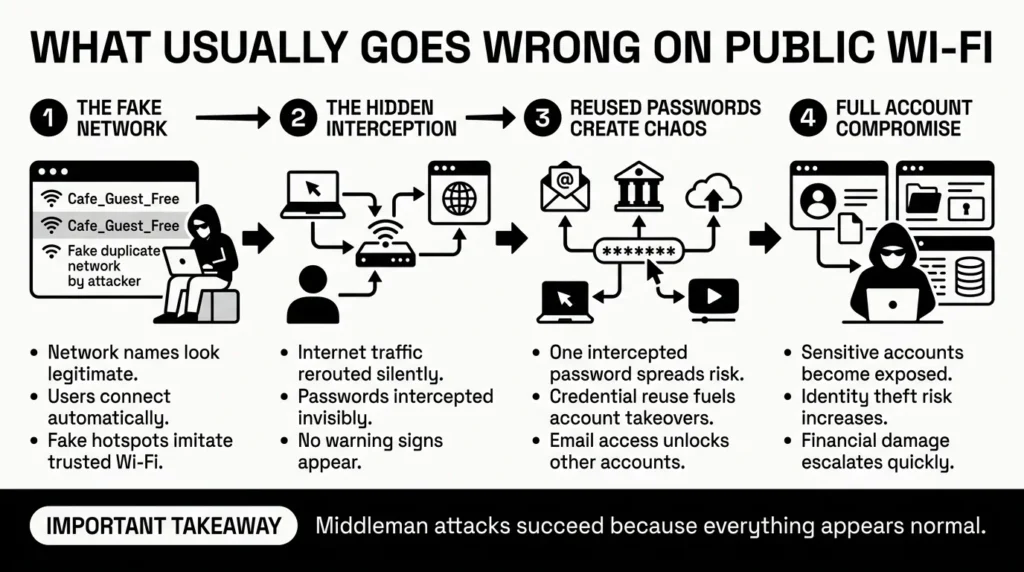
Let’s look at a relatable example. Imagine a freelancer juggling client portals, tax files, and banking credentials while working from a local cafe. They open their laptop and see a network called “Cafe_Guest_Free.” They connect, open their browser, and log into their email.
What usually goes wrong here is assuming that the network name means the network is safe or legitimate. Cybercriminals often set up “evil twin” networks. In fact, imposter scams resulted in $2.95 billion in losses recently, partly due to criminals mimicking trusted entities and services. When the freelancer connects to this fake network, all their internet traffic flows directly through the criminal’s device.
The 2025 Verizon Data Breach Investigations Report found that stolen credentials were the initial access vector in 22% of confirmed breaches. If you reuse passwords, a middleman interception turns into a full-scale emergency. It is no surprise that the Open Worldwide Application Security Project (OWASP) ranks Authentication Failures (A07:2025) as a top ongoing threat. If an attacker intercepts your password for a minor local news site over public Wi-Fi, and it is the exact same password you use for your primary email or banking, the attacker suddenly has the keys to your entire digital life.
The Role of Secure Connections and Encryption
A massive part of mitm password safety relies on something your browser usually handles automatically: encryption.
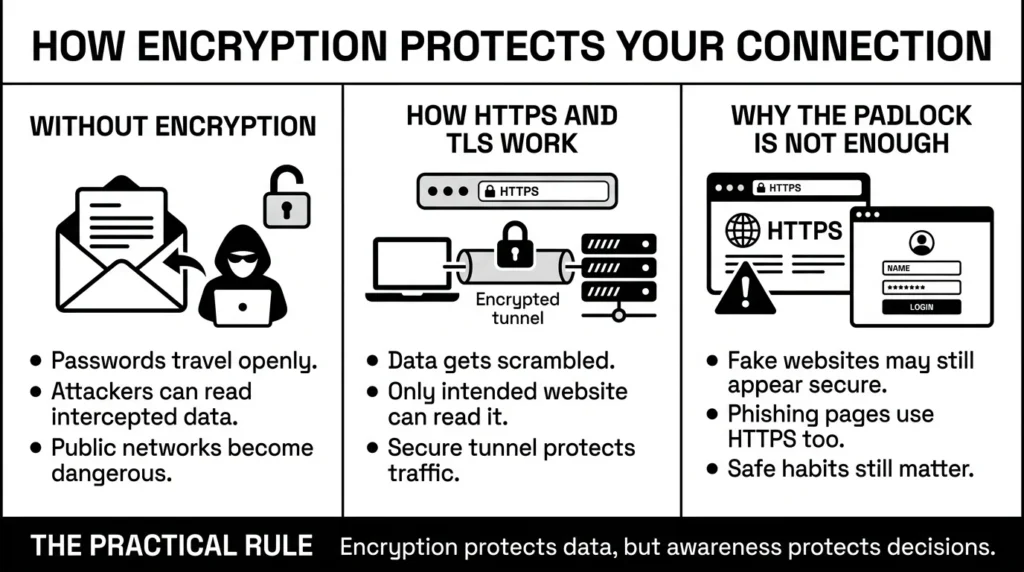
Encryption is a way of scrambling your data so that even if someone intercepts it, they cannot read it. Going back to our postal worker analogy, encryption is like writing your letter in a secret code that only you and the bank know. The stakes for keeping this data secret are incredibly high; IBM reported that the global average cost of a data breach reached $4.44 million in 2025, largely driven by the harvesting of unencrypted personal and corporate data.
When you browse the internet, you want to ensure your data protection is active. This is primarily handled by authentication protocols known as SSL/TLS (Secure Sockets Layer and Transport Layer Security). These protocols create a secure, encrypted tunnel between your device and the website.
How do you know this tunnel is active? You look for “HTTPS” at the beginning of the website address (the “S” stands for Secure), or you look for the small padlock icon in your browser’s address bar. When HTTPS is active, your password encryption is functioning.
However, modern cybercriminals have adapted. Sometimes, they use fake websites that also use HTTPS. The padlock is there, but the site belongs to the attacker. If you type your credentials safeguarding measures are bypassed entirely because you are handing your password directly to the middleman. This is why relying solely on the padlock is not enough; we have to combine it with smarter habits.
Step-by-Step: What To Do Next
You can take practical steps toward mitm password safety right now without needing any special technical skills. Here is a simple, effective checklist to protect your network security and private information.
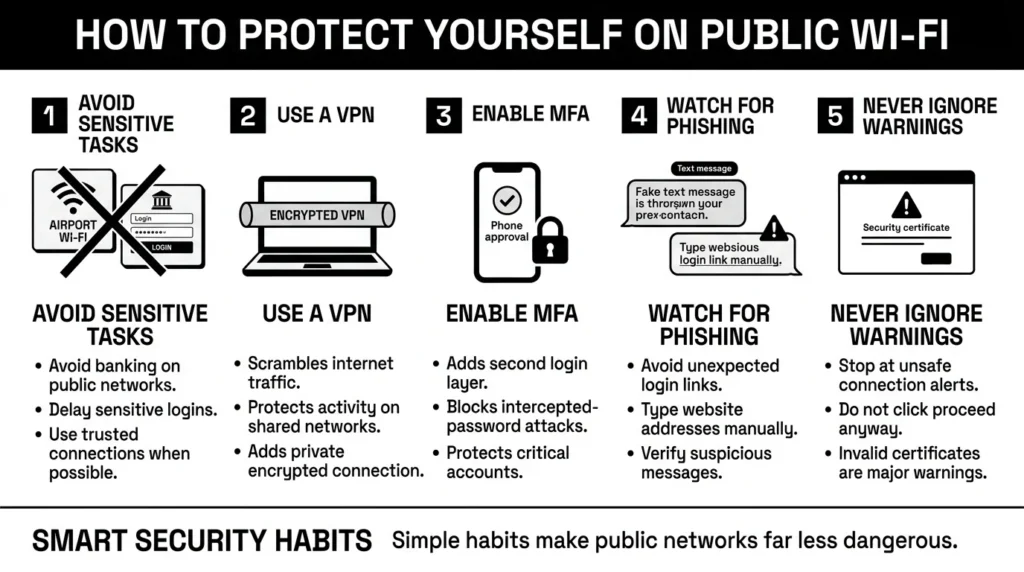
- Avoid Sensitive Tasks on Public Wi-Fi: If you are connected to an airport, hotel, or coffee shop network, treat it as a public space. Avoid logging into your bank, submitting tax documents, or making online purchases until you are on a trusted home network or using your cellular data.
- Use a Virtual Private Network (VPN): If you travel often or work remotely, a VPN creates your own personal, encrypted tunnel. Even if the coffee shop Wi-Fi is compromised, a VPN scrambles your traffic before it leaves your device.
- Turn on Two-Factor Authentication (2FA or MFA): CISA heavily emphasizes multi-factor authentication, as industry research shows it is capable of blocking more than 99% of account compromise attacks. If a middleman intercepts your password, they still cannot log in without the second factor.
- Look Out for Phishing Links: IBM’s 2025 report noted that phishing was involved in 16% of all breaches. If you get an unexpected text message saying an account is locked, do not click the link. Open your browser, type in the actual website address yourself, and log in securely.
- Never Ignore Browser Warnings: If your browser tells you a site’s security certificate is invalid, stop immediately. Do not click “proceed anyway.”
How WhiteVault Helps Keep This Manageable
We know that following all these rules can feel exhausting. The foundation of mitm password safety comes down to limiting the damage if something does go wrong. And the absolute best way to limit damage is to ensure that every single one of your accounts has a completely unique, highly complex password.
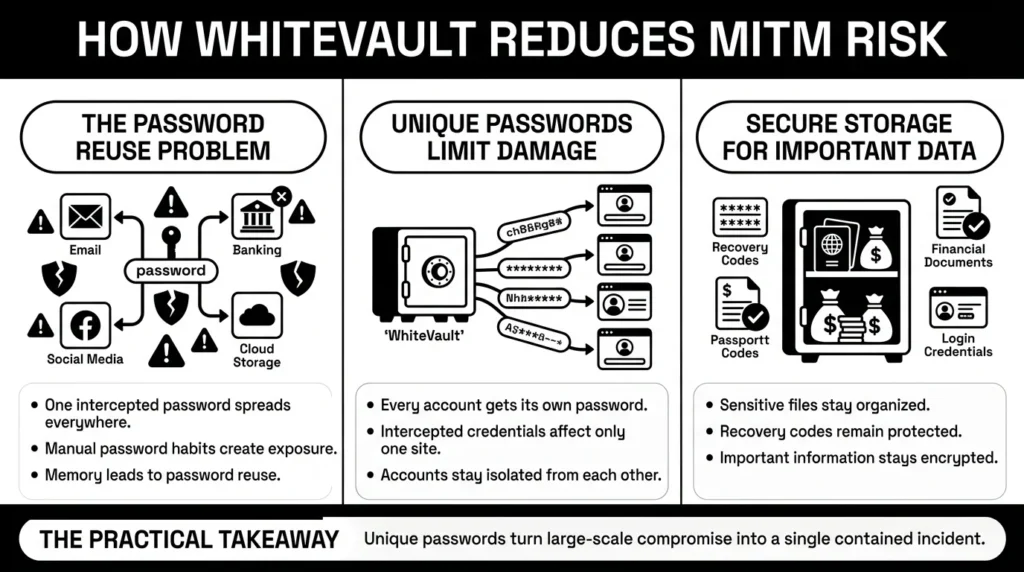
But nobody can memorize 100 unique passwords. This is where WhiteVault makes everyday security simple. WhiteVault is a secure personal vault for credentials and important documents.
If an attacker manages to intercept your login for a travel website while you are using airport Wi-Fi, they only get the password for that one specific site. The 2025 Verizon DBIR showed that third-party involvement in breaches surged to 30%, proving that you cannot rely on just one platform’s security; your accounts must be isolated with unique passwords. Because you used WhiteVault to generate and save unique passwords for your email and bank, those accounts remain entirely safe.
Furthermore, when you need to access important files, you do not have to desperately search through old email attachments while connected to a risky public network. The ITRC reported that Social Security numbers were involved in two-thirds of data breach reports in 2025. Keeping these vital documents in a secure personal vault protects your digital life from everyday friction and serious identity theft.
Habits That Keep You Safer Over Time
Achieving and maintaining mitm password safety does not mean never using public Wi-Fi again or becoming paranoid about every link. It is about building sustainable habits that act as safety nets.
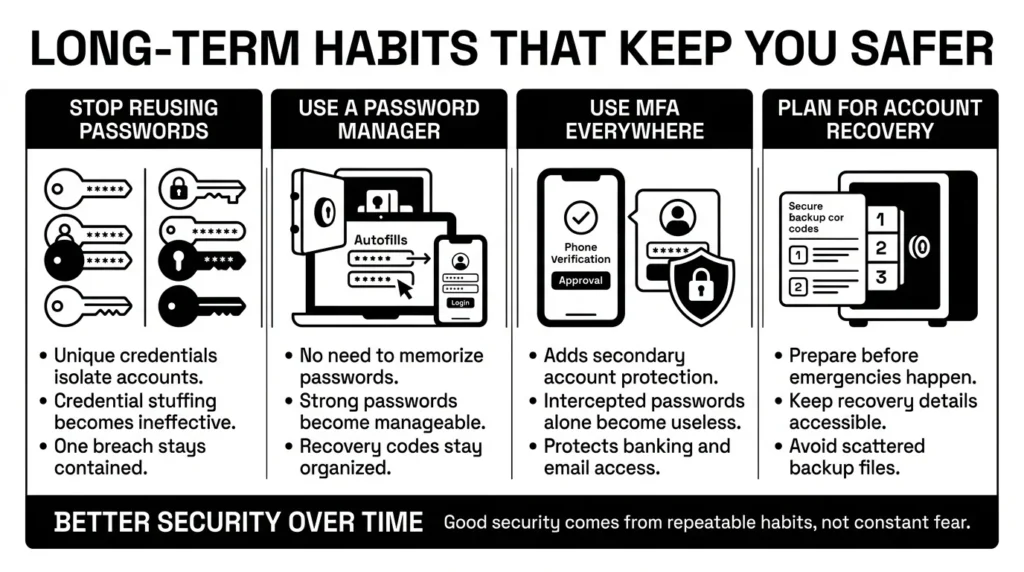
The National Institute of Standards and Technology (NIST) in their updated digital identity guidelines (SP 800-63B Rev. 4) emphasizes that security should be user-friendly. They advocate for using long passphrases and a trusted credential manager, and they no longer recommend forcing frequent password resets unless a compromise is suspected. Relying on memory or complex manual systems usually leads to fatigue and mistakes.
Another excellent habit is stopping the cycle of reused passwords, which directly fuels automated credential stuffing attacks. When you rely on a password manager to handle unique logins, you render these attacks entirely useless against your accounts.
Finally, plan for account recovery before you need it. If you are ever locked out because you had to change passwords quickly after a suspected breach, you will need your backup codes or recovery keys. Instead of leaving these codes scattered in random digital folders, save them directly alongside your logins in a secure credential manager.
Conclusion
Better security rarely comes from one dramatic change or buying a massive piece of enterprise software. It usually comes from a few simple habits repeated consistently: avoiding unsecured networks for sensitive tasks, relying on two-factor authentication, and stopping the cycle of reused passwords.
Approaching mitm password safety is simply about recognizing that our digital connections have moments of vulnerability, particularly when we are traveling, working from cafes, or rushing through tasks. You deserve to live your digital life with confidence knowing your private information is not exposed to invisible eavesdroppers.
A secure personal vault gives you a better way to keep unique passwords and sensitive files without trying to memorize them all. WhiteVault was built for exactly that. Save, remember, and protect what matters, all in your secure personal vault.
Frequently Asked Questions (FAQ)
1) What exactly does mitm password safety mean for a normal person?
For everyday users, this simply means protecting your usernames, passwords, and private data from being secretly intercepted by cybercriminals while you are using the internet, particularly when connected to public or shared Wi-Fi networks.
2) How do I know if someone is actively intercepting my connection?
Unfortunately, you usually will not see obvious signs. The clearest warning is if your web browser (like Chrome or Safari) suddenly shows a full-screen alert stating your connection is “not private” or “unsecure.” Never ignore these warnings.
3) How often should I update my passwords to prevent these attacks?
You do not need to change your passwords constantly. According to modern security guidelines from NIST, you only need to change your password if you suspect it has been compromised in a data breach or intercepted on a network. It is much more important to have a unique, strong password for every account.
4) Is it safer to use my phone’s cellular data instead of public Wi-Fi?
Yes. Your cellular provider encrypts your cellular data connection (4G or 5G) and is significantly harder for a local cybercriminal to intercept compared to the open, shared Wi-Fi network at a hotel, airport, or coffee shop.
5) Will an incognito or private browsing window protect me from a middleman?
No. Incognito mode only prevents your browser from saving your local search history and cookies on your physical device. It does absolutely nothing to encrypt or protect the data traveling through the air over the network.
6) Do I really need multi-factor authentication (MFA) if my password is very long?
Yes. Even if your password is a 30-character passphrase, if an attacker intercepts it in plain text over a compromised network, they know it instantly. MFA requires a secondary code or approval that the attacker cannot intercept just by monitoring the network.
7) Where is the safest place to keep my recovery codes and security answers?
Do not store recovery codes in your email inbox or in a plain text note on your desktop. The safest place to store recovery details, security answers, and backup codes is inside a dedicated, encrypted password manager or personal vault where they are protected but easily accessible when you need them.
8) How does WhiteVault help me deal with these kinds of network threats?
WhiteVault helps by making it incredibly easy to maintain completely unique, complex passwords for every single account you own. If a criminal intercepts your login on a weak network, they only capture the password for that specific site. Because you use WhiteVault to store unique credentials, your email, banking, and other vital accounts remain completely locked down and secure.


