
You are standing at the pharmacy counter trying to pull up your insurance app, but the password fails. Then your phone buzzes: a travel site you used last year just suffered a massive data breach. Panic sets in as you realize you used that exact same password for your email, bank, and medical portal. Learning how to detect compromised passwords in your organization—whether that is your household, a freelance business, or your personal digital life—puts you back in control. At WhiteVault, we help people save, remember, and protect what matters, so security feels manageable instead of a constant source of stress.
Quick Answer To detect compromised passwords, monitor reliable breach notification services, look for unexpected account activity, and watch for unfamiliar login alerts. If a credential leaks, update it immediately and secure your remaining accounts with unique passwords and two-factor authentication.
Why This Topic Matters for Everyday Security
When you hear the word “organization,” you might picture a massive corporation with a dedicated IT department, rows of servers, and a massive cybersecurity budget. But in today’s digital world, your “organization” is often closer to home. It is your freelance business juggling client portals, tax files, banking credentials, and contracts. It is your household, trying to keep track of school forms, health insurance cards, utility logins, and shared family records. It is your personal life, filled with digital subscriptions, online banking, and travel accounts.
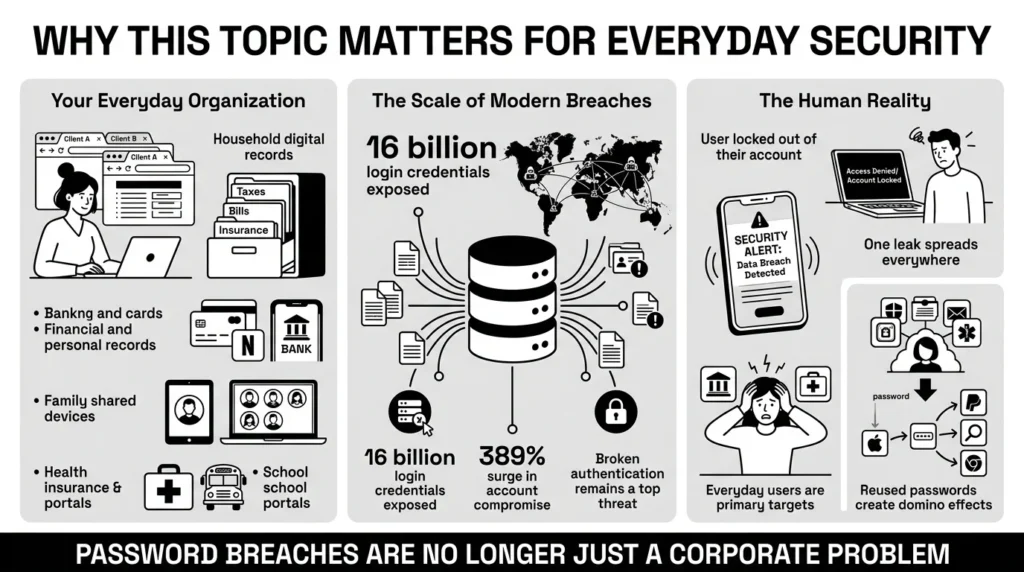
Managing this everyday organization is exhausting. We accumulate dozens, if not hundreds, of online accounts over the years. When a massive data breach makes the news, it is easy to feel overwhelmed. In mid-2025, cybersecurity researchers discovered a single dataset containing an astonishing 16 billion login credentials circulating online. That staggering number proves this is not just a corporate problem; that is a direct cybersecurity risk for everyday people, driven by a 389% year-over-year surge in account compromise.
The reality is that our private information is frequently caught in the crossfire of large-scale attacks. You might do everything right, but if a hotel chain, a local clinic, or an online retailer suffers a password leak, your data could still end up exposed. The Open Worldwide Application Security Project (OWASP) consistently ranks broken authentication as a top web security threat, highlighting how easily exposed credentials can be weaponized against consumers.
This is why knowing how to detect compromised passwords matters so much. It is not about becoming a cybersecurity expert or living in fear of the internet. It is about understanding what happens when a credential is exposed and having a calm, practical plan to secure your digital life before a minor leak turns into a major headache.
What Usually Goes Wrong: The Domino Effect of Reused Logins
We have all reused passwords. It is entirely human to want something familiar. When you are signing up for a new parking app while standing in the rain, or trying to access a school portal while making dinner, you are naturally going to use a password you already know.
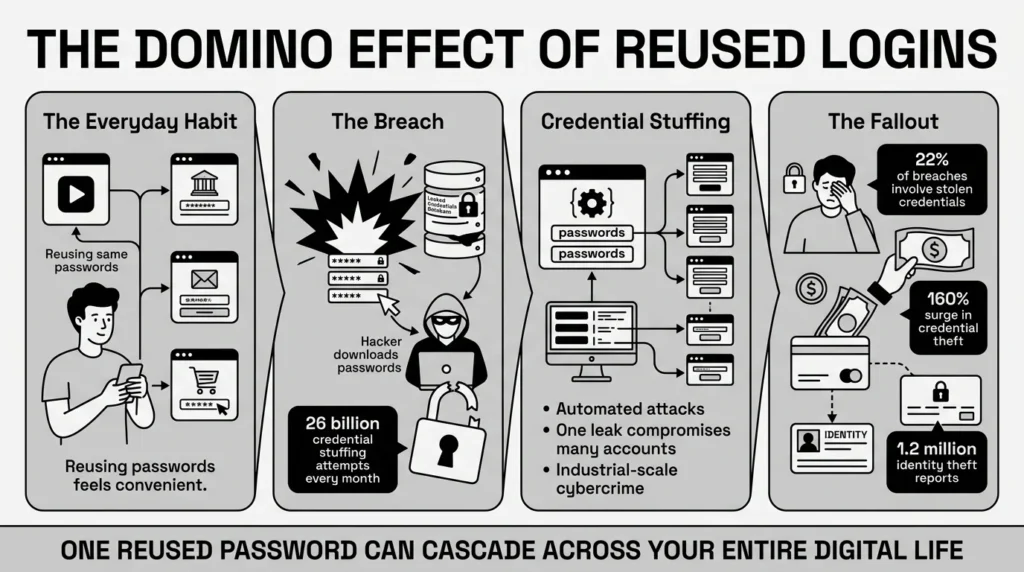
The problem begins when one of those services experiences a breach. Attackers know that everyday users reuse their login details, and roughly 51% password reuse fuels this threat at massive scale. Criminals take the usernames and passwords stolen from one site and run them through automated software to test them against thousands of other popular websites. This tactic is known as credential stuffing, and it has become an industrialized threat, with a staggering 26 billion automated credential stuffing attempts occurring globally every month.
According to the Verizon 2025 Data Breach Investigations Report, stolen credentials drove 22% of all confirmed data breaches. Even more startling, cybersecurity firm Check Point also noted a 160% surge in credential theft volume in early 2025 alone. These exposures have real-world consequences, contributing to the nearly 1.2 million reported cases of identity theft logged in just the first three quarters of 2025.
If you use the same password for your favorite streaming service, your online banking, and your primary email, a breach at the streaming service suddenly puts your financial records and private correspondence at risk. The domino effect is swift. Without a reliable way to detect compromised passwords, you might not realize your credentials have been stolen until you find yourself locked out of an important account or notice strange charges on your credit card.
Consider a professional locked out of a work-related account because the recovery code was saved in an old email they can no longer access. Or imagine logging in to check your reward points before a trip, only to find the account has been drained by hacked accounts. These scenarios happen daily, not because people are careless, but because managing memory-based systems across a hundred different websites is a fundamentally flawed approach to password security.
The Safer Way to Handle It: Shifting Your Strategy
For years, the standard advice was to change your passwords every 30 or 60 days. People would take a base word like “Sunshine” and simply update it to “Sunshine1!”, then “Sunshine2!”, and so on. This forced rotation created an illusion of security but actually made passwords more predictable and easier for attackers to guess.
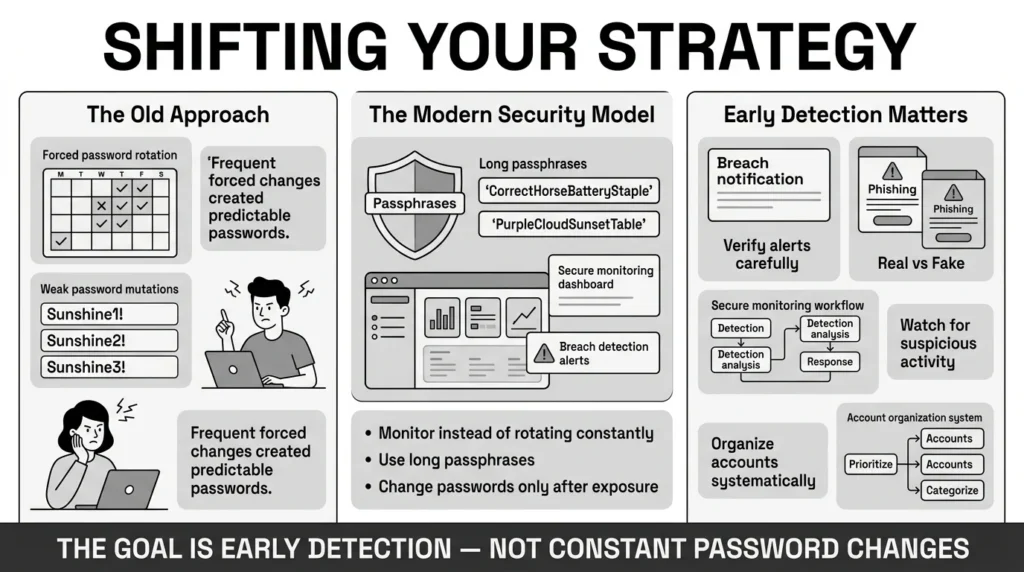
The National Institute of Standards and Technology (NIST), which sets the benchmark for modern digital security, updated their Special Publication 800-63B guidelines to explicitly advise against forced regular password rotation. Instead, NIST recommends only changing a password if there is evidence it has been exposed. They also advise relying on length—such as long passphrases—rather than a complicated mix of random, frustrating symbols.
This shift in advice changes the goal from constant, irritating password changes to vigilant monitoring. Your objective is to detect compromised passwords early and replace them with strong, unique alternatives.
But how do you spot an exposure? Often, the first sign of a password vulnerability is a notification. You might receive an email directly from a company stating that their systems were breached. The Federal Trade Commission (FTC) consumer guidance strongly advises paying attention to these alerts, as they are often the first defense against identity theft. However, you must also be wary of phishing. Attackers often send fake breach notifications to panic you into clicking a malicious link.
A safer strategy is to proactively monitor your digital footprint. By using trusted tools and establishing a secure document management system, you can organize your accounts so that if one credential is lost, you know exactly what it affects and can change it without panic. Taking this approach drastically reduces the threat of fraud and puts you back in control of your private information.
Step-by-Step: What To Do Next
Taking action to secure your credentials does not require a degree in computer science. It just requires a systematic, calm approach. If you suspect an account has been exposed, or if you simply want to perform a routine security audit, follow these simple steps.
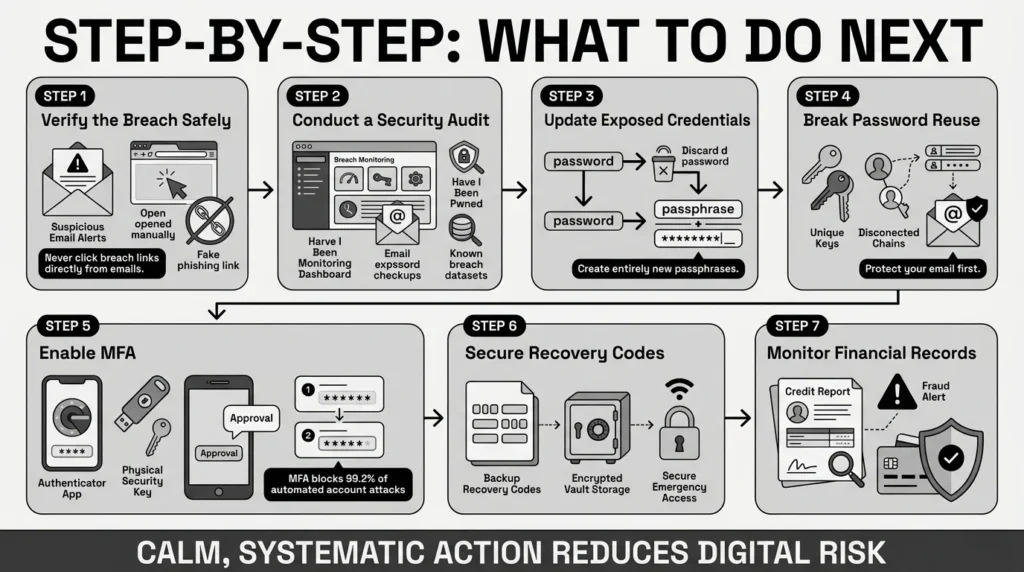
Step 1: Verify the Breach Without Clicking Email Links
If you receive a text message or email claiming your account was compromised, do not click the link in the message. Social engineering tactics often use the fear of a data breach to steal your current password. Instead, open a new browser window, enter the website address yourself, and log in. If the company suffered a real breach, they will typically have an alert on their official dashboard or prompt you to change your password immediately upon logging in.
Step 2: Conduct a Personal Security Audit
You do not have to wait for an alert to detect compromised passwords. You can use a trusted, free service like “Have I Been Pwned.” By entering your email address, this tool checks massive databases of known breaches and tells you if your email and associated passwords have been part of a public leak. Many modern web browsers and smartphone operating systems also have built-in password checkups that alert you when a saved password appears in a known dataset.
Step 3: Update Exposed Credentials Immediately
If you discover a compromised credential, change it right away. Do not just add a number to the end of the old password. Create a completely new, unique passphrase. A passphrase is a string of random words, like “Coffee-Bicycle-Window-Library.” It is long, which makes it incredibly hard for computers to crack, but very easy for you to visualize and type.
Step 4: Break the Chain of Password Reuse
This is the most critical step. If the exposed password was also used for your email, your bank, or your favorite online retailer, you must change it on those sites as well. Prioritize your primary email account above all. Your email is the master key to your digital life. If an attacker controls it, they can request password resets for almost every other service you use.
Step 5: Enable Multi-Factor Authentication (MFA)
The Cybersecurity and Infrastructure Security Agency (CISA) consistently highlights multi-factor authentication (MFA) as one of the most effective ways to stop account takeovers. MFA requires you to provide a second piece of evidence—like a code from an authenticator app or a prompt on your phone—before logging in. Even if an attacker steals your password, they cannot access your account without that second factor, and Microsoft data shows that MFA blocks more than 99.2% of automated account compromise attempts.
Step 6: Secure Your Recovery Paths
When you set up MFA, the service will often give you a list of backup or recovery codes. These are emergency keys you can use if you lose your phone. Do not leave them in an unencrypted digital note or floating around your downloads folder. Keeping them safe is as important as protecting the password itself.
Step 7: Check Your Credit and Financial Records
If the breach involved more than just a password—such as your Social Security number or financial details—take extra precautions. The FTC advises checking your credit reports for unfamiliar accounts. You can also place a free credit freeze on your file, which restricts access to your credit report and makes it much harder for identity thieves to open new accounts in your name.
How WhiteVault Helps Keep This Manageable
Trying to execute a perfect security strategy using only your memory, a spreadsheet, or an old spiral notebook is overwhelming. A retiree organizing medical records, benefits logins, and important family papers should not have to stress over whether a password written on a sticky note was compromised in a 2025 data breach. A student trying to store passport scans, university logins, and financial aid documents needs a system that works across all their devices securely.
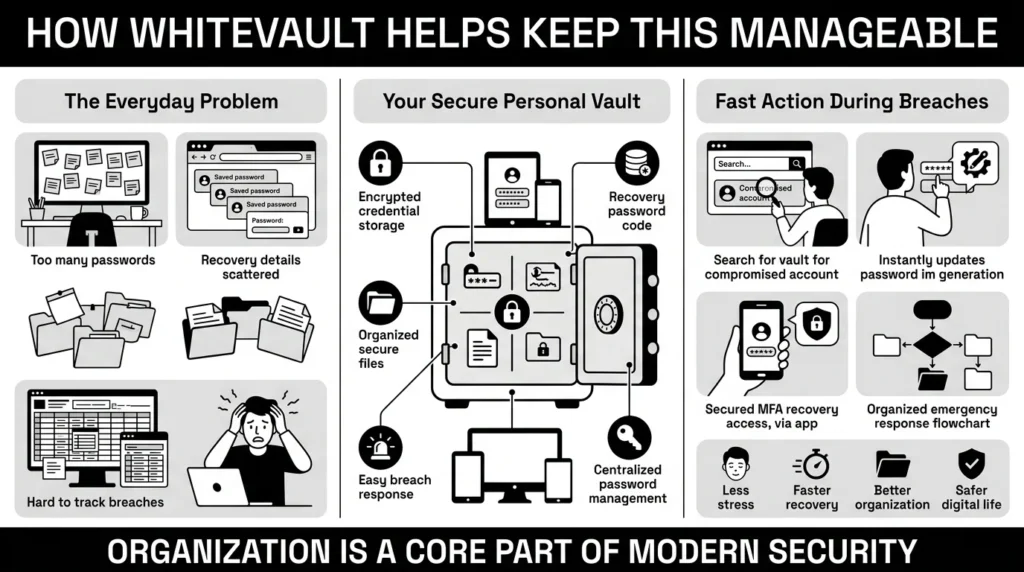
This is where WhiteVault steps in. WhiteVault is a secure personal vault for credentials, passwords, recovery details, private notes, and important documents. We help everyday people save, remember, and protect what matters without turning personal security into a confusing project.
When you rely on scattered notes, random computer folders, or browser-saved passwords, understanding your overall password hygiene is nearly impossible. Browser storage can be vulnerable to infostealing malware, and physical notes can easily be lost. WhiteVault provides a simple way to organize passwords and sensitive files in one encrypted place. Instead of trying to remember fifty different passphrases, you only need to remember one strong master password to unlock your vault.
More importantly, having your accounts organized makes it incredibly easy to detect compromised passwords and take swift action. If you hear about a breach at a specific retailer or hotel chain, you can simply search your vault, find that exact account, and update the password. You can also securely store the recovery codes for your two-factor authentication right next to your login details, ensuring you never get locked out during a family emergency, a travel day, or a payment issue.
Versus trying to remember everything, you can store credentials, recovery details, and important information securely in one encrypted place. Versus document chaos, you can keep important files organized, searchable, and available. It is simple security for everyday life, built for people who want strong protection without daily friction.
Habits That Keep You Safer Over Time
Better security rarely comes from one dramatic change. It usually comes from a few simple habits repeated consistently over time. When you stop striving for perfect security and start aiming for practical, sustainable habits, the entire process becomes much easier to maintain.
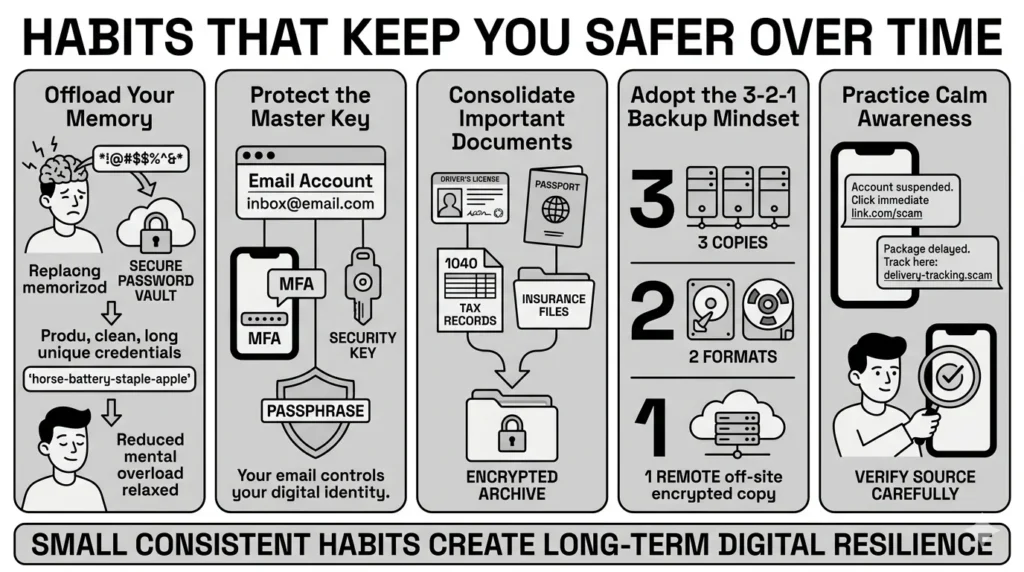
- Offload your memory: Stop trying to memorize everything. Offload that burden to your secure personal vault. By using a vault, you naturally break the habit of reusing passwords because you no longer have to remember them. You can let the system store long, complex credentials for you.
- Protect the master key: Treat your primary email account like a vault of its own. Give it the strongest unique passphrase you can create and protect it with an authenticator app or a hardware security key.
- Consolidate your documents: Your laptop could crash, or you could misplace a physical folder. Keep digital copies of your IDs, passports, tax records, insurance files, and property documents in a secure, encrypted, and searchable location. If a family member asks where a vital document is, you will know exactly which device has the latest copy and how to retrieve it securely.
- Adopt the 3-2-1 backup mindset: While usually applied to IT systems, the 3-2-1 backup rule works for personal records too. Keep multiple copies of critical files, ensure they are on different mediums, and keep one secure copy off-site or in an encrypted digital vault.
- Practice calm awareness: Scams, phishing texts, and credential leaks will continue to happen. When you receive a text message that looks like a real delivery alert or a bank warning, pause. Do not click. Go directly to the source. When you adopt these steady habits, you build long-term digital resilience.
Conclusion
We all have a lot to manage in our digital lives, and dealing with a data breach should not be a source of panic. When you know how to detect compromised passwords, you take back control. You stop reacting with fear and start acting with clarity. By replacing reused logins with strong, unique passphrases, turning on two-factor authentication, and securing your recovery codes, you drastically reduce your risk of identity theft and account takeover.
Better security rarely comes from one dramatic change. It usually comes from a few simple habits repeated consistently: unique passwords, safer recovery details, organized documents, and a secure place to keep what matters. WhiteVault was built for exactly that. It is your trusted partner for the everyday messiness of accounts, devices, and records. Save, remember, and protect what matters, all in your secure personal vault.
Frequently Asked Questions (FAQ)
1) What does it mean when a password is compromised?
A compromised password means that your login credentials have been exposed to unauthorized people, usually through a data breach on a website or app you use. When attackers obtain these details, they may share or sell them on underground forums, leading to a severe cybersecurity risk for your personal information.
2) How can I detect compromised passwords myself?
You can identify exposed credentials by using secure, trusted services like “Have I Been Pwned,” which cross-reference your email against known breach databases. Many modern web browsers and smartphone operating systems also feature built-in security alerts that proactively notify you if a saved password has appeared in a data leak.
3) How often should I check my accounts or update my passwords?
The latest guidance from the National Institute of Standards and Technology (NIST) advises against changing passwords on a forced, regular schedule (like every 90 days). Instead, you should only change your password if you suspect it has been compromised or if you are officially notified of a breach. You should, however, perform a quick security audit on your accounts a few times a year.
4) How do I know if an email warning me about a breach is real or a scam?
Phishing emails often use urgency or fear to trick you into clicking a malicious link. If you receive an alert about a breach, do not click the links provided in the email. Instead, open your browser, navigate directly to the company’s official website, log in, and check for any official security notices or password reset prompts.
5) What is the difference between password and passphrase?
A traditional password usually relies on a complicated mix of letters, numbers, and symbols (like “P@ssw0rd1!”). A passphrase is a series of random, common words strung together (like “Camera-Yellow-Mountain-Coffee”). Passphrases are much longer, making them harder for computers to crack, but they are significantly easier for everyday people to remember and type.
6) Why is using the same password for everything so dangerous?
Using the same password across multiple accounts creates a massive password vulnerability. If one website suffers a leak, attackers will use an automated technique called credential stuffing to try that exact same password on your email, banking, and shopping accounts. One leak can suddenly ruin your digital life.
7) What is the safest way to store my two-factor authentication recovery codes?
Recovery codes should never be kept in an unencrypted phone note, a draft email, or a physical sticky note on your desk. The safest approach is to store these essential backup keys alongside your important documents in an encrypted, secure personal vault where they are protected from unauthorized access but available when you need them.
8) How does WhiteVault help me manage password security?
WhiteVault acts as your secure personal vault, giving you one encrypted place to store unique credentials, recovery details, and important documents. Instead of relying on memory, messy spreadsheets, or scattered notes, WhiteVault organizes your private information so you can easily update passwords after a breach and access what you need without daily friction.


