
Think about the password you type most often. You probably use it for your primary email, your favorite streaming app, and a handful of old online stores you haven’t visited in years. You know you shouldn’t reuse it, but memorizing dozens of unique passwords feels impossible. But when one of those minor websites inevitably suffers a data breach, cybercriminals use automated software to test that exact same password on your most important accounts. Effective credential stuffing prevention matters because a small, forgotten breach should never unlock your entire digital life. At WhiteVault, we help people save, remember, and protect what matters, so security feels manageable instead of overwhelming.
Quick Answer Credential stuffing is when cybercriminals use a leaked password from one website to automatically break into your other accounts. You stop it by using unique passwords for every account and turning on multi-factor authentication (MFA).
Why This Topic Matters for Everyday Security
Most of us juggle dozens, if not hundreds, of online accounts. From utility bills and streaming services to medical portals, shopping sites, and tax software, the digital load is heavy. A parent managing school forms, health insurance cards, and family passwords cannot realistically be expected to remember 50 different complex passwords off the top of their head. Because of this perfectly normal human limitation, password reuse is incredibly common.
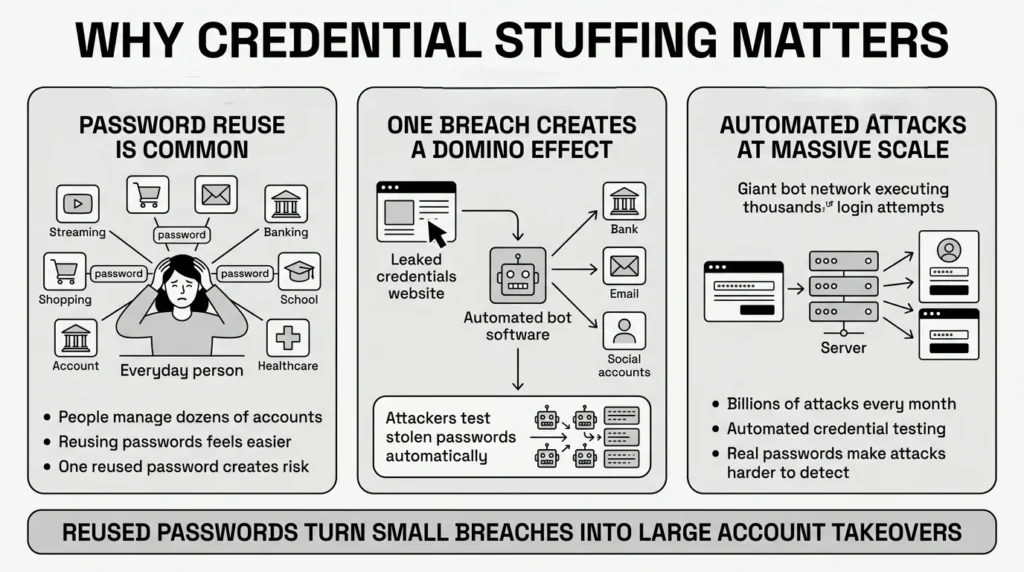
A recent 2025 Bitwarden survey found that 72% of Gen Z users reuse passwords across multiple sites, and the 2025 Verizon Data Breach Investigations Report (DBIR) noted a staggering 51% password reuse rate across all corporate and personal services. We do this to survive the modern internet without daily frustration, but unfortunately, it creates a massive vulnerability.
When we talk about credential stuffing prevention, we are really talking about protecting your identity from the domino effect of these reused passwords. Imagine you use the same email and password combination for a small local flower shop and your main bank account. If that flower shop experiences a data breach, cybercriminals do not just want to buy free flowers. They take that leaked list of emails and passwords, which is often sold on the dark web, and feed it into automated software.
The volume of this threat is staggering. The Identity Theft Resource Center (ITRC) Data Breach Report noted record-breaking numbers of compromised personal records in 2025, providing massive fuel for these attacks. Furthermore, research from the Akamai 2025 State of the Internet Report shows a massive surge in malicious bot traffic specifically targeting login pages. This software rapidly tests those exact same credentials across thousands of high-value websites. According to cybersecurity research from the Fortinet Global Threat Landscape Report, there are an estimated 26 billion automated stuffing attempts globally every month.
This is not about a hacker sitting in a dark room manually guessing your pet’s name; it is a highly industrialized, automated process. If you use the same password for Netflix, your primary email, and your financial institutions, a single data breach exposes everything that matters to you.
What Usually Goes Wrong: The Anatomy of a Compromised Account
We have all reused passwords at some point. It is human to want something familiar, especially when you are in a rush to pay a bill, check a message, or buy a gift online. You might even use a simple pattern, like adding a “1!” to the end of a word you know well. But relying purely on human memory creates structural weaknesses in your digital life.
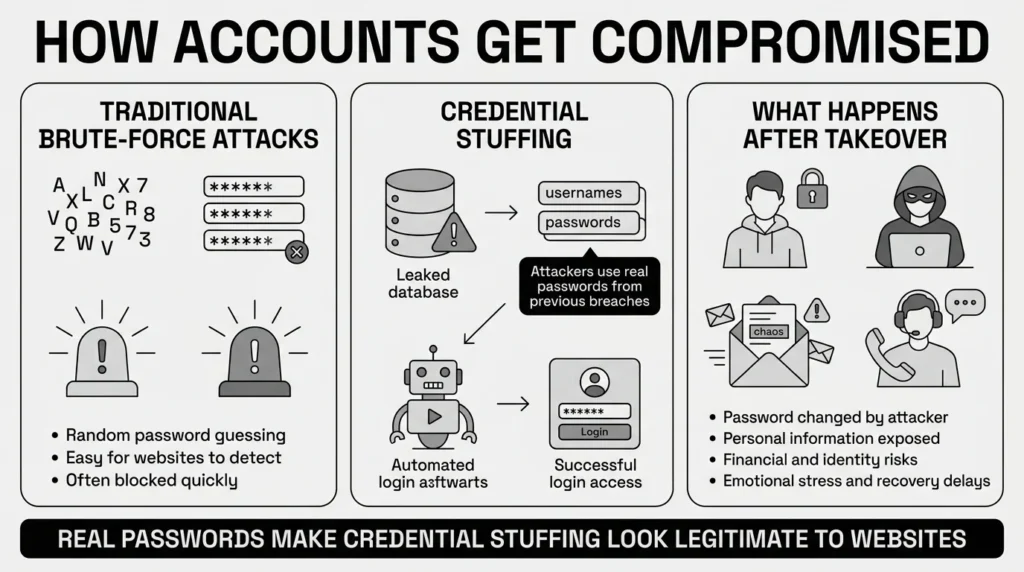
The biggest hurdle in credential stuffing prevention is that attackers use real passwords, which makes the attacks incredibly hard for websites to spot. Traditional brute-force attacks try to guess passwords by randomly cycling through millions of letters and numbers. This is loud, obvious, and quickly triggers a website’s basic login security, locking the attacker out.
Credential stuffing is completely different. Attackers use actual usernames and passwords exposed in previous data breaches, or gathered by highly sophisticated “infostealer” malware—a rapidly growing threat highlighted in the SpyCloud 2025 Identity Exposure Report. Because the credentials are correct, the automated logins look completely legitimate to the website. The system sees the right password and simply lets the criminal right in.
When these automated attacks succeed, the result is an account takeover. The IBM Cost of a Data Breach Report 2025 consistently ranks stolen or compromised credentials as the most common initial attack vector. Imagine a professional locked out of a work-related account because an attacker got in first, changed the password, and the recovery code was buried in an old, disorganized email folder. Suddenly, you are scrambling to prove your identity, waiting on hold with customer support, and worrying about what private information the attacker is viewing or downloading.
The emotional and practical toll of an account takeover is high. The FTC’s 2025 Consumer Sentinel Network noted soaring reports of imposter scams and identity theft directly tied to compromised accounts. Furthermore, the Javelin Strategy & Research 2025 Identity Fraud Study highlights billions of dollars in losses driven largely by these types of account takeovers. When you rely on memory, you naturally simplify your passwords, which plays right into the hands of these automated crime syndicates.
The Safer Way to Handle It: Breaking the Cycle
The secret to successful credential stuffing prevention is not trying to try harder at memorizing long, confusing strings of text. Willpower is not a security strategy. The solution is using better tools and smarter systems so you do not have to rely on your memory at all.
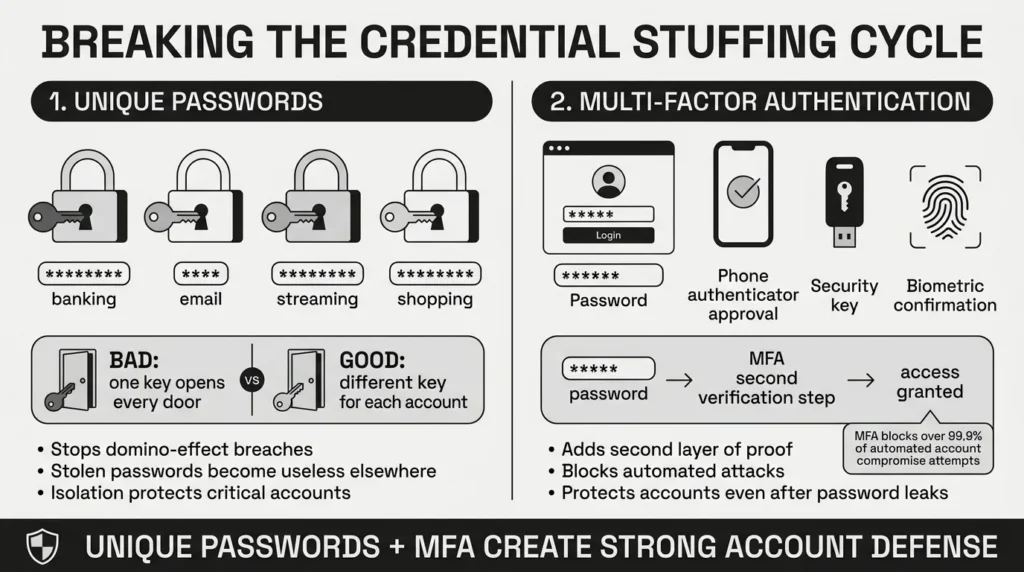
The standard for modern credential security relies on two fundamental principles: creating isolation between your accounts and adding a secondary layer of proof.
First, unique passwords stop the domino effect dead in its tracks. If an attacker gets your password from a minor website breach, it will be completely useless on your email or banking app because those sites use entirely different, highly complex passwords. This strategy is the ultimate defense against credential reuse. If the key only opens one door, a stolen key is not a global disaster.
Second, strong authentication protocols add a crucial checkpoint. Adding multi-factor authentication (MFA) ensures that even if a cybercriminal has your password, they are still locked out. MFA requires a secondary piece of evidence—like a time-sensitive code from an authenticator app on your phone, a physical security key, or a biometric approval prompt.
How effective is this? Incredibly. Microsoft’s 2025 Digital Defense Report confirms that enabling multi-factor authentication blocks over 99.9% of automated account compromise attacks. Furthermore, the Open Worldwide Application Security Project (OWASP) Top 10 for 2025 clearly highlights that enforcing MFA and utilizing password managers are the most critical ways to mitigate authentication failures. By combining unique passwords with MFA, you build a resilient defense that automated bots simply cannot break through.
Step-by-Step: What To Do Next to Secure Your Digital Life
You do not need to fix your entire digital footprint in one afternoon. Taking on too much at once is a quick way to feel overwhelmed and abandon the project entirely. Here is how to put credential stuffing prevention into practice gradually over the next few weeks:
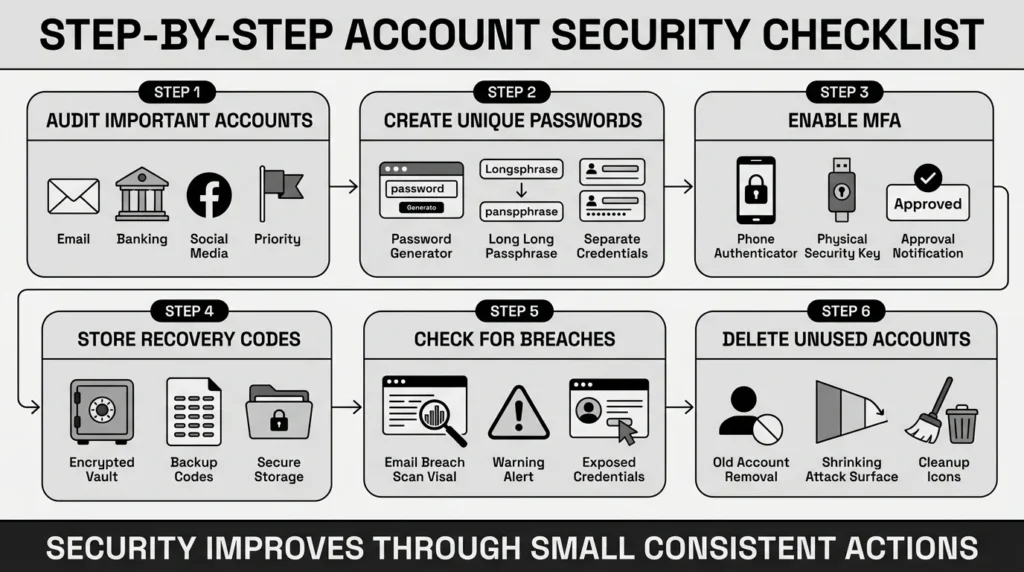
- Audit Your Most Important Accounts First: Do not start with your old forum accounts or unused shopping apps. Start with your primary email, banking, and major social media accounts. Your primary email is the master key to your digital life—if someone controls it, they can reset the passwords for everything else. Secure it first.
- Create Strong, Unique Passwords: Update passwords for those key accounts. Stop using minor variations of the same word. Use long, random passphrases or let a secure tool generate them for you. This perfectly aligns with modern NIST SP 800-63B guidelines for strong password policies, which prioritize length and uniqueness over complex, hard-to-remember character rules.
- Enable Multi-Factor Authentication (MFA): Turn on multi-factor authentication for any account that offers it, following the strong urging of the Cybersecurity & Infrastructure Security Agency (CISA) in their “Secure Our World” campaign. Authenticator apps are generally safer than text messages (SMS), as SMS messages can occasionally be intercepted. However, if text messages are the only option a website offers, they are still significantly better than no MFA at all.
- Organize Your Recovery Details: When you turn on MFA, websites almost always give you backup recovery codes. These are essential if you ever lose or break your phone. Do not leave these sitting in your downloads folder or screenshot them into an unorganized photo album. Store them securely alongside your other important documents.
- Check for Exposed Credentials: Use free, highly respected tools like Have I Been Pwned to see if your email address has been part of a known data breach. If it has, change the password for that specific account immediately. Critically, you must also change the password on any other account where you might have reused that exact same login.
- Clean Up Old Accounts: The fewer accounts you have, the smaller your risk footprint. Take an hour a month to delete accounts you no longer use, effectively removing those credentials from the internet entirely.
How WhiteVault Helps Keep This Manageable
Changing every password sounds exhausting if you are trying to keep them all in your head, written on sticky notes around your desk, or saved in vulnerable, unencrypted spreadsheets. Using a dedicated, reliable tool makes credential stuffing prevention automatic and calm, turning a massive chore into a quiet background process.
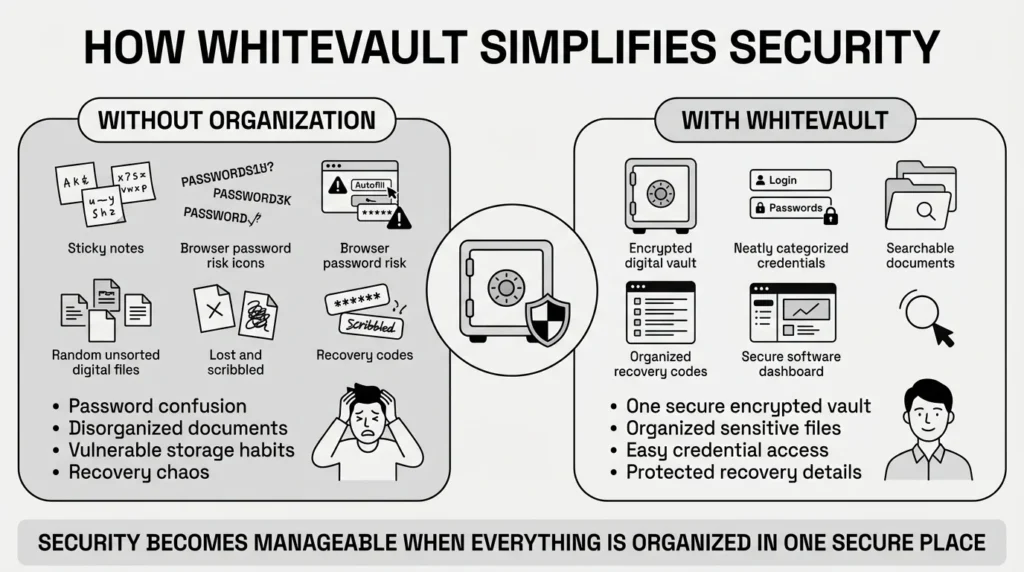
WhiteVault is a secure personal vault specifically designed for credentials, passwords, recovery details, and important documents. Instead of dealing with the stress of a forgotten password during a rushed checkout, or a frantic search for a lost passport scan right before a trip, you store everything in one encrypted, easily searchable place.
We provide strong account protection without the technical headache. Here is how WhiteVault helps you manage the mess:
- Versus trying to remember everything: Store credentials, recovery details, and important information securely in one encrypted place. You only need to remember your one master password, and WhiteVault handles the rest.
- Versus sticky notes and browser storage: Use stronger protection with easy access when you need it. Browser-saved passwords can often be extracted by the malware frequently mentioned in 2025 security reports, whereas a dedicated encrypted vault provides a much stronger defensive layer.
- Versus document chaos: Keep important files—like health insurance policies, tax records, and family ID scans—organized, searchable, and available exactly when you need them. A student trying to store passport scans, university logins, and financial aid documents can keep everything perfectly sorted in one location.
- Versus scattered recovery details: Save backup codes, recovery keys, and security answers where you can find them later. If a website asks for your mother’s maiden name, you can securely store a nonsensical, unguessable answer in your vault and never worry about forgetting it.
- Versus security complexity: Use a simple interface backed by strong protection. You get the benefits of advanced encryption without needing to understand the mathematics behind it. Peace of mind for your digital life should be accessible to everyone.
Habits That Keep You Safer Over Time
Sustainable credential stuffing prevention means making minor adjustments to your digital routine, rather than striving for exhausting perfection. Good security should empower your daily life, not hinder it or slow you down.
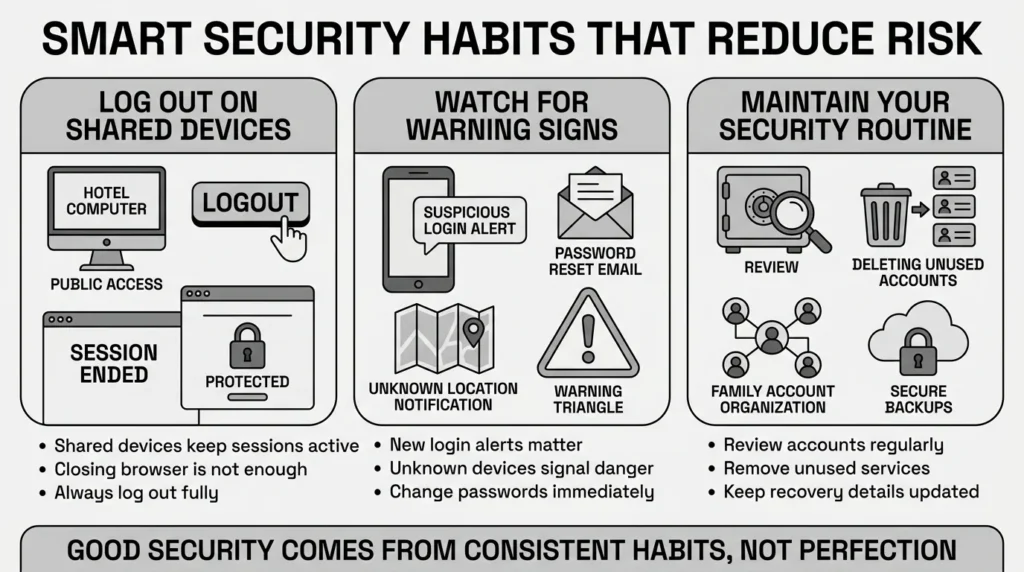
First, practice good session management. If you log into your email or bank on a public computer, a hotel business center, or a device you do not own, always log out completely when you are finished. Closing the browser window is not enough to clear your session.
Second, pay attention to basic anomaly detection. If you receive an email alert about a “new login” or a “password reset request” from a country you have never visited or a device you do not recognize, do not ignore it. That is a clear sign someone is testing your credentials. Immediately log into that account (by typing the web address yourself, never by clicking a link in a suspicious email) and change the password.
Finally, apply these security measures holistically to your family’s digital life. A retiree organizing medical records for estate planning or a freelancer juggling client portals, tax files, and banking credentials needs the same reliable level of access control. Following these security best practices keeps your private information out of the wrong hands. Regularly review your vault, delete accounts you no longer use, and ensure your most important files are securely stored and properly backed up.
Conclusion
Improving your digital safety does not happen overnight, and it does not require a complete overhaul of your life. Effective credential stuffing prevention does not require a computer science degree; it simply requires a shift away from reusing the same few passwords out of convenience. Better security rarely comes from one dramatic change. It usually comes from a few simple habits repeated consistently: using unique passwords, creating safer recovery details, keeping organized documents, and finding a secure place to keep what matters.
WhiteVault was built for exactly that. Save, remember, and protect what matters, all in your secure personal vault. Start organizing your digital life today. Trade the stress of forgotten passwords for the peace of mind you deserve.
Frequently Asked Questions (FAQ)
1) What is credential stuffing in simple terms?
Credential stuffing is a type of cyberattack where criminals take a list of usernames and passwords that leaked from one website’s data breach, and use automated software to “stuff” or test those exact same logins into hundreds of other websites. They are hoping you reused the same password. If you did, they automatically gain access to your other accounts without having to manually guess anything.
2) How do I know if I have been a victim of credential stuffing?
You might notice strange activity on your accounts, such as email alerts about “new logins” from devices or geographic locations you do not recognize. You might also receive unexpected password reset emails, find that your account settings or shipping addresses have been changed, or discover that you are entirely locked out of an account because the attacker changed the password before you could react.
3) How long does it take to secure my accounts against this?
You do not need to secure every account at once. Securing your top five most critical accounts—like your primary email, main bank account, cell phone provider, and primary social media—usually takes about 30 to 45 minutes. From there, you can slowly update your other passwords one by one as you naturally log into them over the coming weeks and months.
4) Is a password manager better than letting my web browser save passwords?
Yes. While letting your web browser save passwords is more convenient than relying on memory, it is generally less secure than using a dedicated encrypted vault. Modern malware specifically targets the local storage files of popular web browsers to quickly steal all your saved passwords and session cookies. A dedicated password manager encrypts your data much more robustly, keeping it isolated and safe even if your device is compromised.
5) I am not tech-savvy; what is the most important step I can take?
The absolute most important step in credential stuffing prevention is to stop using the same password across multiple websites. If you only do one thing, make sure your primary email account has a completely unique, long password that you have never used anywhere else, and turn on multi-factor authentication for that email. Because your email can reset passwords for almost all your other accounts, protecting it is your highest priority.
6) If my passwords are in a secure vault, is my privacy protected from the company that makes the vault?
Yes, reputable secure vaults use a concept called “zero-knowledge encryption.” This means your data is encrypted and decrypted locally on your own device using your master password. The company hosting the vault only ever sees scrambled, unreadable data. They cannot see your passwords, read your documents, or access your recovery codes, ensuring your total privacy.
7) Where is the best place to keep backup recovery codes and identity documents?
The safest place for backup recovery codes, scanned passports, insurance documents, and tax records is inside an encrypted digital vault. Leaving them in your email inbox, a random desktop folder, or your phone’s photo gallery leaves them highly vulnerable if your device is lost, stolen, or hacked. A secure vault keeps them organized, searchable, and strongly protected alongside your passwords.
8) How does WhiteVault help everyday people manage all these passwords and documents?
WhiteVault removes the burden of remembering complex security details. It acts as your secure personal vault, providing one heavily encrypted, easy-to-use space for all your unique passwords, recovery codes, private notes, and sensitive family documents. Instead of dealing with document chaos or relying on sticky notes, WhiteVault helps you easily save, remember, and protect what matters across all your devices without the technical friction.


