
You are logging into a health portal to download a form when the dreaded “Incorrect Password” error appears. According to the 2025 Identity Theft Resource Center (ITRC) report, 80% of consumers received a data breach notice last year, making lockouts increasingly common. It is the exact daily frustration that password training programs are built to address, but office rules rarely help our personal digital lives. Between bank portals and school forms, credential overload is exhausting. At WhiteVault, we help people save, remember, and protect what matters. Let’s simplify your security across the board.
Quick Answer Workplace security education teaches us to avoid reusing credentials, stop relying on memory, and enable multi-factor authentication. Applying these simple habits to your personal accounts protects your private information from data breaches and frustrating account lockouts.
Why Workplace Cybersecurity Education Matters for Your Personal Life
It is easy to view workplace safety rules as another corporate compliance hurdle. However, the systems we use in the office are basically the same ones we use at home. We log into web portals, verify our identities, and manage private information on a daily basis.
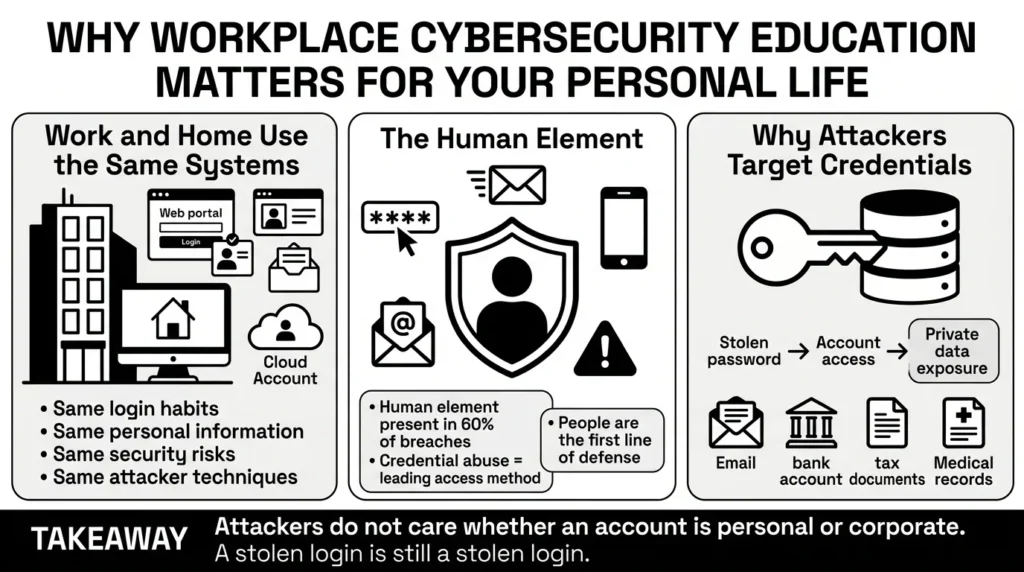
When companies invest in password training programs, they are trying to solve human error at scale. Businesses know that the easiest way for an attacker to break into a system is not by hacking a complex, multi-million-dollar firewall. The easiest way is simply by logging in with a stolen username and password.
The financial impact of these simple compromises is staggering. Data from IBM’s 2025 Cost of a Data Breach Report shows that the global average cost of a data breach is now $4.44 million, with costs in the United States soaring past $10 million. IBM also notes that over half (53%) of all breaches involve customer personally identifiable information (PII). An attacker does not care if a compromised login unlocks a corporate financial database or your personal email account. They simply want access to that valuable private data.
The Human Element in Digital Security
Data consistently show that attackers target people, not just technology. According to the 2025 Verizon Data Breach Investigations Report (DBIR), the human element is present in 60% of all breaches. We are at the forefront of digital defense.
The DBIR further highlights that credential abuse is the leading initial access vector, accounting for 22% of all breaches. This is why cybersecurity education has become mandatory in the professional world. The lessons taught in these courses—such as strong user authentication and recognizing phishing emails—are not just for protecting company secrets. They are exactly the same strategies you need to protect your bank accounts, tax documents, and family records from being compromised.
What Usually Goes Wrong: The Credential Overload Problem
Despite good intentions, corporate security rules often fail to translate well into our daily lives. People are not trying to be insecure; they are simply overwhelmed by the sheer volume of accounts they have to manage.
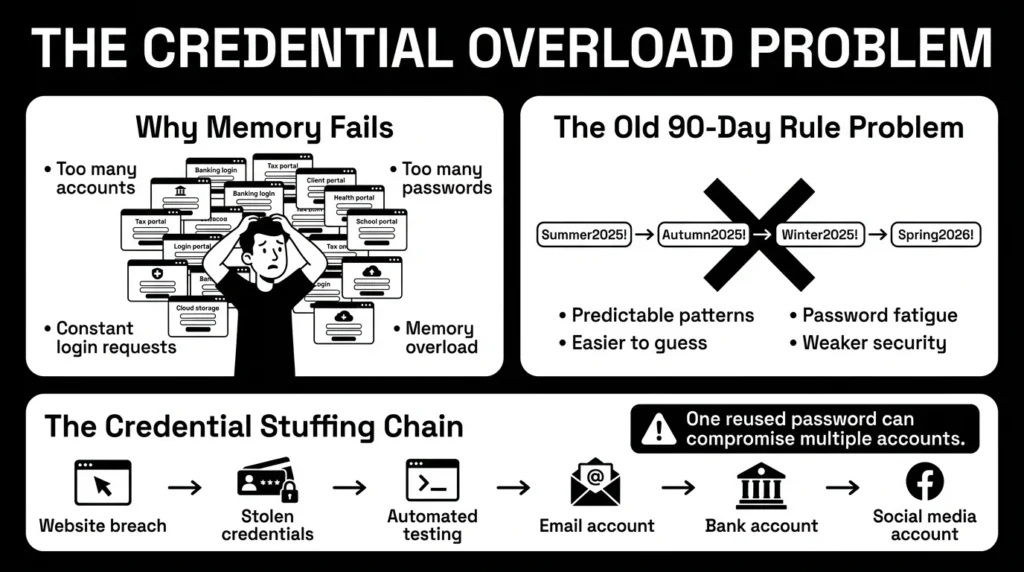
Think about a freelancer juggling client portals, tax files, banking credentials, and contracts. Most standard password training programs used to tell us to change our passwords every 90 days. This well-meaning advice actually created a massive security problem. When forced to constantly come up with new passwords, human memory reaches its limit. People naturally resort to predictable patterns, like updating “Summer2025!” to “Autumn2025!”.
This is incredibly dangerous in modern landscapes. The DBIR reveals a staggering reality: 88% of basic web application attacks now involve stolen credentials. When we rely on our memory, we make ourselves vulnerable to these automated, large-scale attacks.
The Danger of Reused Passwords
Mental fatigue leads directly to password reuse. We have all reused passwords at some point. It is human to want something familiar, especially when you just want to quickly log in and pay a bill.
The problem with this habit is a highly effective tactic called credential stuffing. OWASP guidance on credential stuffing explains how attackers use automated software to test one stolen email and password combination across thousands of websites. In fact, recent analysis of single sign-on provider logs shows that credential stuffing accounts for 19% of all authentication attempts on a median daily basis.
If you used your favorite password for a local online flower shop, and that shop suffers a data breach, attackers will immediately try that exact same email and password combination on major banks, email providers, and social media platforms. This ripple effect is why a person who reused one password often finds themselves dealing with multiple compromised accounts at once. Proper access control training emphasizes that every single account needs its own unique key. But without a system for proper credential management, remembering all those unique keys is impossible.
The Safer Way to Handle Your Accounts
Thankfully, the security industry has realized that punishing users with impossible memory tasks does not work. The standards have evolved, and the advice is now much more practical for everyday people.
The best modern password training programs focus on making security practical rather than punishing. They recognize that if a security rule is too hard to follow, people will simply find a workaround, like writing their passwords on a sticky note attached to their monitor or saving them in an unencrypted spreadsheet.
1) Length Matters More Than Complexity
One of the biggest shifts in security best practices comes from the National Institute of Standards and Technology. According to the updated NIST guidelines on digital identity, the rules for creating a strong password have completely changed.
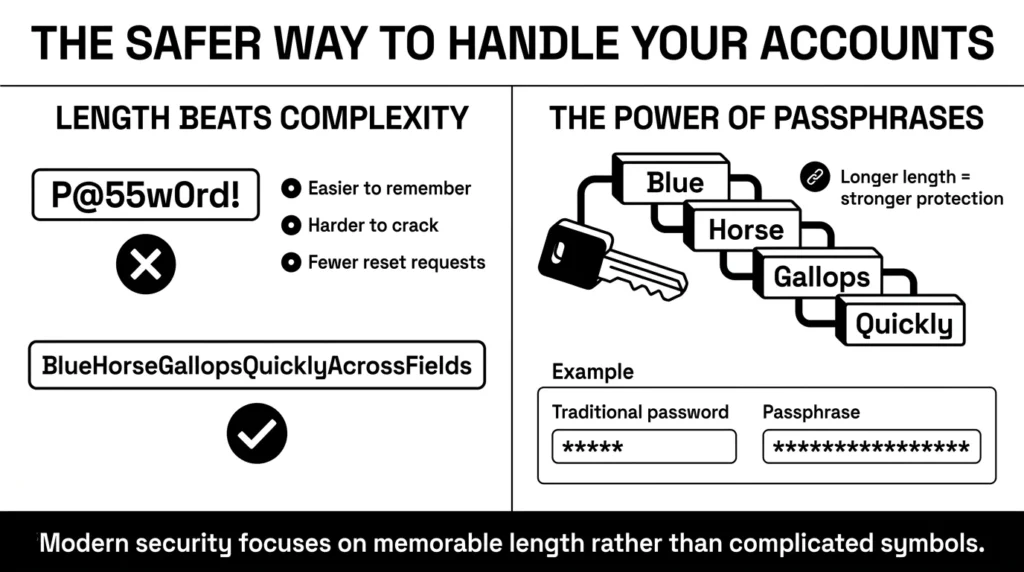
NIST now advises organizations to drop the arbitrary 90-day password reset rules. They also recommend removing the strict requirements for special characters, numbers, and mixed-case letters. Instead, modern password safety awareness focuses almost entirely on length.
A password must be an absolute minimum of 8 characters, but security experts highly recommend 15 characters or more. Why? Because a long string of normal words is mathematically much harder for a computer program to guess than a short, complicated jumble of symbols.
2) The Power of Passphrases
This shift brings us to the passphrase. A passphrase is a sequence of random words strung together, such as “BlueHorseGallopsQuickly.”
A passphrase is incredibly strong because of its length, yet it remains easy for a human brain to picture and remember. This simple change from complex passwords to long passphrases is one of the most effective ways to upgrade your personal security without adding stress to your daily routine.
Step-by-Step: Upgrading Your Personal Security Habits
You do not need to sit through long password training programs to start protecting your personal accounts today. By taking a few intentional steps, you can significantly reduce your risk of identity theft and account lockouts.
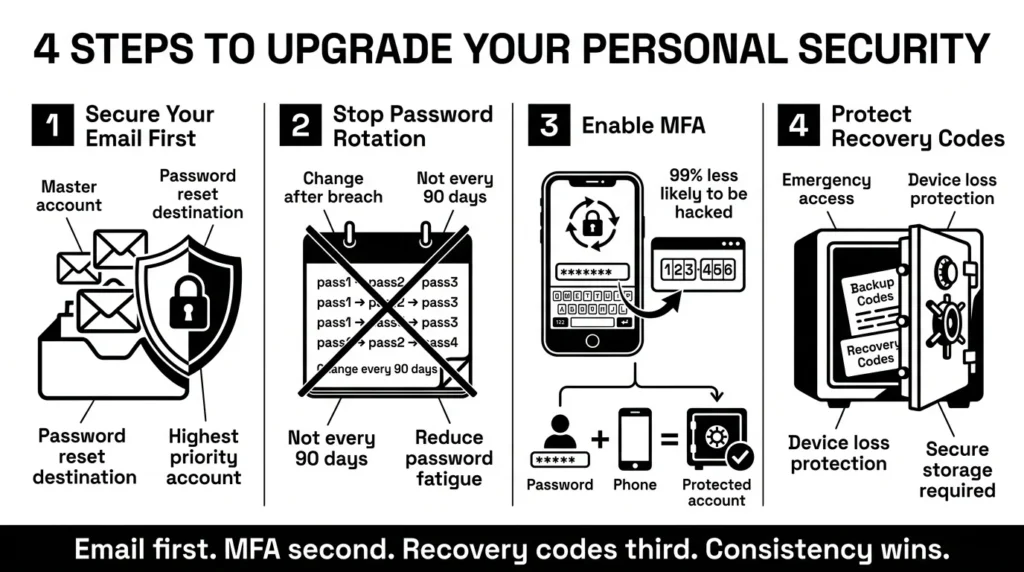
Here is a practical, step-by-step guide to securing your digital life.
Step 1: Secure Your Primary Email Account First
If you only secure one thing today, make it your primary email account. Your email is the master key to your digital life. If you forget a password for your bank, streaming service or health portal, where does the reset link go? It goes straight to your email inbox. If an attacker gains access to your email, they can routinely reset passwords for nearly every other account you own. Ensure your email account has a long, unique passphrase that you do not use anywhere else.
Step 2: Stop the Rotation Routine
Unless you receive a notification that a specific account has been involved in a data breach, you do not need to change your passwords every few months. Constantly changing your credentials leads to weaker passwords and more frustration.
When a breach does happen, you must act quickly. IBM’s 2025 data shows that breaches involving stolen credentials take an average of 246 days to identify and contain. This means attackers often have access to systems for months before anyone notices. Create strong, unique passphrases for your most important accounts and leave them alone, but update them immediately the moment a genuine security alert requires a change.
Step 3: Turn On Multi-Factor Authentication (MFA)
A strong password is essential, but it is no longer enough on its own. You need a second layer of defense, which is where multi-factor authentication (MFA) comes in. According to CISA guidance on multi-factor authentication, enabling MFA makes you 99% less likely to be hacked.
MFA requires two things to log in: something you know (your password) and something you have (usually your smartphone). Even if an attacker steals your password in a data breach, they cannot access your account without also having physical possession of your phone to receive the temporary code. Turn on MFA for your email, banking, and primary social media accounts to ensure strong data breach prevention.
Step 4: Protect Your Recovery Codes
When you set up MFA, platforms will often give you a list of backup recovery codes. These are incredibly important. We frequently hear stories of a professional locked out of a work-related account because their smartphone broke, and their one recovery code was saved in an old email they could no longer access.
Do not rely on taking screenshots of these codes and leaving them in your camera roll. Treat these recovery codes like a digital birth certificate. They need to be stored in a secure, encrypted location where you can easily find them during an emergency.
How WhiteVault Helps Keep This Manageable
We know that setting unique passphrases and managing recovery codes sounds like a lot of work. While corporate password training programs teach you the rules, they rarely give you the tools to manage your personal life. That is why we built WhiteVault.
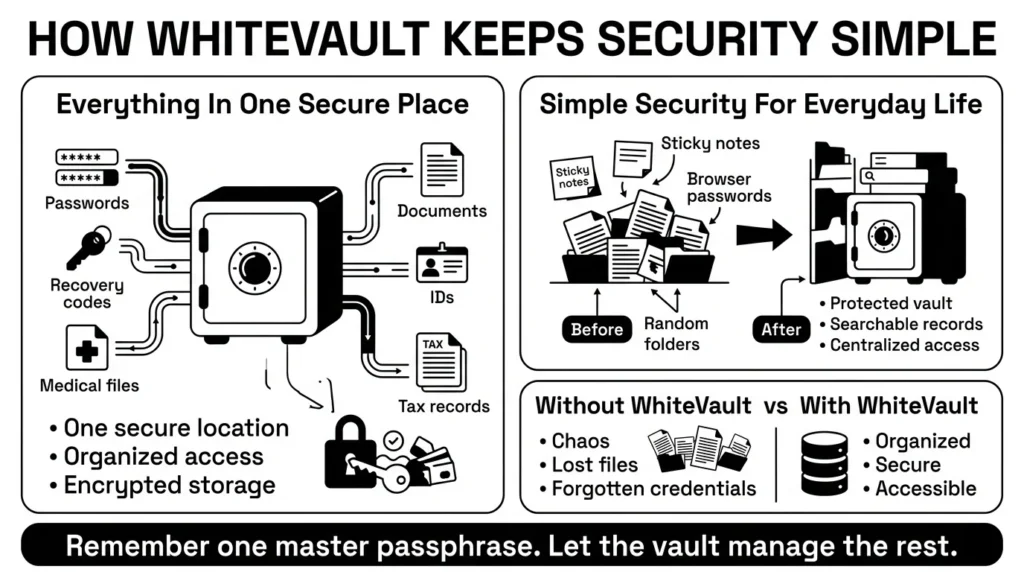
Everything Important, One Secure Place
WhiteVault is a secure personal vault for credentials and important documents. We built it as a safer alternative to sticky notes, browser-saved passwords, random computer folders, and memory-based systems.
Versus trying to remember everything, WhiteVault allows you to store your login credentials, passphrases, and recovery details securely in one encrypted place. You only need to remember one strong master passphrase to unlock your vault, and the system remembers the rest for you.
Simple Security for Everyday Life
Digital security goes beyond passwords. True identity protection means knowing exactly where your important documents are when you need them. The risk to these documents is increasing. The ITRC reported a record high of 3,332 data compromises in 2025, with Social Security numbers involved in two-thirds of reports.
Versus document chaos, WhiteVault gives you a clear, organized space to keep digital copies of your passports, tax records, insurance files, and medical records. If your laptop crashes, you will not lose access to the files you rely on most. WhiteVault provides peace of mind through simple, strong protection, keeping everything organized, searchable, and available only to you.
Habits That Keep You Safer Over Time
Better security rarely comes from one dramatic overhaul of your digital life. It usually comes from a few simple habits repeated consistently. The ultimate goal of all password training programs is to build habits you can actually stick with over the long haul.
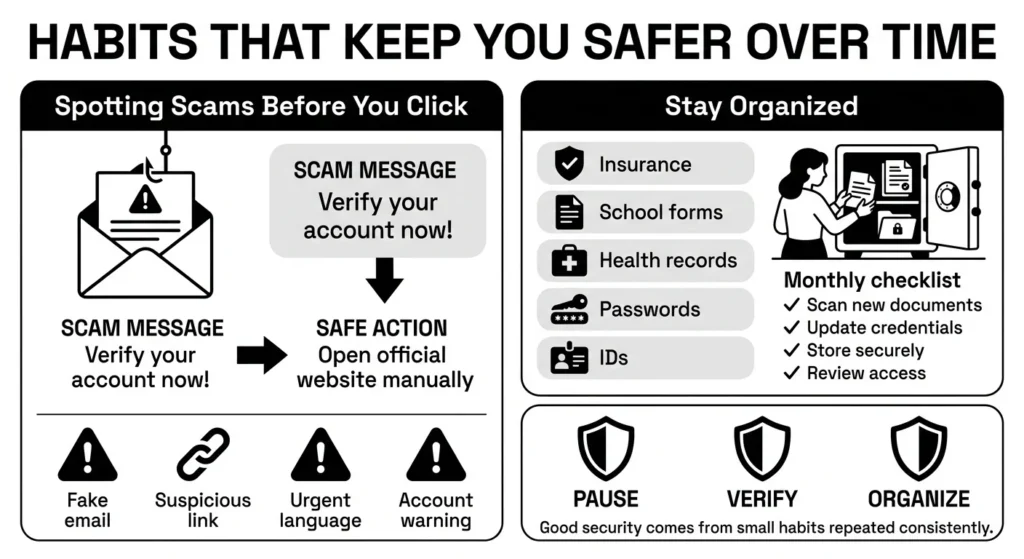
1) Spotting Scams Before You Click
One of the most valuable habits you can develop is pausing before you act. Phishing emails and scam text messages are designed to create a false sense of urgency. Phishing remains a massive threat, accounting for 16% of all data breaches according to recent IBM research. They want you to panic and click a link to “verify your account” before you have time to think.
According to FTC consumer guidance on avoiding scams, legitimate organizations will never demand your password or full social security number via an unexpected text or email. If you get an alarming message from your bank, do not click the link. Instead, open a new browser window, type in the bank’s website yourself, and log in securely. Building this one habit is the foundation of successful security awareness campaigns.
2) Organizing for the Unexpected
Finally, make organization a regular habit. Consider a parent managing school forms, health insurance cards, and family passwords. When an emergency happens, the last thing they need is the stress of hunting through physical drawers and old email chains to find an insurance policy number.
Take 10 minutes once a month to scan new important documents and update your credentials in your secure vault. By keeping your private information organized, you remove the daily friction and anxiety from your digital life.
Conclusion
Managing passwords, accounts, and private documents does not have to be a source of constant stress. With a 79% increase in data compromises over the last five years, taking control of your digital footprint has never been more vital. By moving away from reused passwords, enabling multi-factor authentication, and stopping the endless cycle of 90-day password resets, you take back control.
You do not need a degree in IT or mandatory password training programs to keep your family’s digital life safe. You just need a practical system that works with your daily routine, not against it. Better security comes from consistent habits and having a trusted place to store what matters most. WhiteVault was built for exactly that. Save, remember, and protect what matters, all in your secure personal vault.
Frequently Asked Questions (FAQ)
1) What are password training programs?
In a corporate setting, password training programs are educational modules designed to teach employees how to securely create, manage, and store their login credentials. They aim to reduce human error, prevent data breaches, and ensure employees understand how to protect sensitive company information from cyber threats like phishing and credential stuffing.
2) How do I know if a password is actually strong enough?
Modern security standards prioritize length over complexity. A strong password should be at least 15 characters. You can easily achieve this by creating a “passphrase”—a string of three or four random words (like “CoffeeTableOceanBreeze”). Passphrases are long enough to stop automated hacking software but much easier for you to remember than a short jumble of symbols.
3) How often should I update my passwords?
You only need to update your password if you have reason to believe the account was compromised in a data breach, or if you shared the password with someone who should no longer have access. Constantly rotating passwords every few months leads to password fatigue and weaker security habits.
4) Is saving passwords in my web browser safe for beginners?
While browser-based storage is better than reusing the same password everywhere, it is not the most secure option. If someone gains access to your unlocked computer, they can often view or export your browser-saved passwords. Using a dedicated secure personal vault provides much stronger encryption and better protection for your credentials.
5) How does multi-factor authentication (MFA) protect my privacy?
MFA adds a critical second layer of defense. If a hacker steals your username and password, they still cannot access your private information because they do not have the second factor—such as the temporary code sent to your physical smartphone. It acts as a digital deadbolt that stops unauthorized access even if your password leaks.
6) What should I do if I think I clicked a phishing link?
Do not panic. Immediately disconnect your device from the internet to stop any potential malware from communicating. Then, using a different, safe device, log into the account you believe was targeted and change your password. If it was a financial account, contact your bank’s fraud department immediately to monitor for suspicious activity.
7) Where should I store my account recovery codes and backup documents?
Never store recovery codes in your email inbox, as that defeats the purpose of backup security. You should also avoid keeping them as raw photos on your phone. Important documents and recovery details should be stored in a dedicated, encrypted digital environment where they are organized, searchable, and protected from device loss or theft.
8) How does WhiteVault help me manage all these credentials and files?
WhiteVault acts as your secure personal vault, bringing order to digital chaos. Instead of trying to memorize dozens of passphrases or searching through messy folders for a passport scan, you store everything securely in WhiteVault. You only need to remember one strong master passphrase, giving you peace of mind and easy access to your private information exactly when you need it.


