
You upgrade your phone over the weekend, only to realize on Monday morning that your authenticator app did not transfer your codes. Suddenly, you are locked out of your corporate email, banking, and travel portals right before a major trip. When we talk about executive password security, this is the real threat: not shadowy hackers, but the everyday friction of managing access across devices. As the 2025 Microsoft Digital Defense Report highlights, attackers now frequently bypass traditional infrastructure to target user identities directly. At WhiteVault, we help people save, remember, and protect what matters, ensuring your digital life stays secure and accessible, no matter what happens to your phone.
Strong password protection for executives means using unique, complex credentials for every account, backed by multi-factor authentication, and stored in a secure personal vault. This prevents targeted attacks from turning one compromised password into a company-wide breach.
Why This Topic Matters for Everyday Security
When we talk about executive password security, the conversation often focuses on protecting corporate networks. However, business leaders are also everyday people managing families, finances, travel, and personal private information. You are a high-value target not just because of the company you lead, but because your personal and professional lives are inevitably intertwined.
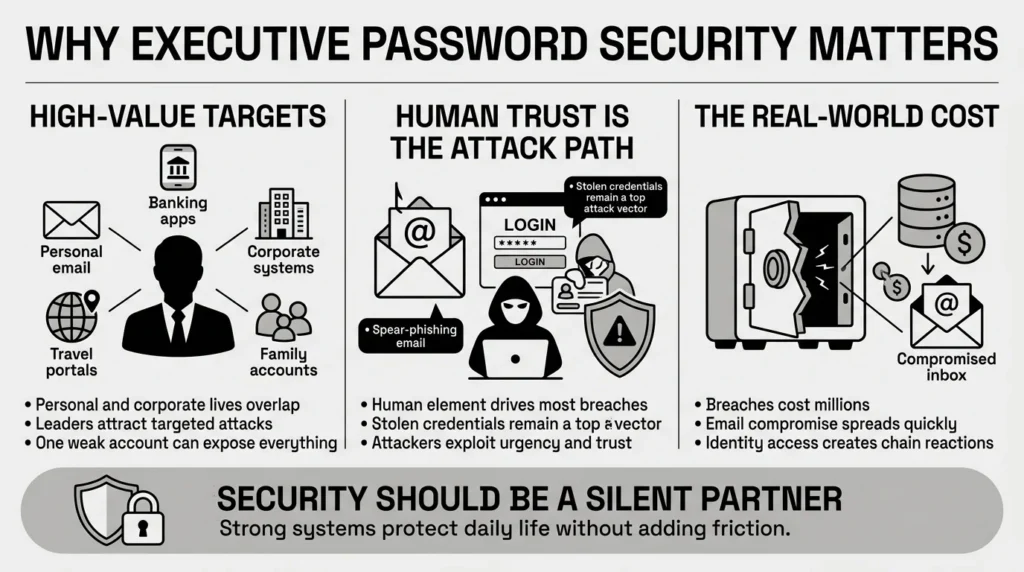
Hackers know that if they can compromise a busy leader’s personal email or banking account, they can often pivot to corporate systems. The stakes have never been higher. According to the 2025 FBI Internet Crime Report (IC3), Business Email Compromise (BEC) accounted for over $3 billion in losses, bypassing technical filters to exploit human trust. Furthermore, the 2025 Verizon Data Breach Investigations Report (DBIR) found that 68% of breaches still involve a human element, with stolen credentials serving as a leading initial access vector.
The financial fallout of these compromised accounts is staggering. The 2025 IBM Cost of a Data Breach Report reveals that the average breach cost in the U.S. hit an all-time high of $10.22 million, with attacks originating from stolen credentials costing millions to remediate. Attackers use sophisticated tactics like spear-phishing—highly targeted scam emails—to trick leaders into handing over their logins.
Effective executive password security is not about forcing yourself to memorize fifty complex strings of characters. It is about acknowledging that you have a target on your back and adopting simple, modern tools that do the heavy lifting for you. Whether you are approving a million-dollar budget or just trying to log into a streaming service for family movie night, the goal is peace of mind for your digital life. Security should be a silent partner, not a daily obstacle.
What Usually Goes Wrong at the Top
A major hurdle in executive password security is simply the speed of business. Leaders are incredibly busy. When you are rushing from a flight to a meeting to a family obligation, convenience usually wins over security. We have all reused passwords. It is human to want something familiar and fast. But this natural habit creates massive vulnerabilities.
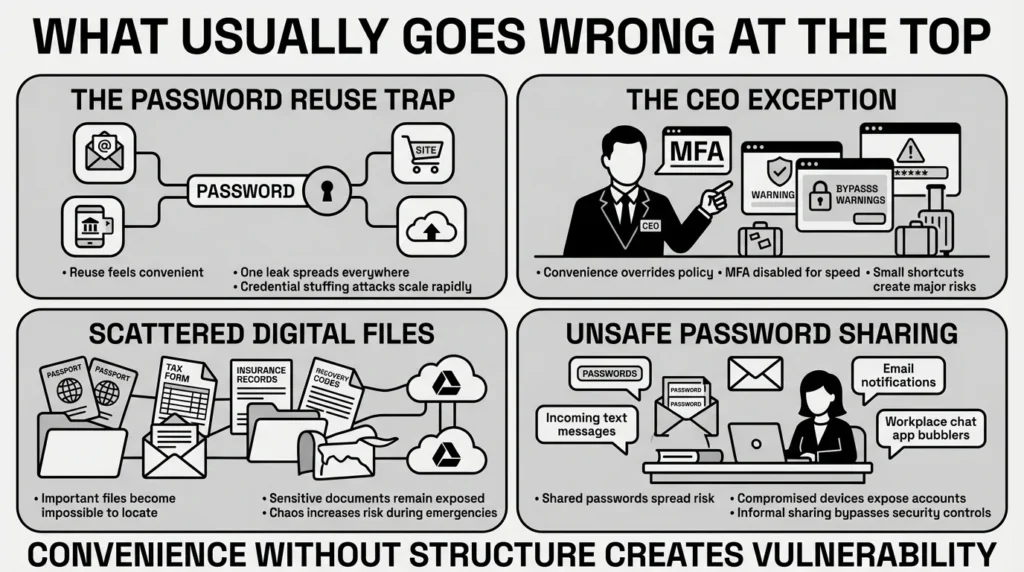
Here are a few common scenarios where things break down:
- The Password Reuse Trap: A leader might use a strong, complex password—but use it across their corporate email, their personal banking app, and an online shopping site. A 2026 cybersecurity data analysis studying billions of leaked records found that a staggering 94% of leaked passwords were reused across multiple accounts. The Open Worldwide Application Security Project (OWASP) consistently lists authentication failures, driven heavily by credential stuffing and password reuse, as a top critical security risk.
- The “CEO Exception”: Often, executives ask their IT departments to bypass strict cybersecurity policies because the rules feel too cumbersome. They might ask to turn off multi-factor authentication (MFA) on their phone because it slows them down during travel.
- Scattered Document Storage: You are filling out a background check or loan application and cannot find the latest scan of your passport. It might be in an old email, a desktop folder, or saved in a temporary cloud drive. Recent Pew Research data indicates that 69% of people feel overwhelmed by password and credential management, leading 41% to write them down and 34% to save them in easily compromised browser storage.
- Unsafe Delegation: Busy professionals rely heavily on executive assistants. A common mistake is sharing passwords or security protocols over text messages, Slack, or email. If the assistant’s device is ever compromised, the executive’s entire digital life is exposed.
The Identity Theft Resource Center’s 2025 Annual Data Breach Report tracked a record 3,322 data compromises, noting that attacks are becoming more automated and harder to detect. These habits are understandable, but they leave your most important private information exposed.
The Safer Way to Handle Privileged Account Security
True executive password security requires moving away from human memory and vulnerable spreadsheets. The safer way is to rely on systems designed to protect data while actually making logging in faster.
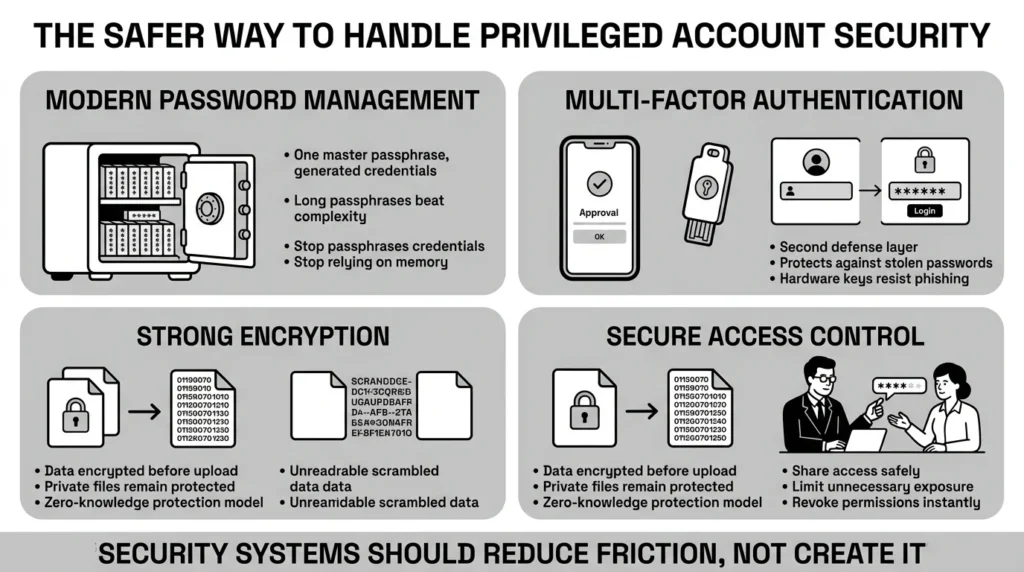
Here are the core concepts that make a difference:
1) Modern Password Management
Instead of trying to remember dozens of logins or letting your web browser save them, a password manager acts as an encrypted container. The 2025 NIST SP 800-63B guidelines recently updated their stance, recommending organizations drop outdated, frustrating complexity rules (like forcing a symbol and a number) and instead prioritize length. NIST now suggests relying on 15-character passphrases managed by secure tools. You only need to remember one strong “master” passphrase, and the system handles the rest.
2) Multi-Factor Authentication (MFA)
MFA is the most critical layer of user authentication. Even if a hacker steals your password, they cannot log in without the second factor. The Cybersecurity and Infrastructure Security Agency (CISA) highly recommends “phishing-resistant” MFA. Additionally, the FIDO Alliance champions hardware security keys and device-bound passkeys that cannot be intercepted by fake login pages, offering a massive upgrade over easily hijacked SMS text codes.
3) Strong Encryption
When storing credentials or important documents, encryption is what scrambles your data so that nobody else can read it. The Electronic Frontier Foundation (EFF) advocates strongly for zero-knowledge encryption models to protect consumer privacy. This means the data is encrypted on your device before it ever goes to the cloud. Not even the company hosting the service can see your files.
4) Secure Access Control
Access control means ensuring only the right people have access to the right accounts. Following guidance from the Privacy Rights Clearinghouse, minimizing how and where your Personally Identifiable Information (PII) is shared is critical. Instead of texting a password to your assistant, modern tools allow you to share a login securely, letting them book travel without ever seeing the actual password.
Step-by-Step: What To Do Next
Improving your executive password security does not have to happen all at once. Taking a calm, methodical approach is the best way to build habits that stick. Here is how to control your accounts and records.
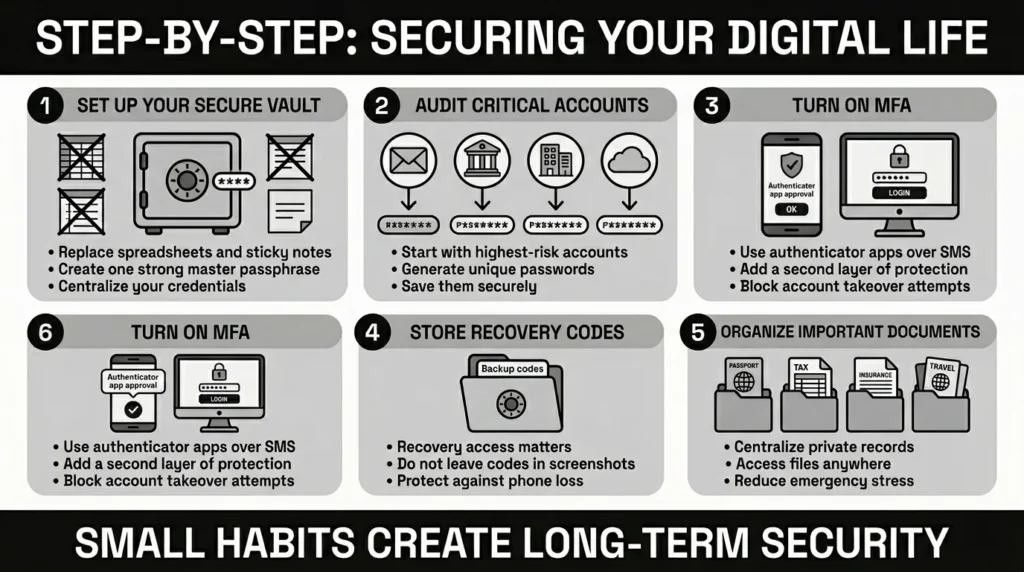
Step 1: Establish Your Secure Vault
Stop using sticky notes, Excel spreadsheets, or browser-based storage. Choose a secure personal vault to be your single source of truth. Your first task is to set up this vault using a strong, unique master passphrase. A passphrase is a string of random words (like “Purple-Coffee-Window-Mountain!”) which is much easier to remember than random characters but mathematically harder for computers to crack.
Step 2: Audit and Update Your Critical Accounts
Do not try to change every password today. Start with your highest-risk accounts:
- Your primary personal email
- Your corporate email
- Your financial and banking institutions
- Your primary cloud storage (where your photos and files live)
Go to these sites, generate a new, random 16+ character password using your vault, and save it.
Step 3: Turn on Multi-Factor Authentication
For those critical accounts, navigate to the security settings and enable multi-factor authentication. Choose an authenticator app over SMS text messages whenever possible. SMS messages can be intercepted by a tactic called SIM swapping, which is a common attack against high-profile executives.
Step 4: Secure Your Recovery Codes
When you set up MFA, the site will give you a list of backup or recovery codes. People often lose these or save them insecurely. Save these recovery codes directly into your secure personal vault. If you ever lose your phone, these codes are your only way back into your accounts.
Step 5: Consolidate Important Documents
Gather your scattered digital life. Find your passport scans, tax records, insurance policies, and estate documents. Move them out of random desktop folders and upload them into your secure vault. This ensures they are protected by strong data protection standards, yet immediately accessible from your phone when you are at the doctor’s office or the airport.
How WhiteVault Helps Keep This Manageable
When evaluating tools for executive password security, leaders need something that balances ironclad protection with a frictionless user experience. You need a system that your family can understand and that your executive assistant can use safely.
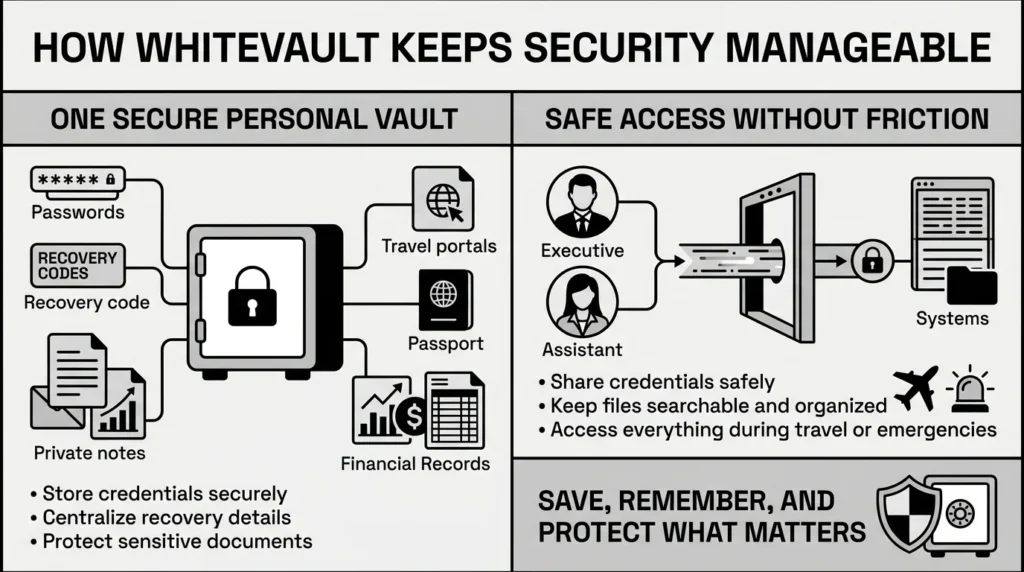
This is where WhiteVault steps in. WhiteVault is a secure personal vault for credentials, passwords, recovery details, private notes, and important documents. We built WhiteVault because trying to manage modern account overload using memory or basic browser tools is a recipe for a data breach.
Versus scattered recovery details, WhiteVault gives you one unified place to save backup codes and security answers where you can actually find them later. Versus document chaos, it keeps your important files organized, searchable, and available no matter where you are traveling.
If you need to grant your assistant access to a travel portal, you can share the credential securely through WhiteVault without ever exposing the actual password. By consolidating your digital life into one secure personal vault, WhiteVault provides simple security for everyday life. You save, remember, and protect what matters, removing the daily friction of forgotten passwords and lost files.
Habits That Keep You Safer Over Time
Sustainable executive password security comes down to a few simple habits repeated consistently. You do not need to become a cybersecurity expert; you just need to practice good digital hygiene.
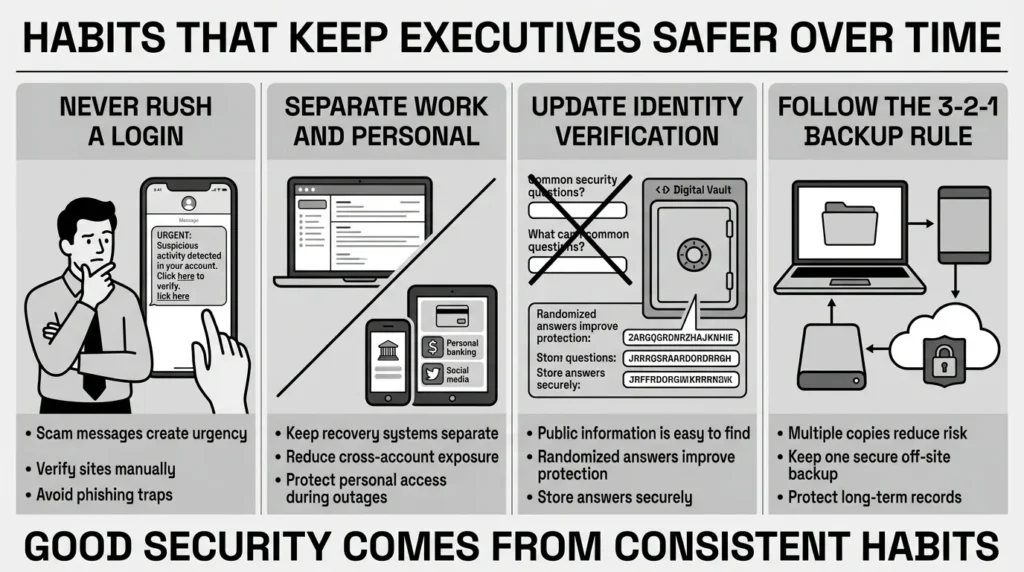
- Never rush a login: The Federal Trade Commission (FTC) warns that modern phishing and SMS text scams are incredibly convincing. If you get a frantic text message claiming your corporate account is locked or your bank account is frozen, pause. Do not click the link in the text. Open your web browser, navigate to the site manually, and log in using your vault.
- Separate work and personal: Never use your corporate email address as the recovery email for your personal bank or social media accounts. If you change jobs or your company experiences a server outage, you could lose access to your personal life.
- Keep identity verification updated: Once a year, review the security questions on your major accounts. Often, the answers to “What was your high school mascot?” or “What city were you born in?” are easily found on your public Wikipedia page or LinkedIn profile. Instead of giving real answers, use your secure vault to generate random passwords to use as the answers for these security questions.
- Embrace the 3-2-1 backup rule for documents: While your secure vault holds your daily critical files, ensure your larger data footprint (like years of family photos) is backed up. The standard rule is three copies of your data, on two different types of media, with one copy kept off-site or securely in the cloud.
Security is not a destination you reach; it is a way you travel. By recognizing the risks associated with high-profile roles and taking calm, practical steps to mitigate them, you ensure your private information remains yours alone.
Conclusion
Better security rarely comes from one dramatic change. It usually comes from a few simple habits repeated consistently: unique passwords, safer recovery details, organized documents, and a secure place to keep what matters. Leaders face unique pressures, but protecting your digital identity shouldn’t add to that stress. WhiteVault was built for exactly that. Save, remember, and protect what matters, all in your secure personal vault.
Frequently Asked Questions (FAQ)
1) What is executive password security?
It is the specific practice of protecting the digital accounts and credentials of business leaders and high-profile individuals. Because executives have access to highly sensitive corporate data and significant personal assets, they are prime targets for cyberattacks. This practice involves using unique credentials, strong encryption, and secure sharing methods to prevent unauthorized access.
2) How do I know if my current password management is dangerous?
If you know any of your passwords by heart (other than your primary computer login and your master vault passphrase), you are likely reusing them or they are too simple. Furthermore, if you store passwords in a plain text file, a notebook on your desk, or rely solely on your web browser’s built-in memory, your system is vulnerable to basic hacking methods.
3) How long does it take to secure my high-level accounts?
You do not have to do it all in one afternoon. Setting up a secure personal vault takes about ten minutes. From there, aim to update three to five of your most critical accounts (like email, banking, and main corporate logins) on the first day. This takes about twenty minutes. You can then update your remaining, lower-priority accounts gradually as you log into them over the next few weeks.
4) Is multi-factor authentication really necessary for every account?
According to national security guidelines, MFA should be enabled on any account that holds financial data, personal identity information, or corporate access. While you might not need MFA for a minor blog you read once a year, it is absolutely essential for your email, bank, and any portal related to your career or personal health.
5) What is the safest way to share passwords with an executive assistant?
Never send a password via text message, email, or a workplace chat app. The safest method is to use the secure sharing feature within a digital vault. This allows you to grant access to a specific credential. The assistant can use the tool to log in, but they do not see the underlying password, and you retain the ability to revoke their access instantly.
6) How does identity verification prevent account takeover?
Identity verification adds a layer of proof that you are who you say you are. When an attacker tries to log in from an unknown device in another country, advanced security systems will pause the login and ask for verification—such as a prompt sent to your physical smartphone or a request for a hardware security key. This stops credential stuffing attacks dead in their tracks.
7) How should I organize my digital credentials and important documents?
Keep them in one centralized, encrypted location. Avoid having some passwords in your browser, some documents in a local desktop folder, and recovery codes in your email. Use a secure personal vault and create clear folders or tags (e.g., “Financial,” “Travel Documents,” “Corporate Logins,” “Healthcare”). This ensures you can find exactly what you need during an emergency or busy travel day.
8) How does WhiteVault help executives protect their private information?
WhiteVault acts as your comprehensive secure personal vault. It replaces messy spreadsheets, unsecure text messages, and fragmented folders by providing one encrypted platform for everything important. It helps leaders generate unique passwords, store critical identity documents safely, and securely share access with family members or assistants, providing peace of mind for your digital life without technical friction.


