
You get a notification on your phone: a suspicious login attempt on your Instagram account from a city you have never visited. The panic sets in immediately as you try to remember which password you used and where else you might have used it. If you are frantically searching for social media password tips, take a deep breath. At WhiteVault, we help everyday people save, remember, and protect what matters. Protecting your accounts does not have to be a stressful project, and regaining control is simpler than you think.
Social Media Password Security: TL;DR
The best way to protect your accounts in 2026 is by using unique passphrases, enabling multi-factor authentication (MFA), and storing your credentials and recovery codes in a secure personal vault rather than relying on your memory or sticky notes.
Why This Topic Matters for Everyday Security
When we talk to people about social media password tips, they often ask why anyone would want to hack their everyday accounts. We tend to think that because we are not celebrities or large corporations, our social media profiles have no value to cybercriminals. This is a common misconception that can leave our private information exposed.
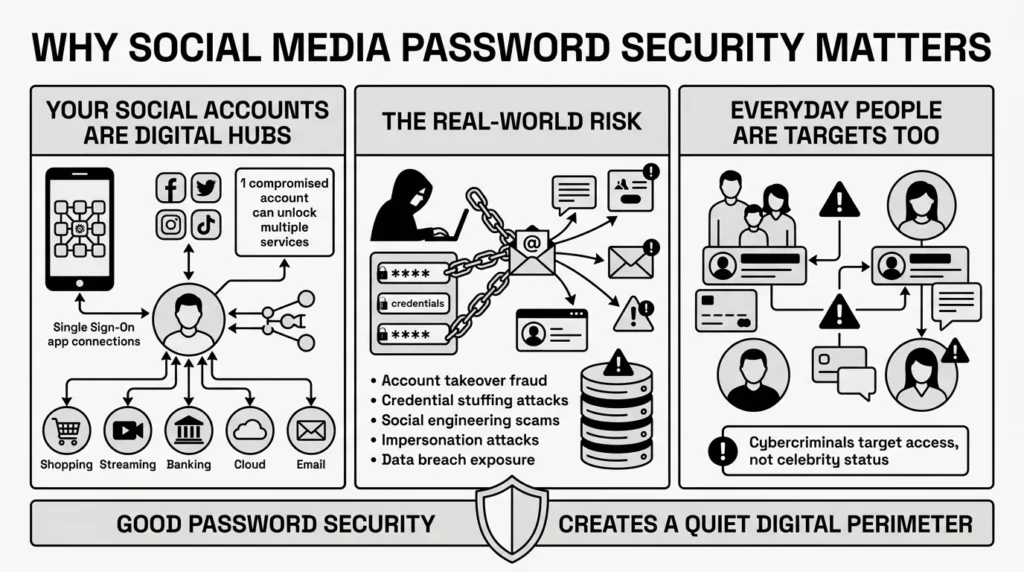
In 2026, your social media accounts are no longer just places to post vacation photos. They are highly connected hubs of personal data. Even more importantly, nearly 70% of internet users use their Facebook, Google, or Apple accounts to log into other services—a feature known as Single Sign-On (SSO). If an attacker gains access to your primary social media account, they often gain the keys to your Spotify, your favorite news sites, and sometimes even your online shopping accounts where your credit cards are saved.
The risk is not just theoretical. According to recent consumer protection data from the Federal Trade Commission (FTC), social media has become a primary staging ground for fraud, with consumers reporting over $1.4 billion in losses originating from social media scams in recent years. Attackers use compromised accounts to impersonate you, sending scam messages to your friends. Compounding this, the Identity Theft Resource Center (ITRC) reports that recent data compromises have exposed billions of credentials, fueling these targeted attacks. Furthermore, Javelin Strategy & Research’s 2025 Identity Fraud Study highlighted that account takeover (ATO) fraud affects tens of millions of consumers annually.
The Cybersecurity and Infrastructure Security Agency (CISA) emphasizes that our digital lives are deeply interconnected. Good password security is about building a quiet, reliable perimeter around your digital life. It is not about becoming a cybersecurity expert; it is about taking simple steps so a minor breach does not turn into a stressful weekend.
What Usually Goes Wrong
We have all reused passwords. It is human to want something familiar. When you are signing up for a new account at the end of a long day, creating a brand new, complex string of characters is the last thing you want to do. A common mistake we see when researching social media password tips is the over-reliance on human memory, which inevitably leads to unsafe shortcuts.
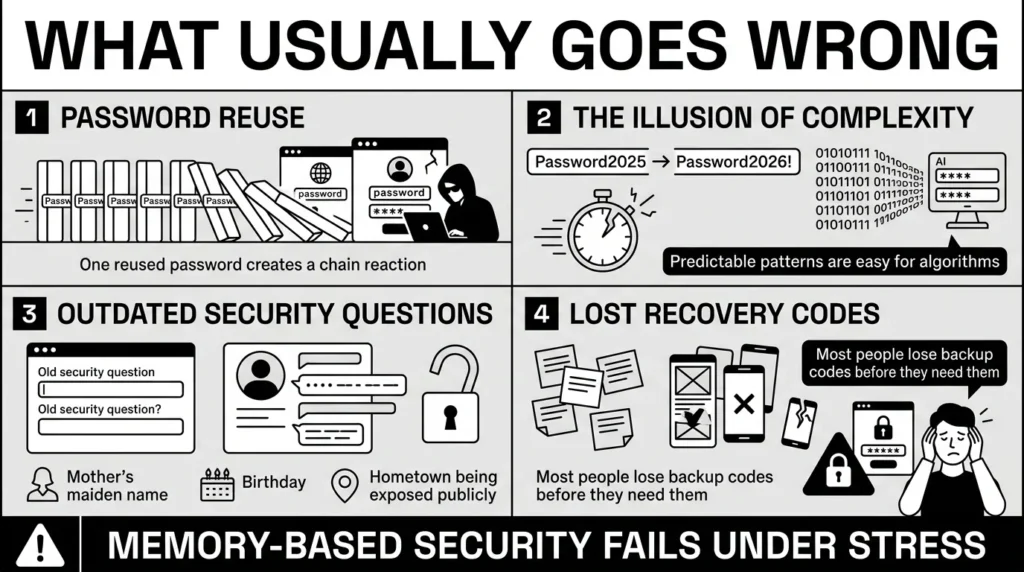
1) The Password Reuse Domino Effect
The most common point of failure is password reuse. A recent Google and Harris Poll study revealed that roughly 65% of people still reuse passwords across multiple sites. This feels efficient until one of those services experiences a data breach. In 2026, automated attacks called “credential stuffing” are incredibly common. As outlined by the Open Worldwide Application Security Project (OWASP), attackers take lists of usernames and passwords stolen from one compromised website and run them through automated software. The sheer volume is staggering; Akamai’s State of the Internet reports regularly track tens of billions of credential stuffing attempts per quarter. If you reused your login, the attacker walks right through the front door.
2) The Illusion of Complexity
Another common trap is the “simple variation” trick. You might have a base password like “Sunshine” and just add the year or a symbol at the end, making it “Sunshine2026!”. While this satisfies basic website requirements, it is surprisingly fragile. According to the 2025 Password Cracking Time Table by Hive Systems, an 8-character complex password containing uppercase, lowercase, numbers, and symbols can now be cracked in less than 5 minutes by modern hardware. We try to be clever, but algorithms are much faster at recognizing our patterns.
3) Relying on Outdated Security Questions
For years, websites forced us to set up security questions: What is your mother’s maiden name? What street did you grow up on? In the modern era of social media, these are no longer secrets. Outdated security questions act as weak backdoors into your accounts.
4) Losing the Recovery Codes
When people turn on two-step verification, they often stumble on the backup plan. Platforms give you “recovery codes” to use if you lose your phone. Unfortunately, most people take a screenshot that gets lost or write the codes on a sticky note. When they buy a new device, they find themselves completely locked out because they cannot find those backup codes.
The Safer Way to Handle It
Security should not require you to memorize endless strings of random letters and numbers. The most effective social media password tips focus on length rather than complexity, and they rely on secure tools to do the heavy lifting for you.
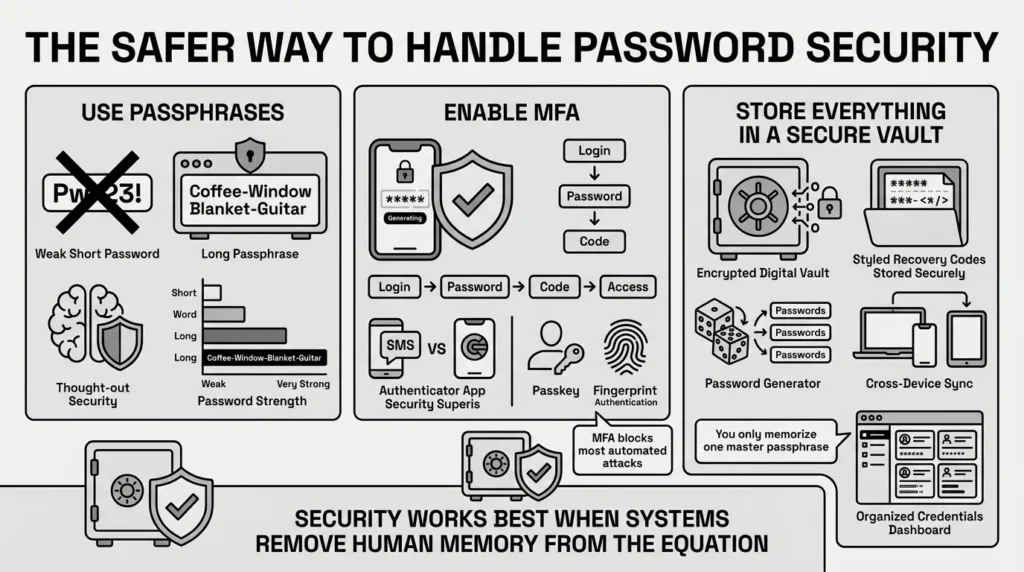
1) Move from Passwords to Passphrases
The National Institute of Standards and Technology (NIST) has updated its digital identity guidelines to reflect how modern cracking software works. Their primary advice? Length beats complexity.
Instead of a messy password like “Xy7!pQ9$”, use a passphrase—a sequence of four or five random, unrelated words (e.g., “Coffee-Window-Blanket-Guitar”). This phrase is mathematically devastating for a computer to crack, but surprisingly easy for a human brain to picture and type.
2) Embrace Multi-Factor Authentication (MFA)
Strong passwords are only the first layer. Multi-factor authentication (MFA) acts as the deadbolt on your front door. According to Microsoft Security Research, enabling MFA blocks over 99.9% of automated account compromise attacks.
MFA usually comes in a few forms:
- SMS Text Messages: A code is texted to your phone.
- Authenticator Apps: You use an app to generate a temporary code. This is much more secure.
- Biometric Login and Passkeys: In 2026, many social media apps support passkeys. The FIDO Alliance reports that over 60% of consumers now prefer passkeys over traditional passwords when given the option, as they are both highly secure and incredibly convenient.
3) Use a Secure Personal Vault
The reality is that you cannot try to memorize a unique passphrase for all your online accounts. You need a secure, encrypted place to keep them. Despite the risks, Consumer Reports data suggests that only about a quarter of Americans use a dedicated password manager. Using a secure personal vault is the single biggest step you can take toward everyday digital peace of mind.
Step-by-Step: What To Do Next
Putting these social media password tips into action does not have to happen all at once. Trying to secure everything in one afternoon is a recipe for frustration. We recommend taking it one step at a time, starting with your most important accounts.
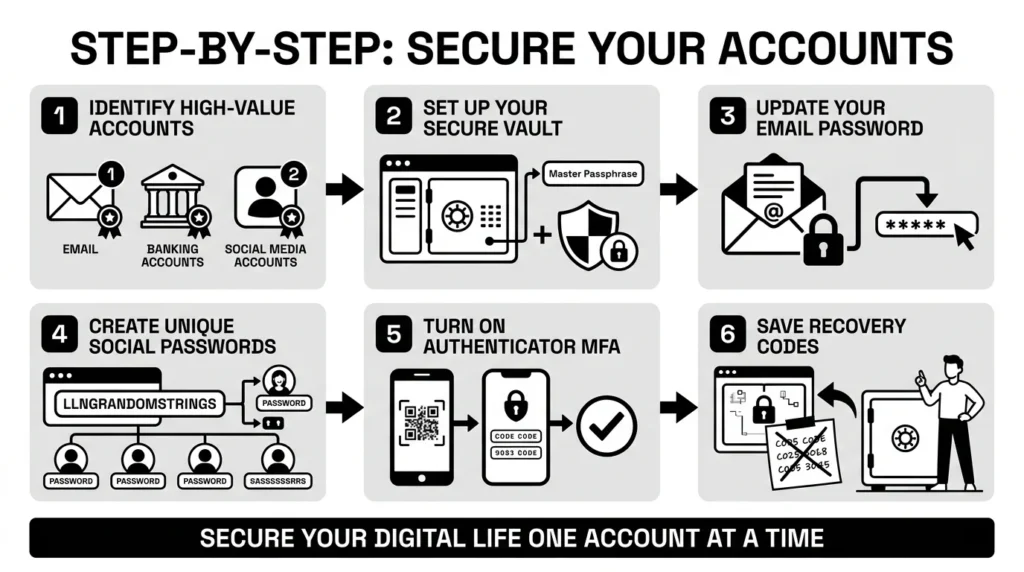
Step 1: Identify your high-value accounts.
Focus on the big ones: your primary email address, your main social media accounts (Facebook, Instagram, LinkedIn, X, TikTok), and your financial accounts.
Step 2: Set up your secure personal vault.
Before you change any passwords, set up your secure vault. You will create one strong, memorable master passphrase. This is the only one you need to memorize from now on.
Step 3: Update your primary email password.
Your email is the master key to your digital life. Go to your email provider, generate a long, unique password, and save it in your vault.
Step 4: Update your social media passwords.
Go through your main social media accounts. Use your vault’s password generator to create a long string of random characters (e.g., 16-20 characters long). Save the new credential in your vault, and paste it into the social media app.
Step 5: Turn on Authenticator-based MFA.
Go into the security settings of your social media profiles and turn on two-factor authentication. Choose the “Authenticator App” option whenever possible.
Step 6: Secure your recovery codes.
When you turn on MFA, the app will give you backup codes. Do not skip this step. Copy these codes and save them directly into your secure vault as a private note attached to that account’s entry.
How WhiteVault Helps Keep This Manageable
We built WhiteVault because reading about social media password tips is only half the battle; actually organizing your digital life requires the right tools. Security fails when it becomes too much of a chore for busy people to maintain.
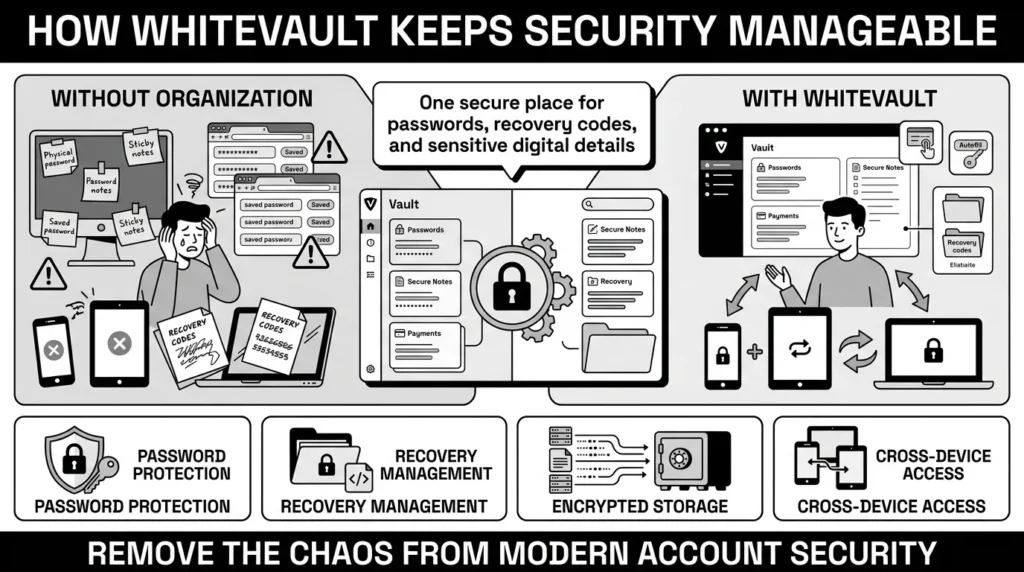
Many people rely on the built-in browser storage on their computers or keep a running list of passwords in their phone’s default notes app. While convenient, these methods lack robust encryption and are often a single accidental tap away from being deleted or exposed.
WhiteVault acts as your secure personal vault. It is built specifically to handle the messy reality of modern security. When you update your Instagram password to something strong and unique, you save it in WhiteVault. You do not have to memorize it. When Instagram hands you a block of 10 complex recovery codes during your MFA setup, you do not have to print them out and hide them in a drawer; you paste them directly into the secure notes section of your WhiteVault.
Instead of dealing with scattered recovery details, scattered notes, and browser-saved logins that don’t sync properly across all your devices, you get one secure place. WhiteVault helps you manage the credentials and important documents you rely on most, giving you peace of mind without turning your daily login process into an obstacle course.
Habits That Keep You Safer Over Time
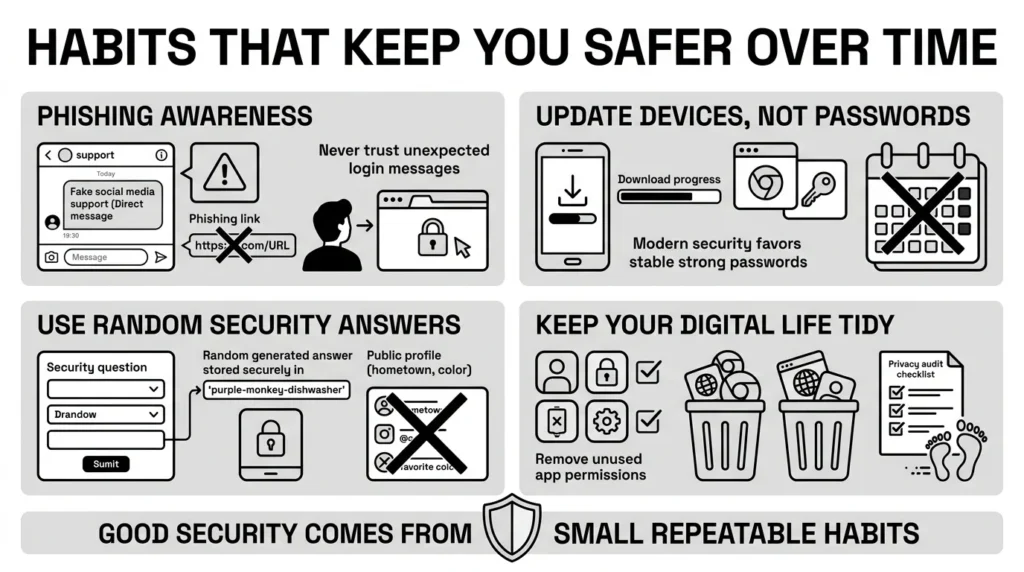
Security is not a switch you flip; it is a set of simple habits you maintain. Even the best social media password tips cannot stop a clever scammer if you hand over your credentials willingly. Building sustainable habits keeps you safe long after you have updated your passwords.
1) Practice Phishing Awareness
Phishing attacks have become highly sophisticated. The 2025 Verizon Data Breach Investigations Report (DBIR) notes that phishing and social engineering are involved in over a third of all data breaches. You might receive a direct message on social media claiming to be from “Support,” warning you that your account will be suspended unless you click a link to verify your identity.
Never click links in unexpected messages, even if they look official. If you receive a warning, close the message, open your web browser, and log directly into the social media platform yourself to check for alerts.
2) Embrace Regular Updates for Devices, Not Passwords
Historically, security advice dictated changing passwords every 90 days. In 2026, security experts strongly advise against this. Forced regular updates usually cause people to use weaker passwords or simple variations. You only need to change your password if you suspect a breach or if you have been reusing it.
Instead, apply the “regular updates” rule to your software. Keep your phone’s operating system, your web browsers, and your social media apps updated to the latest versions. These updates patch security holes that hackers exploit.
3) Avoid Common Words and Public Details
If you are forced to use security questions on an older platform, treat the answer like a password. If the question asks, “What is your favorite color?” write a random word like “Helicopter” or generate a random string of text, and save that answer in your secure vault. Never use real, publicly available information.
4) Keep Your Digital Life Tidy
Every few months, take ten minutes to audit your digital footprint. Close accounts you no longer use. Check which third-party apps have access to your Facebook or Google accounts and revoke permissions for apps you no longer recognize. A smaller digital footprint means fewer opportunities for your data to be compromised.
Conclusion
Better security rarely comes from one dramatic change. It usually comes from a few simple habits repeated consistently: using unique passwords instead of reusing old ones, enabling multi-factor authentication, keeping an eye out for phishing scams, and finding a reliable way to organize your recovery details. Implementing these social media password tips is about taking small, steady steps toward peace of mind. You do not have to be a cybersecurity expert to protect your private information from everyday threats.
WhiteVault was built for exactly that. We understand that you just want to log into your accounts, share updates with your family, and go about your day without worrying about lockouts or data breaches. Save, remember, and protect what matters, all in your secure personal vault. Take an hour this weekend to update your most important accounts, store them safely, and enjoy the relief of knowing your digital life is finally organized and protected.
Frequently Asked Questions (FAQ)
1) What are the most important social media password tips for someone just starting to improve their security?
Start by identifying your most critical accounts, like your primary email and main social media profiles. Stop reusing passwords across these accounts. Instead, use a password generator to create long, unique credentials for each one, and turn on multi-factor authentication (MFA) to add an extra layer of protection beyond just the password.
2) How do I know if my password is strong enough?
A strong password in 2026 relies on length, not just a mix of confusing symbols. If you are memorizing it, it should be a passphrase of four or more random, unrelated words (e.g., “Table-Purple-Cloud-Guitar”). If a tool is generating it for you, it should be at least 16 characters long and entirely random. If you are using the same password anywhere else, it is automatically weak, regardless of its length.
3) How often should I change my social media passwords?
You do not need to change your passwords every few months. Modern security guidance recommends making regular updates to your software, but keeping your passwords the same until there is a specific reason to change them. You should only change your password if a service announces a data breach, if you notice suspicious activity on your account, or if you realize you have been reusing that same password on other websites.
4) What is the difference between a password manager and a secure vault?
The terms are often used interchangeably, but a secure vault typically offers broader protection. While a basic password manager only autofills login forms, a secure personal vault is designed to hold everything you need to recover and protect your digital life. This includes your unique passwords, but also complex recovery codes, answers to legacy security questions, scanned identity documents, and private notes that you need to keep safe but accessible.
5) Are biometric logins safe for social media?
Yes, biometric logins and passkeys are incredibly safe and are highly recommended. When you use your fingerprint or facial recognition to log in, your actual biometric data (like the image of your face) is not sent to the social media company. It stays securely locked on your physical device. The device simply sends a cryptographic mathematical proof to the website confirming that you are the authorized user, eliminating the risk of a password being intercepted.
6) What should I do if I clicked a phishing link on social media?
Do not panic. If you clicked the link but did not type your password into the fake site, simply close the browser; your account is likely fine. If you did type your password, immediately go to the real social media app, log in, and change your password. Then, force a log-out of all active sessions in the security settings. If you use that same password anywhere else, change it on those sites immediately.
7) How do I organize all my different recovery codes and security questions?
Do not rely on screenshots or physical sticky notes, as these are easily lost during emergencies. When a platform gives you backup recovery codes or forces you to create security questions, copy that information directly into the secure notes section of your digital vault, attached to the specific login entry. This ensures that if you lose your phone, your backup keys are safely stored in one encrypted location.
8) How does WhiteVault actually help protect my social media accounts?
WhiteVault acts as your secure personal vault, removing the need for you to memorize complex passwords or rely on unsafe browser storage. By allowing you to securely store unique, generated passwords and backup recovery codes in one organized, encrypted place, WhiteVault ensures you are never locked out of your accounts during an emergency, while protecting your credentials from credential-stuffing attacks and data breaches.
