
We have all experienced that sudden spike of panic when an unexpected password reset link arrives in our inbox. Suddenly, you realize that whoever controls your email also holds the keys to your bank accounts, your family photos, and your identity. Good email password security matters because these everyday accounts shouldn’t be a source of stress. At WhiteVault, we help people save, remember, and protect what matters, making sure your digital life feels manageable instead of overwhelming. Let’s look at how to secure your inbox without the frustration.
Practical Email Account Password: TL;DR
Good email password security means using a long, unique passphrase, turning on two-factor authentication, and keeping your recovery details updated in a secure personal vault. This simple combination stops the vast majority of unauthorized access attempts.
Why This Topic Matters for Everyday Security
Your email account is not just a place to receive newsletters, flight confirmations, and messages from friends. It is the master key to your entire digital identity. Think about what happens when you forget the login for your bank, your streaming service, or your health insurance portal. You click “Forgot Password,” and a reset link is immediately sent to your inbox.
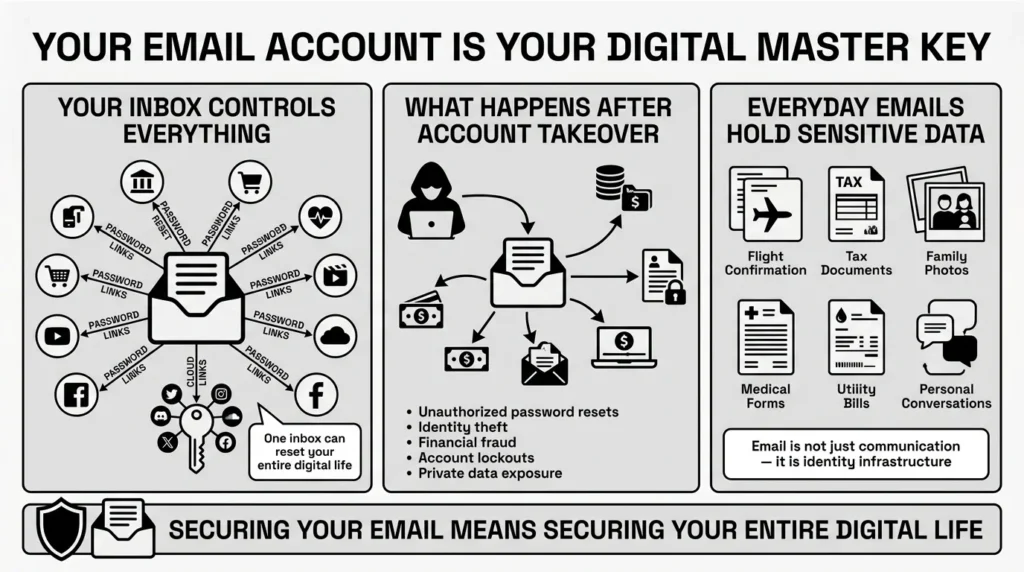
This means that whoever controls your inbox controls almost everything else. If someone gains unauthorized access to your primary email, they do not just have your messages; they have the ability to systematically take over your other accounts.
The 2025 IBM Cost of a Data Breach Report highlights that stolen or compromised credentials remain the most common initial attack vector globally. According to the Cybersecurity and Infrastructure Security Agency (CISA), securing primary accounts is one of the most critical steps an individual can take to protect their digital identity. Yet, many of us treat our email logins with the same casual approach we use for a temporary shopping account.
When we talk about email password security, we are really talking about identity protection. We are talking about preventing the stress of a locked-out family emergency, the panic of stolen financial documents, and the headache of untangling identity theft. The Federal Trade Commission (FTC) noted in their late 2025 Consumer Sentinel data that compromised credentials directly contribute to billions in consumer fraud losses. Furthermore, the Identity Theft Resource Center’s 2025 Annual Data Breach Report confirms that data compromises affecting personal email accounts remain a top driver of secondary identity crimes.
But here is the good news: you do not need to be a cybersecurity engineer to lock down your inbox. You do not need to understand complex coding or spend hours configuring settings. By adjusting a few everyday habits and understanding how modern protection actually works, you can build a defense that keeps your personal life safe, organized, and entirely under your control.
What Usually Goes Wrong With Email Security
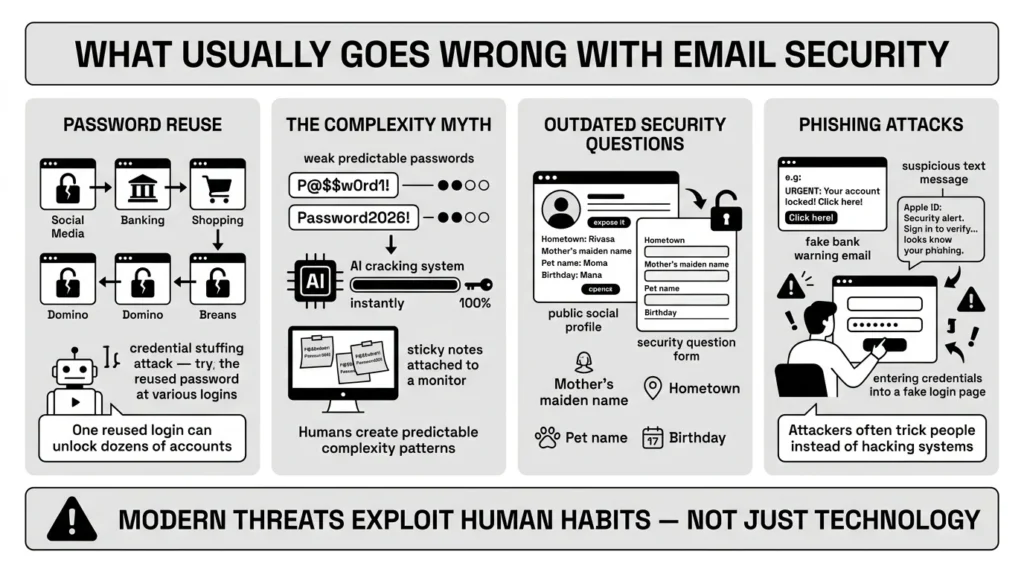
Most security vulnerabilities do not happen because someone is careless; they happen because human memory has limits, and modern life demands too many logins. A recent Pew Research Center survey found that more than 60% of adults feel completely overwhelmed by the sheer number of passwords they have to manage. A weak approach to email password security usually starts with this simple exhaustion.
1) The Password Reuse Trap
We have all reused passwords. It is entirely human to want something familiar. You create a login for a local food delivery app, and without thinking, you use the same phrase you use for your primary inbox. The danger here is not the food app; it is the fact that smaller websites are breached frequently. When attackers steal credentials from a minor site, they use automated software to test those same email and password combinations across major email providers and banks. This tactic, known as credential stuffing, is cited by the 2025 Verizon Data Breach Investigations Report (DBIR) as being involved in nearly half of all unauthorized account access incidents. The Open Worldwide Application Security Project (OWASP) also identifies authentication failures—heavily driven by users recycling passwords—as a critical security risk.
2) The Complexity Myth
For years, we were told that a strong password had to look like a randomized algebraic equation. We were forced to use symbols, numbers, capital letters, and special characters. The result? People created things like P@$$w0rd1! and wrote them on sticky notes attached to their monitors. This forced password complexity actually made us less safe, because humans are predictable. We capitalize the first letter, put a number at the end, and swap an ‘o’ for a zero. Attackers know this. In fact, recent findings from the Microsoft Digital Defense Report indicate that automated attacks targeting these predictable password patterns have surged to over 4,000 attempts per second globally.
3) Outdated Security Questions
Think back to the security questions you answered a decade ago. “What is your mother’s maiden name?” “What street did you grow up on?” “What is the name of your first pet?” In the age of social media, these are no longer secrets. A quick glance at a public Facebook profile or public property records can give an attacker all the answers they need. The Privacy Rights Clearinghouse warns that relying on these static historical facts is a primary vulnerability in modern account recovery processes.
4) The Phishing Problem
Sometimes, attackers do not need to guess your credentials; they just ask you for them. Data from Google’s recent Threat Horizons research shows that advanced phishing campaigns are increasingly bypassing traditional email filters, making human vigilance critical. You might receive an urgent text message that looks exactly like a fraud alert from your bank. These messages are designed to induce panic. When you click the link and type in your details to “verify your identity,” you are actually handing your credentials directly to a scammer.
These common pitfalls happen to busy professionals, students, and retirees alike. Recognizing them is the first step toward building a more resilient system.
The Safer Way to Handle Email Security
To fix these common issues, we need to move away from relying purely on our memory and outdated advice. Modern guidelines focus on making things harder for computers to guess, but easier for humans to manage.
1) Embrace the Passphrase
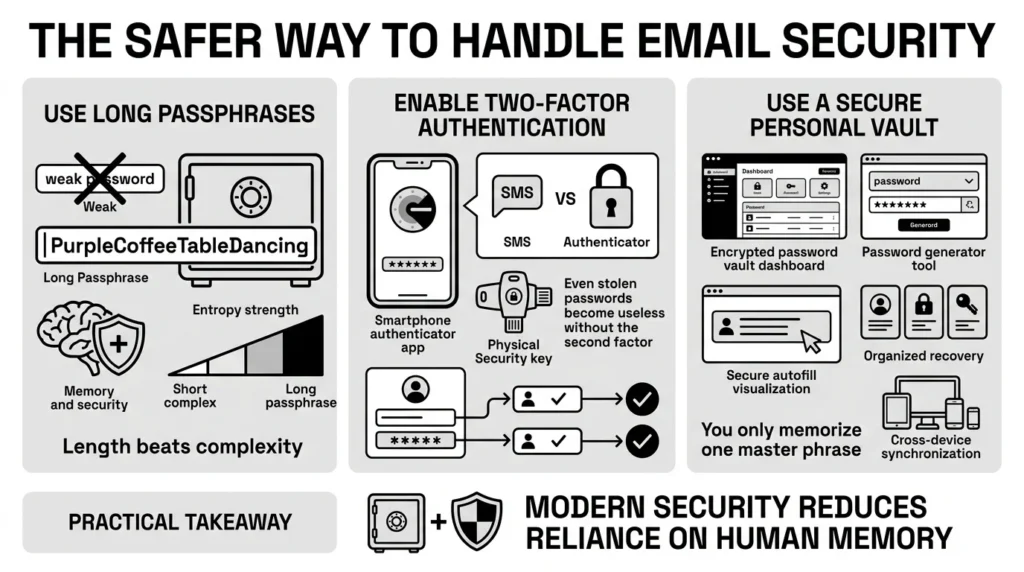
The National Institute of Standards and Technology (NIST) sets the gold standard for digital identity guidelines. Their latest guidance has shifted dramatically: length matters far more than complexity. Instead of a short, confusing string of characters, you should use a long passphrase.
A passphrase is a sequence of random words that is easy for you to visualize but mathematically devastating for a computer to crack. For example, PurpleCoffeeTableDancing is significantly stronger than Tr0ub4dour&3. It is long, it contains a massive amount of “entropy” (randomness), and most importantly, you can actually remember it.
2) Adding the Second Layer
Even the strongest passphrase can be stolen if you type it into a fake website. This is why two-factor authentication (also known as multi-factor authentication) forms the foundation of modern email password security.
Two-factor authentication simply means proving who you are using two different methods: something you know (your passphrase) and something you have (your smartphone or a physical security key). Privacy advocates at the Electronic Frontier Foundation (EFF) emphasize that pairing a strong passphrase with two-factor authentication is the single most effective step everyday users can take to defend their privacy. If an attacker steals your login details, they still cannot get into your inbox without physically possessing your phone.
3) Offloading the Burden
You should only ever have to memorize a few passphrases: the one for your computer, the one for your email, and the one for your secure personal vault. For the hundreds of other accounts you manage, a password manager is the safest solution. A password manager generates, stores, and automatically fills in complex, unique logins for every single site you visit. You only need to remember one strong master phrase to unlock the vault. This completely eliminates the risk of password reuse and protects you from typing your credentials into a deceptive, fake website.
Step-by-Step: What To Do Next
Upgrading your digital defenses does not require a weekend-long IT project. By following these clear, practical steps, taking charge of your email password security takes just a few minutes.
Step 1: Review Your Current Access
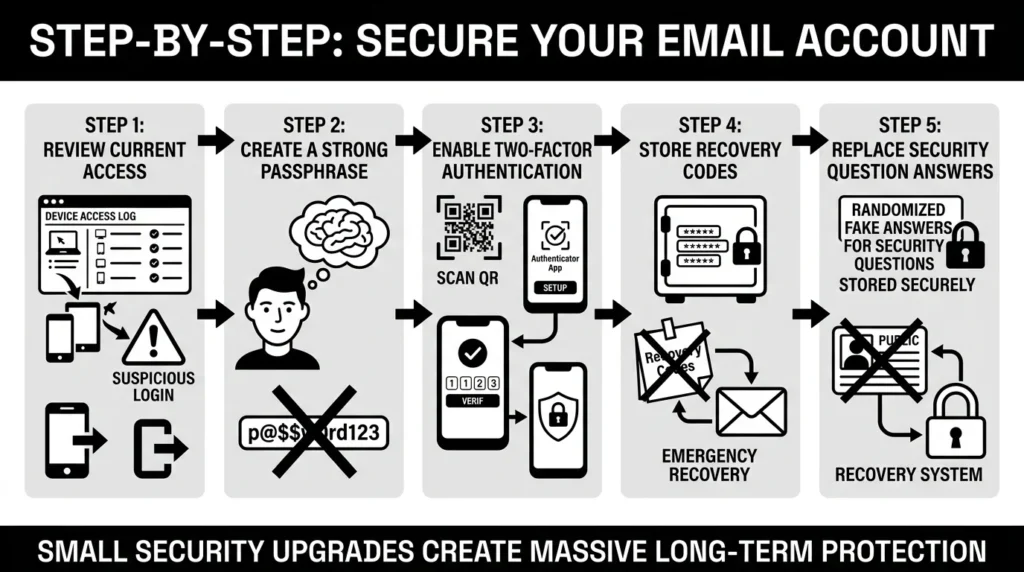
Before changing anything, see who is currently in your account. Most major providers (like Gmail, Outlook, or Yahoo) have an account settings page that shows your recent access logs or “recent devices.” Take a moment to review this list. If you see an old phone you no longer own, a work computer from a previous job, or a location you do not recognize, click the option to sign out of that device immediately.
Step 2: Create Your New Passphrase
Go to your security settings and select “Change Password.” Create a new passphrase made of four or five random words. Do not use famous quotes, song lyrics, or sequential words. Picture a strange scenario in your head, like YellowPenguinReadingLoudly. Type it in. You have just exponentially increased your defense.
Step 3: Enable Two-Factor Authentication
While still in your security settings, look for “Two-Step Verification,” “MFA,” or “Two-Factor Authentication.” Turn it on. You will generally have three choices:
- SMS Text Messages: The provider texts you a code. This is better than nothing, but it is the weakest form of protection because phone numbers can be hijacked.
- Authenticator Apps: You download an app like Google Authenticator, Authy, or Microsoft Authenticator. The app generates a new code every 30 seconds. This is highly recommended for everyday users.
- Security Keys: A physical USB key you plug into your device. This is the strongest protection available.
Choose the authenticator app method if you are comfortable with smartphone apps, or stick to SMS if you need the simplest starting point.
Step 4: Secure Your Recovery Options
When you set up two-factor authentication, your provider will give you a list of recovery codes (sometimes called backup codes). These are single-use codes designed to get you back into your account if you lose your phone or cannot receive a text message.
Do not skip this step. If your phone falls in a lake, these codes are the only way back into your digital life.
This is where WhiteVault comes in. Do not screenshot these codes and leave them in your camera roll. Do not write them on a sticky note. Store credentials, recovery details, and important information securely in one encrypted place. WhiteVault acts as your secure personal vault, ensuring that when you face an emergency lockout, your backup codes are exactly where you left them, protected by military-grade encryption but instantly accessible to you.
Step 5: Clean Up Old Security Questions
If your provider still uses security questions for account recovery, change your answers to treat them like passwords. If the question asks, “What city did you meet your spouse in?” do not write “Chicago.” Write a random phrase like GreenBicycleTires. Save this random answer in your secure vault as well. This prevents anyone from guessing their way into your account using public information.
Habits That Keep Your Email Account Safe
Security is not a one-time checklist; it is a mindset. However, it should be a calm mindset, not a paranoid one. Once your foundation is set, maintaining long-term email password security is about building small habits.
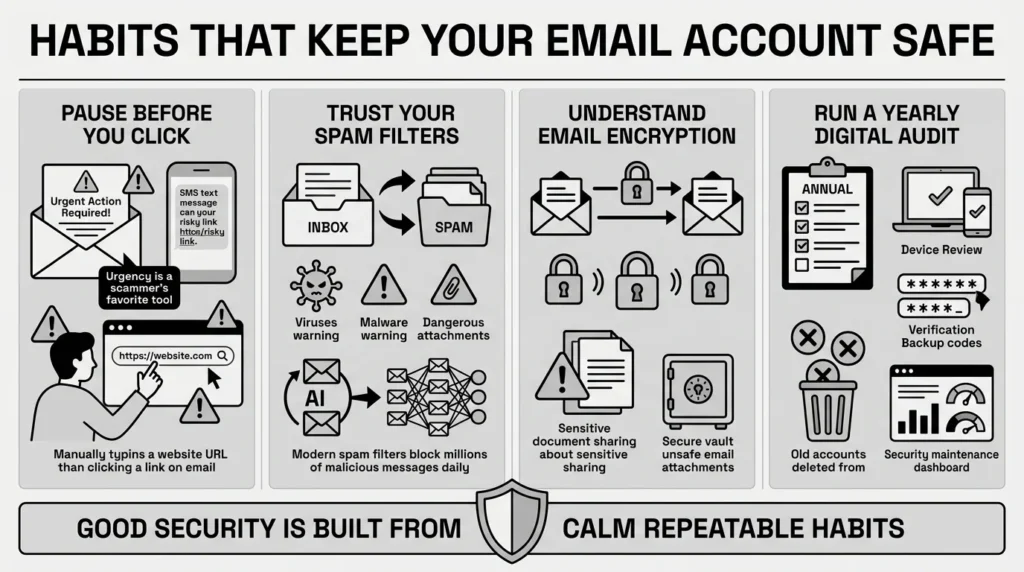
1) Pause Before You Click
Phishing protection is primarily a human habit, supported by technology. Scammers rely on urgency. The Better Business Bureau (BBB) 2025 Scam Tracker Risk Report notes that text-based phishing (smishing) has become the primary method scammers use to create false urgency. Whenever you receive an alarming message, take a breath. Do not click the link in the email. Instead, open your web browser, type the website address in manually, and log in securely.
2) Trust Your Spam Filters
Modern email providers invest heavily in spam filtering. If an email ends up in your spam or junk folder, leave it there. Do not assume the system made a mistake unless you are specifically looking for a verified email from a known contact. Spam filters analyze millions of data points to catch malicious links and malware before they reach your inbox; trust their judgment.
3) Understand Email Encryption Basics
For everyday users, it is helpful to know that most major email providers use standard encryption to protect your messages while they travel from your outbox to the recipient’s inbox. This stops casual eavesdropping on public Wi-Fi. However, if you are regularly sending highly sensitive documents—like tax returns, scans of your passport, or legal contracts—consider whether email is the right tool at all. Instead of emailing unencrypted sensitive files, store them in your secure vault and use secure sharing features when necessary.
4) Audit Your Digital Life Annually
Once a year, perhaps during tax season or daylight saving time, do a quick digital audit. Check your access logs again. Make sure your recovery phone number is still correct. Ensure your backup codes are still securely stored. Delete old accounts you no longer use, which reduces the amount of your personal data floating around the internet.
Conclusion
Better security rarely comes from one dramatic change or a deep understanding of computer science. It usually comes from a few simple habits repeated consistently: using unique passphrases, setting up two-factor authentication, watching out for rushed phishing messages, and finding an organized place to keep your records. Mastering email password security doesn’t require a degree in computer science; it just requires taking a few minutes to replace outdated habits with modern, practical steps.
We know that keeping track of all these backup codes, recovery answers, and important documents can feel like a chore. That is why WhiteVault was built. We want to remove the friction from personal security. Save, remember, and protect what matters, all in your secure personal vault, so you can spend less time worrying about your digital life and more time actually living it.
Frequently Asked Questions (FAQ)
1) What exactly is email password security?
It is the combination of practices, tools, and habits you use to protect your primary email account from unauthorized access. Because your inbox receives password reset links for your bank, social media, and other services, securing it is the most critical step in protecting your overall digital identity.
2) How do I know if my email account has been compromised?
There are a few clear warning signs. If you stop receiving expected emails, notice messages in your “Sent” folder that you did not write, or receive password reset alerts for other accounts that you did not request, someone may be in your account. You can also check your provider’s “recent activity” or device access logs to see if there are logins from locations or devices you do not recognize.
3) How often should I change my email password?
According to the latest NIST guidelines, you should not change your password routinely (like every 90 days) unless you have reason to believe it has been compromised. Forced, frequent changes usually lead people to create weaker passwords. Instead, create one very strong, long passphrase and keep it indefinitely, changing it only if you suspect a breach or if your provider alerts you to a security issue.
4) What is the difference between two-factor authentication and a password?
A password is “something you know.” It is your first line of defense, but it can be stolen, guessed, or intercepted. Two-factor authentication (2FA) adds a second layer, requiring “something you have” (like your smartphone receiving a code) or “something you are” (like a fingerprint). Even if a hacker steals your password, they cannot access your account without that second, physical factor.
5) Is it safe to write my passwords down on a sticky note?
For beginner safety, writing a password on a piece of paper in your home is actually safer than reusing the same password across fifty websites. A hacker in another country cannot see your desk. However, physical notes can be lost, thrown away, or destroyed in an emergency. The safest, most sustainable method is using a digital secure vault where your information is encrypted but always accessible to you.
6) Can someone read my emails if they intercept them?
Most modern providers use standard encryption to protect emails as they travel across the internet, making it very difficult for someone on a public Wi-Fi network to casually read your messages. However, standard email is not fully “end-to-end encrypted.” For highly sensitive information like Social Security numbers or medical records, it is better to avoid email entirely and use a secure portal or encrypted document storage.
7) How should I organize my account recovery codes?
When you enable two-factor authentication, you are given backup recovery codes. Do not save these as a screenshot on your phone, as you will lose them if the phone breaks. You should organize these codes in a dedicated, secure digital environment. Title them clearly (e.g., “Google Backup Codes 2026”) and store them alongside your other critical digital identity documents so you always know exactly where to look during an emergency.
8) How does WhiteVault help me protect my email account?
WhiteVault acts as your secure personal vault, providing an encrypted space to store your complex passphrases, two-factor backup recovery codes, and updated security questions. Instead of relying on your memory or scattering vital recovery details across random notes and folders, WhiteVault keeps everything organized in one trusted place, ensuring you never lose access to your most important digital accounts.

