
We have all seen it: a sticky note on a monitor with the shared marketing login, or a panicked text asking for the accounting software password. Managing team access can feel messy. But a strong business password policy matters because one lost login should not compromise your entire operation. At WhiteVault, we help people save, remember, and protect what matters. We believe team security should feel manageable, not overwhelming. Here is how to organize rules so your HR, sales, and operations teams stay secure without the daily frustration of locked accounts.
Creating Department Specific Password Policies: Quick Answer
A department-specific password policy sets unique security rules based on the sensitivity of data each team handles. It combines access control, multi-factor authentication, and secure password storage to protect company accounts without slowing down your staff’s daily work.
Why This Topic Matters for Everyday Security
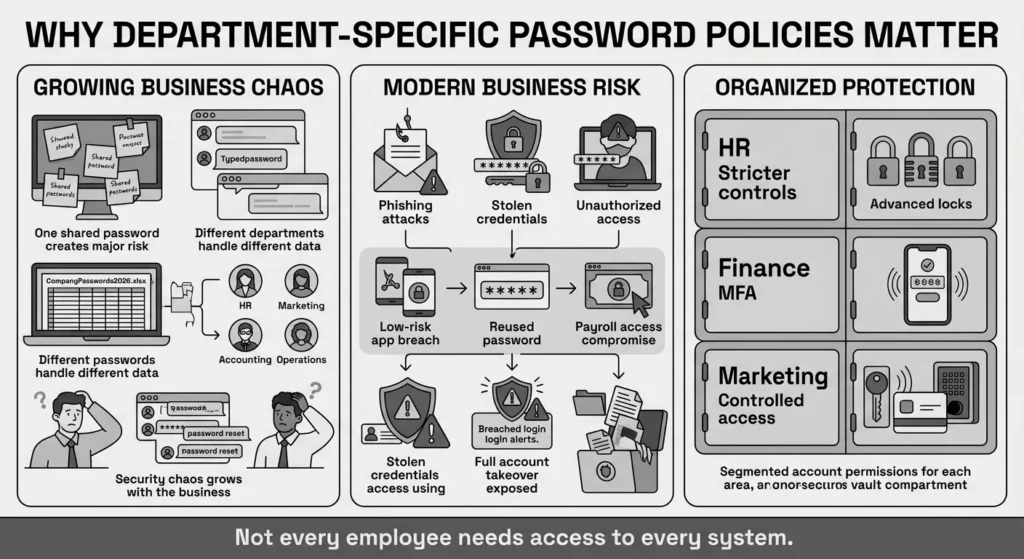
When a business grows beyond just one or two people, sharing logins becomes complicated very quickly. In the early days, you might have shared a single password for your website domain, your email hosting, and your financial software. But as you add team members, that shared approach quickly turns into a major security risk. The marketing team needs access to social media, while human resources handles sensitive payroll data and employee identity documents. Treating all these accounts the same is a recipe for stress and confusion. In fact, the 2025 National Cybersecurity Alliance (NCA) Small Business Report reveals that 60% of small businesses close within six months of a severe data breach.
Creating a business password policy tailored to different departments ensures that high-risk data gets tighter protection, while low-risk daily tools remain easily accessible for the people who need them. We often hear from everyday office managers, small business owners, and team leads who feel like they are supposed to be IT experts. You do not need to be an enterprise security engineer to protect your team. You just need a practical system.
The financial stakes are higher than ever. The IBM 2025 Cost of a Data Breach Report notes that the average cost of a data breach has surpassed $5 million, with compromised credentials acting as the most expensive initial attack vector. According to CISA guidance on cyber hygiene, compromised credentials remain one of the primary ways that unauthorized users access business systems. When an attacker gets a hold of one password, they try it everywhere. If your team is not using proper user account management, a minor breach in a low-level graphics app could give someone access to your company bank account. Department-specific rules prevent this domino effect, keeping everyday operations smooth and private information locked down.
What Usually Goes Wrong
When teams lack clear guidance, they default to convenience. We have all reused a simple password across multiple software platforms just to get through a busy Monday. It is completely human to want something familiar, but according to the Bitwarden 2025 Password Decisions Survey, over 60% of employees still admit to reusing passwords across multiple work and personal accounts. Often, teams share a single login for expensive software to save money, passing the password around in chat apps, unencrypted emails, or text messages. A startling 40% of office workers still keep a physical notebook or sticky note with sensitive company logins, per the Yubico 2025 State of Global Authentication Report.
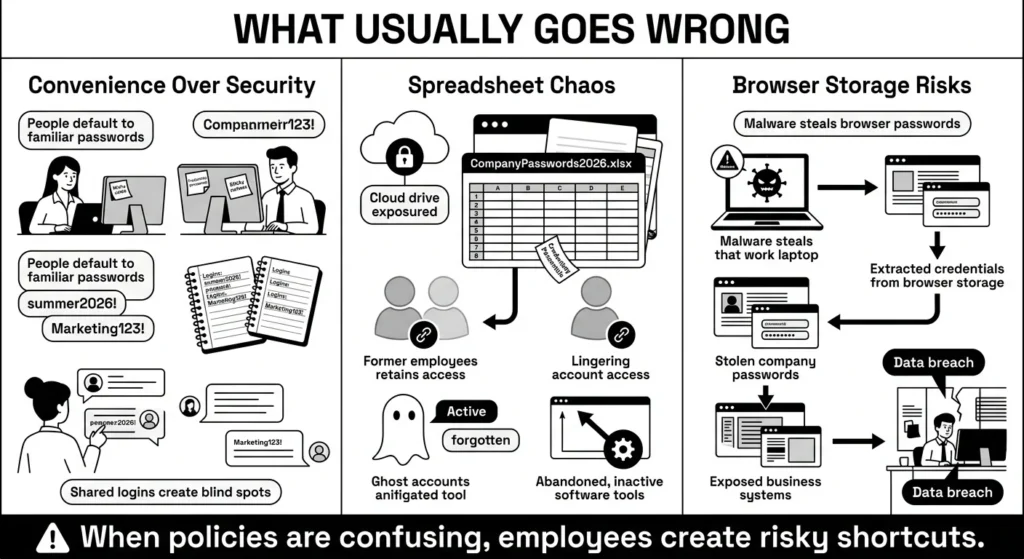
We frequently see the classic spreadsheet named “CompanyPasswords2026.xlsx” sitting on a shared cloud drive. While it feels organized in the moment, it creates massive vulnerabilities. If a disgruntled employee leaves, does anyone remember to go into that spreadsheet and change all 45 shared passwords? Usually, the answer is no. This creates massive blind spots; the Varonis 2025 Data Risk Report found that over 45% of companies have “ghost accounts” left active by former employees. This oversight is incredibly common, and it is exactly how account takeover incidents happen.
Another common pitfall is the dreaded “summer2026!” password format. When cybersecurity policies are too rigid or confusing, employees will naturally find workarounds. If you force your team to change their passwords every 30 days and demand extreme password complexity—like requiring three symbols, four numbers, and an uppercase letter—people will simply write those passwords down on physical notebooks or save them directly in their web browser.
Browser storage might feel convenient, but it is deeply vulnerable to malware. If an employee’s laptop is compromised, every password saved in that browser can be extracted in seconds. According to the 2025 Verizon Data Breach Investigations Report, stolen credentials continue to be the leading entry point for data breaches. People are trying their best to do their jobs, but without a secure personal vault and a clear set of rules, the messy reality of daily work takes over.
The Safer Way to Handle It
A better approach to team security is matching the security level to the risk level. This is the foundation of a healthy business password policy. Your accounting department, which handles bank details, tax records, and vendor payments, needs much stricter authentication standards than the team managing the company’s public blog.
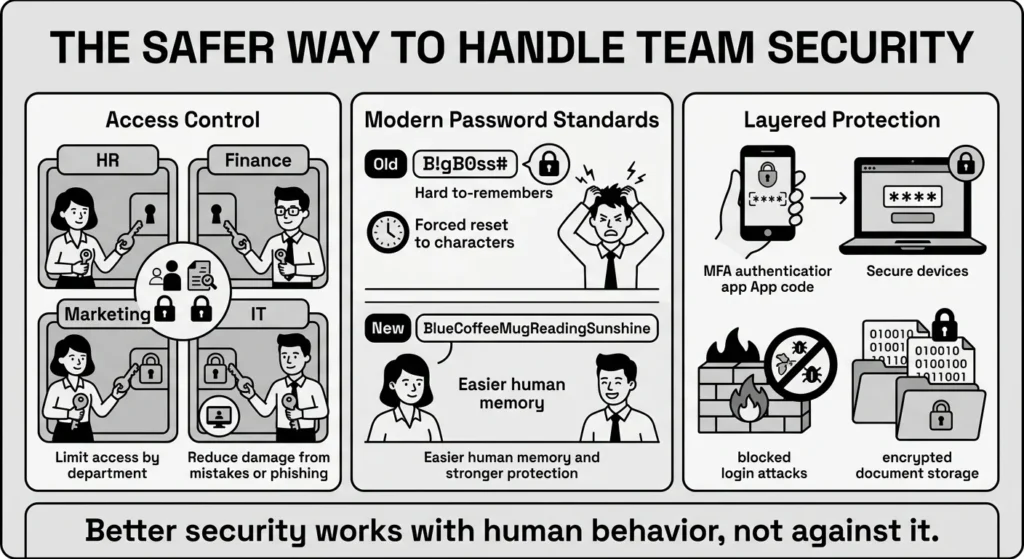
This concept is known as access control. Access control simply means giving people the exact keys they need to do their jobs, and absolutely nothing more. If the social media manager does not need to see the payroll software, they should not have an account for it, and they certainly should not know the shared password for it. Segmenting your team by department limits the damage if one person makes a mistake or clicks on a phishing link. The Identity Theft Resource Center (ITRC) 2025 Annual Data Breach Report highlights that account takeover incidents increased by over 30% in the last year, largely due to unsegmented access.
The traditional advice for credential strength used to focus on making passwords incredibly hard for humans to type. However, modern security standards have shifted. The National Institute of Standards and Technology (NIST) now recommends avoiding arbitrary password rotation and moving away from forced complexity. Instead, the focus is on length. A long passphrase, like “BlueCoffeeMugReadingSunshine,” is much harder for a computer to crack than a short, complex password like “B!gB0ss#”, and it is much easier for a human to type.
By applying these modern standards department by department, you can create a culture of password security that actually makes sense. You can require long passphrases and strict security compliance for your finance and HR teams, while keeping rules a bit more flexible for general staff tools, provided they are backed by the right layers of protection.
Step-by-Step: What To Do Next
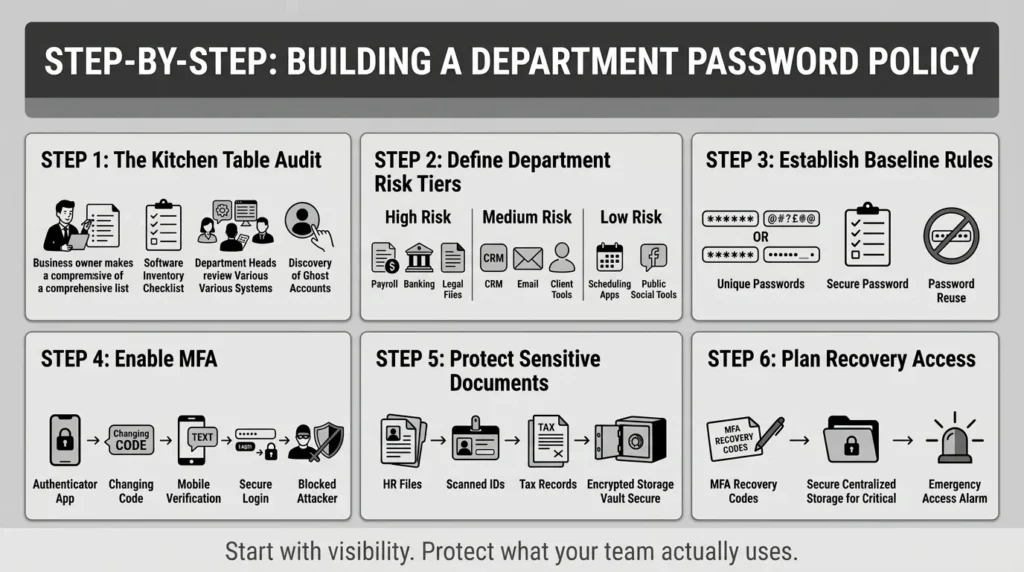
Every effective business password policy starts with visibility. You cannot protect what you do not know exists. Building a department-specific plan requires a few calm, deliberate steps.
Step 1: The Kitchen Table Audit
Before you set any rules, you need to know what tools your team is actually using. Sit down and make a list. Ask your department heads to list every software platform, app, and website their team uses to get work done. You will likely be surprised by how many “ghost accounts” exist—tools that a former employee signed up for three years ago that are still billing your credit card and holding company data.
Step 2: Define Your Department Tiers
Once you have your list of tools, group them into three tiers of risk.
- High Risk: This includes HR payroll systems, company bank accounts, legal document storage, and IT administration panels.
- Medium Risk: This includes customer relationship management (CRM) software, primary company email accounts, and client project management tools.
- Low Risk: This includes generic research tools, public social media scheduling apps, and internal event planning software.
Step 3: Establish Baseline Rules
Now, you can establish a baseline business password policy for all tools, and add stricter rules for the higher tiers. A good baseline for every employee, regardless of department, is to never reuse a password across different work platforms. Every login must be unique.
Step 4: Implement Multi-Factor Authentication (MFA)
For your High Risk and Medium Risk tiers, you must turn on multi-factor authentication. MFA requires a user to provide a second piece of evidence—like a temporary code from an authenticator app or a prompt on their phone—before logging in. The Federal Trade Commission (FTC) strongly advises small businesses to use MFA wherever possible, as it blocks the vast majority of automated login attacks. This is not an exaggeration; the Microsoft 2025 Digital Defense Report confirms that MFA blocks 99.9% of automated account compromise attacks. If a hacker steals your HR manager’s password, they still cannot access the payroll system without that second physical device.
Step 5: Secure Your Important Documents
Department policies are not just for passwords. Think about where your HR team stores scanned passports, employee tax forms, and health insurance documents. Unstructured data, like scattered HR documents and tax forms, makes up 80% of enterprise data and is often the least protected, according to the Ponemon Institute 2025 Global State of Document Security. Your policy must dictate that sensitive files cannot live on a random desktop folder or an unencrypted USB drive. These files require the same level of enterprise security as your passwords, stored in a secure, encrypted environment where access can be tracked and revoked if necessary.
Step 6: Plan for Account Recovery
Finally, assign a safe place to store account recovery codes. When you set up MFA on a new company account, the platform usually gives you a list of backup codes in case you lose your phone. Do not let your team save these codes in their email drafts. They need to be stored in a highly secure, centralized location so the business owner can recover the account during an emergency.
How WhiteVault Helps Keep This Manageable
Memorizing different rules for different platforms is exactly why people resort to sticky notes and dangerous spreadsheets. If your team is struggling to keep up with their business password policy, adding more rules will not help. They need better tools.
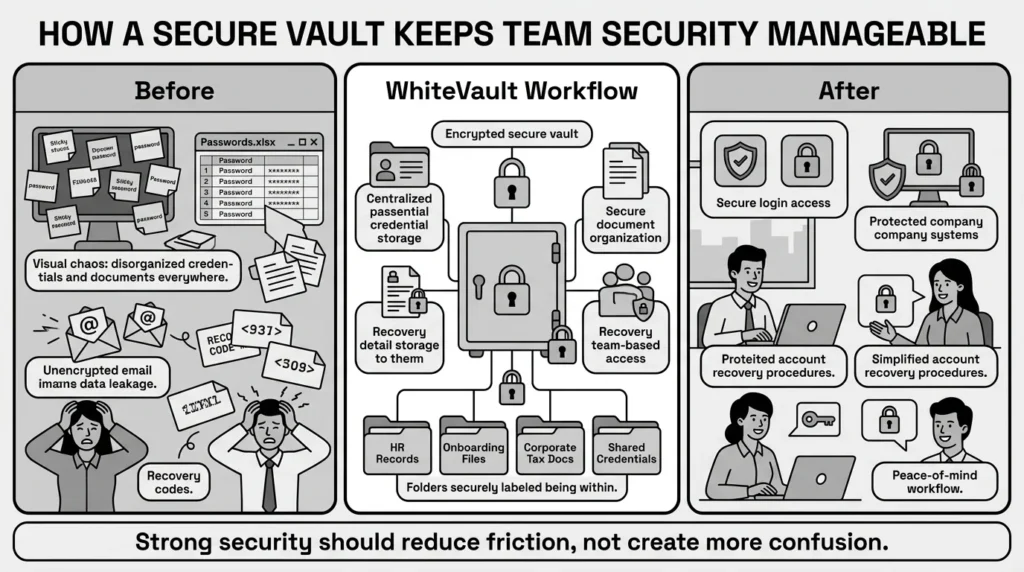
WhiteVault is a secure personal vault for credentials, passwords, recovery details, private notes, and important documents. Instead of passing passwords through unencrypted emails or storing them in a vulnerable shared document, your team can use WhiteVault to save, remember, and protect what matters.
Versus trying to remember everything, WhiteVault allows your employees to store their unique credentials and recovery details securely in one encrypted place. When the HR department needs to access a sensitive portal, they do not have to guess if they are using the right password variation.
Versus scattered recovery details and document chaos, WhiteVault gives you a trusted place to store what matters most. Whether you are keeping track of employee onboarding documents, corporate tax files, or backup security answers, WhiteVault provides peace of mind through simple, strong protection. It is a tool built for people who want strong security without daily friction, making it easier for every department to follow the rules without feeling slowed down.
Habits That Keep You Safer Over Time
Building a business password policy is not a one-time project that you write down, put in a binder, and forget about. It requires gentle, consistent habits to maintain. Security should feel like a normal part of the workday, not a yearly crisis.
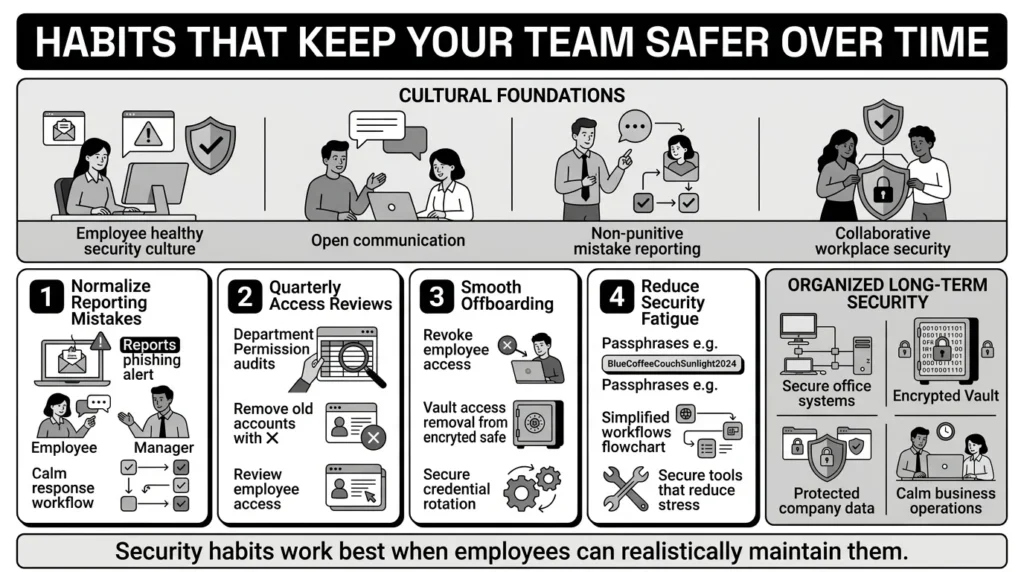
First, normalize reporting mistakes. If an employee accidentally clicks on a phishing text that looks like a real delivery alert, or if they realize they used their work password on a personal shopping site that just experienced a data breach, they need to feel safe telling management. With the Proofpoint 2025 State of the Phish showing that more than 75% of organizations experienced targeted phishing attacks last year, honest mistakes are inevitable. Shame-based security advice only encourages people to hide their mistakes until it is too late. Create a culture where updating a compromised password is a routine, blameless activity.
Second, schedule a quarterly access review. Every three months, look at who has access to your High Risk and Medium Risk tools. Have people changed departments? Did a freelancer finish their contract? Remove access for anyone who no longer actively needs it. This keeps your access control tight and prevents old accounts from becoming vulnerabilities.
Third, create a smooth offboarding process. When someone leaves the team, whether on good terms or bad, you should never have to scramble to figure out what they had access to. Because you have grouped your tools by department and stored shared credentials securely, you simply revoke their access to the vault and reset any shared passwords they handled.
Finally, do not let your team suffer from security fatigue. Encourage them to use passphrases, support them with tools like a secure vault, and remind them why these steps matter. When people understand that protecting company data also protects their own paychecks and privacy, they are much more likely to participate willingly.
Conclusion
Better security rarely comes from one dramatic change or an intimidating list of technical demands. It usually comes from a few simple habits repeated consistently: using unique passwords, understanding the risks of sharing logins, securing your recovery details, and keeping important documents organized.
When you take the time to create department-specific rules, you remove the guesswork from your team’s daily routine. A good business password policy makes your team feel capable, not restricted. It gives them the confidence to do their jobs knowing that the company’s private information is safe. WhiteVault was built for exactly that. Save, remember, and protect what matters, all in your secure personal vault.
Frequently Asked Questions (FAQ)
1) What is a business password policy?
This policy is a set of practical rules that dictates how employees create, store, and share their login credentials and sensitive documents. By creating department-specific rules, you ensure that teams handling highly sensitive data (like HR or Finance) follow stricter security protocols than teams handling general daily tasks, reducing your overall risk without frustrating your entire staff.
2) How do I know if my team needs different rules for different departments?
If your team has grown to a point where different people handle entirely different types of data, it is time for department-specific rules. For example, if your graphic designer and your payroll manager are using the same password complexity rules and storing their passwords in the same shared spreadsheet, your sensitive financial data is at risk. Different data requires different levels of protection.
3) How often should we review or update our security rules and access?
You should review who has access to your company tools at least once a quarter. This is a quick check to ensure former employees, finished contractors, or people who have moved to different departments no longer have access to systems they do not need. The policy itself should be reviewed annually to ensure it still matches the tools your team actually uses.
4) Is saving passwords in a web browser safe enough for a small business?
No. While browser storage is convenient for everyday users managing low-risk personal accounts, it is not secure enough for business environments. If an employee’s device is infected with malware, attackers can easily extract all the passwords saved in the browser. A dedicated, encrypted vault provides much stronger credential strength and protects against device-level compromises.
5) What is the most beginner-friendly step a small team can take to improve security today?
The most impactful step you can take today is turning on multi-factor authentication (MFA) for your primary email accounts and financial software. MFA requires a second form of proof, like a code on your phone, to log in. Even if a hacker steals your password, they cannot access the account without your physical device. It is simple to set up and blocks most common attacks.
6) Does implementing multi-factor authentication invade employee privacy?
No. When an employee uses an authenticator app on their personal phone for work, the app only generates random numbers. It does not give the company access to the employee’s personal text messages, photos, or browsing history. It simply acts as a secure digital key to verify their identity when logging into work systems.
7) How should we organize shared department documents securely?
Important documents like tax records, scanned IDs, and insurance policies should never be stored in random desktop folders or sent via unencrypted email. They should be stored in an encrypted environment with strict access control, meaning only the people who directly need those files can open them. Organizing them logically by department helps prevent accidental data leaks.
8) How does WhiteVault help with team credential management?
WhiteVault acts as your secure personal vault, replacing vulnerable spreadsheets and messy sticky notes. It gives your team a single, encrypted place to save, remember, and protect what matters. Instead of guessing passwords or struggling with account recovery, WhiteVault keeps your credentials and important documents organized, so your team can focus on their work with peace of mind.

