
We all have that one drawer, sticky note, or digital spreadsheet where our passwords go to hide. It feels like the only way to manage having over 100 online accounts—a number that recent digital behavior studies from Pew Research show is only growing. When we look at our password security history, it is easy to see why we take these shortcuts—the old rules were built for computers, not humans. But there is a better way. At WhiteVault, we help you save, remember, and protect what matters. Let’s explore how modern, simple security can finally bring peace of mind to your digital life.
Quick Answer Password standards evolved from simple, memorable words to complex requirements, and now toward passkeys and passphrases. Today, using unique passwords stored in a digital vault and enabling Two-Factor Authentication (2FA) is the safest, easiest approach for everyday users.
Why Managing 100+ Accounts is Breaking Our Brains
If you have ever stared at a screen, frustrated because a website demanded your password have 1 uppercase letter, 1 number, and 1 special character, you are not alone. For years, the digital world placed the heavy burden of security squarely on our shoulders. We were expected to act like human computers, generating and memorizing dozens of complex codes.
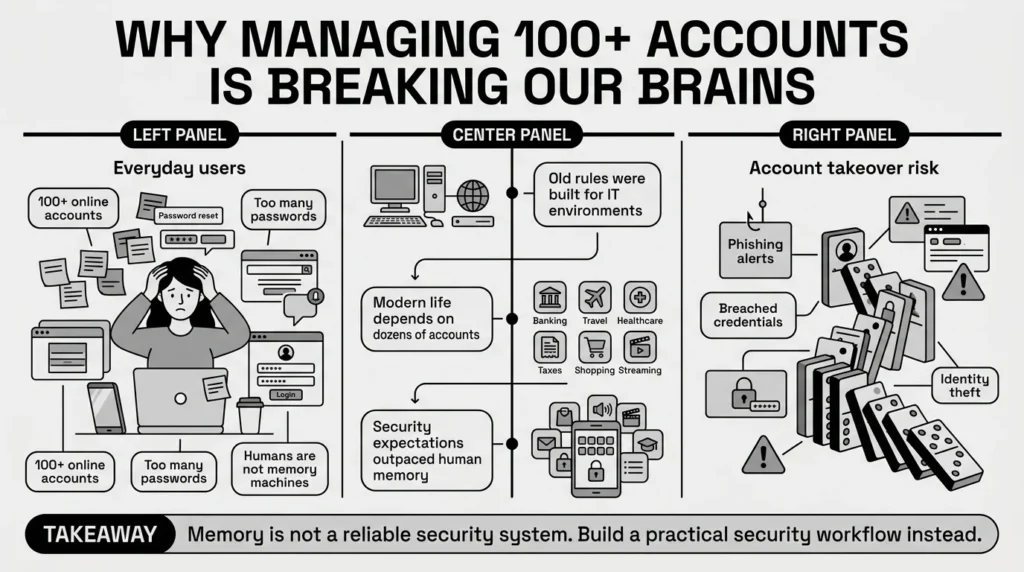
When we look closely at password security history, we see that the rules were originally designed for IT professionals in closed office environments, not for a parent managing school forms, health insurance cards, and family passwords all from a smartphone. We are booking travel, filing taxes, ordering groceries, and managing bank accounts online.
The stakes are also higher today. According to the FTC’s 2025 Consumer Sentinel Network reports, account takeovers and identity theft remain leading causes of consumer fraud. But this data is not meant to scare you. Rather, it highlights why relying on your memory—or a worn-out sticky note—is no longer the best strategy for identity protection.
Consider a freelancer juggling client portals, tax files, banking credentials, and contracts. If they lose access to their primary email, it can halt their entire business. Understanding the digital security history that led to our current best practices helps us see why adopting newer, simpler methods is not just about avoiding hackers; it is about reclaiming your time and peace of mind.
Takeaway: Acknowledge that memory is not a reliable security tool. Your first step to better security is realizing you need a practical system, not a sharper memory.
From University Basements to Global Threats: How the Rules Changed
To understand the annoying password rules of the past decade, it helps to see where they came from. The password evolution has been a bumpy ride, largely because technology moved faster than human habits could adapt.
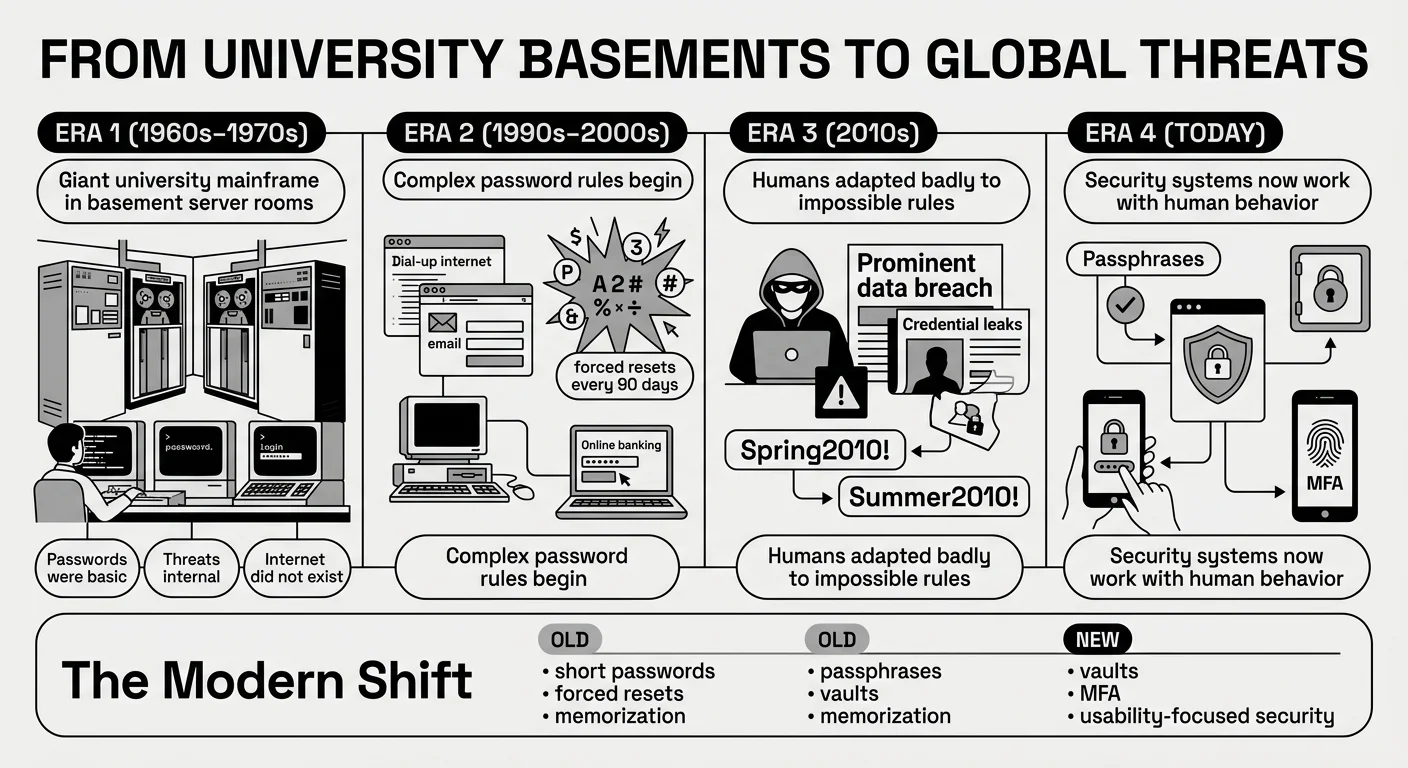
If you trace password security history back to its origins in the 1960s and 1970s, user authentication was incredibly basic. Computers were massive machines locked in university basements or corporate headquarters. Passwords were just a way to keep coworkers from accidentally deleting each other’s files. People used their names, their pets’ names, or simple words like “admin.” Because the internet did not exist as we know it, the threat of outside security breaches was almost zero.
Then came the 1990s and early 2000s. The internet entered our homes, and authentication methods had to adapt. Suddenly, we had email accounts, early social media, and basic online banking. IT departments realized that simple words were too easy for automated programs to guess. This led to the era of complex password policies. Organizations told us to change our passwords every 30 or 90 days and mandated a mix of symbols, numbers, and cases.
A major turning point in password security history occurred in the 2010s. Cybersecurity incidents became mainstream news. However, the complex rules we were told to follow actually backfired. Because humans cannot remember 20 different random strings of characters, we started taking shortcuts. If forced to change a password from “Spring2010!”, we simply changed it to “Summer2010!”. We created predictable patterns.
Security experts eventually realized that forcing humans to act like machines was a failing strategy. We needed systems that worked with human nature, not against it, paving the way for the modern credential management guidelines we use today.
Takeaway: Forcing yourself to remember complex, symbol-heavy passwords is an outdated practice. Give yourself permission to let go of the “Spring2010!” pattern in favor of modern solutions.
The Domino Effect: Why Reusing Your Favorite Password is a Trap
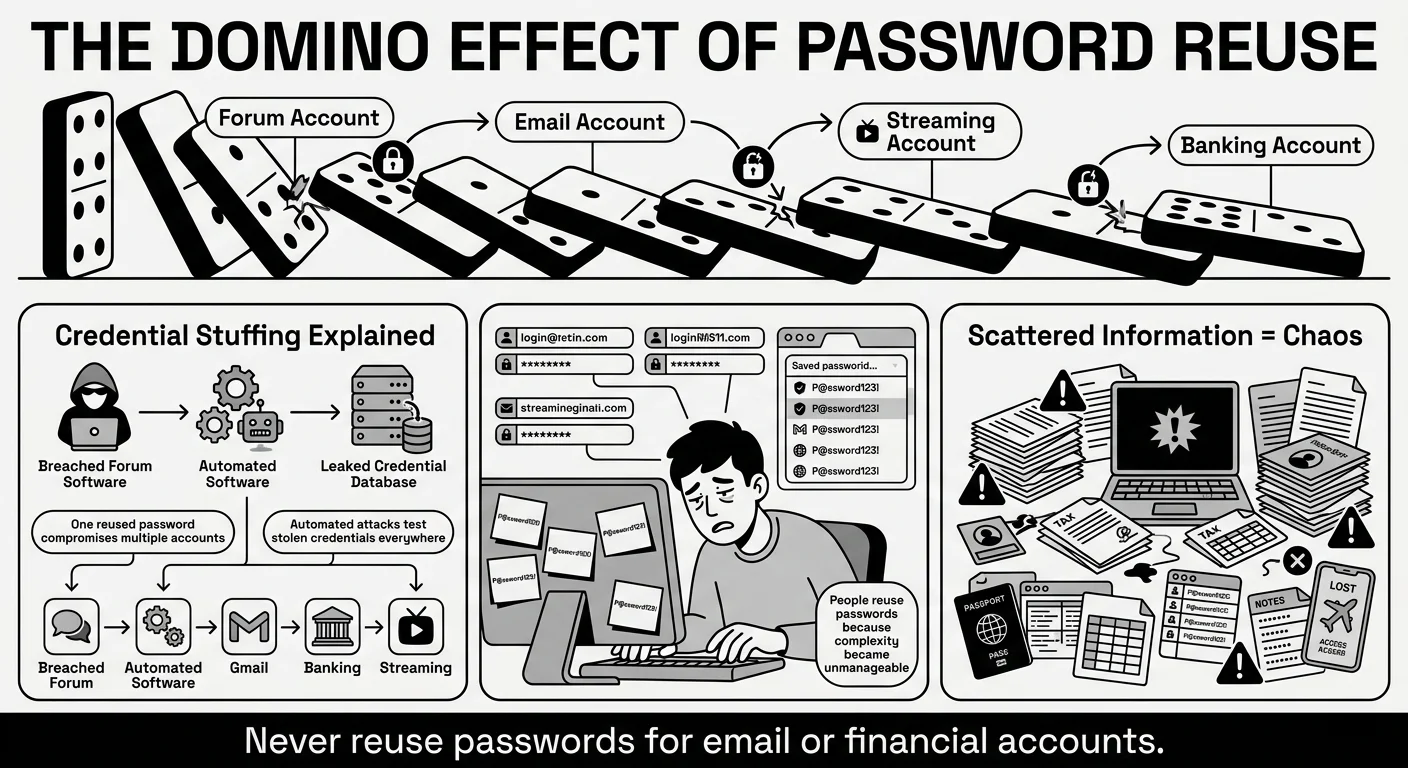
We have all reused passwords—it is completely human to want something familiar. You are trying to log into a streaming service to watch a movie, and you just want the easiest path forward. So, you use the same password you use for your email, your favorite shopping site, and maybe even your bank.
Despite the harsh lessons of password security history, we all break the “rules” because the old rules were unmanageable. But here is what usually goes wrong when we take these understandable shortcuts.
The Danger of Credential Stuffing
Imagine you used the same password for an old, forgotten online forum and your primary email account. If that old forum experiences a data breach, hackers will take the stolen list of emails and passwords and run them through automated software. This software tests those stolen credentials against major sites like Gmail, Netflix, and Chase Bank. This is called “credential stuffing.” The 2025 Verizon Data Breach Investigations Report (DBIR) consistently shows that stolen and reused credentials remain one of the primary ways attackers access systems. Furthermore, the Identity Theft Resource Center’s 2025 Annual Data Breach Report notes that compromised credentials continue to fuel the vast majority of secondary attacks on consumers. It is not that someone “hacked” your email directly; they just used the key you accidentally left under the mat somewhere else.
The Chaos of Scattered Documents and Notes
Another common trap is how we handle document protection and storage. Keeping passwords in phone notes, sticky notes, spreadsheets, or even relying solely on browser-saved logins creates vulnerability. But it is not just passwords. Think about a traveler needing quick access to passport scans, visa documents, and booking details. Recent consumer surveys from Cybersecurity Ventures indicate that nearly 30% of users have been locked out of a critical account or lost access to a vital document while traveling or during an emergency.
If your laptop crashes and the only scan of your passport is buried in an old, unencrypted desktop folder, a minor inconvenience becomes a major crisis. When important documents and the passwords needed to access them are scattered across different devices and random physical drawers, getting locked out is practically guaranteed. Our digital organization suffers because we lack a single, trusted system.
Takeaway: Stop treating all accounts equally. If you must reuse a password temporarily, never reuse the password protecting your primary email or financial accounts.
Ditching the Symbols: Why Passphrases and Vaults Win
Perhaps the most relieving update in password security history is that the official experts have changed their minds. The National Institute of Standards and Technology (NIST) updated their digital identity guidelines (SP 800-63B), and they now officially recommend against forcing people to change their passwords every 90 days unless there is evidence of a breach. They also recognize that forcing special characters often just leads to weaker, predictable passwords.
Here is what the modern standard of access control looks like today.
Embrace the Passphrase
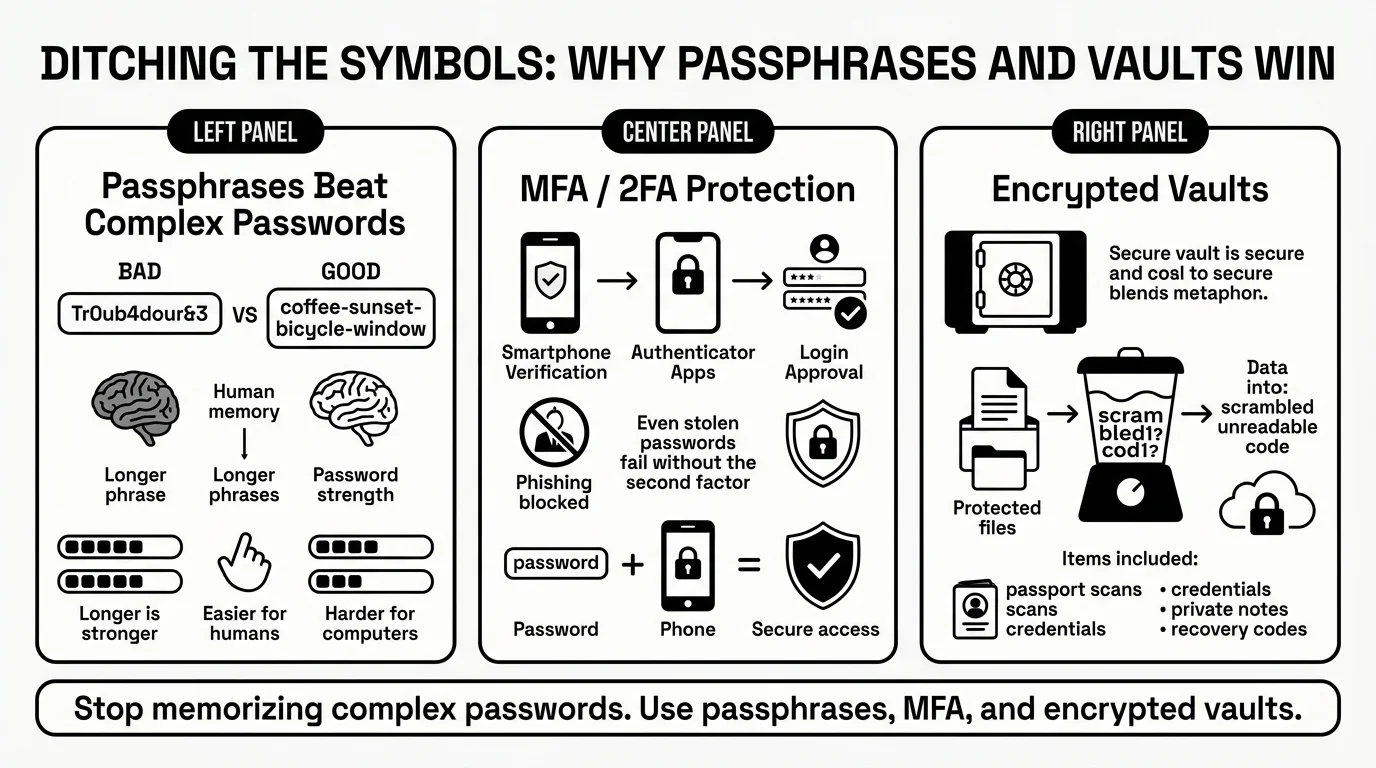
Instead of a short, complex password like Tr0ub4dour&3, security experts—including direct guidance from the FBI—now recommend passphrases for password safety. A passphrase is a sequence of random words, like coffee-sunset-bicycle-window. It is much longer, which makes it mathematically harder for computers to crack, but it is vastly easier for a human brain to picture and remember.
Multi-Factor Authentication (MFA)
Even the best password can be stolen in a phishing attack. That is why modern systems rely heavily on Multi-Factor Authentication (MFA), often referred to as 2FA. MFA means you need 2 things to log in: something you know (your password) and something you have (your phone or an authenticator app). The Cybersecurity and Infrastructure Security Agency (CISA) strongly urges everyone to enable MFA on their email, banking, and financial accounts. In fact, the 2025 Microsoft Digital Defense Report confirms that enabling MFA blocks over 99% of automated account compromise attacks. If an attacker steals your password but does not have your physical phone, they cannot get in.
Understanding Encryption and Vaults
You do not need to be a math genius to understand modern encryption techniques. Think of encryption like a digital blender. When you type your password or upload a document into a secure system, the software blends that information into an unreadable scramble of code. The only way to unblend it is with your unique master key. This means that even if a secure storage company’s servers are compromised, the attackers only get “blended,” useless data. Furthermore, privacy rights organizations like the Electronic Frontier Foundation (EFF) emphasize that true privacy control requires encrypted storage so that nobody but you can read your most sensitive files.
Takeaway: Switch your mindset from memorizing “complex passwords” to using long “passphrases,” and utilize an encrypted digital vault to remember the rest for you.
5 Simple Steps to Take Control of Your Digital Life Today
The best practical takeaway from password security history is that you do not need to fix everything in 1 day. Security is a process, not a switch you flip. Here are 5 simple steps to bringing your personal security up to modern standards without feeling overwhelmed.
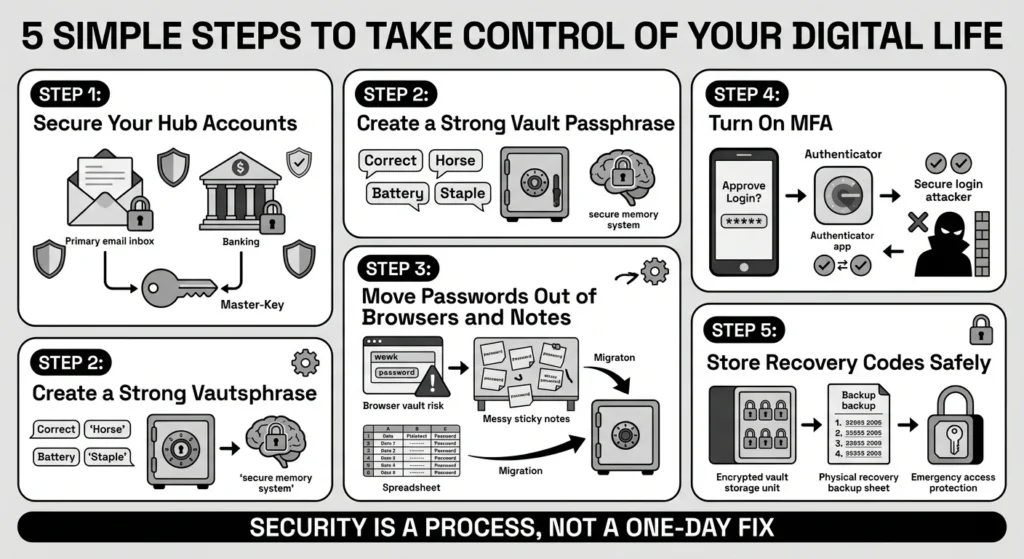
- Step 1: Secure Your “Hub” Accounts First Do not try to change all 100+ of your passwords this weekend. Start with the most important one: your primary email account. Your email is the master key to your digital life because every other service sends its “Forgot Password” link there. If your email is safe, everything else is easier to protect. Next, focus on your banking and financial accounts.
- Step 2: Create a Strong, Unique Passphrase for Your Vault You only need to remember 1 strong password if you use a digital vault. Create a memorable, 4-word passphrase. This will become your master key. Never use this passphrase anywhere else.
- Step 3: Move Passwords Out of Your Browser and Notes Browsers are great for navigating the web, but they are not dedicated secure storage tools. The 2025 IBM Cost of a Data Breach Report highlights how modern infostealer malware increasingly targets these loosely protected browser vaults. Begin transferring your logins from phone notes, spreadsheets, and browsers into your encrypted vault.
- Step 4: Turn on MFA for Important Accounts Go to the security settings of your email, bank, and primary social media accounts. Turn on Two-Factor Authentication. Whenever possible, choose an authenticator app over SMS text messages, as text messages can sometimes be intercepted. The Open Worldwide Application Security Project (OWASP) Credential Stuffing Prevention Cheat Sheet highlights MFA as a critical defense against automated credential stuffing attacks.
- Step 5: Safely Store Your Recovery Codes When you turn on MFA, the website will usually give you a list of recovery codes. These are vital. If you drop your phone in a lake, these codes are the only way back into your account. Do not leave them in your downloads folder or email them to yourself. Save them directly into your digital vault as a private note.
Takeaway: Do not try to fix everything at once. Start by securing your hub accounts (email and banking) with a digital vault and 2FA this week.
Future-Proofing: Building Sustainable Habits You Will Actually Keep
Looking at the long road of password security history, the goal has never been perfection. The goal is resilience. We want to build habits that protect us when life gets messy.
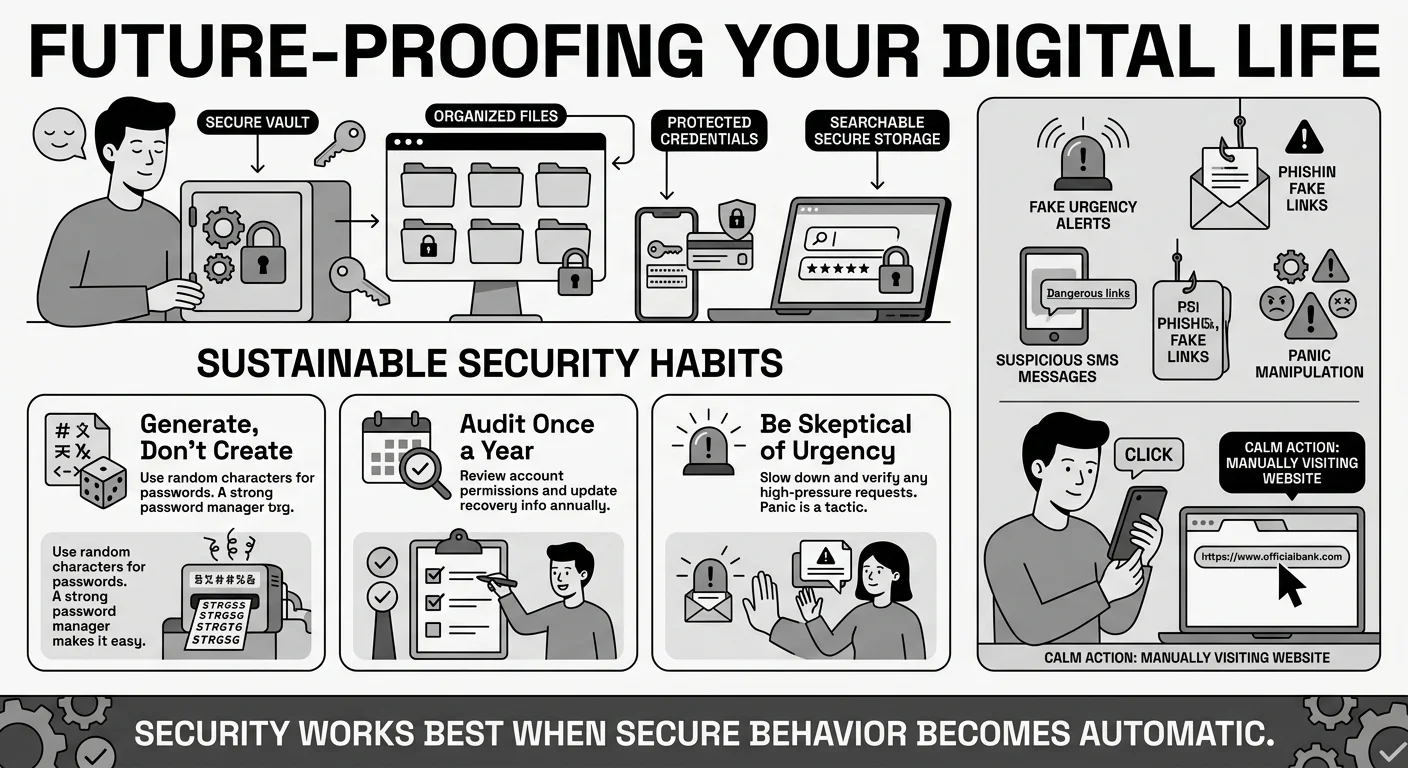
Better security means having a system you actually use. This is where WhiteVault comes in. Versus trying to remember everything or relying on scattered sticky notes, WhiteVault provides a digital vault for credential management, private notes, and important documents.
Imagine you are applying for a mortgage or filling out college financial aid forms. You need your tax returns, your social security numbers, and your bank login details. Instead of frantically searching through old email attachments, physical file cabinets, and trying to reset a forgotten bank password, everything is waiting for you in one secure, searchable place.
Sustainable Security Habits
- Generate, Don’t Create: When you sign up for a new website, let your vault generate a random 16-character password for you. You do not need to know what it is; your vault will remember it.
- Audit Once a Year: Pick a date—maybe when you do your taxes or during daylight saving time—to quickly review your digital life. Are there old accounts you can delete? Do you have the latest copy of your ID scanned and saved?
- Be Skeptical of Urgency: Most scams rely on panic. The latest Anti-Phishing Working Group (APWG) trends show that urgent fake alerts are at an all-time high. If you get an email or text saying your account is locked and you must click a link immediately, pause. Never click the link. Go directly to the website by typing it into your browser and logging in securely to check.
Takeaway: Security is a habit, not a destination. Use a trusted tool to make secure organization your default behavior, not a weekly chore.
Conclusion
The biggest lesson from our shared password security history is that human memory was never meant to hold hundreds of complex codes, nor were our kitchen drawers meant to hold our most critical digital recovery keys. Taking control of your digital security doesn’t mean becoming a cybersecurity expert. It means taking a few smart steps today that protect your information tomorrow. Start with 1 change—whether that’s updating your most important passwords, enabling Two-Factor Authentication, or organizing your critical documents—and build from there.
You do not have to be a tech expert to protect your family’s information. You just need the right tool for the job. WhiteVault was built for exactly that. It is designed to replace the chaos of scattered notes and risky browser storage with a clean, simple, and highly protected environment. Save, remember, and protect what matters, all in your secure personal vault.
Frequently Asked Questions (FAQ)
1) What is a secure password by today’s standards?
By modern standards, a secure password is one that is long, unique, and not easily guessed. Instead of a short word with complex symbols, security experts now recommend “passphrases”—a string of 3 to 5 random words (like guitar-sunshine-coffee-table). It is easier for you to remember but mathematically much harder for a hacker’s computer to crack.
2) How do I know if my password has been stolen in a data breach?
You can use free, reputable services like “Have I Been Pwned” (HIBP) to check if your email address or phone number has appeared in a known public data breach. Additionally, many modern digital vaults will automatically alert you if they detect that one of your saved passwords matches a known breached database, prompting you to change it.
3) How often should I be changing my passwords?
Unless you have been notified of a security breach, or you suspect someone has accessed your account, you do not need to change your passwords frequently. The old advice of changing them every 90 days has been retired by major security organizations, as it usually leads to people creating weaker, predictable passwords.
4) Are passkeys the same thing as passwords?
No, passkeys are a newer, safer alternative to passwords. According to the FIDO Alliance guidelines on passkeys, they use your device’s security (like your phone’s facial recognition, fingerprint scanner, or a PIN) to verify your identity with a website instead of a typed word. They are entirely resistant to phishing because there is no password for a hacker to steal or intercept.
5) Is it safe to write my passwords down on paper?
Writing passwords down on a piece of paper in your home is generally safer than reusing the same password across 50 websites, provided you keep that paper locked away and out of sight. However, paper cannot be backed up easily, it can be lost in a move or a fire, and it does not help you automatically log in on your phone. Digital vaults offer a much safer, more convenient alternative for proper credential management.
6) What is credential stuffing and how do I prevent it?
Credential stuffing is an automated cyberattack where hackers take a list of usernames and passwords stolen from one website’s breach and try them on hundreds of other popular websites, like banks or streaming services. You can completely prevent this by never reusing passwords. If every account has a unique password, a breach at one company will not compromise your other accounts.
7) How should I organize my Two-Factor Authentication (2FA) recovery codes?
When you set up 2FA, you are given a list of backup or recovery codes in case you lose your phone. Never save these in your email or as a screenshot in your photo gallery. They should be treated as highly sensitive. Store them in a secure, encrypted environment, such as a private note inside your digital vault.
8) How does WhiteVault help with managing my security?
WhiteVault acts as your secure personal vault, combining password management with secure document storage. Instead of trying to remember dozens of logins or keeping your passport scans and tax documents in unencrypted computer folders, WhiteVault encrypts and stores them in 1 centralized, easily accessible app. It remembers your complex passwords for you and keeps your private files organized, bringing peace of mind to your digital life.
