
The average person now manages over 100 online accounts—from banking and shopping to streaming and social media. Remembering unique, strong passwords for each one? Nearly impossible. So we reuse passwords, write them on sticky notes, or reset them constantly. But there is a better way that does not require a photographic memory. Welcome to our password generator guide. At WhiteVault, we help people prioritize personal security and digital organization without the overwhelm. You deserve a simpler way to keep your private information safe, and it starts with letting tools do the heavy lifting.
Password Generator: Quick Answer
A password generator creates long, random passwords that are impossible for attackers to guess. By using one alongside a digital vault, you replace easily forgotten or reused passwords with strong credentials you never have to memorize.
Why Your Brain is Not a Secure Password Manager
When reading any password generator guide, the first question is usually about why this is necessary for a normal person. Many of us assume that cyber attacks only happen to large corporations, tech executives, or wealthy individuals. But everyday users are the most common targets. We all have email accounts, banking details, airline miles, and shopping profiles that require serious identity protection.
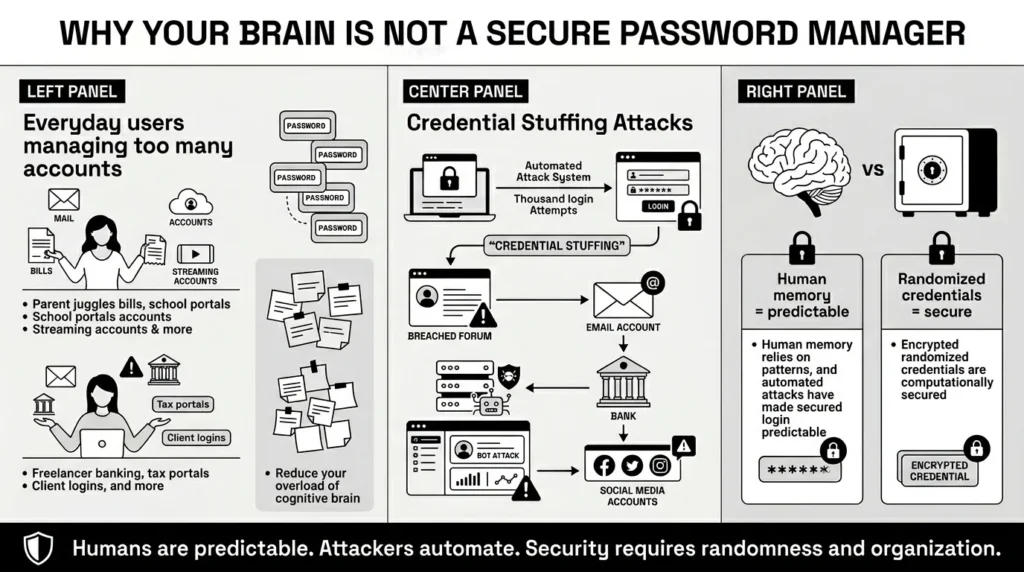
In modern security, attackers do not usually sit at a keyboard guessing your childhood pet’s name or your favorite color. They use automated software to test millions of stolen passwords across thousands of websites every single minute. According to the Cybersecurity and Infrastructure Security Agency (CISA) in their 2026 cyber hygiene reports, compromised and reused credentials remain a leading cause of everyday account takeovers.
If a minor recipe forum or local community message board you joined 5 years ago gets breached, attackers will instantly try that same username and password combination on your primary email, your banking portal, and your social media accounts. This tactic is called credential stuffing, which Verizon’s 2025 Data Breach Investigations Report notes is responsible for a massive percentage of all web application attacks.
Think about the sheer cognitive load of trying to outsmart these automated systems on your own. A parent might be managing school grading portals, family health insurance accounts, utility bills, and three different streaming services. A freelancer is often juggling multiple client project management portals, tax filing systems, and banking credentials. You simply cannot be expected to invent, remember, and safely store a hundred unique, complex codes using just your brain. That expectation is unrealistic and sets you up for security failures.
The Danger of Familiarity: Why Your Birthday Makes a Terrible Password
A major reason you need a password generator guide is to break the exhausting cycle of password fatigue. When faced with creating a new account while trying to quickly check out of an online store or sign up for a service, human nature takes over. We want something familiar. We want something easy to type on our smartphone keyboards.
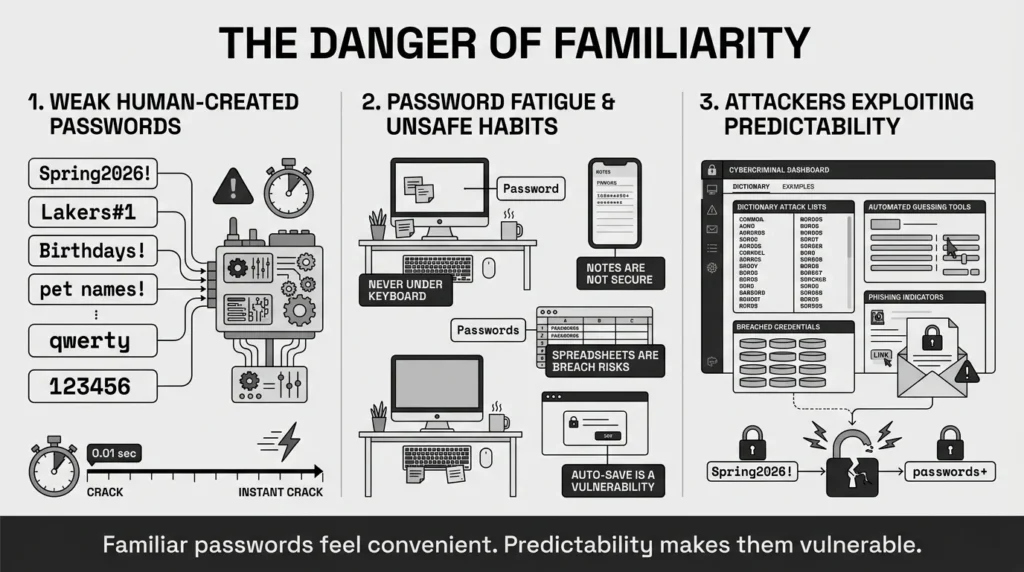
Despite the widely known risks of credential reuse, Bitwarden’s 2025 Password Decisions Survey found that over 60% of people still reuse passwords across multiple sites. We rely on highly predictable human patterns. We use a base word, like a spouse’s name, a favorite sports team, the city we live in, or a season, and then we add a number and a symbol at the end. “Spring2026!” or “Lakers#1” might meet a website’s basic requirements for a capital letter and a special character, but they are highly predictable. Hackers program their brute-force tools to guess these exact human patterns first, running through dictionary words and common keyboard walks (like “qwerty” or “123456”) in a matter of seconds.
Another incredibly common mistake is writing these passwords down in places that are easily lost, exposed, or corrupted. We keep passwords in unencrypted phone notes, on physical sticky notes tucked under our keyboards, or in shared household spreadsheets that anyone on the home network could accidentally modify or delete.
We also heavily rely on our web browsers to save our logins because it feels convenient. However, privacy rights organizations like the Electronic Frontier Foundation (EFF) continually stress that browser storage often lacks the deep encryption techniques and structural separation needed to keep your credentials truly safe if malware infects your computer. Furthermore, consumer guidance from the Federal Trade Commission (FTC) highlights in their 2025 Consumer Sentinel Network report that severe financial fraud and identity theft events often trace their origins back to these simple, avoidable password mistakes.
The Identity Theft Resource Center (ITRC) also notes in their 2025 Annual Data Breach Report that attacks targeting consumers directly are increasingly relying on compromised passwords to access sensitive documents like tax returns and medical records.
The Power of Randomness: How a Password Generator Works
The core lesson of our password generator guide is simple: computers are incredibly bad at guessing true randomness, and humans are incredibly bad at creating it. To ensure real password safety in 2026, you must rely on random password creation.
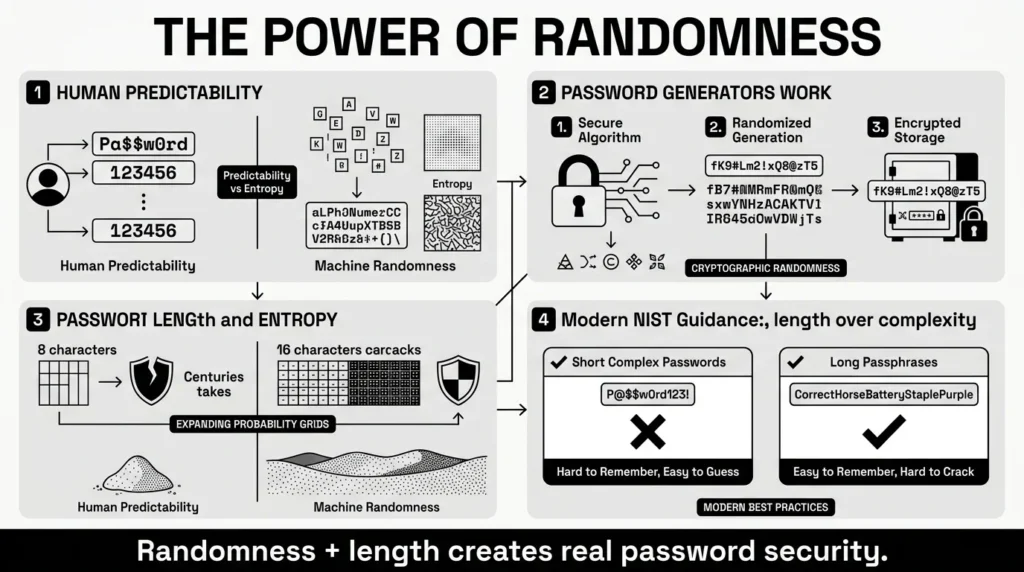
A password generator takes your human predictability completely out of the equation. It uses secure, randomized mathematical algorithms to instantly produce a string of characters that has no meaning, no linguistic pattern, and no ties whatsoever to your personal life.
When discussing security best practices today, cybersecurity experts emphasize length over complexity. For years, we were told to create passwords that looked like algebraic equations, substituting the letter “a” for “@” and “s” for “$”. But attackers caught onto those tricks a decade ago.
The National Institute of Standards and Technology (NIST) updated its digital identity guidelines (SP 800-63B) to reflect this new reality. A password that is 16 characters long, even if it uses primarily letters and numbers, is mathematically much harder for a computer program to crack than a short, 8-character password stuffed with a dozen special symbols.
Password length creates what security professionals call entropy. Entropy is a technical term describing how unpredictable and chaotic a password is. Think of it like trying to find a specific grain of sand. A short password is like finding a specific grain of sand in a teacup. A long password is like finding a specific grain of sand on a massive beach.
The longer the password, the more possibilities an attacker has to guess. As recent 2026 data from Hive Systems shows, an 8-character complex password can be cracked by modern graphics cards in just minutes, while a 16-character password turns a task that would take seconds into one that would take centuries to decipher.
The Hidden Benefit: Protection Against Phishing
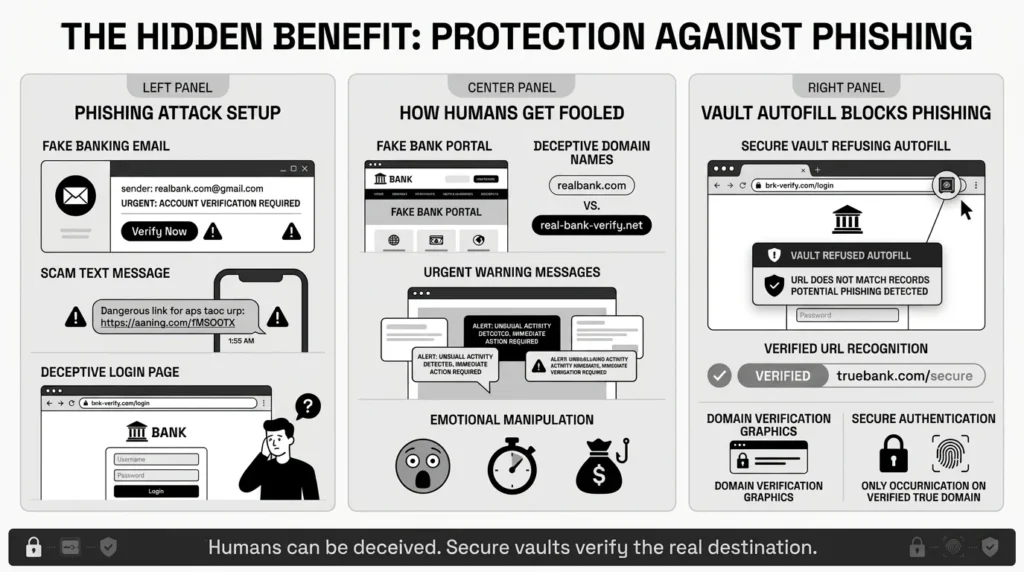
One of the most overlooked advantages we must cover in this password generator guide is how these tools protect you from phishing scams. Phishing occurs when a scammer sends you a deceptive text message or email that looks identical to a message from your bank, streaming service, or a delivery company. They urge you to click a link and log in to resolve an “urgent” issue.
According to the Anti-Phishing Working Group (APWG) 2025/2026 Phishing Activity Trends Report, social engineering and phishing remain the absolute most common methods for stealing consumer data.
If you memorize your passwords, you might accidentally type your banking password into a fake website that looks exactly like your bank’s real portal. Human eyes are easily tricked by a fake logo or a slightly altered web address (like “chase-bank-secure-login.com” instead of the real URL).
However, a digital vault combined with a password generator is not fooled by visuals. The software looks at the underlying code and the exact URL of the website. If you navigate to a fake banking site, your secure vault will simply refuse to autofill your password because it does not recognize the fraudulent web address. This automatic refusal is a massive, invisible safety net that stops countless account takeovers before they happen.
Action Plan: 5 Simple Steps to Lock Down Your Accounts
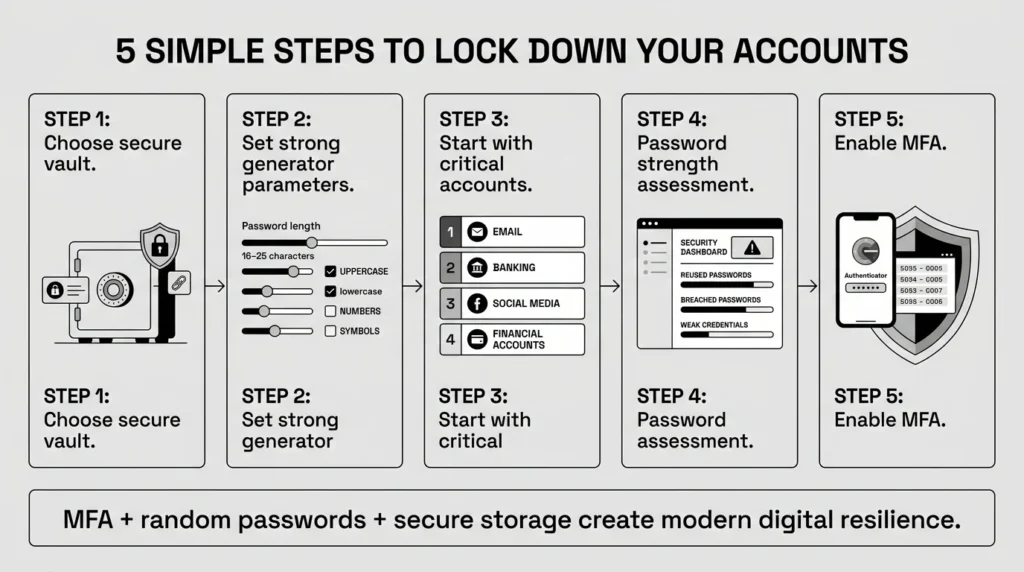
Turning good advice into good habits takes a clear plan. You do not need to fix every account today. Treating digital security as an all-or-nothing marathon is the fastest way to get overwhelmed and give up. Follow these 5 methodical steps to secure your digital life:
1) Choose a Secure Home for Your Credentials
Before generating any new passwords, you need to set up a digital vault. This is the foundation of your personal security. Look for a solution that prioritizes your privacy control and uses “zero-knowledge” strong encryption—meaning not even the company hosting the vault can see your data. This vault will hold your new passwords, your Two-Factor Authentication recovery codes, and your important family documents.
2) Set the Generator Parameters for Maximum Safety
When you open your password generator tool, you will usually see a few sliding scales or checkboxes. Set the password length to at least 16 characters. If a website allows it (and many modern sites do), pushing the slider to 20 or 25 characters is even better. Ensure you have checked the boxes for uppercase letters, lowercase letters, numbers, and symbols to maximize character variety and meet any strict website requirements automatically.
3) Start with Your Most Critical Accounts First
Do not try to change 100 passwords in one sitting. Start with your primary email account. Your email is the master key to your digital life; if someone accesses your email, they can request a password reset link for almost any other service you use (banking, shopping, social media). Generate a new, random password for your primary email first. Save it directly into your vault. Once that is done, take a break. Over the next few days, gradually move on to your bank accounts, financial services, and primary social media profiles.
4) Run a Password Strength Assessment
Many secure vaults include a built-in dashboard that acts as a password strength assessment tool. It will scan your saved logins and alert you to passwords that are weak, reused, or have been found in known data breaches on the dark web. Use this list as your ongoing, low-stress to-do list. Aim to change 1 or 2 weak passwords a week until your digital life is fully secure.
5) Add a Second Layer of Defense (MFA)
The final step in this password generator guide is to turn on Two-Factor Authentication (2FA) or Multi-Factor Authentication (MFA) for every account that supports it. Microsoft’s 2026 Digital Defense Report shows that MFA blocks an astonishing 99.9% of automated account compromise attacks. MFA requires a second piece of evidence—like a time-sensitive code from an authenticator app on your phone—in addition to your password. Always save your permanent 2FA backup recovery codes inside your secure vault so you never get locked out if you lose your phone.
How WhiteVault Brings Calm to Digital Chaos
While a password generator guide teaches you how to make strong credentials, you still need a daily, reliable system for digital organization. This is where WhiteVault steps in as your trusted partner.
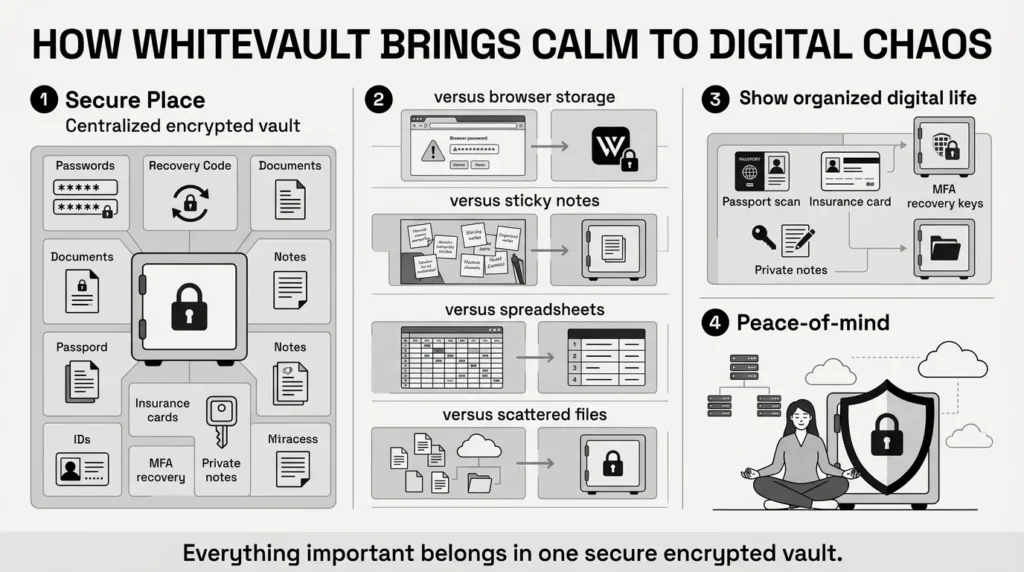
WhiteVault is your secure personal vault for credentials, passwords, recovery details, private notes, and important documents. We built WhiteVault because everyday people need 1 secure, organized place for the information they rely on most, without needing a background in cybersecurity to figure it out.
Here is how WhiteVault simplifies your digital life and removes daily friction:
- Versus trying to remember everything: WhiteVault allows you to store credentials securely in 1 encrypted place. You only need to remember 1 strong master password (ideally a long passphrase made of several random words). The vault does the rest of the memorization for you.
- Versus browser storage: You enjoy stronger credential management with easy access across all your devices. Browsers are built for navigating the web, not acting as fortified safes. WhiteVault provides a dedicated, encrypted environment specifically built for data protection.
- Versus document chaos: WhiteVault ensures document protection by helping you keep important files organized and searchable alongside your passwords. If you are rushing to the airport and need your passport scan, or you are at the doctor’s office trying to find an insurance card, WhiteVault lets you securely store those identity documents right alongside your related login credentials.
- Versus scattered recovery details: Security isn’t just about passwords; it’s about account recovery. WhiteVault lets you save MFA backup codes, recovery keys, and old security answers where you can actually find them. Never struggle to remember your mother’s maiden name security answer or your first car’s make and model from a decade ago.
- Actionable Takeaway: Let WhiteVault handle the heavy lifting. By consolidating your logins, recovery codes, and sensitive documents into 1 secure vault, you eliminate the daily friction of managing your online life and give yourself true peace of mind.
Set It and Forget It: Habits for Lasting Peace of Mind
Security is not a final destination; it is a daily practice. However, once you have set up your vault and started generating strong passwords, maintaining your safety becomes a background task that requires very little effort.
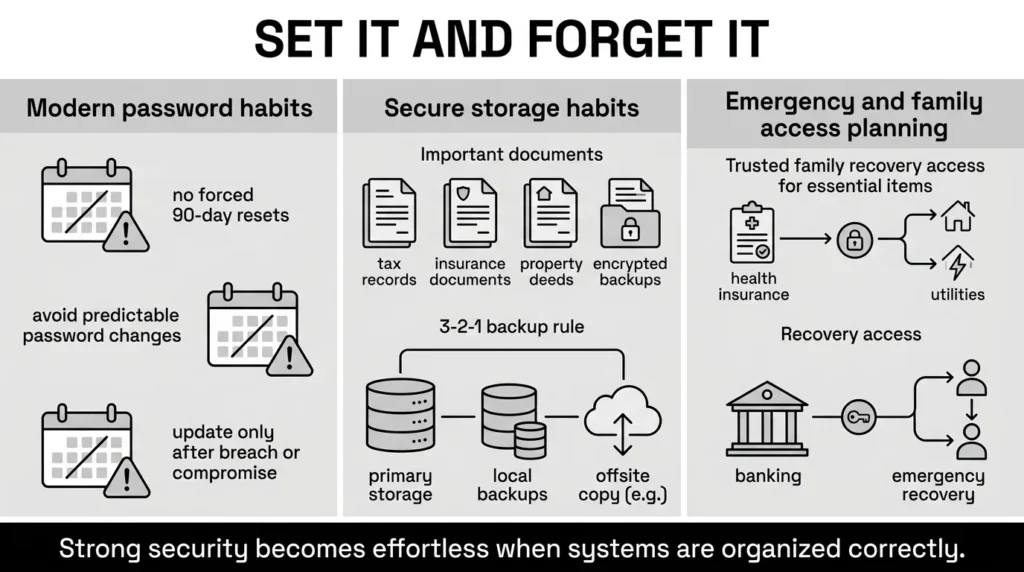
First, ignore the old, outdated advice about changing your passwords every 30 or 90 days. Modern security experts, including NIST, now strongly advise against arbitrary password rotation. Frequent, forced changes actually encourage people to make minor, predictable tweaks (like changing “Fall2025!” to “Winter2026!”). You only need to change a randomly generated password if you suspect it has been compromised in a specific data breach, or if you accidentally typed it into a public or shared computer.
Second, practice secure storage for your most critical life files. Treat your vault as the digital equivalent of a fireproof home safe. Store your tax records, insurance policies, property deeds, and medical records securely. Maintain the “3-2-1 backup rule” for highly sensitive files: keep 3 total copies of your data, on 2 different mediums, with 1 copy stored securely off-site (like in an encrypted cloud vault).
Finally, plan for account recovery and secure family access. Digital security shouldn’t mean locking your loved ones out during an emergency. A parent managing household affairs needs to ensure their partner knows how to access the family’s health insurance documents, utility passwords, and banking details if something unexpected happens.
Conclusion
Taking control of your digital security does not mean you have to become a cybersecurity expert or spend hours every weekend managing your accounts. It simply means taking a few smart, automated steps today that protect your private information tomorrow. Start with one small change—whether that is updating your most important email password using a generator, or finally organizing your critical identity documents—and build your digital resilience from there.
We hope this password generator guide has shown you that protecting your digital life is a highly achievable goal. By relying on tools to manage the complexity of modern credentials, you free up your mind, protect your identity, and drastically reduce your daily stress. Everything important belongs in 1 secure place. Save, remember, and protect what matters, all in your secure digital vault with WhiteVault.
Frequently Asked Questions (FAQ)
1) What is a password generator guide and why do I need one?
A password generator guide explains how to use automated tools to create long, random, and highly secure passwords, and how to store them properly. You need one because the average person has over 100 online accounts, which is far too many to rely on human memory. As a result, we take shortcuts. Reusing simple passwords across multiple websites is the leading cause of identity theft, financial fraud, and account takeovers. A guide helps you break this dangerous habit and transition to a system where software handles the heavy lifting of your personal security.
2) How do I know if my current passwords are weak?
If you can easily remember your password without looking it up, it is very likely weak. If your password contains a dictionary word (in any language), a proper name, a date of birth, or sequential numbers (like 1234), it is vulnerable to automated cracking tools. Furthermore, if you have used the exact same password on more than 1 website, it is compromised by default. A high-quality digital vault will often scan your saved logins and automatically alert you to passwords that are reused, weak, or have appeared in known data breaches.
3) How often should I update a generated password?
You do not need to update a strong, randomly generated password on a set schedule (like every 90 days). The cybersecurity industry has moved away from forced expiration policies because they lead to poor password habits. You only need to change a generated password if the company holding your account formally announces a data breach, if you notice suspicious login activity on your account, or if you accidentally typed the password into a shared, public, or infected computer. Otherwise, a long, random password is safe indefinitely.
4) Is it better to use a generator or make up my own passphrase?
A password generator is generally better for the dozens of everyday accounts you manage (like shopping sites, streaming services, and forums) because it creates true mathematical randomness that is impossible to guess, and you never have to remember those passwords anyway. However, a passphrase (which is 4 or 5 random, completely unrelated words strung together, like “horse-battery-staple-correct”) is an excellent strategy for the 1 master password you must memorize to unlock your secure storage. A passphrase is long enough to be secure, but easy enough for a human brain to picture and memorize.
5) Can I really trust a computer program to make my passwords?
Yes, absolutely. Reputable password generators create passwords locally on your device using highly complex mathematical algorithms designed specifically for security (cryptographic pseudo-random number generators). They are significantly safer than any human-created password because computers do not rely on predictable behavioral patterns, keyboard walks (like typing “qwerty” or “asdfg”), or emotional attachments to words, dates, or family names.
6) If the generator creates the password, does the company keep a copy of it?
If you are using a trustworthy digital vault, the answer is no. Industry-standard vaults use “zero-knowledge” architecture and end-to-end encryption. This means your passwords and files are encrypted and decrypted locally on your own smartphone or computer using your master password. The company hosting the vault only stores the scrambled, encrypted data on their servers. They cannot see, read, or access your generated passwords, your recovery codes, or your private documents. Only you hold the decryption keys.
7) How do I keep track of all these random passwords and recovery codes?
You should never try to write them down on paper, save them in an unencrypted spreadsheet, or attempt to memorize them. You keep track of them by saving them immediately into an encrypted credential management tool or digital vault at the exact moment you create them. The vault acts as a highly searchable, secure, and organized database for all your credentials and important files. When you return to a website, the vault automatically retrieves and fills in the long, random password for you.
8) How does WhiteVault help with this exact problem?
WhiteVault acts as your comprehensive, secure digital vault. It provides the automated tools to instantly generate strong passwords, saves them securely using zero-knowledge encryption, and seamlessly autofills them when you return to a website or app. Beyond just passwords, WhiteVault gives you an encrypted space for total document protection—allowing you to confidently organize your MFA backup recovery codes, private notes, health records, and sensitive identity documents so you never lose them and attackers can never access them.

