
We have all had that moment where the password we were sure we knew suddenly does not work. Maybe it happens during a hurried online checkout, right before a trip, or while trying to help a parent access an important health portal. A unique password strategy matters because these small moments can quickly turn stressful. At WhiteVault, we help people save, remember, and protect what matters, so security feels manageable instead of overwhelming. Let’s look at how to secure your accounts without having to memorize a dictionary.
Unique Passwords for Every Account: TL;DR
A secure password plan means using a different, strong password for every single account. Instead of relying on your memory, use a secure personal vault to generate and store these passwords so you only need to remember one.
Why a unique password strategy Matters for Everyday Security
For a long time, internet security felt like something only IT professionals needed to worry about. Today, our entire lives are digital. We manage banking, health insurance, school communications, taxes, and family photos online. With so much private information spread across the web, the way we lock those digital doors is more important than ever.
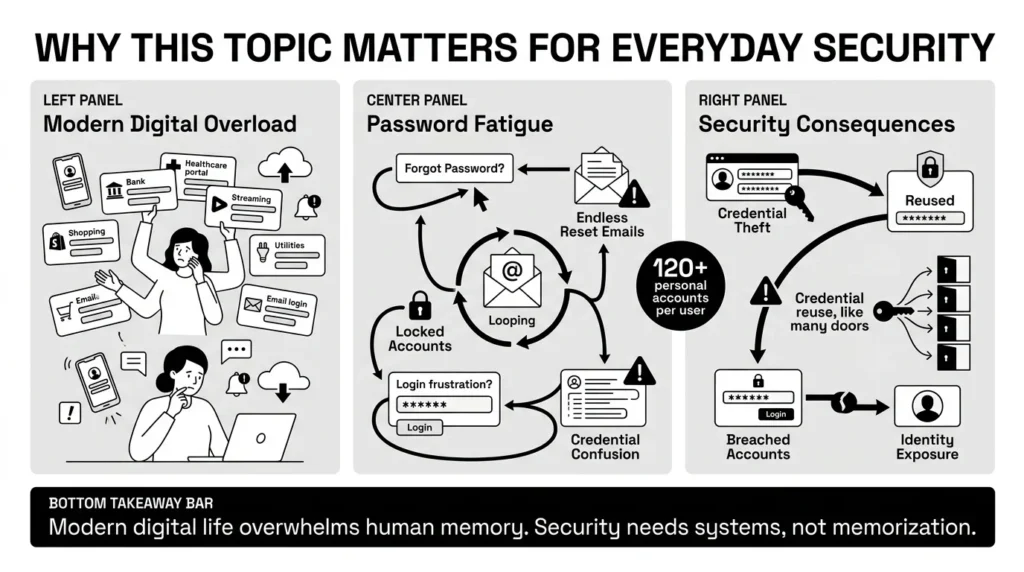
One of the most common threats everyday people face is something security researchers call “credential stuffing.” It sounds technical, but the concept is very simple. Imagine a thief finds a single key hidden under your doormat. Instead of just trying it on your front door, they walk down the entire street, trying that exact same key on every single house, mailbox, and garage they can find.
In the digital world, when a popular website is breached—like a shoe store, a food delivery app, or a hotel chain—hackers take the email and password combinations that leaked. They then use automated software to test those exact same logins on email providers, banks, and streaming services. The scale of this threat is massive; industry analysis indicates that an estimated 26 billion credential stuffing attempts occur globally each month.
According to the 2025 Verizon Data Breach Investigations Report (DBIR), stolen or reused credentials drove 22% of all confirmed data breaches, and an overwhelming 88% of basic web application attacks. Furthermore, the IBM 2025 Cost of a Data Breach Report found that credential-based breaches take an average of 246 days to identify and contain, meaning compromised accounts can stay undetected for months.
When you adopt a unique password strategy, you immediately stop this domino effect. If a hacker gets your password from a minor shopping site, they cannot use it to unlock your primary email or your bank account. The damage is contained to that one single, isolated account. Using unique account credentials ensures that a small data breach at a local business doesn’t become a massive headache for your personal life.
What Usually Goes Wrong: The Password Reuse Trap
We’ve all reused passwords—it’s human nature to want something memorable. But with the average person managing 100+ accounts, reusing passwords is like using the same key for your home, car, and office. In fact, according to the 2025 Bitwarden World Password Day Global Survey, a massive 84% of people still reuse passwords across multiple sites. Here’s a better way.
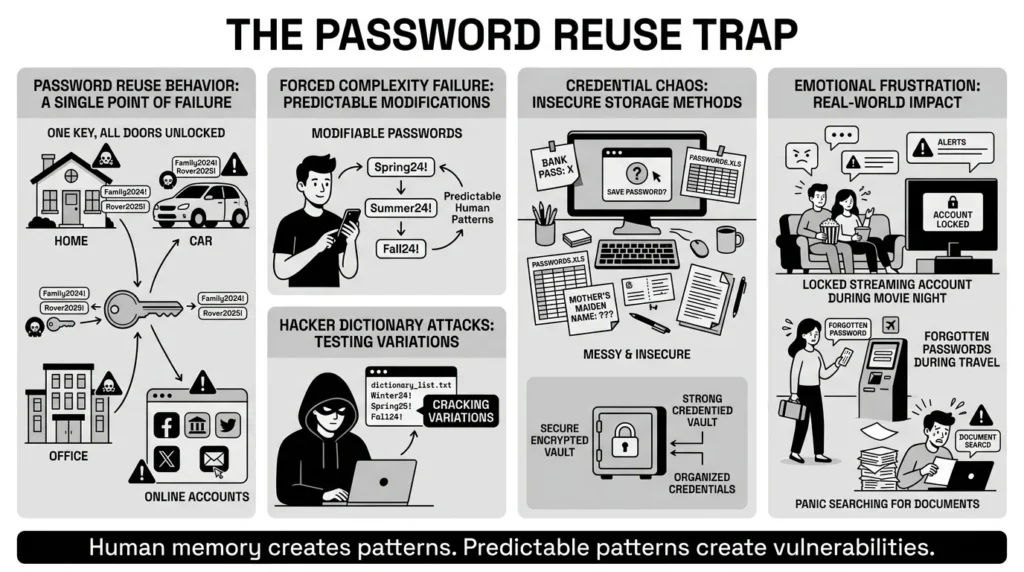
Without a unique password strategy, it is entirely normal to fall back on what feels safe: repetition. Often, we find ourselves staring at a screen that demands a capital letter, a number, and a special character. This forces us into bad habits. We take a base word we know—like a pet’s name or a favorite sports team—and just add “1!” to the end. The problem with forced password complexity is that humans are predictably unoriginal. Hackers know that “Rover2025!” is a highly likely variation of “Rover.”
This is compounded by the outdated advice of regular password updates. For years, workplaces and websites forced us to change our passwords every 30 or 90 days. What did we do? We changed “Spring24!” to “Summer24!”. The National Institute of Standards and Technology (NIST) has updated their digital identity guidelines to advise against these forced, arbitrary resets, noting that forcing people to constantly change passwords just makes them create weaker, more easily guessed variations.
The result of this confusion is document and credential chaos. Think about the real-world frustration: You’re locked out of your Netflix account during movie night. Your laptop crashes and you can’t remember where you saved your passport scan. Or, you’re filling out an important form and can’t recall your mother’s maiden name security answer from a decade ago.
None of these methods or mistakes are inherently “wrong”—they are just everyday people trying to cope with an overwhelming system. But sticky notes get lost, browsers can be compromised by malware, and scattered documents cause panic. We need a simpler, calmer way to manage this digital load.
The Safer Way: Passphrases and Random Generation
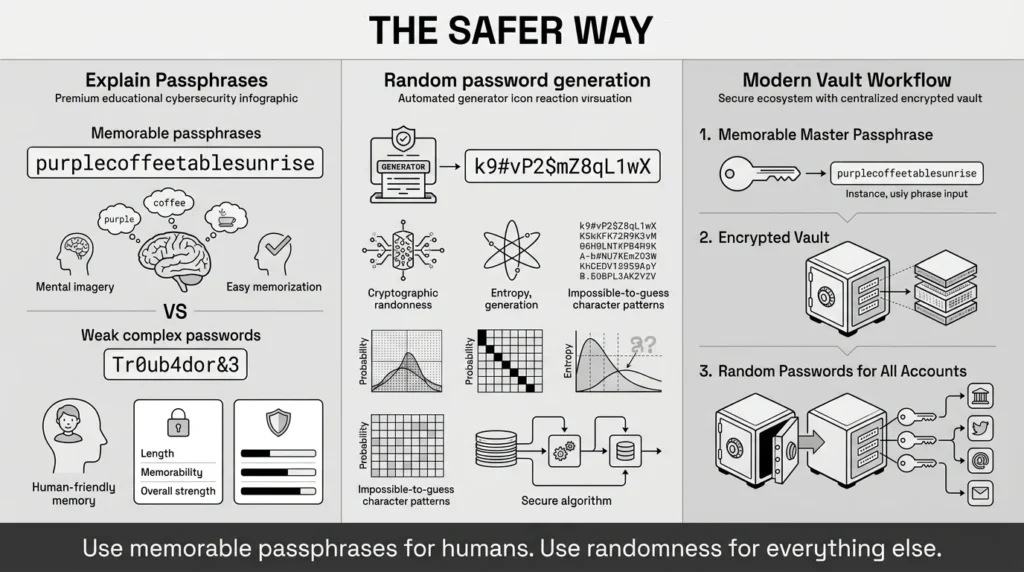
If we cannot rely on memory, and we shouldn’t rely on sticky notes or simple variations, what is the alternative? The modern approach to password security relies on two powerful concepts: passphrases and random generation.
First, let’s look at passphrase creation. A passphrase is exactly what it sounds like—a phrase instead of a single word. NIST guidelines now strongly recommend length over complexity. A password that is 16 characters long but only uses lowercase letters is mathematically harder for a computer to crack than an 8-character password packed with symbols.
To put this into perspective, the 2025 Hive Systems Password Table demonstrates that while an 8-character lowercase password can now be cracked in just 3 weeks using modern consumer hardware, a complex 16-character passphrase would take trillions of years to crack.
Instead of trying to remember Tr0ub4dor&3, which is hard for a human to memorize but easy for a computer to crack, you can use something like purplecoffeetablesunrise. It is long, it is a visual image you can easily picture in your mind, and it is exceptionally secure. Passphrases are perfect for the few passwords you actually need to type out from memory, such as the master password to your secure personal vault or your laptop’s login screen.
For everything else, the safest method is random password generation. When you sign up for a new account or update an old one, you should use a tool to create a string of completely random characters, such as k9#vP2$mZ8qL1wX. You will never memorize this, and you shouldn’t try.
This is where the magic of a modern security setup comes in. You use a memorable passphrase for the “front door” of your personal vault, and you let the vault use random generation for every other door inside. This completely removes the burden of memory from your shoulders. It transforms security from a test of your memory into an automated, quiet process running in the background.
Step-by-Step: How to Build Your unique password strategy
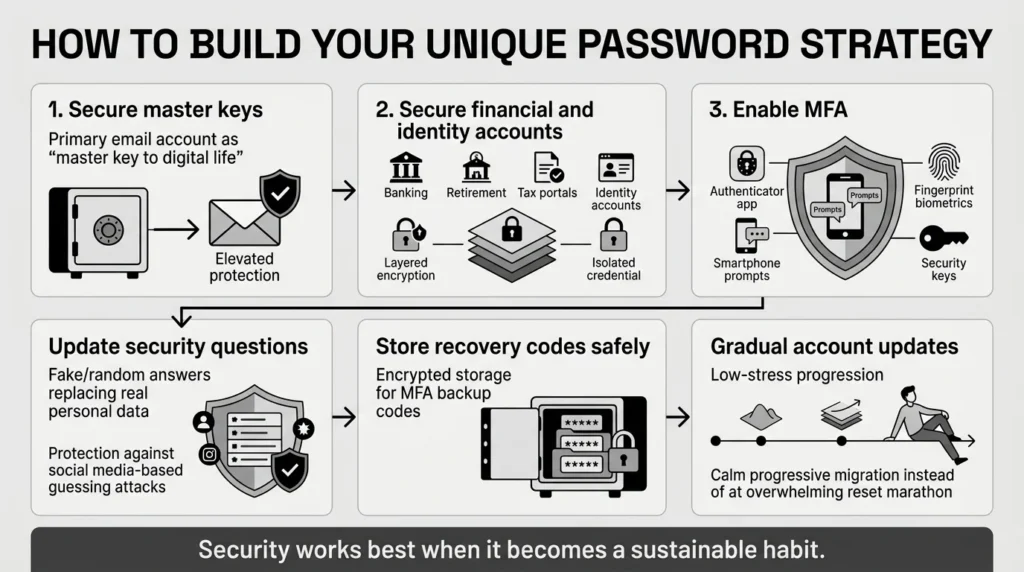
Building a unique password strategy does not mean spending an entire weekend resetting every login you have ever made. In fact, trying to do it all at once is a recipe for burnout. Security is a journey, not a sprint. Here is a calm, practical, step-by-step approach to securing your digital life.
Step 1: Secure Your “Master Keys” First
Not all accounts are created equal. Start by identifying your most critical accounts. For most people, this is your primary email address. If someone gets into your email, they can request password resets for almost every other account you own. Update your primary email password to a strong, long passphrase.
Step 2: Secure Your Financial and Identity Accounts
Next, focus on your banking, retirement, and tax portal accounts. Use random password generation to create long, complex passwords for each of these. Because these hold highly sensitive private information, they should never share a password with any other service.
Step 3: Enable Multi-Factor Authentication (MFA)
Passwords are the first layer of defense, but they should not be the only layer. For your most important accounts, enable multi-factor authentication. MFA requires a second piece of proof that you are who you say you are. This could be a code sent to an authenticator app, a prompt on your smartphone, or a physical security key. Even if a hacker steals your password, they cannot access your account without that second factor. Where possible, lean into biometric security, such as FaceID or fingerprint scans on your trusted devices, to make this second step seamless.
Step 4: Update Your Security Questions
We often forget about security questions, but they are a massive vulnerability. If your security question is “What city were you born in?”, anyone with access to your public social media profiles can probably find the answer. Treat security questions like extra passwords. Instead of answering honestly, generate a random word or use a passphrase. If the bank asks for your first pet’s name, the answer can safely be blue-electric-bicycle. Just be sure to save that exact answer in your secure personal vault.
Step 5: Safely Store Your Recovery Codes
When you set up MFA, platforms will often give you “backup codes” or “recovery codes.” These are your safety nets if you lose your phone or can’t access your authenticator app. Do not take a screenshot of these and leave them in your camera roll. Save these critical codes directly into your secure personal vault alongside the login credentials.
Step 6: Update Other Accounts Gradually
Once your email, banking, and identity portals are secure, stop. Take a breath. From this point forward, simply update your older accounts as you naturally log into them. Over a few months, you will naturally secure your most-used accounts without turning it into a massive chore.
How WhiteVault Helps Keep This Manageable
The biggest hurdle to maintaining a unique password strategy is simply the limits of human memory. You cannot mentally juggle sixty different random strings of characters. This is exactly why we built WhiteVault.
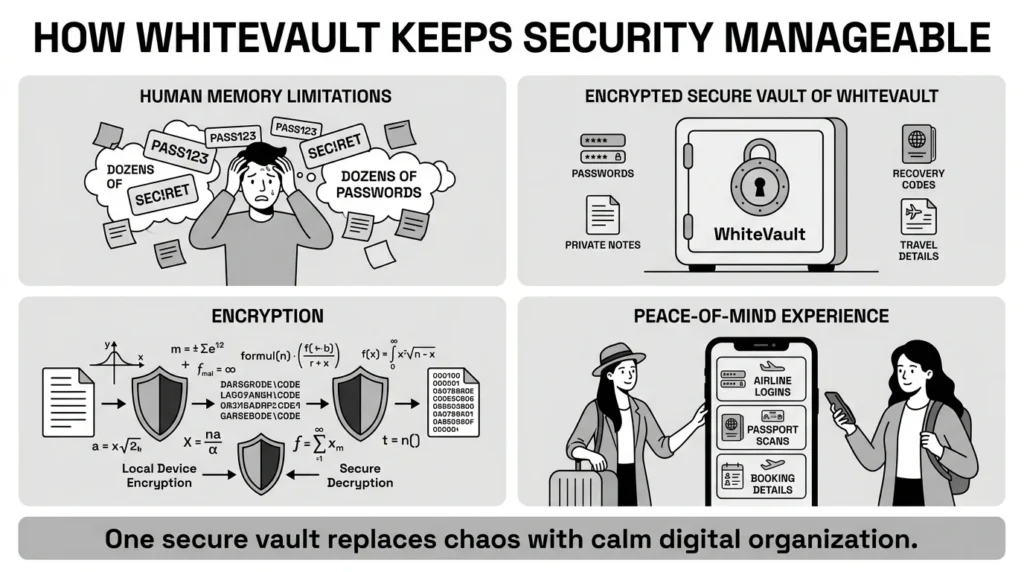
WhiteVault acts as your secure personal vault—a trusted place to save, remember, and protect what matters. Instead of writing credentials on sticky notes or relying on your browser (which can easily be wiped if your computer crashes), a password manager like WhiteVault provides dedicated, encrypted storage.
Encryption sounds complex, but you can think of it as a digital lockbox where the contents are scrambled into unreadable code. The only way to unscramble the information is with your master passphrase. Because the decryption happens on your device, even if someone were to intercept the data, all they would see is mathematical gibberish.
When you use WhiteVault, the daily friction of security disappears. If you are a traveler needing quick access to airline logins, passport scans, and booking details, everything is organized in one searchable place. WhiteVault takes the burden of memorization away, allowing you to use incredibly strong, unique credentials for every site, while only ever having to remember one single master passphrase.
Habits That Keep You Safer Over Time
True security is about building quiet, sustainable habits rather than reacting to emergencies with panic. Once your accounts are secured in your personal vault, maintaining your safety requires very little effort.
One of the best habits you can develop is knowing how to react to a data breach. The news cycle frequently reports on massive corporate hacks. If you hear that a company you use has been compromised, do not panic. Because you have implemented unique passwords, your other accounts are safe. Simply log into the affected service, generate a new random password, update your vault, and move on with your day.
Furthermore, be mindful of phishing—scam texts and emails designed to trick you into handing over your credentials. Spotting a fake is getting harder; 2026 cybersecurity data reveals that over 82% of recent phishing emails utilized AI, allowing scammers to perfectly mimic legitimate brands. A great habit is to never click links in unexpected messages. Instead, open your browser, navigate directly to the company’s official website, and log in securely using your vault. According to recent 2025 consumer guidance from the Federal Trade Commission (FTC), staying skeptical of unsolicited messages is one of the most effective ways to prevent identity theft.
Finally, keep your important documents just as organized as your passwords. Just as you wouldn’t leave physical tax records scattered across your living room floor, don’t leave scans of your ID, insurance forms, or financial documents scattered in random desktop folders. Store them safely in your encrypted vault so you always know exactly where they are during an emergency.
Conclusion
Better security rarely comes from one dramatic, exhausting overhaul of your digital life. It usually comes from a few simple, practical habits repeated consistently over time. Using different passwords for different accounts, securing them with multi-factor authentication, and keeping your recovery details organized are steps anyone can take.
A unique password strategy is one of the most powerful gifts you can give your future self. It turns a potential crisis—like a data breach at a favorite online store—into nothing more than a minor, five-minute chore. You don’t have to be a security engineer to protect your private information; you just need the right tools to carry the load for you.
WhiteVault was built for exactly that purpose. We believe security should bring you peace of mind, not daily frustration. By moving away from memory and scattered notes, you can save, remember, and protect what matters, all in your secure personal vault. Take control of your digital life today, one login at a time.
Frequently Asked Questions (FAQ)
1) What exactly is a unique password strategy?
It is a simple security rule where you use a completely different, unrepeated password for every single online account you own. This ensures that if one website is hacked and your password is stolen, the hackers cannot use that same password to break into your email, bank, or other accounts.
2) How do I know if my current passwords are unsafe?
If you can easily remember the passwords to your bank, your email, and your favorite shopping sites, and if they share a similar root word (like “Family2023!” and “Family2024!”), they are likely unsafe. Relying on memory usually means you are reusing patterns, which makes your accounts vulnerable to automated guessing software.
3) How long does it take to update all my passwords?
If you try to do it all at once, it can take hours and feel exhausting. We recommend a gradual approach. Take 15 minutes to secure your primary email and bank accounts today. After that, just update your other passwords one by one as you naturally log into those websites over the coming weeks and months.
4) Is a password manager safer than letting my web browser save my passwords?
Yes. While browser-saved passwords are convenient, they are often tied to the device itself. If your computer crashes, is stolen, or gets infected with malware, those passwords can be lost or compromised. A dedicated secure personal vault uses stronger encryption, allows you to access your credentials across multiple different devices safely, and lets you store much more than just passwords, like secure notes and recovery codes.
5) I am not very good with technology. Is it hard to use random passwords?
Not at all! Once you set up a secure vault, the software does the hard work for you. It will generate the random passwords and automatically fill them in when you visit a website. The only password you actually need to type and remember is the single master passphrase that unlocks your vault.
6) If I put all my passwords in one vault, isn’t that a single point of failure?
It is natural to worry about “all your eggs in one basket.” However, leaving your eggs scattered across sticky notes, text messages, and reused passwords is mathematically much more dangerous. A reputable vault uses advanced, localized encryption. This means the lockbox is incredibly strong, and only you hold the key. When combined with multi-factor authentication, it is by far the safest way for everyday people to manage their private information.
7) Where should I keep the backup codes for my two-factor authentication?
Never keep them in your phone’s photo gallery or in an unencrypted notes app. These codes are just as sensitive as your passwords. You should store them directly inside your secure personal vault, attached to the specific account they belong to, or in a dedicated encrypted note within the vault.
8) How does WhiteVault help me manage all of this?
WhiteVault acts as your centralized, secure personal vault. Instead of trying to remember dozens of logins or where you saved a scan of your passport, WhiteVault stores your credentials, private notes, security questions, and important documents behind strong encryption. It remembers the complex passwords so you don’t have to, providing simple security for your everyday digital life.

