
We often view cybersecurity as a battle of machines: firewalls blocking viruses and encryption scrambling data. However, the most critical element in security is not silicon; it is biological. It is the human brain. Why do we choose “Password123” even when we know it is weak? Why do we use the same login for our bank that we use for a random newsletter?
The answer lies in how our minds function. We are wired for efficiency, pattern recognition, and anxiety reduction. When faced with the tedious task of creating a new login, our brains prioritize speed and recall over safety. This conflict between security protocols and human nature creates the vulnerabilities that hackers target.
According to data from the Federal Trade Commission (FTC), consumer losses to fraud and identity theft have continued to climb, with credential stuffing—where attackers use stolen passwords from one site to access others—remaining a top threat. These breaches rarely happen because a hacker “cracked” a complex code using a supercomputer. They happen because humans are predictable.
Understanding password psychology helps us break these cycles. By recognizing the mental shortcuts that lead to weak protection, we can design better habits. This is not about becoming a tech wizard; it is about working with your brain rather than against it. Whether you are a busy parent managing family accounts or a professional guarding client data, understanding the “why” behind your choices is the first step toward true peace of mind.
What “Password Psychology” Really Means
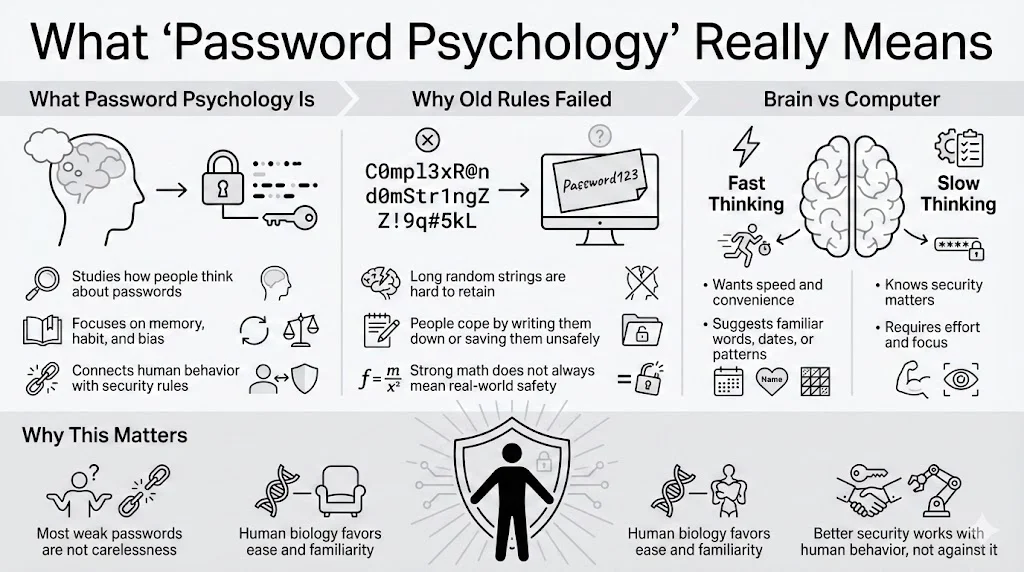
Password psychology is the study of how human cognitive processes—memory, perception, habit, and bias—influence the way we create, store, and manage our credentials. It bridges the gap between rigid technical requirements (like “must contain one special character”) and the messy reality of human behavior.
For years, security experts approached this issue with a purely technical mindset. They enforced complex rules, demanding strings like X9#m$2pL!. While mathematically strong, these rules ignored the human element. Users, unable to recall such random strings, simply wrote them down on monitors or saved them in unsecured text files, paradoxically lowering security.
The Conflict Between Brain and Screen
Our brains are not designed for the abstract, nonsensical data strings that computers prefer. We evolved to recall stories, faces, and spatial locations—things that have meaning. When a website demands a password, two distinct systems in the brain clash:
- System 1 (Fast Thinking): This intuitive, automatic system wants to finish the sign-up process quickly. It suggests familiar words, dates, or patterns (like keyboard walks: “qwerty”).
- System 2 (Slow Thinking): This analytical system knows you should create a strong, unique code. However, this requires effort, focus, and future memory retrieval, which causes cognitive strain.
Most of the time, System 1 wins. We convince ourselves that “nobody would guess my dog’s name backwards,” and we move on. This is not laziness; it is biology. Password psychology seeks to understand these mechanisms so we can construct defenses that account for human nature rather than ignoring it.
How the Human Mind Handles Passwords
To understand why we struggle with credentials, we must look at the mechanics of memory. The brain is an incredible storage device, but it has specific limitations regarding abstract information.
Memory Mechanisms at Work
Psychologists often refer to Miller’s Law, which suggests the average number of objects an average human can hold in short-term working memory is about seven (plus or minus two). When we try to generate a random string of characters, we quickly exceed this capacity.
- Short-term vs. Long-term Recall: When you create a password, it sits in your short-term memory. To be useful, it must transfer to long-term memory. This transfer requires repetition and meaningful association. A random string like H8s&2@9 lacks meaning, making the transfer difficult. A phrase like Purple-Elephant-Dance-Tuesday is longer but easier to encode because it uses existing concepts (colors, animals, actions).
- The Decay of Data: Without regular use, abstract data decays rapidly. If you have an account you access only once a year—like a tax portal—the likelihood of recalling a complex, unique password is near zero without an external aid.
Mental Shortcuts and Cognitive Biases
To cope with these limits, our brains employ heuristics, or mental shortcuts. While helpful for daily survival, these shortcuts are disastrous for security.
- Pattern Bias: We love structure. If forced to use a capital letter, 90% of people will put it at the beginning. If forced to use a number, they usually place it at the end (often “1” or the current year). If forced to use a symbol, “!” is the overwhelming favorite. Hackers know this. They do not just guess random letters; they run programs that test these specific human patterns first.
- Predictability Bias: When asked to pick a random word, humans are terrible at being truly random. We pick words related to our environment (coffee, computer), our lives (names, teams), or positive concepts (love, sunshine).
- Overconfidence Effect: We tend to overestimate the obscurity of our personal knowledge. You might think your high school mascot is a secret, but in the age of social media, that information is public. We assume that because we crafted the password privately, it remains private.
Understanding password psychology reveals that “complexity” does not always equal “security” if that complexity forces the user to engage in unsafe behaviors, like reusing that same complex string everywhere.
Risk Perception and Decision Making
Why do we lock our front doors but leave our virtual accounts guarded by “123456”? It comes down to how humans perceive risk.
The Invisibility of Cyber Threats
In the physical world, risk is visible. If you see a broken window or a shadowy figure, your heart rate increases, and you take action. In the internet world, threats are invisible. A website looks the same whether it is secure or compromised. Without a visual cue of danger, our brains do not trigger the “fight or flight” response that motivates protection.
This leads to a phenomenon known as optimism bias—the belief that bad things happen to other people. “I’m just a regular person,” we think. “Why would a hacker want my data?” We fail to realize that attacks are often automated. Bots scan millions of accounts looking for any open door, regardless of who owns it.
Convenience vs. Perceived Danger
Every security decision is a trade-off between security and convenience.
- High Effort, Low Perceived Risk: Creating a unique 16-character password for a rewards program feels like overkill. The brain calculates: “The worst that happens is I lose my points.” So, we choose a weak password.
- The Accumulation of Risk: The problem arises because we rarely segregate our risk. We use that same “low risk” password for our email or bank. We prioritize the immediate convenience of the sign-up process over the hypothetical, future danger of a breach.
Risk management often loses to speed. The friction of stopping to find a pen, opening a document, or generating a secure code feels like a barrier to what we actually want to do (buy the ticket, read the article, send the message). Team WhiteVault understands this friction. It is why having a secure personal vault matters—it removes the friction. Instead of weighing risk versus convenience, you can have both: a secure place to store credentials that is instantly accessible.
Habit Formation in Password Behavior
Our lives are built on habits—automatic behaviors triggered by context. Password psychology relies heavily on understanding these habit loops.
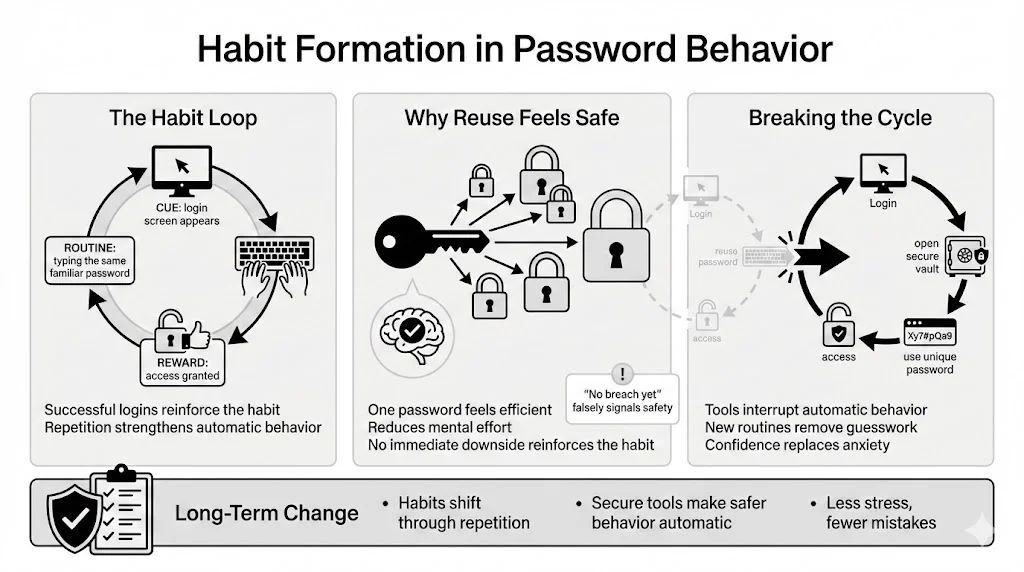
The Habit Loop
- Cue: You see a login screen.
- Routine: You type your “standard” password.
- Reward: You gain access to the site.
Every time this loop completes successfully, the habit reinforces itself. If you have used “Mustang1965” for ten years and never been hacked, your brain views this as evidence that the behavior is safe. This is called survivorship bias. The absence of a negative outcome (a hack) reinforces the risky behavior.
Why Reuse Feels Safe
Password reuse is the most dangerous habit in the connected world, yet it is the most common. Psychologically, it feels efficient. You have one “code” for everything. It reduces cognitive load. You do not have to think; you just type.
This habit is hard to break because the negative consequence (the hack) is delayed and uncertain, while the positive consequence (access) is immediate and certain.
Breaking the Cycle
To change this, we must disrupt the routine. We need a new tool that intervenes in the loop. This is where a credential manager or a secure vault becomes essential.
- New Cue: You see a login screen.
- New Routine: You open your secure vault (like WhiteVault) and copy the unique credential.
- New Reward: You gain access and feel a sense of relief knowing you are safe.
Over time, this becomes the new automatic behavior. The anxiety of “did I use the right one?” vanishes, replaced by the confidence of organization.
Motivation Theories Behind Password Choices
What pushes a person to finally upgrade their security? Motivation theory offers two main drivers: fear and reward.
Fear-Based Motivation
Historically, the industry used fear. “Change your password or you will be hacked!” Warnings, red padlocks, and scary news stories are common. While effective in short bursts, constant fear leads to security fatigue. When people are bombarded with warnings, they become desensitized. They feel helpless, assuming that “hackers will get in anyway,” so they stop trying. This is known as learned helplessness.
Reward-Based Motivation
A more sustainable approach involves positive reinforcement. This focuses on what the user gains rather than what they might lose.
- Gain Control: Knowing exactly where your data lives.
- Gain Time: No more resetting forgotten credentials.
- Gain Peace: Removing the background anxiety of potential theft.
Personal Stakes
Motivation increases when the stakes feel personal. Protecting a bank account feels urgent; protecting a random forum account does not. However, users often fail to see the web of connections. If that forum account contains your email and date of birth, it is a stepping stone to your bank account.
Password psychology suggests we should frame security not as a chore, but as an act of self-care. Organizing your important documents and credentials in a secure personal vault is like cleaning your house or organizing your finances. It feels good. It reduces mental clutter.
Anxiety, Stress, and Password Avoidance
Stress impacts our cognitive abilities. When we are stressed, our ability to make complex decisions degrades. We revert to primitive, automatic behaviors.
The Mental Load
Managing 100+ accounts creates a massive “cognitive load.” It is a background task that never finishes. Every time you see a prompt to “update your password,” it adds a micro-stressor to your day.
- Lockout Anxiety: There is a specific anxiety attached to the “Incorrect Password” error message. It signals a disruption. It means you have to go through a reset process, check email, verify codes, and think of a new string. To avoid this pain, people cling to old, weak passwords they know they will not forget.
- Oversimplification: Under high stress (e.g., trying to book an emergency flight or pay a bill late at night), users will create the simplest possible password allowed by the system.
Reducing the Burden
The goal of modern security tools should be to lower this anxiety. We need to offload the memory burden from the biological brain to a secure external system. By placing your trust in a dedicated tool, you free up mental energy. You no longer need to panic when a laptop crashes or a memory fails, because you know the information is safe in your WhiteVault. This reduction in stress leads to better decision-making in other areas of life.
Trust Factors and Identity Verification
Whom do we trust with our secrets? Password psychology is deeply tied to brand perception.
The Halo Effect
We often transfer our trust in a brand’s product to its security. We assume a major tech company or a beloved retail brand has “military-grade” protection. We feel safe typing our credit card number into their forms. Consequently, we might use a weaker password because “they will protect me.”
Reality often contradicts this. As seen in the Verizon Data Breach Investigations Report, major breaches happen to massive corporations regularly. Your security is not just about their wall; it is about your code. If you reuse a password, it does not matter how strong their encryption is—if that code was stolen from a smaller, less secure site, the hackers have a free pass.
Identity Verification Fatigue
We are constantly asked to prove who we are. Two-factor authentication (2FA) codes, CAPTCHAs, and security questions create friction. While necessary, this constant friction erodes patience. Users start looking for the path of least resistance. They might disable 2FA if given the choice, or choose security answers that are easy to type but easy to guess (e.g., Mother’s maiden name: “Smith”).
When trust feels high, users cut corners. We must maintain a healthy level of skepticism. Regardless of the platform’s reputation, your credential should be unique.
Security Awareness and Real User Behavior
There is a frustrating paradox in cybersecurity: Awareness does not equal behavior. Most people know they should not use “123456.” They know they should not write PINs on debit cards. Yet, millions do.
The Knowledge-Action Gap
Knowing that vegetables are healthy does not stop people from eating junk food. Similarly, knowing password psychology concepts is not enough without a mechanism for change. The gap exists because:
- Immediate Cost vs. Future Benefit: Security takes time now for a benefit later.
- Social Influence: If a spouse or colleague shares passwords openly or uses simple ones, it normalizes the behavior. “If they do it, it must be fine.”
Making Security “Normal”
To bridge this gap, we need to normalize the use of tools. Using a password manager or a document vault should be as normal as wearing a seatbelt. It is not paranoid; it is standard practice.
We also need to recognize that “security awareness” often focuses on technical facts (how encryption works) rather than behavioral triggers. Effective awareness training helps people spot their own biases (“Am I rushing this because I’m stressed?”) and provides simple tools to mitigate them.
Common Password Creation Mistakes Explained Psychologically
Let’s look at common errors through the lens of password psychology.
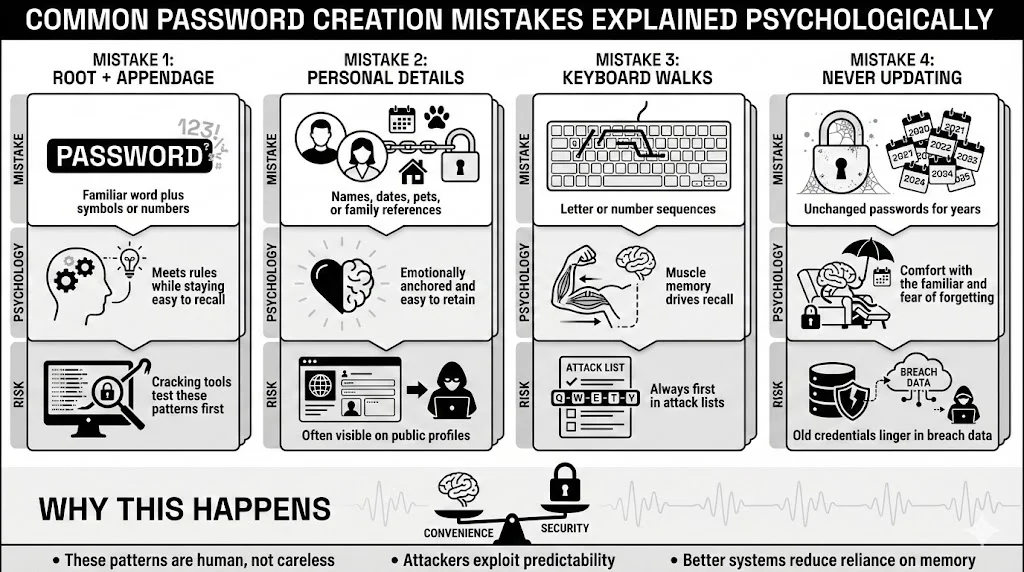
1. The “Root + Appendage” Method
- The Mistake: Using a base word like “Boston” and adding numbers or symbols to the end: “Boston1”, “Boston2025”, “Boston!”.
- The Psychology: This satisfies the system’s requirements (letters, numbers, symbols) while keeping the core word accessible in memory.
- The Risk: Cracking tools specifically target this structure. They take a dictionary word and run permutations of common appendages.
2. Leaking Personal Details
- The Mistake: Using kids’ names, pet names, or birth years.
- The Psychology: These are emotionally resonant. They are “hard encoded” in long-term memory, so they are impossible to forget.
- The Risk: This information is often public on social profiles. It allows attackers to build a profile and guess credentials without any technical hacking.
3. The Keyboard Walk
- The Mistake: “QWERTY”, “ASDF”, “123456”, “qazwsx”.
- Psychology: This relies on muscle memory rather than semantic memory. Your fingers know the pattern even if your brain doesn’t think of the letters.
- The Risk: These are the first strings checked by any brute-force attack script.
4. Ignoring Updates
- The Mistake: Keeping a password for 10 years, even after hearing about breaches.
- The Psychology: Status quo bias. Doing nothing is easier than doing something. We also fear that if we change it, we will forget the new one (loss aversion).
Applying Password Psychology to Safer Choices
So, how do we fix this? We cannot rewire our brains, but we can change our strategies to fit our biology, aligning with NIST SP 800-63B guidelines that favor usability over arbitrary complexity.
Use Passphrases, Not Passwords
A string of random characters (G7#kL9!p) fights your memory. A passphrase connects random concepts: Correct-Horse-Battery-Staple.
- Why it works: It uses semantic memory. The length provides mathematical strength against brute force, but the words make it human-readable.
- Tip: Visualize the scene. Imagine a horse fixing a battery with a staple. The stranger the image, the better the recall.
Externalize the Memory
Stop trying to recall everything. It is cognitively impossible to maintain 100+ unique, strong codes.
- The Solution: Use a secure personal vault. This changes the task from “retaining 100 codes” to “protecting one master code.”
- Team WhiteVault Approach: By consolidating your credentials and critical documents in one encrypted location, you remove the excuse for weak passwords. You can generate complex, gibberish passwords for every site because you never have to type them—you only have to copy them.
Strategy Over Complexity
Do not just make passwords harder; make your system smarter.
- Tier Your Accounts: Your bank and email need fortress-grade security (unique, long, 2FA enabled). A throwaway account for a forum can have a simpler (but still unique) password.
- MFA is Mandatory: Multi-factor authentication bypasses password psychology entirely. Even if you choose a weak password or get phished, the second factor (a code on your phone) protects you.
Conclusion
For too long, the tech industry has blamed users for being “the weakest link.” But the truth is, users are just being human. We are fighting millions of years of evolutionary programming that prioritizes efficiency and ease.
Password psychology teaches us that we cannot scare or shame ourselves into better security. We must acknowledge our limits. We have finite memory and finite attention. The path to safety lies in acknowledging these limits and using tools that support them.
By shifting your mindset—from “I need to recall everything” to “I need to manage my vault”—you drastically reduce your risk profile. You move from a state of chaotic anxiety to organized control. Small shifts, like adopting a passphrase for your master login and using a secure vault for the rest, create a strong defense that stands up to modern threats.
Save, recall, and protect what matters. It starts with understanding your own mind.
Frequently Asked Questions (FAQ)
1) What is password psychology in simple terms?
It is the explanation of how our thinking patterns, memory limitations, and biases shape the passwords we create. It looks at why we choose specific words, why we reuse them, and how stress affects our security decisions.
2) Why do people keep using weak passwords even when they know the risks?
This is due to the “habit loop” and “optimism bias.” We are creatures of habit who crave convenience. Since we rarely see the immediate consequences of a weak password (we don’t get hacked every day), our brains prioritize the speed of access over the invisible risk of a breach.
3) How does stress affect password safety?
Stress increases “cognitive load.” When we are anxious or overwhelmed, our brains have less capacity for complex tasks. We revert to the easiest options—like simple passwords or reusing old ones—to reduce the mental effort required to log in.
4) Are complex passwords always better for human memory?
No. Complexity without a strategy fails. If a password is too complex to recall (like 8#nVA$2), users will write it on a sticky note or save it in an unencrypted file, which exposes it to theft. A long, memorable passphrase is often safer because it stays in the user’s head.
5) How can security awareness improve real behavior?
Awareness helps you spot your own “autopilot” moments. When you realize you are about to use your dog’s name because you are in a rush, awareness allows you to pause and use a better strategy, like a passphrase or a password manager.
6) What psychological factors lead to password reuse?
The main factors are “cognitive economy” (saving mental energy) and “survivorship bias” (believing that because you haven’t been hacked yet, your reused password is safe). It feels like an efficient solution to the problem of having too many accounts.
7) Can understanding motivation theories improve password habits?
Yes. Moving from fear-based motivation (“I don’t want to be hacked”) to reward-based motivation (“I want to be organized and in control”) helps build long-term, positive habits. Using tools like WhiteVault becomes a satisfying act of organization rather than a fearful chore.


