We all have that moment of panic. You sit down for a well-deserved gaming session, grab the controller, and realize you are unable to sign in. The screen prompts you for credentials you set up three years ago and haven’t thought about since. With the average person now managing over 100 internet accounts—from banking and shopping to streaming and social media—it is no surprise that details get lost in the shuffle.
Recalling unique, strong passcodes for every single login is nearly impossible without help. Because of this, many people fall into the trap of reusing the same code across multiple sites or writing them on sticky notes attached to their monitors. While this feels convenient at the moment, it leaves your personal data exposed. Your PlayStation Network (PSN) account holds more than just game saves; it contains payment methods, personal contact details, and a library of purchases worth hundreds or even thousands of dollars.
When credentials are weak or reused, hackers can easily breach your defenses. A compromised account means lost funds, stolen identity data, and the frustration of losing years of gaming progress. This guide is designed to help you take control. We will walk you through the Playstation password reset process, explain why security matters, and show you how to organize your credentials so you never have to worry about being locked out again.
Taking charge of your tech security does not mean you need to be a computer wizard. It means taking a few smart steps today to protect your information tomorrow. Whether you are a busy professional, a parent managing family accounts, or just someone who loves gaming, this guide will provide the tools you need to stay safe.
Understanding PlayStation Network Account Security
What Your PSN Account Protects
It is easy to think of a gaming ID as just a username for high scores, but in the modern connected world, it serves as a gateway to sensitive information. Understanding what is actually at risk helps clarify why protecting this specific login is so important.
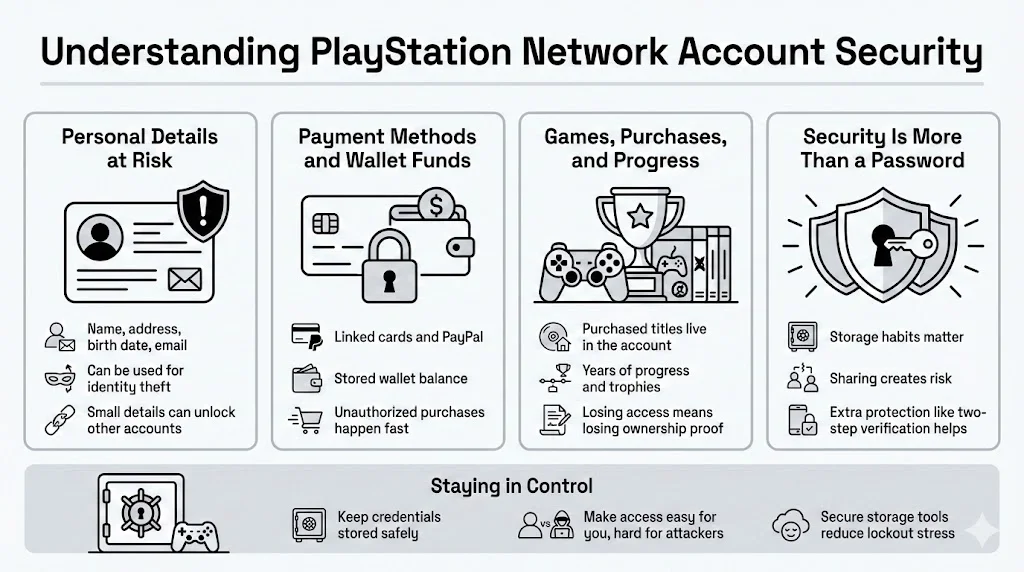
- Personal Details Your profile contains your full name, home address, date of birth, and email address. In the wrong hands, these pieces of information can be used for identity theft or targeted phishing attacks. Data privacy advocates frequently warn that even seemingly minor details can be pieced together to answer security questions on other platforms, creating a domino effect of vulnerability.
- Payment Methods and Stored Funds Most users link a credit card, debit card, or PayPal account to the PlayStation Store for easy purchases. Additionally, many accounts hold a “wallet” balance of pre-paid funds. If someone gains access, they can make unauthorized purchases in seconds. While banks often refund fraud, the hassle of canceling cards and disputing charges is a major stressor you want to avoid.
- Game Libraries and Saved Progress For many, the most painful loss is not financial, but sentimental. Your account represents years of progress, trophies, and a library of purchased titles. Losing access means losing hundreds of hours of gameplay and the specific achievements that you earned. In an era where games are bought virtually rather than on discs, your login is the only thing proving you own that content.
Why Security Is Not Just About Passwords
Security is a system, not just a secret word. It involves how you store that secret, who you share it with, and the layers of protection you add, such as Two-Factor Authentication (2FA). The goal is to create barriers that are frustrating for thieves but easy for you to manage. This is where tools like WhiteVault can be a game-changer, offering a secure personal vault to store these crucial details so they are always accessible to you, but invisible to everyone else.
Common Threats to PSN Accounts
Cyber threats are constantly changing. In 2024 and 2025, security researchers have seen a sharp rise in automated attacks targeting entertainment accounts. Understanding these threats is the first step in defending against them.
Phishing Emails and Fake Login Pages
Phishing remains one of the most effective tactics used by scammers. You might receive an email that looks exactly like an official message from Sony, claiming your account has been suspended or that a purchase was made. These emails include a link to a fake login page designed to steal your credentials the moment you type them in.
The Federal Trade Commission (FTC) reports that impostor scams are consistently among the top fraud categories. These fake pages often look identical to the real thing, down to the logos and fonts. The danger is that once you hand over your details, the attacker can change your settings immediately, locking you out before you realize what happened.
Password Reuse: The Silent Risk
The National Institute of Standards and Technology (NIST) advises against using the same secret code across multiple systems, yet it remains a common habit. If you use the same credentials for a forum, a shopping site, and your PSN ID, you are taking a massive risk. If that smaller, less secure forum gets hacked (a frequent occurrence), attackers will take those stolen credentials and try them on high-value targets like PlayStation Network, Amazon, and Netflix. This technique, known as “credential stuffing,” relies on the fact that people value convenience over variety.
Compromised Devices and Shared Systems
Signing in on a friend’s console or a public computer adds another layer of risk. If that device has malware or if you forget to sign out, your account is open for the taking. Malware that records keystrokes can capture your login information without you ever knowing. This is why limiting where you sign in is just as vital as what you sign in with.
Signs Your PlayStation Account May Be at Risk
Catching a security breach early can save you from a disaster. Often, there are subtle warning signs before a full lockout occurs. Staying alert to these indicators allows you to act fast.
- Unexpected Login Alerts Most platforms, including PSN, will notify you if a new device signs into your account. If you receive an email stating that a login occurred in a country where you do not live or at a time when you were asleep, treat it as an emergency.
- Changes to Security Settings If you receive a notification that your 2FA settings were disabled or that your sign-in ID (email address) was changed, immediate action is required. Attackers often alter these settings first to prevent you from recovering the account.
- Trouble Signing In If your known credentials suddenly stop working, do not assume it is a glitch. While technical errors happen, a sudden “incorrect password” error is often the first clue that someone else has changed it.
- Emails About Changes You Did Not Make Pay close attention to confirmation emails. A message saying “Your password has been successfully changed” when you did not initiate a request is a clear sign of a breach. In this scenario, performing a Playstation password reset immediately is your best defense to regain control before the attacker can do further damage.
When You Need a Playstation password reset
There are specific moments when updating your credentials is not just a good idea—it is urgent. Recognizing these situations helps you protect your data before it is compromised.
Situations That Call for Immediate Action
- Forgotten Credentials: The most common reason is simply forgetting. If you have not logged in for months, you might blank the code.
- Suspicious Activity: As mentioned above, any unauthorized change to your profile or unexpected purchase notification demands an instant credential update.
- Data Breaches on Other Sites: If a website where you have an account announces a data breach, and you used the same credentials there as on PSN, you must change your PSN credentials immediately. Tools like WhiteVault can help you keep track of which unique codes go with which accounts, so you know exactly which ones to update during a breach.
- Selling a Console: Before you sell or give away a system, you should deactivate the device from your account and update your credentials to ensure the new owner is unable to access your data automatically.
Why Acting Fast Matters
Speed is a critical factor in damage control. The longer an intruder has access, the more harm they can do. They can purchase games, chat with your friends (posing as you to run scams), or get your account banned by violating terms of service. By initiating a reset quickly, you cut off their access. It invalidates the old credentials on all devices, forcing a logout for anyone currently using the account. This protects your linked payment details and prevents long-term recovery problems.
Step-by-Step Playstation password reset Process
Regaining access to your account is a straightforward process, but it requires attention to detail. Follow these steps to restore your security.
Starting the Credential Reset
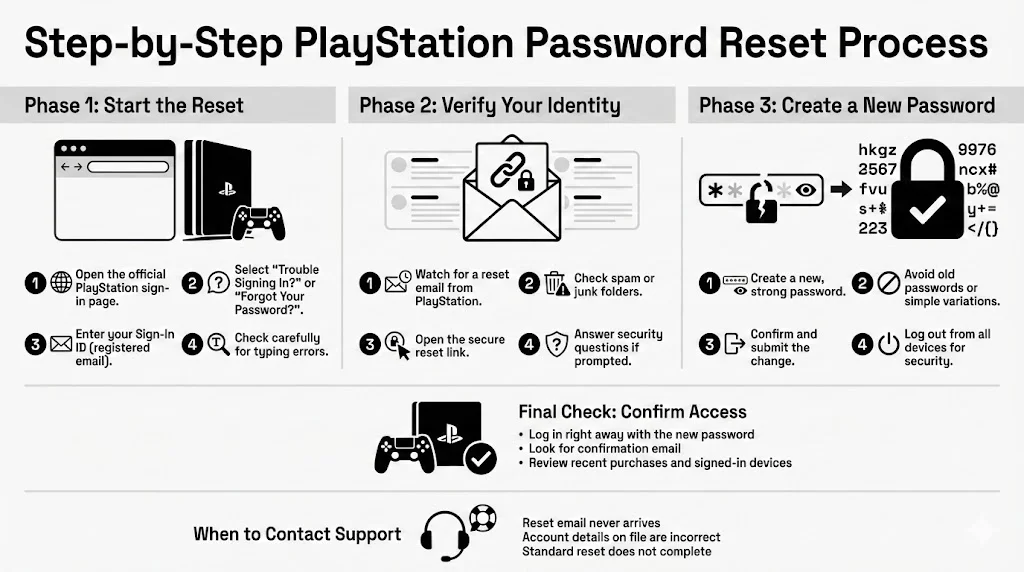
Initiating a Playstation password reset is the first step to regaining control. You can do this through a web browser on a computer or smartphone, or directly through your console. A web browser is often easier for typing and verifying emails.
- Access the Sign-In Page: Go to the official Sony PlayStation Network sign-in page. Look for the “Trouble Signing In?” link or the “Forgot Your Password?” button.
- Enter Your Sign-In ID: This is the email address registered to your account. Ensure you are typing it correctly. A simple typo here can lead to confusion if the recovery email never arrives.
- Select the Reset Option: Once you submit your email, the system will initiate the verification process.
Completing the Verification Process
Sony needs to verify that you are the actual owner of the account. This is usually done via email.
- Check Your Inbox: Look for an email from PlayStation. It may take a few minutes to arrive. Be sure to check your spam or junk folders, as automated messages often end up there.
- Follow the Secure Link: The email will contain a specific link. Click it to be taken to a secure page where you can create your new credentials.
- Answer Security Questions: In some cases, particularly if suspicious activity was detected, you might be asked to verify your identity further by answering security questions you set up when creating the account (e.g., “Where were you born?”).
- Create a New Code: This is the most critical step. Enter a new, strong string of characters. Do not use the old one or a variation of it (like changing “Gamer2024” to “Gamer2025”).
Confirming Access Restoration
After you submit the new information, try logging in immediately on your primary device.
- Test the Login: Enter your email and the new code.
- Watch for Confirmation: You should receive an email confirming the update.
- Check Activity: Once inside, review your recent transaction history and authorized devices. If you see anything odd, contact support.
If you are unable to complete this process because the email never arrives or the birth date on file is incorrect, you may need to contact support directly. However, for most users, the standard Playstation password reset function is sufficient to regain control.
Best Practices for Creating a Strong PlayStation Password
Creating a “strong” code often feels like a chore, but it is your first line of defense. The goal is to create something that a computer program cannot guess but that you can manage.
What Makes a Credential Safer?
Length and Variety Length is more important than complexity. A phrase of 15 characters is generally harder to crack than a short, complex code. The Open Web Application Security Project (OWASP) recommends using “passphrases”—a combination of random words that form a story or mental image. For example, “Coffee-Tiger-Jump-Sky” is stronger and easier to type than “P@55w0rd.”
Avoiding Personal Details Avoid using your name, your pet’s name, birthdays, or street addresses. These are the first things attackers guess because they can often find this information on your social media profiles.
Uniqueness is Non-Negotiable Your PSN credentials must be unique. They should not match your email, banking, or social media logins. This isolates the risk. If one account falls, the others remain standing.
Storing Credentials Without Risk
The biggest challenge with unique credentials is memory. How do you recall a different 15-character phrase for every site? This is where many people fail, reverting to easy-to-guess patterns.
The Password Manager Solution Security experts universally suggest using a secure storage solution. Writing codes on paper is risky—paper gets lost, thrown away, or seen by visitors. Browser-based saving is convenient but can be vulnerable if your computer is compromised.

Why WhiteVault?
Team WhiteVault understands that you want safety without complexity. WhiteVault serves as your secure personal vault for credentials, documents, and important notes. Instead of trying to memorize complex strings, you save them in WhiteVault. You only need to recall one master credential to access everything else. It is encrypted, organized, and available whenever you need it. This allows you to use incredibly complex credentials for your PSN account without the fear of forgetting them.
Strengthening Account Security Beyond Passwords
While a strong code is vital, it is not the only lock on the door. Modern security requires layers.
Adjusting PlayStation Security Settings
Two-Step Verification (2SV) This is the single most effective upgrade you can make. 2SV requires two things to log in: something you know (your password) and something you have (your phone). When enabled, PSN sends a text message with a code every time you sign in on a new device. Even if a hacker has your password, they are unable to access your account without your phone.
Reviewing Trusted Devices Periodically check the list of consoles linked to your account. You can do this via the web portal under “Device Management.” If you see a PS4 or PS5 you do not recognize, deactivate it immediately.
Require Password at Checkout To protect your wallet, enable the setting that requires a password entry for every purchase. This prevents accidental spending (by children, for example) and adds a barrier if someone gets partial access to your console.
Keeping Credentials Updated
You do not need to change your credentials every week—NIST actually advises against arbitrary rotation because it leads to weaker choices. However, you should perform a Playstation password reset if you hear of a large breach in the gaming industry or if you suspect your computer was infected with a virus.
Regularly reviewing your account health—checking that your recovery email and phone number are current—is a habit that saves huge headaches later.
Account Recovery Options If You’re Locked Out
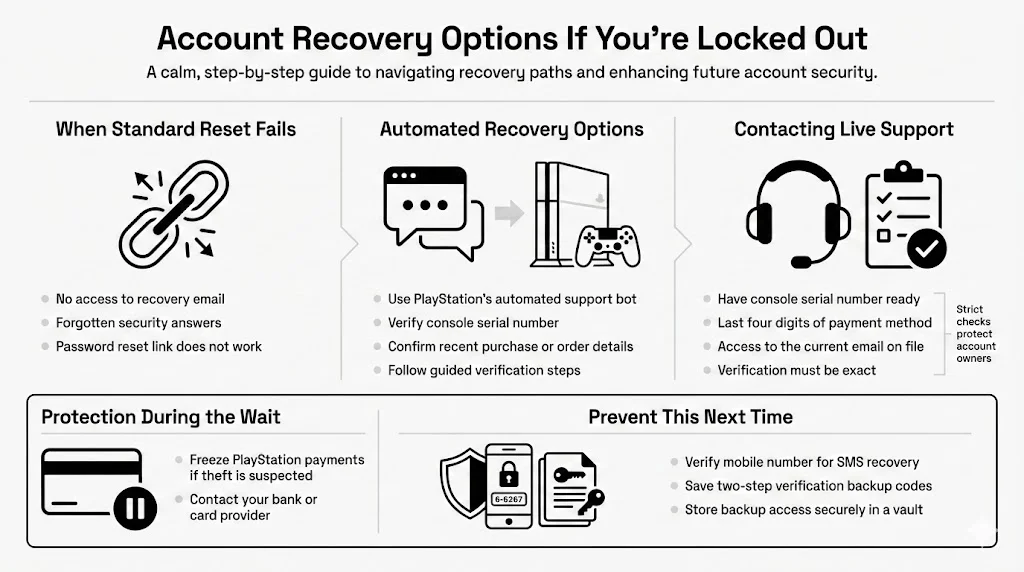
Sometimes, the standard reset links do not work. Maybe you no longer have access to the email address on file, or you forgot the answer to your security question.
Standard Account Recovery Paths
If the “Forgot Password” link fails, try the automated support bot on the PlayStation website. It can guide you through alternative verification methods. You might be asked to verify the serial number of the console you used to create the account or details of a recent transaction (like an Order Number from a game purchase).
What to Do If Recovery Fails
If automated systems fail, you will need to contact live support. This requires patience.
- Gather Proof: Have your console serial number, credit card details (last 4 digits used), and access to the email currently associated with the account ready.
- Be Persistent: Support agents need to be 100% sure you are the owner. If you are unable to prove it, they are unable to help. This is a safety feature, not a flaw.
- Protect During the Wait: If you are locked out and fear theft, contact your bank/credit card issuer to freeze payments to PlayStation immediately.
Avoiding Future Login Issues
Once you are back in, take steps to ensure you never face this stress again.
- Update Recovery Info: Ensure your mobile number is verified for SMS recovery.
- Backup Codes: PlayStation provides “backup codes” for 2SV. These are printable codes you can use if you lose your phone. Print them out or, better yet, store a screenshot of them in your WhiteVault. This ensures that even if you lose your phone, you are not locked out of your life.
Conclusion
Securing your gaming life is about more than just a single secret word. It is about understanding the value of what you own and taking proactive steps to defend it. From spotting phishing emails to enabling two-step verification, every layer of security adds to your peace of mind.
While a Playstation password reset is a powerful tool for fixing immediate problems, the goal is to build habits that prevent issues from happening in the first place. By using unique credentials and storing them securely in a tool like WhiteVault, you remove the burden of memorization and the risk of simple mistakes.
Don’t wait for a crisis to upgrade your security. Take ten minutes today to review your settings, update your credentials, and organize your recovery information. Your future self—and your game library—will thank you.
Frequently Asked Questions (FAQ)
1) How long does a Playstation password reset take?
The process is usually instant. Once you click the link in your email and enter a new code, the change takes effect immediately. Delays typically happen only if the verification email gets stuck in a spam filter or if you have trouble recalling your security answers.
2) What should I do if I do not receive the reset email?
To start, check your Spam and Junk folders. Next, verify you are typing the email address exactly as it appears on your account. If you still see nothing after 20 minutes, contact PlayStation support, as your email provider might be blocking their messages.
3) Can someone reset my password without my permission?
They can initiate the request, but they are unable to complete it without access to your email inbox to see the verification link. This is why securing your email account is just as crucial as securing your console.
4) How often should I change my PlayStation password?
There is no rule saying you must change it every 90 days. Instead, change it immediately if you suspect a breach, if you used the credentials on a shared device, or if a site where you used the same code gets hacked.
5) Is two-step verification worth enabling?
Absolutely. It is the single best defense against remote hackers. Even if they steal your login details, they are unable to bypass the second check sent to your phone.
6) What details are needed for full account recovery?
If you lose all access, support will ask for the console serial number where the account was created, details of recent purchases, and your original sign-in ID. Storing these details in a secure personal vault like WhiteVault ensures you have them ready when it matters most.


