
The typical individual now manages over 100 web-based accounts—from banking and shopping to streaming and social media. Think about that for a moment. That is one hundred different virtual doors you have to lock. Memorizing a unique, strong code for each one? That feels nearly impossible for the human brain.
So, we cope. We reuse codes, scribble them on sticky notes, or reset them every single time we try to log in. We manage our Netflix login with the same casualness as our bank login, often using the same “code” for both. But with data breaches hitting headlines almost weekly in 2024 and 2025, that habit has become dangerous.
It is time for a change. You don’t need to be a tech genius to secure your information. You just need a plan. Conducting a password security audit is the most effective way to see exactly where you stand. It’s not about paranoia; it’s about practical protection. It is about verifying that if one domino falls, your entire life doesn’t fall with it.
At WhiteVault, we believe security shouldn’t be a source of stress. It should be the thing that removes stress. This guide will walk you through exactly how to check your virtual locks, clean up your credentials, and finally gain peace of mind.
Why Password Risks Still Matter in Daily Life
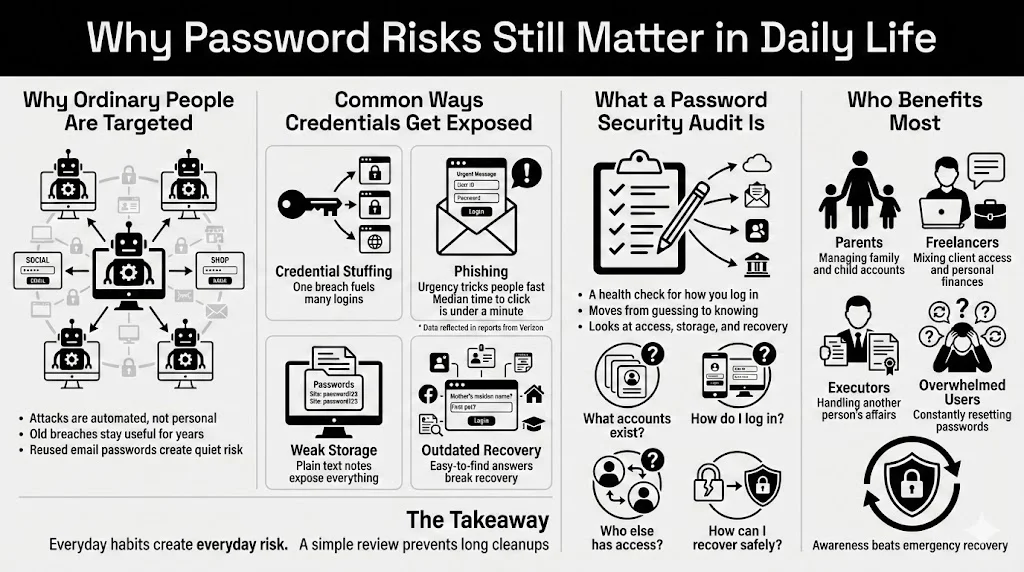
We often assume that hackers only target big corporations or billionaires. The reality is much more mundane. Cybercriminals use automated scripts to try millions of stolen credentials across thousands of sites every day. If your email password was exposed in a breach three years ago, and you still use that same password for your insurance portal, you are vulnerable.
Common Ways Personal Credentials Get Exposed
Most people lose control of their accounts not through targeted spy-movie hacks, but through simple oversights:
- Credential Stuffing: Attackers take a username/password pair from one breach (like a fitness app) and try it on high-value sites (like Amazon or PayPal). Credential stuffing remains a top attack vector in 2024.
- Phishing: You receive an email that looks exactly like a delivery notification or a bank alert. You click, you type, and you hand over your login details. According to the 2024 Verizon Data Breach Investigations Report, the median time for users to fall for a phishing email is less than 60 seconds.
- Weak Storage: Saving a file named “Passwords” on your desktop or in an unencrypted notes app is like leaving your house key taped to the front door.
- Outdated Recovery Methods: Using security questions like “Mother’s Maiden Name,” which can easily be found on public genealogy sites or social media.
What a Password Security Audit Actually Is
A password security audit is simply a health check for your authentication methods. It is a deliberate process where you review your accounts, the strength of your protections, and how you store that information. It moves you from “I hope I’m safe” to “I know I’m safe.”
Unlike a quick password change, an audit looks at the whole picture:
- Which accounts do I actually have?
- How am I getting into them?
- Who else has access?
- Are my recovery methods secure?
Who Benefits Most?
Everyone benefits, but specifically:
- Parents: Managing accounts for themselves, kids, and potentially aging parents.
- Freelancers: Juggling client data and personal finances.
- Executors: People handling the estate or affairs of a loved one.
- Anyone overwhelmed by virtual clutter: If you spend ten minutes a week clicking “Forgot Password,” this process is for you.
Understanding What a Password Security Audit Covers
Think of a password security audit as a home inspection for your internet life. You are checking the windows to make sure they lock, verifying the front door is solid, and checking that you haven’t given a spare key to a neighbor who moved away three years ago.
Cleanup vs. Full Audit
You might think, “I’ll just delete some old emails and be done.” That is a cleanup. It’s helpful, but it’s superficial.
A cleanup involves:
- Unsubscribing from newsletters.
- Deleting old files.
- Emptying the trash folder.
An audit involves:
- Checking if the password for your email is unique.
- Verifying that Two-Factor Authentication (2FA) is active on your bank account.
- Ensuring your recovery phone number is current.
- Checking if your data has appeared in known breaches.
The audit goes deeper. It reduces vulnerabilities tied to your personal identity, credit card numbers, and private documents.
When to Run an Audit
You don’t need to do this every weekend. We recommend a full check:
- Annually: Set a date, perhaps during Data Privacy Week or at the start of the year.
- After a Life Event: Getting married, divorced, or moving house often involves many account changes.
- Following a Breach News Cycle: If a service you use announces a leak, audit immediately.
- When You Receive a Suspicious Alert: If your email provider says, “Login attempted from another country,” it’s time to review everything.
Taking Inventory of Your Passwords and Accounts
You cannot protect what you do not know you have. The first step of any security strategy is inventory. This is often the most eye-opening part of the process because most of us underestimate how many accounts we have by half.
The “Ghost” Accounts
We all have them. The forum you signed up for in 2014 to ask one question. The shopping site you used once for a holiday gift. These “ghost” or “zombie” accounts are dangerous because they often hold valid personal data (names, addresses, birthdays) but are protected by old, likely weak passwords.
Categorizing Your Accounts
To make this manageable, break your life down into tiers. This helps you prioritize.
Tier 1: Critical (Immediate Action)
- Email Accounts: This is the master credential. If someone gets into your email, they can reset the password for every other account you own.
- Financial Tools: Banks, investment apps, PayPal, tax software.
- Government/Identity: Social Security, passport services, driver’s license portals.
- Password Manager Master Password: The one code that rules them all.
Tier 2: High Value (High Priority)
- Shopping: Amazon, eBay, grocery delivery (often have saved credit cards).
- Social Media: Facebook, LinkedIn, Instagram (high risk of impersonation).
- Cloud Storage: Google Drive, Dropbox, iCloud (contains personal docs and photos).
- Medical: Patient portals and insurance apps.
Tier 3: Low Value (Maintenance)
- Streaming Services: Netflix, Spotify.
- Newsletters/Forums: Accounts with no financial data attached.
Identifying Reused Credentials
As you list these out, be honest: How many share the same password? If your “Tier 3” forum password is the same as your “Tier 1” email password, you have created a direct tunnel for hackers to walk right into your bank account.
Organizing with Tools
This is where a tool like WhiteVault shines. Instead of keeping this inventory in a physical notebook (which can be lost) or a spreadsheet (which can be hacked), a secure vault allows you to catalog these items.
Action Step: Spend 30 minutes scrolling through your email inbox searching for “Welcome,” “Verify,” or “Subscription.” This will reveal dozens of forgotten accounts. List them, then decide: Keep and secure, or delete?
Evaluating Password Strength and Storage Methods
Now that you have your inventory, we need to test the locks. What does a “strong” password look like in 2025?
The Evolution of “Strong”
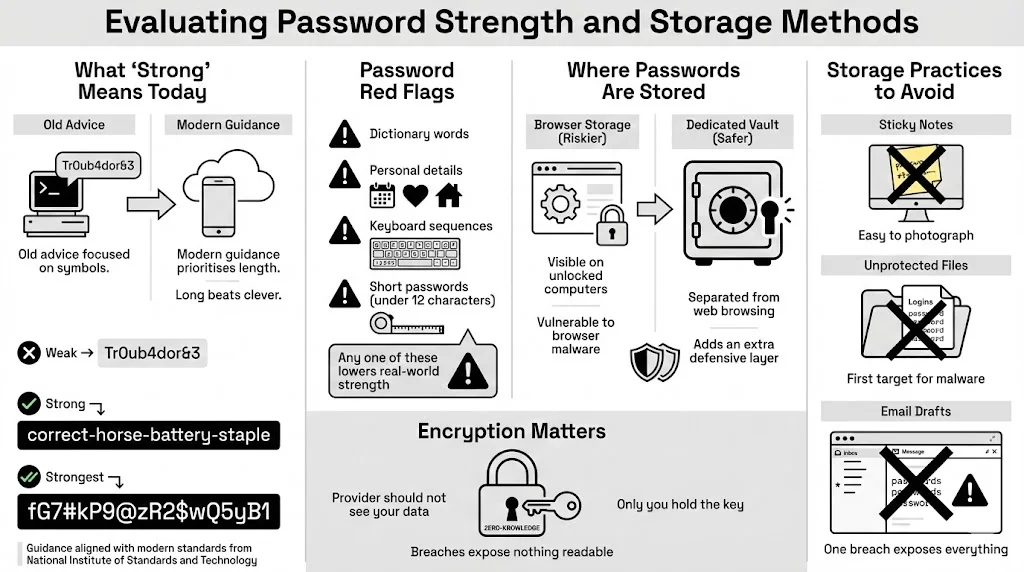
Ten years ago, advice was: “Use P@ssw0rd1!”. Today, computers can crack short, complex passwords relatively quickly. The new standard, supported by NIST (National Institute of Standards and Technology), prioritizes length over complexity.
- Weak: Tr0ub4dor&3 (Short, predictable substitutions).
- Strong: correct-horse-battery-staple (Long, random words).
- Strongest: A random string generated by a password manager, like Xy7#m9$Lp2!qR5vN.
During your password security audit, look for these red flags:
- Words found in the dictionary.
- Personal information (dog’s name, kids’ birth years).
- Sequential keys (123456, QWERTY).
- Short strings (under 12 characters).
The Risk of Browser Storage
When Google Chrome or Safari asks, “Save this password?”, it is tempting to say yes. While better than nothing, browser-based storage has flaws. If someone gains access to your open computer, they can often view all your saved passwords in plain text within settings. Furthermore, if malware infects your browser, it can siphon that data.
Dedicated vaults separate your credentials from the browser you use to surf the web. This separation is a crucial layer of defense.
Encryption Standards
How your passwords are saved matters just as much as what they are. You want Zero-Knowledge Encryption. This means your provider (like WhiteVault) locks your data in such a way that even they cannot see it. Only you hold the decryption key. If a service doesn’t offer this, they are storing your data in a way that, if they get hacked, your data gets exposed.
Red Flags in Storage
- Sticky Notes: Visual hacking is real. A repair technician or house guest can snap a photo in a second.
- Unprotected Documents: A Word doc named “Logins” is the first thing malware looks for.
- Email Drafts: Never save passwords in an email draft. If your email is breached, everything is lost.
Reviewing Authentication Protocols in Use
A password alone is no longer enough for critical accounts. This is where we talk about the single most effective security upgrade you can make: Multi-Factor Authentication (MFA).
Single-Factor vs. Multi-Factor
- Single-Factor (SFA): Just a password. (Something you know).
- Multi-Factor (MFA/2FA): A password + a code/scan. (Something you know + Something you have/are).
Why MFA Limits Takeovers
Imagine a thief steals your house key. If you have a second lock that requires a fingerprint or a code sent to your phone, the stolen key is useless. MFA stops 99.9% of automated account attacks according to Microsoft security research.
Evaluating Your Setup
During your audit, check every Tier 1 and Tier 2 account.
- Is MFA turned on? If not, enable it immediately.
- What method are you using?
- SMS Text: Better than nothing, but susceptible to “SIM swapping” attacks.
- Authenticator Apps (Google/Microsoft Auth): Much stronger. The code lives on your device, not the phone network.
- Hardware Keys (YubiKey): The gold standard. Physical USB keys that must be plugged in.
- Passkeys: The modern replacement for passwords entirely, using biometrics (FaceID/TouchID) to authenticate.
Friction vs. Protection
People resist MFA because it adds five seconds to the login process. Reframe this thought. Those five seconds are the barrier between you and identity theft. For your bank, email, and primary vault, that friction is necessary. For a cooking recipe site? Maybe not.
Checking Access Controls and Privileged Accounts
We often share our virtual lives. We share streaming passwords with siblings, bank accounts with spouses, or Wi-Fi codes with guests. An audit must assess these connections.
Who Has the Keys?
Review who has access to your accounts.
- Streaming Services: Check “Manage Devices.” Are there logins from locations you don’t recognize? Or from an ex-partner you haven’t spoken to in years? Log them out.
- Shared Drives: Did you share a folder of tax documents with a mortgage broker three years ago? Remove that access.
The “Admin” Problem
On your personal computer, do you run your daily account as an “Administrator”? If so, any malware you accidentally click has full permission to install itself deep in your system. Security Tip: Create a standard user account for daily use and only use the Admin account when you need to install software. This limits the damage malicious software can do.
Managing Shared Credentials Safely
Texting a password to your spouse is unsafe. If that text history is synced to a tablet or laptop, the password is sitting there in plain text. Use a secure sharing feature within a tool like WhiteVault. This allows you to grant access to a specific item without exposing the raw characters in a chat log, and you can revoke that access anytime.
Assessing User Credential Policies
Corporations have strict IT policies. As the “IT Director” of your own life, you need personal policies too. This sounds formal, but it’s really just a set of rules you agree to follow to keep yourself safe.
Setting Your Rules
During your password security audit, establish these ground rules:
- Unique Always: Every account gets a new, random password. No exceptions.
- Length Over Complexity: I will use passphrases (4 random words) or 16+ character random strings.
- No Rotation Without Cause: I will stop changing passwords every 90 days (which leads to weak passwords like Summer2025!) and only change them if I suspect a breach.
- Separation of Church and State: I will never use my work email for personal accounts (like Amazon) and vice versa.
Handling Security Questions
Be a liar. Yes, really. If a bank asks “What is your mother’s maiden name?”, do not give the real answer. Hackers can find that on your mom’s Facebook profile. Instead, generate a random password for the answer.
- Question: What is your high school mascot?
- Answer: Purple-Banana-Rocket-77
Store this “answer” in the notes section of your password manager entry for that bank. This adds a powerful layer of obscurity to your account recovery process.
Identifying Security Vulnerabilities Through Testing
You have updated your locks. Now, let’s see if thieves already have your keys.
Breach Monitoring
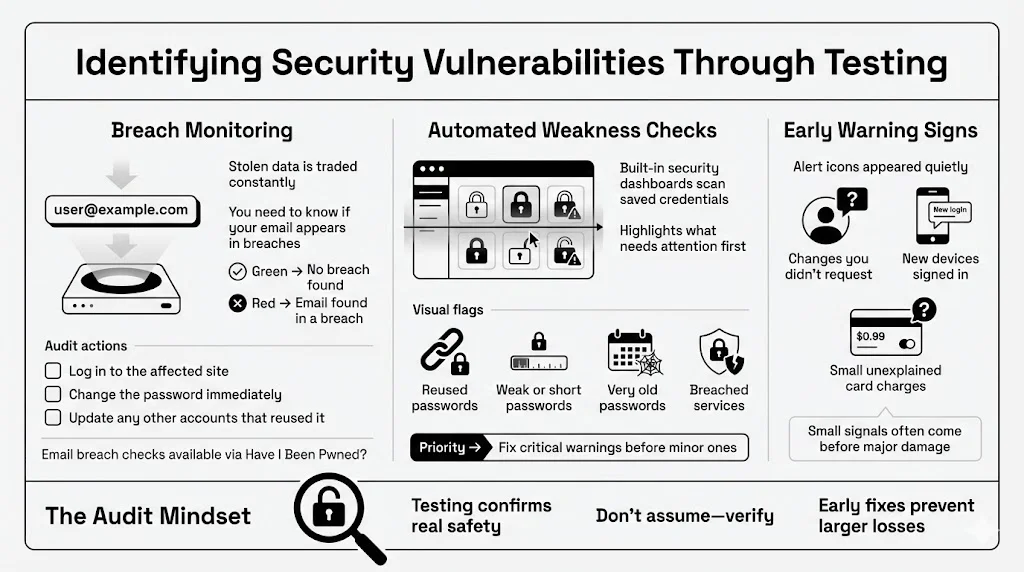
The internet has a dark underbelly where stolen data is traded. You need to know if your data is there. Tools like Have I Been Pwned? allow you to enter your email address to see if it was part of known data dumps.
- Green: Good news.
- Red: Your email and potentially your password were in a breach.
Audit Action: If you find a “pwned” result for a specific site:
- Log in to that site immediately.
- Change the password to a strong, unique one.
- If you used that old password anywhere else, change it there too.
Checking for Weaknesses
Many modern password managers have a “Security Dashboard” or “Watchtower” feature. This is your best friend during a password security audit. It scans your saved items and flags:
- Duplicates (Reused passwords).
- Weak passwords (too short or common).
- Old passwords (unchanged for years).
- Compromised websites.
This automated risk assessment helps you prioritize. Fix the “Critical” warnings first.
Early Warning Signs
Be alert to the subtle signs of compromise:
- Emails confirming password changes you didn’t request.
- New devices appearing in your logged-in list.
- Small, unauthorized transactions on your credit card (thieves test with $1 charges before draining the account).
Aligning With Compliance and Safety Standards
You might think “compliance” is just for businesses, but the principles of frameworks like GDPR (General Data Protection Regulation) or CCPA (California Consumer Privacy Act) apply to how you handle your own data privacy.
Why Standards Matter to You
These frameworks exist to ensure data Minimization, Integrity, and Confidentiality.
- Minimization: Don’t keep data you don’t need. If you haven’t used an account in 5 years, close it. The less data you have floating around the web, the smaller your target.
- Integrity: Ensure your backup documents (wills, deeds, insurance policies) are current and haven’t been corrupted.
- Confidentiality: Ensure only authorized people (you and your trusted emergency contact) can see your data.
Preventing Data Breaches at Home
By following the NIST guidelines mentioned earlier (Long passwords, MFA, no hints), you are aligning your personal life with the same high standards the government uses. This consistency creates a shield. An attacker looking for an easy target will move on when they see you are following robust security protocols.
Improving Long-Term Password Habits
The goal of this audit isn’t to be perfect for one day and then slide back into bad habits. It is to build a sustainable routine.
Building the Routine
Security is a muscle. You have to exercise it.
- Daily: Use your password manager / vault. Let it auto-fill. Don’t type passwords.
- Monthly: Check your bank statements for odd charges.
- Quarterly: Run a mini password security audit. Check your “Security Dashboard” for new alerts.
- Yearly: Review your “Emergency Access” plan. If something happens to you, can your designated loved one access your vault?
Using Tools the Right Way
A password manager is only as good as how you use it.
- Don’t save the Master Password in the browser.
- Do memorize your Master Password or write it down on a piece of paper stored in a physical fireproof safe/lockbox.
- Do use the “Notes” and “Secure File Storage” features for things that aren’t passwords: Wi-Fi codes, alarm pins, software license keys, and scans of your passport.
Separation of Data
Keep your documents organized. Create folders within your vault:
- Identity (Passports, IDs)
- Financial (Credit cards, bank routing numbers)
- Medical (Vaccination records, prescriptions)
- Household (Insurance policies, deed/lease)
This organization prevents panic when you need a document urgently. It turns your vault into a one-stop shop for your entire administrative life.
Conclusion
Taking control of your security does not require a degree in computer science. It requires intent. A password security audit is not a one-time task; it is a shift in mindset. It is the realization that your personal information is valuable and deserves to be treated with respect.
By taking inventory, strengthening your credentials, enabling multi-factor authentication, and using a secure vault like WhiteVault, you are building a fortress around your identity. Small fixes—like changing one reused password or turning on 2FA for your email—add up to massive protection.
Make these checks a part of your normal routine. Just as you lock your front door every night without thinking about it, secure access to your accounts should become second nature. You have the tools. You have the knowledge. Now, take the first step to save, recall, and protect what matters most.
FAQ: Password Security Audit Questions Answered
Q1: What is a password security audit and why should I do one?
It is a thorough review of your web-based accounts, passwords, and security settings. You should do it to identify weak, reused, or compromised credentials before hackers do, making sure your personal data and finances remain safe.
Q2: How often should I audit my passwords?
We advise a full audit once a year. However, you should do a “mini-check” anytime you hear about a major data breach or if you receive a suspicious login alert.
Q3: Do I need special tools to run a password security audit?
While you can do it manually with a pen and paper, it is much faster and safer with a password manager or secure vault. These tools often have built-in auditing features that automatically flag weak or reused passwords for you.
Q4: Is multi-factor authentication (MFA) really necessary for personal accounts?
Yes. It is the single most effective way to prevent account takeovers. Even if a hacker steals your password, MFA stops them from logging in without your second factor (like a code on your phone). Enable it on all “Tier 1” accounts (email, banking).
Q5: How does a password audit help prevent data breaches?
By identifying “zombie” accounts you no longer use (which often have weak security), you can close them. By fixing reused passwords, you make sure that a breach at one company (like a hotel chain) doesn’t give hackers access to your main email or bank account.
Q6: What should I do if I find compromised credentials?
Do not panic. First, log in to that account immediately and change the password to a strong, unique one. If you used that same old password on other sites, change those too. Finally, enable multi-factor authentication on that account to lock the door tight.


