
We all have that moment of panic. You are trying to log into a bank portal or a streaming service, and the screen shakes “no.” You try your usual variation—maybe adding a capitalized letter or a special symbol at the end—but nothing works. The average person now manages over 100 web-based accounts. Trying to recall a unique, complex string for every single one is nearly impossible for the human brain.
Because of this memory overload, many people resort to dangerous habits. We reuse the same credentials across multiple sites, write them on sticky notes, or use simple phrases that are easy to type. Unfortunately, cybercriminals count on this fatigue. This is where understanding the math behind security becomes vital. This password entropy guide will strip away the technical confusion and show you exactly how to strengthen your defenses without needing a degree in computer science.
What Password Entropy Means
To protect your information, you must move past the idea of “hard to read” and embrace the concept of “hard to predict.”
Simple definition of entropy as unpredictability
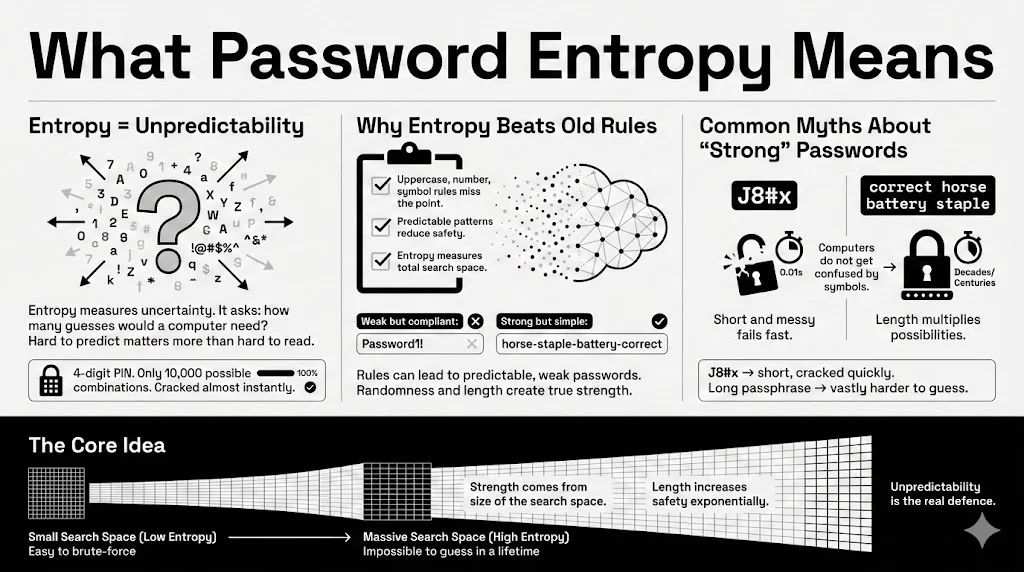
Entropy, in the context of information theory, is a measure of uncertainty. When we apply this to passwords, we are asking a specific question: How many guesses would it take for a computer to find the correct combination by pure chance?
Imagine you have a four-digit PIN. There are only 10,000 possible combinations (0000 to 9999). A modern computer can guess all of them in a fraction of a second. That is low entropy. Now, imagine a string of 20 random characters including Japanese Kanji, emojis, and numbers. The pool of possibilities is so vast that the entropy is massive. Unpredictability is the core of safety.
Why entropy is a better signal than surface-level rules
For years, websites forced us to follow arbitrary rules: “Must contain one uppercase letter, one number, and one symbol.” These rules often backfire. Users, trying to be compliant but memorable, simply capitalize the first letter and add a “1!” at the end.
- Weak but compliant: Password1! (Fits all rules, extremely low entropy).
- Strong but non-compliant: horse-staple-battery-correct (Might fail older complexity checks, but has very high entropy).
Entropy measures the total search space, not just whether you checked a few boxes. It tells you the raw mathematical difficulty of cracking the code.
Common misunderstandings about what “strong” means
A common myth is that if a human cannot read it, a computer cannot guess it. This is false. A short, garbled string like J8#x looks complex to human eyes. However, because it is only four characters long, the entropy is terribly low. A computer will crack it instantly. Conversely, a long passphrase might look simple to you, but its length gives it tremendous mathematical strength. True strength comes from the total number of possibilities, not visual confusion.
Password Strength vs Real Security
There is a difference between a password that looks tough and one that actually stops a breach.
Why length alone is not enough
While length is a major factor, a long string of repetitive characters offers false hope. A password like aaaaaaaaaaaaaaa is long, but it has almost zero entropy because there is no variation. Attackers know that humans are lazy. They program their cracking tools to look for repeated patterns. Therefore, length must be paired with a lack of predictability to be effective.
Why complexity rules can fail
Mandatory complexity rules often train users to act predictably. If a system requires a special character, 90% of users will use !, @, or #. If it requires a number, most will use 1 or 123.
Attackers know these habits. They use “masks” to optimize their attacks. They tell their software: “Try dictionary words, but capitalize the first letter and add a single digit at the end.” This reduces the work the computer has to do, effectively lowering the entropy of your “complex” password.
How attackers approach password cracking today
Modern attackers do not guess credentials manually. They use “GPU clusters”—banks of powerful graphics cards similar to those used for mining cryptocurrency. These machines can test billions of combinations per second.
They utilize three main tactics:
- Dictionary Attacks: Running through every word in the dictionary.
- Hybrid Attacks: Combining dictionary words with common modifications (like replacing ‘a’ with ‘@’).
- Brute Force: Trying every possible character combination, starting from ‘a’, then ‘b’, and so on.
Where entropy fits into modern cryptographic security
Entropy is the mathematical shield against these tactics. If your password entropy guide score is high enough, a brute force attack becomes computationally expensive. It might take a GPU cluster 100 years to guess your code. Attackers are opportunistic; they will not spend a century cracking one bank account. They will move on to an easier target with lower entropy.
Randomness and Why It Matters
Humans are terrible at being random. We think we are being creative, but we follow subconscious patterns.
What randomness measurement looks like in passwords
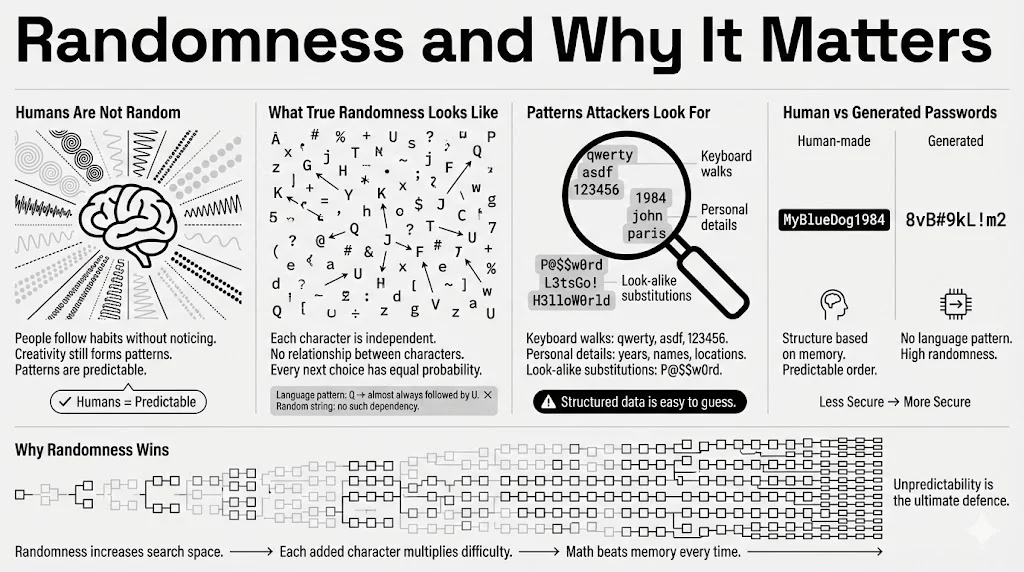
True randomness means that each character in your credential is independent of the others. If the first letter is ‘Q’, the next letter should have an equal probability of being any other character. In human language, letters are dependent. If you see ‘Q’, the next letter is almost certainly ‘u’.
This dependency reduces entropy. Attackers use “Markov chains”—statistical models that predict the next letter based on the previous one. A random string generated by a machine breaks these chains.
Predictable patterns attackers look for
Hackers look for:
- Keyboard walks: Patterns like qwerty, asdfgh, or 123456.
- Personal info: Birth years (1985, 1990), names of sports teams, or local area codes.
- Leetspeak: Replacing letters with look-alikes, such as P@$$w0rd.
These are not random. They are structured, and structured data is easy to compress and guess.
Human-chosen passwords vs generated passwords
When you create a password in your head, you rely on your memory. When you use a generator (like the one built into WhiteVault), you rely on math.
- Human: MyBlueDog1984 (Predictable structure: Possessive + Color + Animal + Year).
- Generated: 8vB#9kL!m2 (No structure, high randomness).
The generated option has significantly higher entropy because there is no linguistic pattern for a hacker to exploit.
How randomness improves attack resistance
Randomness expands the “search space.” If an attacker knows you are using an English word, they only have to search ~170,000 possibilities (the Oxford English Dictionary). If you use a truly random string of characters, they must search the entire character set for every single position. This exponential growth in difficulty is what protects your data.
Bit Complexity Explained Without Math Overload
You will often see entropy measured in “bits.” You do not need to be a mathematician to grasp this, but understanding it helps you score your own security.
What bit complexity refers to in passwords
In computing logic, everything boils down to zeros and ones. A “bit” represents a single unit of uncertainty—a coin flip. One bit of entropy means there are two possibilities. Two bits mean four possibilities.
When we say a password has “60 bits of entropy,” we mean that it is as hard to guess as flipping a coin 60 times in a row and getting the exact sequence right.
How bits scale with guessing difficulty
The magic of bits is that they scale exponentially. Adding just one bit of entropy doubles the difficulty for the attacker.
- 40 bits: Can be cracked by a home computer in seconds.
- 60 bits: Might take a powerful server cluster a few months.
- 80 bits: Currently considered safe against massive brute-force attacks.
- 128 bits: Mathematically unbreakable with current known physics and hardware.
Why higher bit counts slow down brute-force attempts
Every time you add a character to your password, you are adding bits. If you use a diverse character set, you add more bits per character. This forces the attacker’s computer to do more math. Eventually, the cost of the electricity required to run the attack exceeds the value of what is inside the account. That is the winning threshold.
Character Diversity and Its Role
Expanding the “alphabet” you use is one of the easiest ways to boost entropy.
Lowercase, uppercase, numbers, and symbols
Think of your password as a code constructed from a pool of available blocks.
- Lowercase only: Pool size is 26.
- Mixed case: Pool size is 52.
- Mixed case + numbers: Pool size is 62.
- All of the above + symbols: Pool size is roughly 94.
How character diversity expands the search space
Let’s look at the math simply. If your password is 8 characters long:
- Using only lowercase: $26 \times 26 \times \dots$ (8 times) $\approx 200$ billion combinations.
- Using all characters (94 pool): $94 \times 94 \times \dots$ (8 times) $\approx 6$ quadrillion combinations.
By simply allowing more types of characters, you made the password 30,000 times harder to crack without making it any longer.
When diversity helps and when it does not
Diversity helps only if it is used randomly. If you use a 94-character pool but your password is Password1!, you are not really utilizing the pool. You are using a predictable pattern. Diversity acts as a multiplier for entropy, but length and randomness are the base numbers being multiplied.
Password Length and Entropy Growth
If you have to choose between a short, complex password and a long, simple one, which wins?
Why length has an outsized impact on entropy
Length is the most powerful factor in this password entropy guide. Because the math is exponential, adding characters adds safety faster than adding complexity.
A 7-character password like Tr0ub4! (complex) is actually weaker than correcthorsebatterystaple (simple but long). The sheer number of characters in the second example creates a massive mathematical barrier.
Short complex passwords vs long simple ones
- &yB9!: 5 characters. Very complex. Entropy is low because the total length is tiny. A computer cracks this instantly.
- I love eating pizza at noon: 26 characters. Only letters and spaces. The entropy is enormous simply because the string is so long.
Practical length ranges for everyday use
According to 2025 standards from NIST (National Institute of Standards and Technology):
- Minimum: 12 characters.
- Recommended: 16+ characters.
- Paranoid/High Value: 20+ characters.
For your WhiteVault master password—the one code that guards all others—we recommend a passphrase of at least 4 words or 20 characters.
Entropy Calculation in Practical Terms
How do you actually know if your password is good?
How entropy calculation works conceptually
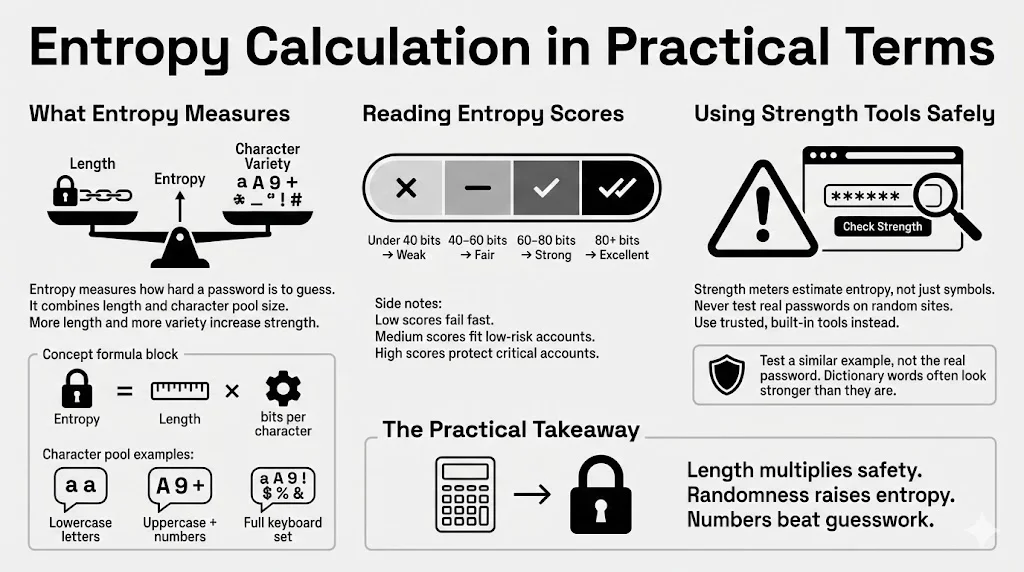
The formula is $E = L \times \log_2(R)$.
- $E$ = Entropy in bits.
- $L$ = Length of password.
- $R$ = Size of the character pool (26 for lowercase, 94 for full keyboard).
Basically, you take the pool size and see how many bits of information each character represents, then multiply that by the length of the password.
What tools estimate entropy and how to read results
There are many “password strength meters” on the web. A good meter does not just look for symbols; it estimates entropy.
- Red / Weak: Under 40 bits. Change immediately.
- Yellow / Fair: 40-60 bits. Okay for low-risk forums, bad for banking.
- Green / Strong: 60-80 bits. Good for most internet services.
- Excellent: 80+ bits. Serious protection.
Limits of automated estimators
Warning: Never type your actual password into a random website to test it. You might be handing your secret directly to a hacker. Instead, use built-in estimators in trusted tools like WhiteVault, or type a similar variation of your password into a checking tool (e.g., if your password is “BlueHorse”, test “RedHouse” to see the score).
Also, automated tools often overestimate the strength of dictionary words. They might see “Password” as 8 random characters, whereas a hacker sees it as 1 dictionary word.
How Attackers Test Passwords
Understanding your enemy helps you build better walls.
Common password cracking methods
Attackers rarely target one person specifically unless that person is a celebrity or CEO. Usually, they download a “dump” of 50 million usernames and passwords from a breached site. They then run scripts to see which of those passwords work on other sites (like Amazon or Gmail).
Dictionary attacks vs brute force
- Dictionary Attack: The software tries every word in the English (and French, Spanish, etc.) language. It tries “apple,” “baseball,” “monkey.” If your password is a common word, it is gone in seconds.
- Credential Stuffing: The attacker takes a password found in a breach (e.g., Yahoo 2013) and tries it on Spotify in 2025. This is why reuse is deadly.
Why low-entropy passwords fall quickly
Low entropy means the answer is near the top of the attacker’s list. If you use 123456 (the most common password annually), the cracking software finds it on the very first attempt. If you use Password123, it is found on the 100th attempt. These take microseconds.
How entropy improves resistance across attack types
High entropy forces the attacker out of the “Dictionary” method and into the “Brute Force” method. Once they are forced to brute force a long, random string, the time required jumps from seconds to centuries. They will give up and move to the next user in the database who has a weaker code.
Password Entropy and Security Best Practices
High entropy is the engine, but you need a car to drive it.
Using password managers safely
The Catch-22 of security is that the strongest passwords are the hardest to remember. You cannot memorize twenty unique, 16-character random strings.
This is why a secure personal vault like WhiteVault is essential. You only need to memorize one high-entropy Master Password (perhaps a memorable passphrase). The vault then generates and remembers the complex, high-entropy machine code for every other account: your bank, your email, your social media.
Creating unique passwords for each service
Entropy provides no protection if you reuse the password. If you use a massive 100-bit password for a gaming forum, and that forum has poor security and gets hacked, the attackers now have your 100-bit password. If you used that same password for your email, your email is compromised.
Rule: One service, one unique password.
When passphrases outperform complex strings
For the few passwords you must type manually (like your computer login or your WhiteVault Master Password), use a passphrase.
- Passphrase: correct-horse-battery-staple
- Easy to type.
- Easy to remember (mental image of a horse).
- Very high entropy due to length.
How entropy fits into broader security best practices
Entropy is part of a system.
- High Entropy: Makes the password hard to guess.
- Manager: Makes the passwords possible to store.
- 2FA (Two-Factor Authentication): Acts as a safety net. Even if an attacker guesses your high-entropy password (or steals it via malware), they still cannot get in without your phone or security token.
Balancing Security With Usability
Security that is too hard to use is bad security because people will bypass it.
Why memorability still matters
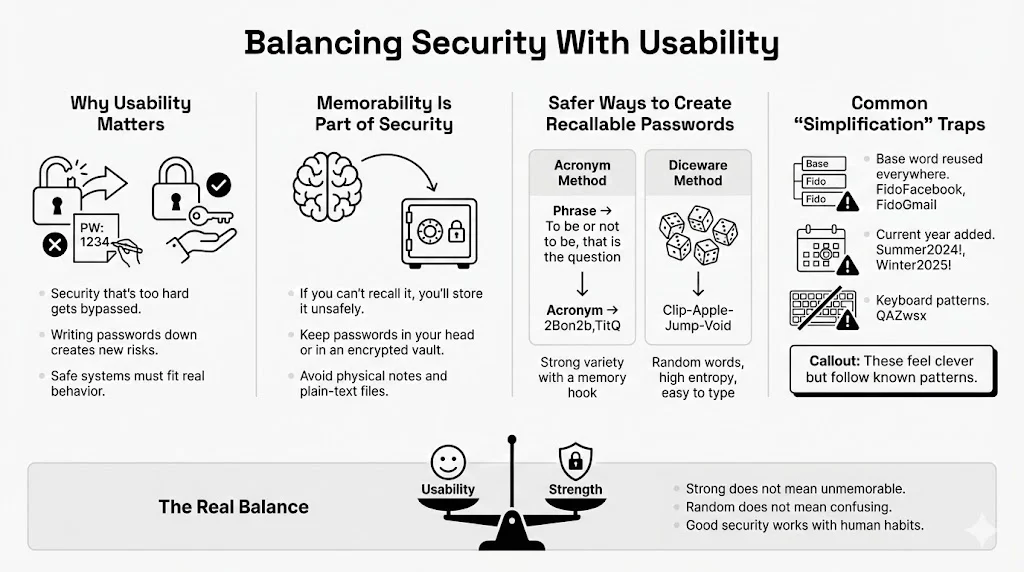
If you create a password so complex that you have to write it on a sticky note attached to your monitor, you have lowered your security. Physical theft is a real threat. You need a method that keeps credentials inside your head or inside an encrypted vault—nowhere else.
Safer ways to create passwords you can recall
Use the “Diceware” method or an acronym method for your core passwords.
- Acronym Method: Take a song lyric or quote. “To be or not to be, that is the question.” -> 2Bon2b,TitQ. (High variety, high randomness, distinct memory hook).
- Diceware: Roll a physical die to select random words from a list. Clip-Apple-Jump-Void. The words are random (high entropy) but standard English (easy to type).
Mistakes people make when trying to simplify
- The “Base” Word: Using Fido for everything, but adding the site name. FidoFacebook, FidoGmail. If a hacker figures this out once, they have everything.
- The Year: Appending the current year. Summer2024!, Winter2025!. Attackers guess these first.
- Keyboard Patterns: QAZwsx (Running down the left side of the keyboard). This feels random to you, but it is a known pattern to hackers.
Conclusion
Understanding the mechanics of digital safety can feel overwhelming, but it boils down to one concept: Entropy. It is the clearest measure of strength we have. It cuts through the confusion of special characters and arbitrary rules, focusing purely on how unpredictable your credentials are.
You do not need to change everything overnight. Start small. Perhaps today, you identify your three most critical accounts—email, banking, and medical records—and update them to high-entropy unique credentials stored in a secure tool like WhiteVault.
Small changes create large security gains. By moving from a predictable date-based password to a long, random passphrase, you increase the difficulty for an attacker by a factor of billions. We encourage you to apply this password entropy guide thinking to your connected life. Stop relying on luck, and start protecting what matters most with the power of probability.
Frequently Asked Questions
1) What is a good entropy score for a password?
General ranges and what they signal for safety For general internet accounts, aim for at least 60 bits of entropy. For critical infrastructure (banking, primary email, password manager master keys), aim for 80 bits or higher. Anything below 40 bits is considered vulnerable to modern cracking tools.
2) Are long passphrases safer than complex passwords?
How entropy compares in both cases Generally, yes. A passphrase like eating-yellow-submarines-daily is often safer than P@s5w0rd!. The sheer length of the passphrase adds more bits of entropy than the complexity of the shorter string. Plus, passphrases are easier to remember, reducing the likelihood that you will write them down insecurely.
3) Do password rules like symbols and numbers still help?
When rules increase entropy and when they fail They help if they encourage you to increase the pool of characters without shortening the password. However, if a rule forces you to change a secure 20-character passphrase into an 8-character complex string, it has failed. Rules should set a “floor” for complexity, not a “ceiling” for length.
4) Can attackers guess passwords with high entropy?
Realistic expectations about attack resistance Statistically? No. If your password has 80+ bits of entropy, the energy required to guess it would cost more than the GDP of most countries. Attackers are rational; they will not waste resources guessing a high-entropy password. They will look for other ways in, like phishing emails or malware, which is why you still need antivirus and caution.
5) How often should passwords be changed?
Entropy-based guidance rather than fixed timelines Old advice said to change passwords every 90 days. NIST and security experts now say: Do not change your password unless you have evidence of a breach. If you have a high-entropy password, changing it frequently often leads to “pattern fatigue” (e.g., changing Secret1 to Secret2). Create one strong, unique password and keep it until the service reports a security incident.
6) Are password strength meters reliable?
What they measure well and what they miss They are useful rough guides, but take them with a grain of salt. A meter might rate P@ssword123! as “Strong” because it sees variety, failing to realize it is a common dictionary word. Conversely, it might rate a long, nonsense string as “Weak” if it does not see a symbol. Use meters that specifically mention “entropy” or “bits” for a more accurate assessment.


