
Picture this: It is Tuesday night. You are trying to log into a streaming service to watch a movie. You type in the code you swear you used last week. Access denied. You try a variation with a capital letter. Denied again. Frustrated, you hit “Forgot Password,” wait for the email, and create a new code—only to be told, “New password cannot be the same as the old one.”
Does that sound familiar?
You are not alone. In 2026, the average person manages credentials for over 100 web-based accounts, from banking and healthcare to shopping and social media. Trying to recall a unique, complex string of characters for every single one is nearly impossible for the human brain. As a result, many of us fall into dangerous habits: we reuse codes, write them on sticky notes, or choose simple patterns like “Summer2025!” that hackers can guess in seconds.
Protecting your credentials matters more now than ever before. Data breaches are no longer rare events; they are a daily reality. Identity theft statistics from the FTC and data privacy groups show a sharp rise in attacks targeting personal accounts. The stakes—your money, your privacy, and your peace of mind—are incredibly high.
This guide will clear up the confusion. We are going to look at the passphrase vs password debate to help you understand which method actually keeps you safe. By the end of this article, you will gain:
- Security Clarity: Understanding exactly why length beats complexity.
- Practical Guidance: Step-by-step instructions on creating credentials that are hard to crack but easy to type.
- Real-World Use Cases: Knowing when to use a standard password and when to switch to a passphrase.
At WhiteVault, we believe security should not be a burden. Whether you are looking to secure your life’s most important documents or just stop the cycle of endless resets, this guide is for you.
Password vs Passphrase: Understanding the Basics
Before we dive into the comparison, we need to define our terms. While many people use these words interchangeably, they function differently in terms of security mechanics.
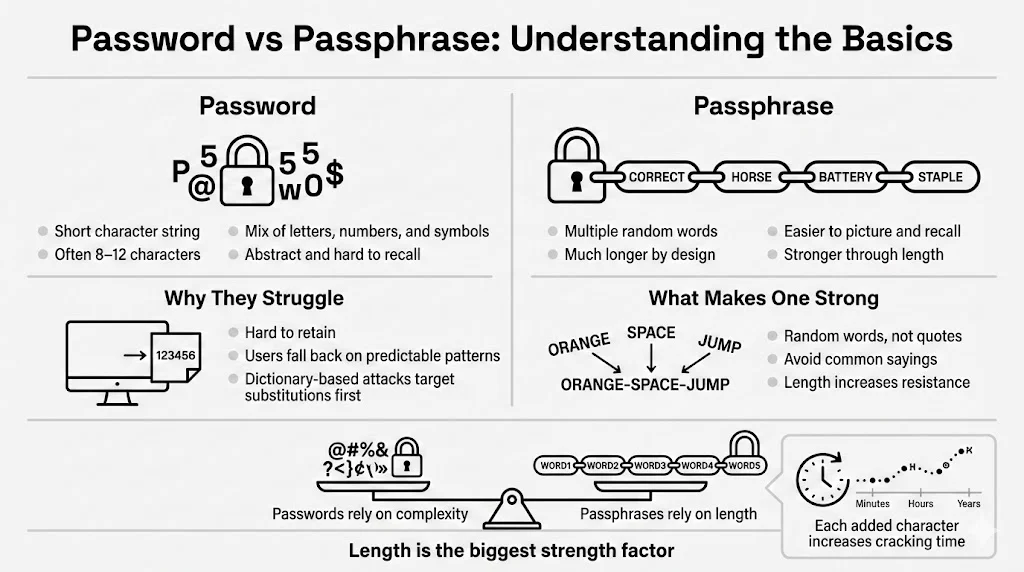
What Is a Password?
A password is a string of characters used to verify your identity. Historically, systems designed these to be short because storage space was expensive and processing power was limited.
Common Characteristics:
- Short Length: Typically 8 to 12 characters.
- Artificial Complexity: A mix of uppercase letters, lowercase letters, numbers, and symbols (e.g., Tr0ub4dor&3).
- Abstract: usually a random string or a modified word that doesn’t make grammatical sense.
Where Passwords Are Still Widely Used: Most legacy systems and strict corporate environments still enforce password policies. You know the drill: “Must contain one capital letter, one number, and one symbol.” While well-intentioned, these rules often backfire.
The Human Weakness: Because random strings like J8#kL!2p are hard to recall, humans take shortcuts. We use Pa$$w0rd1 or Admin123!. Hackers know this. They do not just guess random letters; they use “dictionary attacks” that run through common words and predictable substitutions (like swapping ‘a’ for ‘@’). When we try to outsmart the machine with predictable patterns, we usually fail.
What Is a Passphrase?
A passphrase is a sequence of words—usually four or more—strung together to create a much longer credential. It looks like a sentence or a random collection of words, often including spaces or hyphens.
Definition and Structure: Instead of Tr0ub4dor&3, a passphrase might be correct-horse-battery-staple.
How Multi-Word Passphrases Work: The strength of a passphrase lies in its length. By combining random words, you create a string that is mathematically exponentially harder for a computer to guess, yet significantly easier for a human to visualize and recall.
Difference Between Random Words and Meaningful Phrases: A strong passphrase uses random words (e.g., purple-garage-flying-toast). A weak passphrase uses a common saying or quote (e.g., to-be-or-not-to-be). Using famous quotes reduces security because cracking software includes databases of literature and pop culture references.
Why Length Plays a Major Role in Security: Every character you add to your credential increases the time it takes for a computer to crack it. We will look at the math shortly, but simply put: length is the most critical factor in the passphrase vs password equation.
Passphrase vs Password: Core Differences
To make an informed choice, we need to break down how these two methods stack up against each other in four critical areas: length, entropy, security level, and convenience.
Length and Structure
The average password hovers around 8-10 characters. A decent passphrase usually starts at 20 characters (e.g., four 5-letter words).
- Resistance to Attacks: Modern Graphics Processing Units (GPUs) can guess billions of combinations per second. An 8-character password, even with symbols, can often be cracked in hours or days. A 20-character passphrase? With current technology, that could take centuries.
- Changing the Math: Security is a numbers game. Systems process longer strings differently. When you double the length of your credential, you don’t just double the difficulty for the hacker; you multiply it by orders of magnitude.
Complexity vs Entropy
This is where most people get stuck. We are taught that “complexity” (looking messy) equals security. In reality, entropy (unpredictability/randomness) is what matters.
- Complexity: P@ssw0rd! looks complex to a human eye because it has symbols and numbers. To a computer, it is predictable. The entropy is low.
- Entropy: house-river-table-jump looks simple to a human. It contains only lowercase letters. However, because the computer has to guess which four words out of thousands were chosen, and in what order, the entropy is massive.

Why Predictable Complexity Fails:
When you are forced to add a symbol, you likely put an exclamation mark at the end. When forced to add a number, you likely add 1 or the current year. Attackers program their tools to check these patterns first. Random word combinations have no such pattern.
Security Level
How do they stand up against specific threats?
- Brute-Force Attacks: This method tries every possible character combination (aaaa, aaab, aaac…). Long passphrases are virtually immune to brute-force attacks simply because of the character count.
- Dictionary Attacks: This method tries words from a dictionary. A single word like Monkey is cracked instantly. Four random words (Monkey-Planter-Drive-Galaxy) defeat this because the attacker must guess the combination of words, not just a single entry.
- Performance Against Modern Cracking Tools: In the passphrase vs password comparison, the passphrase wins against cracking hardware consistently, provided the words are chosen at random.
User Convenience
Security is useless if you cannot use it.
- Ease of Recall: It is easier to visualize a “Purple Elephant Eating Pizza” than it is to recall P#3p1zz@. The brain is wired for narrative and imagery, not alphanumeric strings.
- Typing Effort: On a mobile device, switching between keyboards (letters to numbers to symbols) is annoying and slow. Typing a passphrase often allows you to stay on the main keyboard, making the login process faster despite the higher character count.
- Authentication Flow: A passphrase flows naturally. It reduces the “did I capitalize that?” anxiety that causes lockouts.
Security Under the Hood
You do not need to be a coder to understand the basics of how systems protect your data. Knowing a little about the backend helps explain why we advocate for passphrases at WhiteVault.
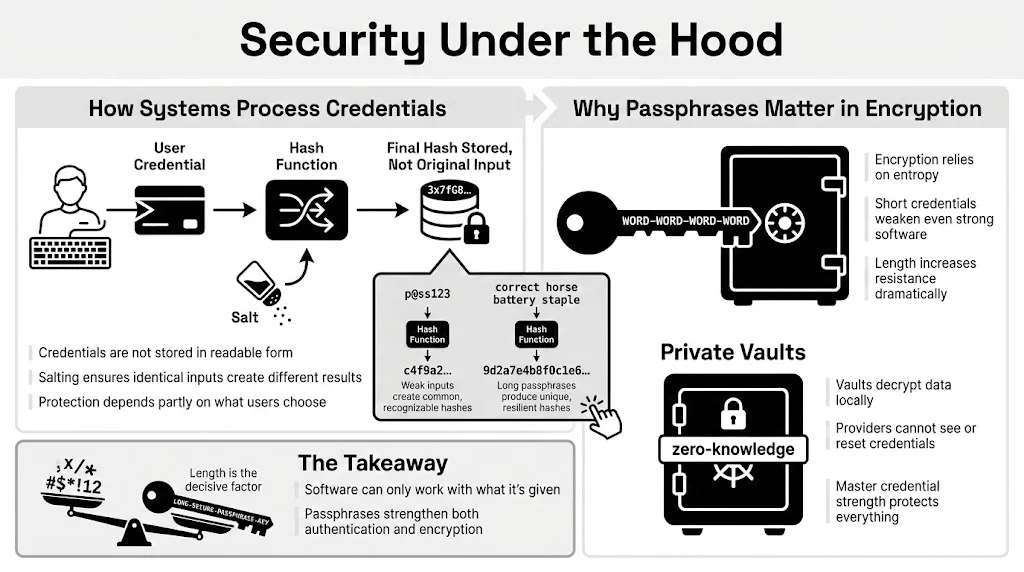
How Authentication Systems Process Credentials
When you create an account, the service (ideally) does not save your credential in plain text.
- Hashing: The system runs your credential through a mathematical algorithm (a hash function) that turns it into a scrambled string.
- Salting: They add random data (salt) to your credential before hashing it to ensure that two people with the same password have different hashes.
System-Side Protection Depends on User Choices: Even with hashing, if you use 123456, the hash is easily recognized. If you use a long passphrase, the resulting hash is unique and resistant to “rainbow table” attacks (pre-computed lists of common hashes).
Passphrases in Cryptography
In high-security environments, specifically with encryption, length is non-negotiable.
- Higher Entropy Preference: Cryptographic systems favor high entropy. When you encrypt a file—like a tax return or a will—the software uses your credential to generate the encryption code. A weak credential results in weak encryption, no matter how good the software is.
- Private Vaults: Tools like WhiteVault rely on your master credential to decrypt your personal data. Because we use “zero-knowledge” encryption (meaning we cannot see your data or reset your credential), the strength of that master credential is the only thing standing between your data and an attacker. This is a classic passphrase vs password scenario where the passphrase is the clear winner for protecting your “cyber life.”
Real-World Scenarios
When should you use which? Not every login requires Fort Knox-level security, but your primary accounts certainly do.
When Passwords Fall Short
- Reuse Across Services: You use the same complex password for your email and a random forum. The forum gets hacked. The hackers try that email/password combo on your bank. This is “credential stuffing.”
- Shortcuts Under Pressure: You are in a rush to create an account. You type Winter2025!. Three months later, the system forced a change. You type Spring2025!. This pattern is trivial to crack.
Where Passphrases Shine
- Protecting Sensitive Documents: If you are storing scans of birth certificates, property deeds, or medical records, you need strong encryption. A long passphrase ensures that even if someone gets the file, they cannot open it.
- Securing Password Managers: Your password manager holds the codes to everything else. This “Master Password” should absolutely be a passphrase. It needs to be the one thing you recall perfectly.
- Device-Level Encryption: Logging into your laptop or phone. A passphrase like open-my-blue-file is easier to type on a prompt than O$enM7B!ue.
- Recovery Phrases: Cryptocurrency wallets and secure vaults often use a 12-24 word recovery phrase. This is the ultimate passphrase—essentially unbreakable by brute force.
Security Best Practices for Everyday Users
You don’t need to be a spy to have good security. You just need a system.
Creating Strong Passwords (When You Must Use Them)
Sometimes, a website will force you to use a password with strict limits (e.g., “Max 12 characters”). In this case:
- Use a Generator: Let your password manager create a random string like 8xL#v9Pm.
- Don’t Memorize: Save it to your manager.
- Avoid Substitutions: P@ssw0rd is not clever.
Creating Strong Passphrases
For your master credentials or device logins:
- Choose Unrelated Words: Look around the room. Lamp-Coffee-Rug-Window. Better yet, use a random word generator or the “Diceware” method (rolling dice to select words from a numbered list).
- Avoid Quotes: Do not use song lyrics or “To infinity and beyond.”
- Word Separators: Use spaces if the system allows, or hyphens/periods if not. This makes it easier to read as you type.
- Ideal Length: Aim for 4 words or roughly 20+ characters.
Managing Credentials Safely
- Role of Password Managers: You cannot recall unique credentials for 100 sites. Use a manager. You only need to recall one strong Master Passphrase to access the rest.
- WhiteVault: For your most critical identifiers and documents, WhiteVault offers a secure environment. Unlike a standard browser, your vault is designed to hold the heavy hitters—passport scans, insurance policies, and the credentials to your financial life—protected by high-level encryption.
- Two-Factor Authentication (2FA): Always turn on 2FA. It acts as a safety net. If someone guesses your credential, they still need the code from your phone or app.
- Regular Review: Check your accounts once a year. Delete old ones you don’t use to reduce your exposure surface.
Common Myths and Misunderstandings
Let’s bust a few persistent myths in the passphrase vs password debate.
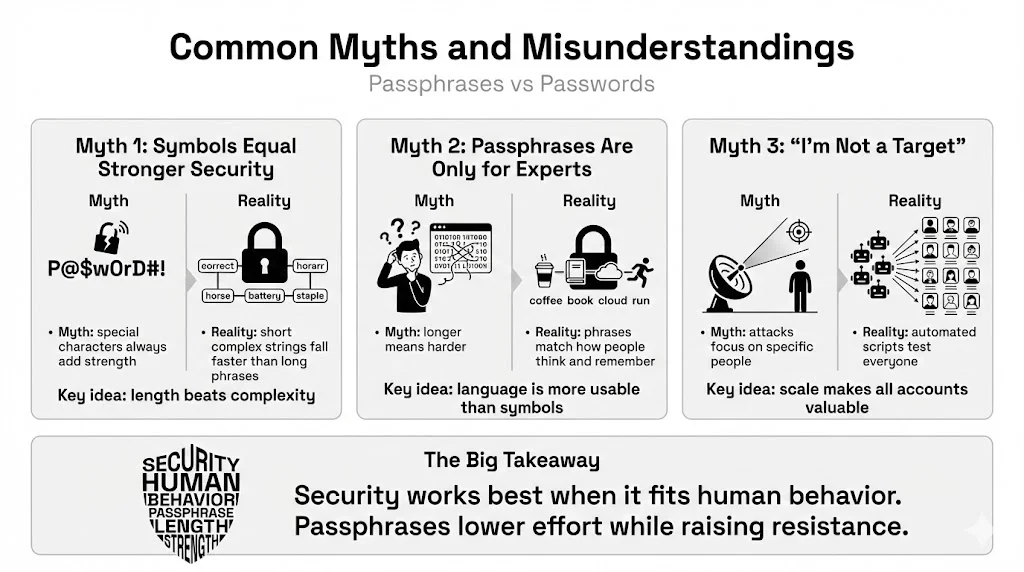
Myth 1: “Complex Symbols Always Mean Better Security”
Why this persists: For years, IT departments shouted, “Use special characters!” The Reality: A computer cracks &r5%9 much faster than correct-horse-battery-staple. Complexity adds friction for you, not necessarily for the attacker. Length is the true champion of security.
Myth 2: “Passphrases Are Only for Experts”
Why this belief is outdated: People assume longer means harder. The Reality: Passphrases are more accessible for the average user. They rely on language, which we use every day, rather than abstract codes. Telling your grandmother to use “purple-tea-flying-cloud” is much more effective than asking her to recall “P7#rT3@!”.
Myth 3: “I’m Not a Target, So It Doesn’t Matter”
The Reality: Bots and automated scripts attack everyone. They don’t care who you are; they care that your processor power or bank balance is accessible.
Conclusion
The shift from password to passphrase represents a change in how we think about safety. It moves away from confusing, machine-focused complexity toward human-friendly, math-backed security.
To recap the passphrase vs password comparison:
- Passwords are suitable for low-security accounts if generated randomly and stored in a manager.
- Passphrases are superior for master accounts, encryption, and devices because they offer immense resistance to cracking while being easier for humans to recall.
Modern security leans toward longer credentials because computing power is getting cheaper and faster. What took a supercomputer decades to crack ten years ago can now be done by a gaming PC in weeks. Your defense is length.
We encourage you to rethink how you create your credentials today. Start small. Change your email login or your computer login to a 4-word passphrase. Get a password manager (or check out WhiteVault for your most sensitive documents) and start offloading the burden of recalling hundreds of codes.
Your peace of mind is worth the five minutes it takes to upgrade your security habits.
FAQ: Passphrase vs Password
1) What is the main difference between a passphrase and a password?
A password is typically a short string of random characters (8-12), while a passphrase is a longer sequence of words (20+ characters). Passphrases rely on length for security, while passwords rely on complexity.
2) Are passphrases safer than random passwords?
Generally, yes. A long passphrase (4+ random words) has higher entropy (randomness) and is much harder to brute-force than a standard 8-character complex password. However, a random 20-character password is safer than a 20-character passphrase, but impossible for a human to memorize.
3) How long should a secure passphrase be?
Aim for at least 4 random words, or roughly 20 characters. Current NIST guidelines suggest longer is better.
4) Do passphrases work with all login systems?
Not always. Some older websites have character limits (e.g., “max 16 characters”). In those cases, use a random password generator. Most modern sites, however, support long phrases.
5) Can passphrases be hacked?
Nothing is 100% hack-proof, but brute-forcing a strong passphrase takes centuries with current technology. The biggest risk to a passphrase is if you reuse it or if you fall for a phishing scam (giving it away voluntarily).
6) Should I switch all my passwords to passphrases?
You should use a unique passphrase for your “Master” accounts (email, password manager, banking, computer login). For the hundreds of minor accounts (newsletters, forums), use your password manager to generate random complex passwords.
7) Are passphrases harder to type on mobile devices?
Actually, they are often easier. You can type words using the standard keyboard and predictive text without constantly switching to the symbol or number layout.
8) Do password managers support passphrases?
Yes. Password managers treat passphrases just like any other credential. You can save them, autofill them, and even generate them within the app.
Sources referenced for general guidance: NIST (National Institute of Standards and Technology) Special Publication 800-63B; OWASP (Open Web Application Security Project) Authentication Cheat Sheet; FTC (Federal Trade Commission) Consumer Advice on Password Security.


