The average person now juggles over 100 internet accounts and keeps digital versions of passports, tax forms and personal records. In 2024 there were 3,158 data compromises affecting 1.3 billion people, and 88% of basic web attacks involved stolen credentials. It’s no wonder many feel overwhelmed and search for a single encrypted vault. This guide is for anyone who wants peace of mind—parents managing family logins, students keeping travel documents handy, professionals with dozens of accounts and retirees sorting their paperwork. We’ll explain how master passwords work, show you how to craft a strong one you can recall, and outline additional protections so you feel in control.
What Is a Master Password and How It Works
A master password is the single secret that opens your credential manager or secure vault. When you open a password manager, it asks for this one secret; once entered, it reveals all of your stored account passwords and documents. Because it guards everything else, the master password must be unique and never reused anywhere else. In modern password managers—including WhiteVault—your master password is never sent to the service or stored in plain text. Instead, the software uses it to generate cryptographic secrets that decrypt your data locally on your device. The vendor adopts a zero‑knowledge architecture, meaning staff can’t see or recover your secrets.
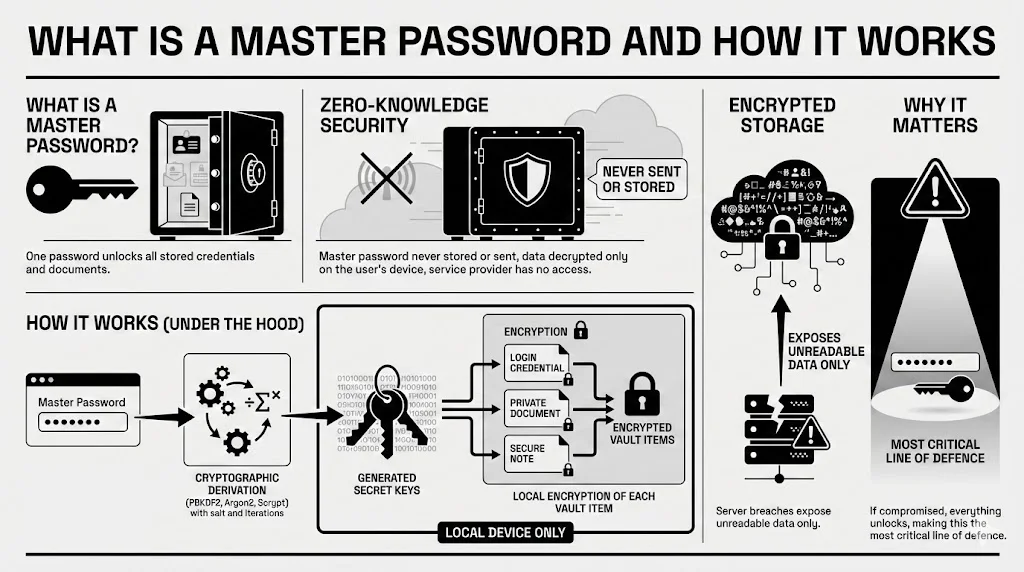
Under the hood, the process is straightforward. When you create a vault, your passphrase feeds into a cryptographic derivation function such as PBKDF2, Argon2 or Scrypt with a random salt and thousands of iterations. This produces a secret used to encrypt each item you store (logins, memos or ID scans). Each item is encrypted with its own secret, and those secrets are then protected by your main passphrase‑derived secret. Everything happens on your device before any data goes to storage, so a breached server would reveal only gibberish.
Because the master password powers all of this, master password security becomes the most critical line of defence. If someone guesses or steals your master password, they can decrypt everything else despite strong encryption and individual account passwords. That’s why we advocate a cautious, layered approach.
How Credential Managers Like WhiteVault Use Encryption
To understand why you need a strong master password, it helps to grasp the basics of encryption without getting lost in jargon. Imagine locking your papers in a safe. You have two secrets: one that secures each document in its own box (the data encryption secret) and another that secures all those boxes in a larger container (the secret derived from your master password). Without the second secret, the inner boxes remain sealed—even if thieves break open the safe itself.
Modern password managers (like WhiteVault) take that safe analogy further. They rely on AES‑256 encryption (the same strength used by governments), derive encryption secrets via algorithms like PBKDF2, Argon2 or Scrypt with salt and multiple iterations, and follow a zero‑knowledge approach where the service never has access to your secrets.
This architecture makes stealing your stored data extremely difficult. However, encryption strength can’t compensate for a weak master password. If your master password is “password123,” even AES‑256 won’t help you. Attackers can easily try the most common passwords against stolen vaults. That’s why length, uniqueness and randomness matter—and why multi‑factor authentication (MFA) adds another barrier.
Together, these features illustrate how master password security relies on cooperation between cryptography and a strong passphrase. The algorithms scramble your information, but your secret phrase is what initiates the process.
Why Weak Master Passwords Put Everything at Risk
The Single Point of Failure Problem
When you store all your credentials and sensitive documents behind a single master password, that one secret becomes the gatekeeper to your virtual life. A weak master password is like a flimsy lock on a safety deposit box. Attackers know this: 81% of confirmed data breaches in recent years involved weak, reused or stolen passwords. According to Verizon’s 2024 Data Breach Investigations Report, 31% of breaches involved stolen credentials specifically. If an attacker obtains your master password through phishing, malware or social engineering, it exposes all your saved credentials, even if those individual passwords are long and unique. A single compromised master password can therefore lead to identity theft, financial fraud and personal trauma.
Common Attack Methods Targeting Master Passwords
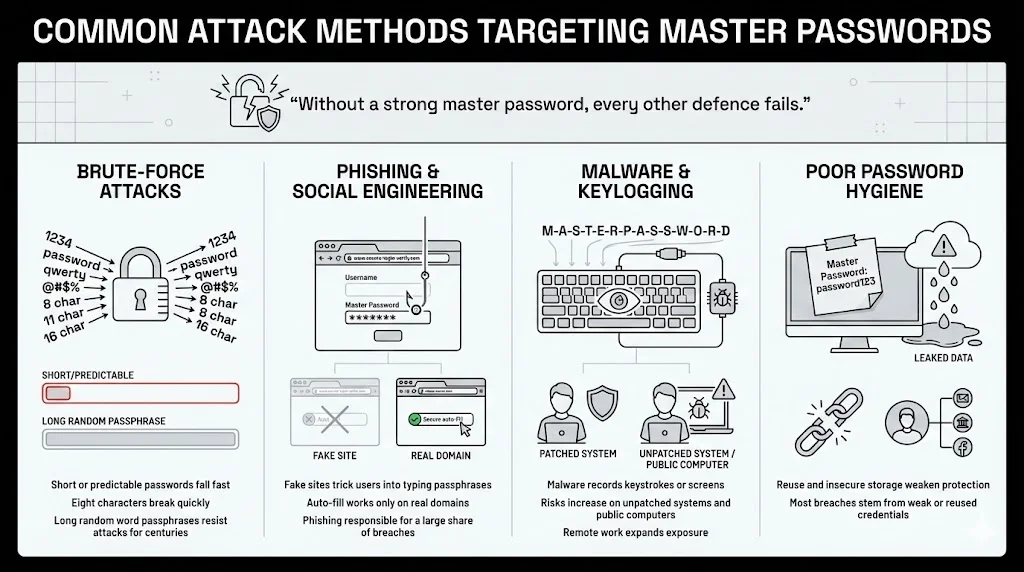
This example underscores the importance of master password security—without a resilient passphrase, every other defence crumbles.
- Brute‑force attacks exploit short or predictable passwords. Computers can test billions of guesses per second, so an eight‑character password can fall in minutes. A passphrase of six or more random words resists such attacks for centuries.
- Phishing and social engineering lure you into entering your passphrase on fake sites. Always verify web addresses and rely on your manager’s auto‑fill, which only operates on genuine pages. Phishing accounted for roughly one‑fifth of breaches in a 2024 survey.
- Malware can include software that records what you type or captures your screen. Keeping your system patched and avoiding public computers helps prevent these threats. In 2023 there were billions of malware attacks, and remote work has amplified exposure.
- Poor password hygiene—such as writing your passphrase in a cloud memo or reusing it elsewhere—makes it easy for criminals. A 2024 study found that weak or reused credentials drove most breaches.
Core Principles of a Strong Master Password
Before diving into specific techniques, it’s useful to recognise that these principles build the foundation of master password security. By following them you strengthen the single secret that protects everything else.
1. Length Over Complexity
The National Institute of Standards and Technology (NIST) and Open Web Application Security Project (OWASP) agree: longer passwords are significantly more secure than complex but short ones. NIST recommends passphrases of at least 15 characters, noting that adding symbols and numbers is optional because length is the primary driver of entropy. OWASP calls any password shorter than 15 characters weak if multi‑factor authentication isn’t enabled. The concept is simple: every additional character exponentially increases the number of possible combinations. For example:
- A 10‑character password using letters and numbers has about 62^10 combinations, but computers can test billions per second.
- Focus on length over complexity. Each extra character exponentially increases the number of possible combinations, making brute‑force attacks infeasible. Resist the urge to add lots of symbols if they make it harder to recall; instead choose a longer string of words.
2. Uniqueness and Non‑Reuse
Your master password must be one of a kind. Do not base it on your email password, banking PIN or any credential used elsewhere. According to the FTC, you should never reuse a password, because if one account is compromised, all your accounts are at risk. Use your password manager to generate strong, unique passwords for each service and rely on the master password only to open the vault. This reduces your attack surface and helps you respond quickly if a single account is breached.
3. Randomness and Unpredictability
Predictable patterns—such as replacing letters with numbers or adding simple sequences—are easily guessed. A better approach is to assemble random, unrelated words like “coffee bicycle orange galaxy river.” Privacy guides suggest passphrases of at least six words. Avoid using names, birthdays or famous quotes, which appear in cracking lists.
Creating a Master Password You Can Recall Without Writing Down
Storing your master password in your head may feel scary, but it’s easier than you think when you follow a structured approach. Here are three methods:
1. Using Passphrases Instead of Single Words
Imagine a story or scene composed of unrelated words. For example, “garden planet piano raindrop library mountain” paints a vivid picture, making it easier to recall than a jumble of symbols. Each word adds length and unpredictability. You can include spaces or hyphens; WhiteVault supports spaces, and OWASP recommends allowing all characters including white space. Resist the urge to tweak known phrases or quotes; those appear on common lists and weaken security. Instead, pick words from different categories (an object, a place, an action) and create a mental image.
2. Adding Personal Logic Without Personal Data
To personalize your passphrase, invent an internal rule that isn’t obvious to others—perhaps capitalising certain letters, inserting a specific symbol or rearranging letters in each word. Your rule should not be based on public information like birthdays or favourite teams. A private pattern makes the phrase easier for you to recall yet unpredictable to attackers.
3. Balancing Memory and Protection
The best passphrase is one you can bring to mind without writing it down yet still meets strong security guidelines. If it becomes too long or convoluted, you won’t use it effectively. Aim for six to seven random words with simple modifications. Practise typing or saying it until you can recite it easily, and destroy any written copy once you’ve committed it to memory.
Mistakes That Undermine Master Password Security
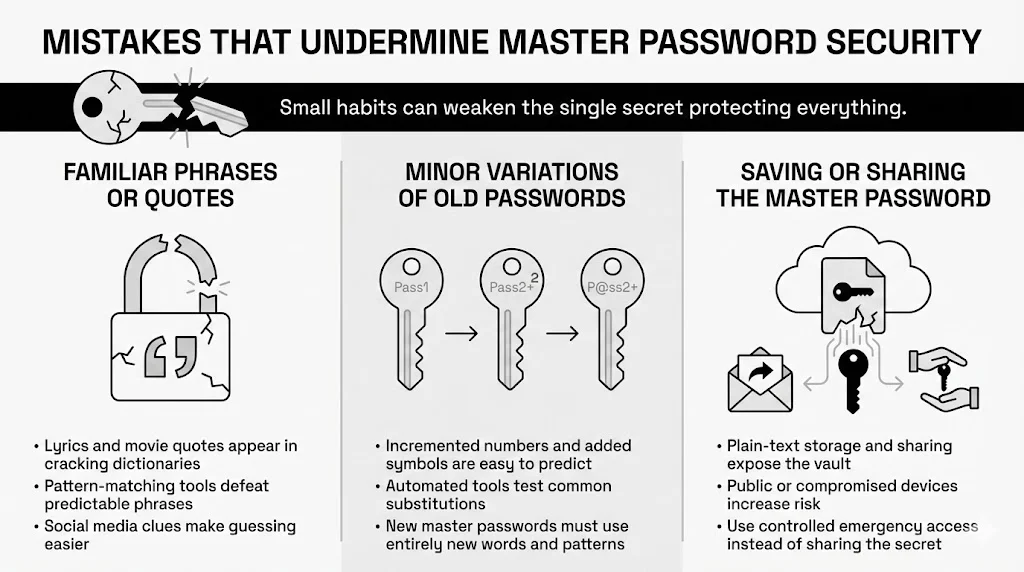
These missteps can undermine master password security by weakening the single secret that holds all your accounts and documents.
1. Relying on Familiar Phrases or Quotes
It may be tempting to use lyrics from your favourite song or a famous movie quote. Attackers know this and include such phrases in password dictionaries. For example, “May the Force be with you!” or “To be or not to be” appear in many cracking lists. Even long quotes are predictable once pattern‑matching algorithms substitute characters. Avoid anything that could exist in a list or that others could guess based on your social media presence.
2. Minor Variations of Old Passwords
Many people “upgrade” an old password by incrementing numbers or adding a symbol, for example “Sunflower@23” becomes “Sunflower@24.” Attackers can guess these patterns quickly. In fact, 30% of breaches come from reused passwords, and criminals run automated tools to check common substitutions. If you decide to change your master password due to a suspected compromise, create a completely new passphrase. Don’t reuse the same base words or patterns.
3. Saving or Sharing the Master Password
Never store your passphrase in plain text or share it with anyone. If your cloud account is hacked or someone forwards an email, they gain access to your vault. Use your manager’s emergency access feature to grant trusted contacts controlled entry instead of giving them your secret. Avoid typing the passphrase on public computers, which may harbour malware or typing loggers, and don’t enter it on a device you suspect is compromised.
Strengthening Master Password Security with Additional Layers
Even the strongest master password benefits from backup protections. Here are two ways to build layers.
Multi‑Factor Authentication and Other Authentication Methods
Multi‑Factor Authentication (MFA) adds a second step to your login. Use an authenticator app or a hardware token rather than SMS, because SIM‑swap attacks can intercept texts. Even if someone steals your passphrase, they’ll still need this second factor. Biometric options are convenient, but they complement rather than replace the passphrase; you still need the words if your face or fingerprint sensor fails. WhiteVault supports TOTP codes and hardware tokens—enabling them for your vault and recovery email.

Multi‑Factor Authentication
Adding these layers enhances master password security—even a stolen passphrase isn’t enough when an attacker must also provide a second factor.
Device‑Level Security and Identity Verification
Security doesn’t end at the vault; your device is part of the equation. Keep your computer and phone up to date with the latest patches, as malware often exploits outdated software. Use a strong, unique passcode or passphrase for your operating system and enable disk encryption (FileVault on macOS, BitLocker on Windows). Avoid using untrusted devices for accessing your vault. If you must, change your master password afterward. Whenever possible, verify your identity through two‑step verification, and log in only from secured networks. Consider using a Virtual Private Network (VPN) on public Wi‑Fi to add privacy.
How Often Should You Change a Master Password
It used to be common advice to rotate passwords every 90 days. Modern security standards now discourage frequent changes because people end up choosing weaker passwords or repeating patterns. NIST guidelines advise changing a password only when there is evidence of compromise. The Privacy Guides emphasize that you shouldn’t feel obligated to change a memorized master password unless you suspect it has been exposed. If your password manager notifies you of a breach or you suspect your device has malware, immediately change your master password and enable MFA if not already active. Otherwise, leave your strong, unique passphrase untouched and focus on overall security hygiene.
Testing and Evaluating Password Strength Safely
If you’re curious about the strength of your passphrase, avoid web‑based “password checkers” that might harvest it. Instead, use offline tools or the builtin health reports in your password manager. WhiteVault and similar services can flag weak or reused credentials and score your passphrase locally. You can also judge strength yourself: aim for at least 15 characters or six to seven unrelated words, avoid personal information and reuse, and prioritise length over fancy symbols.
Master Password Security Best Practices for Long‑Term Protection
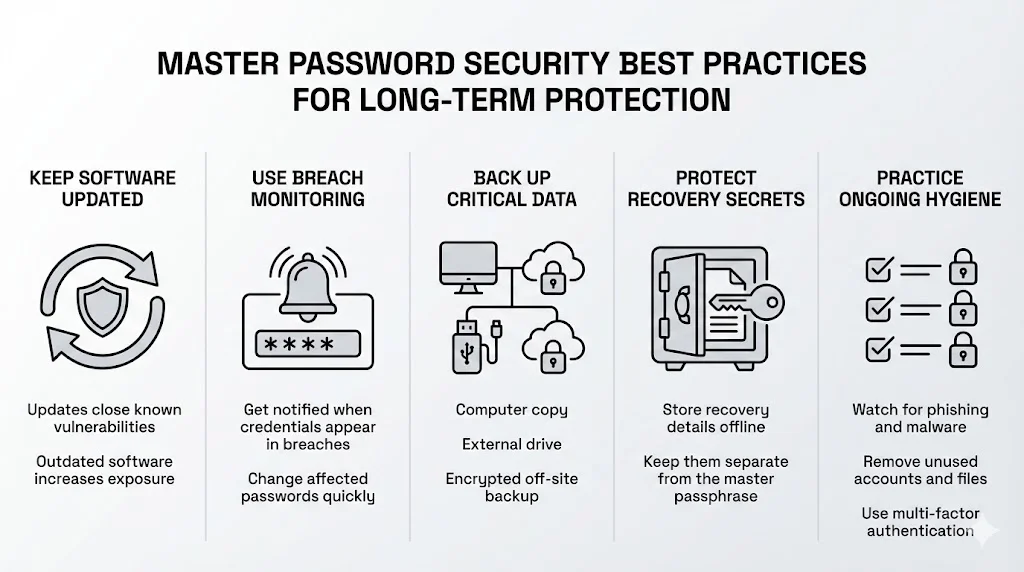
Keeping your passphrase safe isn’t a one‑time task. Adopt a few habits: keep your software updated so you don’t fall victim to old vulnerabilities, use breach‑monitoring features to receive alerts and update affected passwords promptly, and maintain at least three copies of critical documents on different media (computer, external drive and an off‑site encrypted backup). Print and store your recovery secret in a safe place away from your passphrase, stay aware of phishing scams and new malware tricks, and periodically purge unused accounts and files. These steps turn your passphrase into one part of a balanced security plan that combines encryption, multi‑factor authentication and good habits.
Conclusion
A master password is more than just a string of characters; it’s the gateway to your virtual life. In a world where data breaches are commonplace and attackers target our most sensitive information, master password security deserves special care. Choosing a long, unique and random passphrase is the first step, but it doesn’t stop there. Protecting yourself also involves enabling multi‑factor authentication, keeping your devices secure, testing your passphrase properly and maintaining good cyber hygiene. WhiteVault provides the tools—military‑grade encryption, zero‑knowledge architecture, breach monitoring and simple organisation—but the responsibility of creating and committing the master password to memory remains with you. By taking these steps, you can save, recall and protect what matters with confidence. Electronic security isn’t about perfection; it’s about making thoughtful choices that reduce your risk. Start today with one change—perhaps creating a strong passphrase or enabling MFA—and build from there. You’ve got this.
Frequently Asked Questions (FAQ)
1) What makes a master password different from regular passwords?
A master passphrase opens your password manager and isn’t reused anywhere else. It never leaves your device, and it’s used to generate the encryption secrets that protect everything inside, so it must be strong and unique.
2) How long should a master password be?
Aim for at least 15 characters or six random words. NIST suggests passphrases because length matters more than complexity, and a seven‑word diceware phrase yields high entropy. Use unrelated words and the longest length your manager allows.
3) Can a master password be recovered if forgotten?
No. Password managers can’t retrieve your passphrase because they never store it. Keep your recovery secret or emergency kit in a safe place; without it, your vault can’t be opened.
4) Is a password manager still safe if the master password is strong?
Yes. When paired with end‑to‑end encryption, multi‑factor authentication and a secure device, a strong passphrase makes a password manager one of the safest options. Maintain good cyber hygiene and keep malware off your device.
5) Should a master password include symbols and numbers?
Symbols and numbers are optional. NIST notes that length and randomness matter more. Add them if they help you recall the phrase or if a service requires them, but don’t shorten your passphrase to include them.
6) Is it safe to store documents along with passwords?
Yes. A vault with strong encryption and zero‑knowledge design protects files as well as passwords. Keep your passphrase strong, enable MFA and follow the 3‑2‑1 backup rule to safeguard passport scans, tax forms and other sensitive files.

StorIng documents AND passwords in WhiteVault
WhiteVault’s design is intentionally simple. You don’t need to be a technical expert: just install it, set up your passphrase and start saving what matters. Knowing your credentials and documents live in one secure place brings peace of mind. This convenience complements master password security.

