
We have all been there. You try to log in to a web account you use every day, only to be stopped by a prompt telling you your password has expired. Frustrated, you enter your current password, hoping to keep things simple. The system rejects it: “New password cannot be the same as the old one.” So, you sigh, type the same password again, and add “123” or “!” to the end. You are back in, but your account is not necessarily safer. In fact, it might be weaker.
For years, we were told that changing credentials every few months was the golden rule of internet safety. But as we move through 2025, the guidance has shifted. Managing the password change frequency for dozens (or hundreds) of accounts is no longer just about the calendar; it is about context. Research suggests the average person manages over 100 web accounts—from banking and shopping to streaming and social media. Recalling unique, strong codes for each one is nearly impossible without help. This leads to the “sticky paper” method or using the same secret code for everything, which is like using the same opener for your home, car, and office.
At Team WhiteVault, we understand that security fatigue is real. You want to protect your personal files, identity, and money without making your daily life miserable. This guide cuts through the confusion. We will explain why the old rules existed, why experts now suggest a different approach, and how you can strike the right balance between convenience and ironclad protection.
What Password Change Frequency Really Means
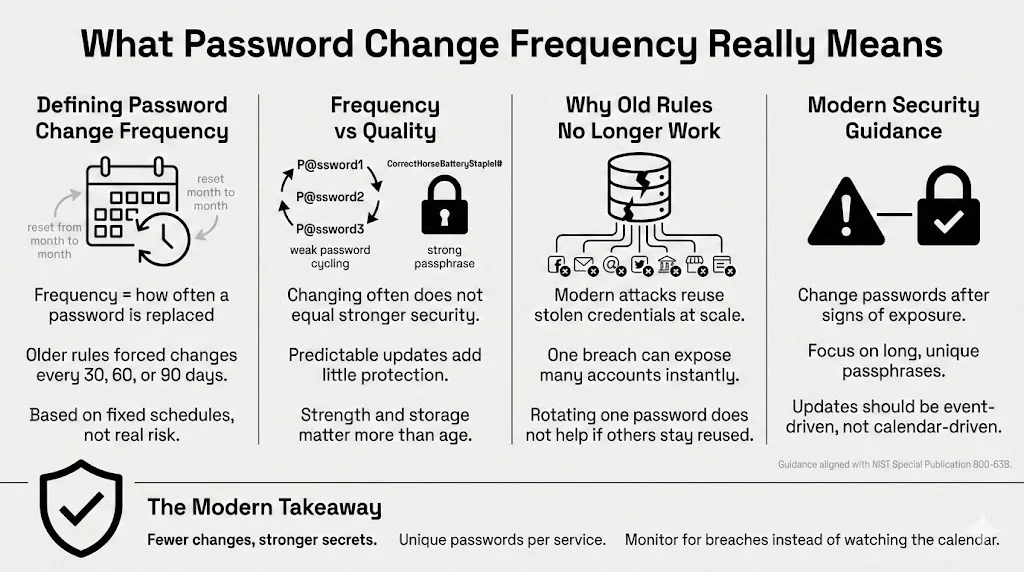
To take control of your cyber safety, we must first define our terms. Password change frequency refers to the specific schedule or policy that dictates how often a user must replace their current authentication credentials with new ones. In the past, this was a rigid timeline—usually 30, 60, or 90 days.
Clearing Up the Definition
It is important to separate “frequency” from “quality.” You can change your code every day, but if you are rotating from “Password01” to “Password02,” you are not improving your security posture. You are simply following a schedule. True protection comes from the strength of the credential itself and how well it is guarded, not just how new it is.
In an ideal scenario, a credential would be changed only when there is a risk that it has been exposed. However, because we rarely know when a breach happens instantly, frequency policies were created as a safety net. The idea was simple: if a hacker stole your code in January, but you changed it in February, their access would be cut off.
Moving Away from the “Every 30 Days” Rule
For a long time, IT departments and banking sites forced users to update credentials monthly. This was based on older threats where computing power was lower, and cracking a code took longer. The logic was that by the time a hacker cracked your code, you would have already changed it.
Today, that logic is flawed. Attackers do not usually spend months cracking one person’s complex code. They use “credential stuffing”—taking millions of username/password pairs stolen from one site and trying them on hundreds of others instantly. If you reuse credentials, a 30-day rotation on your bank account won’t help if your email password (which you haven’t changed in years) gets stolen today.
Authentication Updates in Modern Security
Modern security standards have shifted significantly. The NIST Special Publication 800-63B guidelines (widely regarded as the authority on this subject) actually advise against arbitrary, periodic password changes for personal and enterprise accounts unless there is sign of a compromise.
Why? Because forced updates drive bad behavior. When people are forced to change a complex string of characters frequently, they choose predictable patterns. They capitalize the first letter, add a year (e.g., “Summer2025”), or cycle through numbers. Computers are very good at guessing these patterns. Modern policy focuses less on the calendar and more on “event-based” changes—updating your secret phrase only when there is evidence of a breach or compromise.
Why Regular Password Changes Matter
While the rigid “every 30 days” rule is fading, we cannot ignore updates entirely. There are specific reasons why managing your password change frequency is still a critical part of your defense strategy, especially for high-value targets like your primary email or financial institutions.
Preventing Unauthorized Access
The internet is a hostile environment. Attackers are constantly scanning for weaknesses. Static credentials—those that stay the same for five or ten years—are low-hanging fruit.
Consider a scenario where a hacker gains access to a database from a service you stopped using five years ago. If you are still using that same email and password combination on your active accounts today, that old breach is a current threat. By updating your credentials periodically (even if just once a year for important accounts), you sever the link to those old, potentially compromised databases.
Rotation acts as a “kill switch.” If an unauthorized person is quietly lurking in your account—reading your emails or monitoring your bank usage—changing the code shuts them out instantly. They would need to re-authenticate, which they are unable to do without the new credentials.
Reducing Long-Term Exposure
Time is an enemy of secrecy. The longer a secret exists, the more likely it is to be shared, written down, saved in an insecure browser cache, or captured by malware.
Think about data breaches. They are not always reported immediately. A company might discover a breach in 2025 that actually happened in 2023. If you haven’t updated your login details since 2022, you have been exposed for years. A sensible rotation schedule limits this window of exposure. It ensures that even if data was stolen three years ago, the credentials in that dataset are now useless junk data for the criminals.
Supporting Strong Access Control Protocols
Your password is the first line of defense, but it is part of a larger system of access control. When you update your credentials, you are essentially refreshing your identity verification.
This is where a service like WhiteVault becomes essential. We often think of “access” as just logging into Facebook or Gmail. But what about your most vital documents? Your will, your deed, your passport scans, or your crypto phrases? If the credentials protecting these assets are stale, the risk is catastrophic. Regular updates ensure that the “codes to the kingdom” are always fresh and known only to you right now, not to someone who might have glimpsed over your shoulder at a coffee shop two years ago.
Old Rules vs Modern Security Thinking
To understand where we are going, we have to look at where we came from. The shift in how we handle credentials is one of the biggest changes in the tech world over the last decade.
Where Traditional Advice Came From
In the early days of the web and corporate networks, security was focused on the “perimeter.” Imagine a castle with high walls. Once you were inside the castle (the network), you were trusted. The password was the way through the gate.
Administrators knew that users often chose weak words like “football” or “password.” To combat this, they implemented strict expiration policies. The theory was mathematical: if it takes a computer 40 days to guess a password, forcing a change every 30 days keeps the system safe.
This created a culture of frequent resets. It is why many of us still feel a pang of guilt if we haven’t changed our login details in six months. We were trained to believe that “stale” meant “unsafe.”
Why Experts Changed Their View
As computing power exploded, the “time to crack” math changed. But more importantly, security researchers started looking at human psychology.
Years ago, Microsoft researchers argued that frequent expiration policies were actively harming security. This is often called the “user friction” problem. When a system demands a new complex code every 90 days, the user does not create a totally new, random string. They adapt the old one.
- Old: WhiteVault2024!
- New: WhiteVault2025!
Hackers know this. They write scripts that test these common transformations. If they know your old code, they can guess your new one in milliseconds.
Frequent changes also cause users to write secrets down. A sticky paper memo on a monitor is a far bigger security risk than a strong password that is a year old. The modern consensus—supported by the FTC and the Electronic Frontier Foundation (EFF)—is that a long, unique, and static phrase (protected by Two-Factor Authentication) is far superior to a weak one that changes often.
How Often Should You Change Your Passwords Today?
So, if the 30-day rule is dead, what is the new schedule? There isn’t a “one size fits all” answer. Instead, we categorize accounts by risk level.
General Guidelines for Personal Accounts
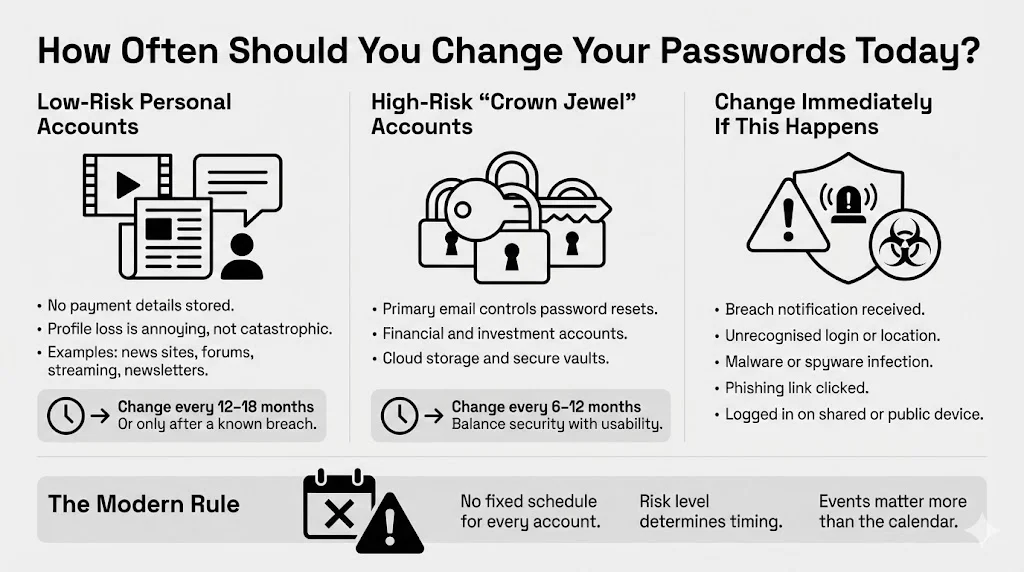
For the vast majority of your accounts—the “low risk” tier—you do not need to obsess over rotation. These include:
- News sites or forums where you do not store credit card info.
- Streaming services (though losing your profile is annoying, it is rarely life-ruining).
- Newsletters.
For these, a password change frequency of once every 12 to 18 months is acceptable, provided the credential is strong and unique to that site. In many cases, you can leave these indefinitely unless you hear news of a breach at that specific service. Changing these too often adds little value and contributes to fatigue.
High-Risk Accounts That Need More Attention
The rules change for your “crown jewels.” These are the accounts that, if compromised, could destroy your finances, reputation, or privacy.
- Primary Email Account: This is the master pass. If a hacker gets into your email, they can use the “Forgot Password” link to reset every other account you own.
- Financial Institutions: Banks, investment brokers, crypto exchanges.
- Cloud Storage & Vaults: Google Drive, Dropbox, iCloud, and secure repositories like WhiteVault where you store sensitive documents.
For these high-risk accounts, we suggest a rotation schedule of every 6 to 12 months. This is frequent enough to sever access to long-term lurkers but infrequent enough that you can still generate high-quality, memorable passphrases without getting frustrated.
Situations That Require Immediate Changes
Regardless of your schedule, certain events trigger an immediate “Code Red.” You must update your credentials right now if:
- Breach Notification: You receive an email from a service saying they were hacked. Do not wait.
- Suspicious Activity: You see a login location you do not recognize (e.g., a login from another country).
- Malware Infection: Your computer had a virus or spyware. Assume everything you typed while infected was captured.
- Phishing Suspicions: You clicked a link in a weird text message and logged in, then realized it looked fake.
- Shared Devices: You logged into a sensitive account on a library computer or a friend’s device and forgot to log out or clear the cache.
Password Changes and Data Breach Prevention
We are living in an era of “mega-breaches.” In 2024 alone, reports indicate billions of records were exposed across various industries. Understanding how these breaches work helps explain why your rotation strategy matters.
When a company is breached, hackers usually steal a database of usernames (emails) and “hashed” passwords. A hash is a scrambled version of your code. If your code was “123456,” the hash looks like gibberish. However, hackers have “rainbow tables”—massive lists of common passwords and their corresponding hashes. They can instantly guess weak passwords.
If you have a very strong, unique passphrase, the hacker cannot crack the hash easily. However, if that site stored passwords in plain text (which still happens, unfortunately), they have your exact login.
This is where reuse multiplies the damage. If you used that same combination on your bank account, the hacker doesn’t need to crack anything. They just walk right in.
A sensible password change frequency helps contain this damage. If you updated your bank credentials six months ago, but the breach at the retail store involves data from two years ago, your bank account is safe. The stolen pass no longer fits the lock.
The WhiteVault Approach to Breach Preparedness
Part of surviving a breach is having your house in order. When a breach happens, panic sets in. You might not recall which accounts use which email, or where you stored the recovery codes for your Two-Factor Authentication.
This is where WhiteVault shines. By using a secure personal vault to store not just credentials, but the documents associated with your identity (account numbers, recovery codes, proof of ownership), you are prepared. If you are shut out during a hacking attempt, having your information organized means you can prove your identity to customer support and regain control quickly. It turns a nightmare into a manageable nuisance.
Strong Passwords Matter More Than Frequent Changes
If we are changing them less often, the passwords themselves must be better. A fortress wall that is rebuilt every day is useless if it is built out of straw. A stone wall built once can stand for a century.
What Makes a Password Strong
Strength comes from two things: Entropy (randomness) and Length.
- Length: This is the critical factor. A 15-character password is exponentially harder to crack than an 8-character one.
- Uniqueness: It must never be used anywhere else.
- Unpredictability: Avoid dictionary words, names of pets, birthdays, or keyboard patterns (like “qwerty”).
The current best practice is to use “Passphrases.” These are strings of random words that are easy for humans to visualize but hard for machines to guess.
- Weak: Fido1985!
- Strong: Correct-Horse-Battery-Staple (The famous XKCD example, though do not use that specific one!).
- Better: Purple-Garage-Singing-Tuna-24.
Avoiding Common Password Mistakes
The biggest mistake is substitution. Replacing “a” with “@” or “o” with “0” (zero) does not fool modern hacking software. They are programmed to check for those substitutions automatically.
Another mistake is relying on memory for complex strings. If you try to recall Xy9#mP2!qL for ten different sites, you will fail. You will inevitably revert to easier patterns. This brings us to the tools that solve this problem.
Tools That Make Password Management Easier
You do not need to be a math genius or have a photographic memory to be secure. You just need the right toolkit. Technology has evolved to handle the heavy lifting for us.
Password Managers and Their Benefits
A password manager is a software tool that generates, retrieves, and stores complex credentials for you. You only need to recall one “Master Password” (make it a very good one) to open the vault. The manager fills in the rest.
Using a manager allows you to have 30-character, completely random nonsense for every single account. You never even have to see the password.
- Secure Storage: These tools encrypt your data. Even the company that makes the software cannot see your secrets.
- Habit Improvement: Since you don’t have to type the code, you won’t be tempted to choose “easy” words.
- Phishing Protection: A password manager will not auto-fill your credentials if you are on a fake website (e.g., g00gle.com instead of google.com). It recognizes the URL mismatch.
WhiteVault complements this approach. While a password manager handles the login, WhiteVault serves as the secure home for the files and identity documents that those logins protect. It is the deeper layer of your organizational security.
Multi-Factor Authentication as a Backup Layer
We cannot talk about password change frequency without mentioning Multi-Factor Authentication (MFA), often called 2FA.
MFA adds a second step to the login process. After typing your password, you must provide a code sent to your phone, generated by an app, or provided by a hardware device (like a USB stick).
MFA is a game-changer. Even if a hacker steals your password because you haven’t changed it in three years, they cannot access your account without that second code. This reduces the pressure to rotate passwords constantly. It provides a safety buffer. If you have MFA enabled on an account, you can confidently extend your rotation schedule, knowing that the password is not the single failure point.
Password Change Frequency in Work and Shared Systems
Managing personal accounts is one thing; dealing with workplace systems or shared family accounts is another.
Following Organizational Security Policy
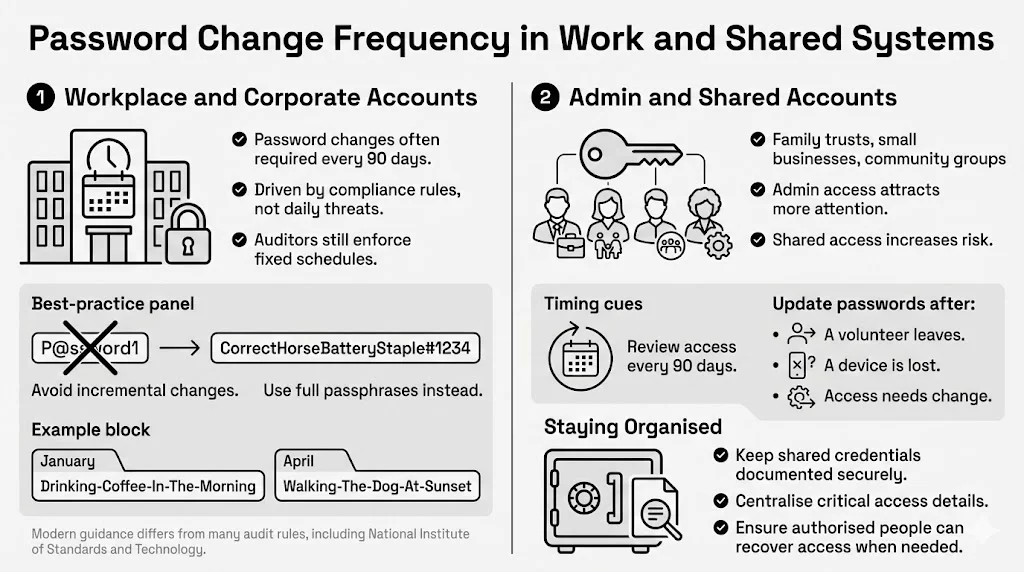
If you work for a corporation, you are likely forced to change your login every 90 days. This is often due to compliance regulations (like SOX, HIPAA, or PCI-DSS) rather than pure security logic. Even though NIST suggests stopping this, many auditors still demand it.
In this environment, do not fight the system. However, avoid the “incremental number” trap. Do not go from CompanyPass1 to CompanyPass2. Use a passphrase method.
- January: Drinking-Coffee-In-The-Morning
- April: Walking-The-Dog-At-Sunset
These are easy to type, satisfy the length requirements, and are totally different from one another.
Admin and Privileged Accounts
If you manage accounts for a family trust, a small business, or a community group, you hold “privileged” access. These accounts are high-value targets.
For these specific roles, a stricter password change frequency is warranted. Reviewing access logs and updating credentials every 90 days is smart, especially if multiple people have access. If a volunteer leaves your organization or a family member loses their phone, change the shared secrets immediately.
This is another area where WhiteVault helps. By centralizing the critical documents needed for these shared responsibilities in a secure, encrypted environment, you ensure that even if a login is lost, the underlying important data remains organized and retrievable by authorized persons.
Building Safer Long-Term Security Habits
Security is not a product you buy; it is a process you live. It sounds intimidating, but it is really just about building routines, much like brushing your teeth or locking your front door.
Creating Routines That Stick
Don’t try to fix everything in one day. You will get overwhelmed. Start small.
- Month 1: Set up a password manager and secure your primary email account with a strong passphrase and MFA.
- Month 2: secure your financial accounts.
- Month 3: Scan your vital documents (Passport, Birth Certificate, Insurance) and store them in your secure personal vault.
Once a year, do a “Security Spring Clean.” Check your email to see if any of your accounts have been involved in a breach (services like “Have I Been Pwned” are great for this). Review your password change frequency strategy. Are there old accounts you don’t use anymore? Delete them. Closing unused accounts is better than securing them.
Balancing Safety with Usability
The best security system is the one you actually use. If your system is so complex that you get locked out constantly, you will find unsafe workarounds.
At WhiteVault, we believe in practical protection. We design our tools to be intuitive because we know that real people have busy lives. You shouldn’t need a degree in computer science to keep your family’s data safe. By combining strong, unique credentials with a secure storage solution for your documents, you create a robust defense that runs in the background of your life.
Conclusion
The debate over password change frequency has moved from “change everything constantly” to “change when necessary, but make it strong.” It is a shift from panic to precision.
We are moving away from the era of memorizing nonsense strings every 30 days and toward an era of identity management. By using long passphrases, enabling Multi-Factor Authentication, and utilizing tools like password managers and secure document vaults, you can achieve a level of security that was previously impossible for the average person.
Recall, the goal is not to be perfect; it is to be hard to hack. Every unique password you create and every document you secure makes you a smaller target. Start today. Update that one old password you have been dreading. Enable MFA on your email. Upload your critical files to a secure place. Your future self—and your peace of mind—will thank you.
FAQ: Password Change Frequency Explained
Q1: How often should I change my passwords if I use a password manager?
If you use a password manager with strong, unique, generated passwords (20+ characters), you rarely need to change them—perhaps once every year or two for critical accounts. You only need to change them if a specific service announces a breach. The manager does the heavy lifting of recalling, so the risk of you using a weak pattern is gone.
Q2: Is changing passwords every 30 or 60 days still necessary?
For most personal accounts, no. In fact, it can be harmful if it causes you to choose weaker passwords to recall them. It is better to have one very strong password that stays the same for a year than six weak passwords that change every two months. However, always follow your workplace policy if they require 30-day changes.
Q3: Should I change all my passwords after a data breach?
Not necessarily all of them. You absolutely must change the password for the breached site. If you reused that password on other sites (which you shouldn’t do!), you must change it on those sites too. If every account has a unique password, a breach at one site does not affect the others.
Q4: Do longer passwords matter more than frequent changes?
Yes. Length adds exponential difficulty for attackers trying to crack your code. A 15-character password is significantly stronger than an 8-character one, even if the 8-character one is changed monthly. Focus on length and uniqueness first; worry about password change frequency second.
Q5: What’s the safest approach for managing many accounts?
The safest practical approach is the “Three-Legged Stool” of modern security:
- A Password Manager: To generate and store unique keys for every site.
- Multi-Factor Authentication (MFA): To protect accounts even if a password is stolen.
- A Secure Personal Vault (like WhiteVault): To organize and protect the vital documents and identity records that exist beyond just website logins.
Combine these, and you have a defense system that is tough to break but easy to live with.


