
Imagine standing in front of your house. You have a solid oak door and a heavy-duty deadbolt. But instead of keeping the physical key on a secure ring in your pocket, you leave it under the welcome mat. Or worse, you tape it to the front of the door. It sounds ridiculous when we talk about physical security, yet millions of us do the equivalent with our internet lives every single day.
We manage an average of nearly 170 accounts—from banking and email to streaming services and shopping profiles. Trying to memorize a unique, complex code for every single one feels impossible. So, we take shortcuts. We use the name of a pet, our birth year, or that one “strong” phrase we came up with in 2015 and have used everywhere since.
These habits are understandable. They are human. But in an era where data breaches hit the news cycle almost weekly, these shortcuts have become dangerous vulnerabilities. Password security mistakes are the most common entry point for cybercriminals. According to the 2024 Verizon Data Breach Investigations Report, over two-thirds of breaches involve a non-malicious human element, such as a person falling for a phishing attack or making an error with their credentials.
This article isn’t here to scare you or make you feel guilty about your current habits. Instead, we want to show you exactly how attackers operate and give you practical, manageable ways to protect yourself. You will learn how to secure your identity, safe-keep your credentials, and organize your most critical documents without needing a degree in computer science.
What Are Password Security Mistakes and Why They Matter
At their core, password security mistakes are behaviors that prioritize convenience over safety in a way that attackers can easily exploit. We often think of hacking as someone writing furious code in a dark room to bypass a firewall. In reality, most attackers don’t break in; they simply log in. They use the credentials we unwittingly hand them through poor habits.
Cybercriminals rely on predictability. They know that people want to recall their login details, so users tend to follow specific patterns. Attackers use automated tools that can guess millions of combinations in seconds, or they buy lists of exposed credentials from old breaches to try them on other sites.
The consequences of these slips are real and immediate. An account takeover can mean more than just a stolen Netflix profile. It can lead to drained bank accounts, tax fraud filed in your name, or the permanent loss of sentimental photos stored in the cloud. Identity theft cases reported to the Federal Trade Commission (FTC) remain historically high, with consumers losing over $10 billion to fraud in 2023 alone.
The good news is that prevention is significantly easier than recovery. Cleaning up after identity theft can take hundreds of hours and months of stress. Fixing your security habits takes only a fraction of that time. By understanding where the gaps are, you can close them.
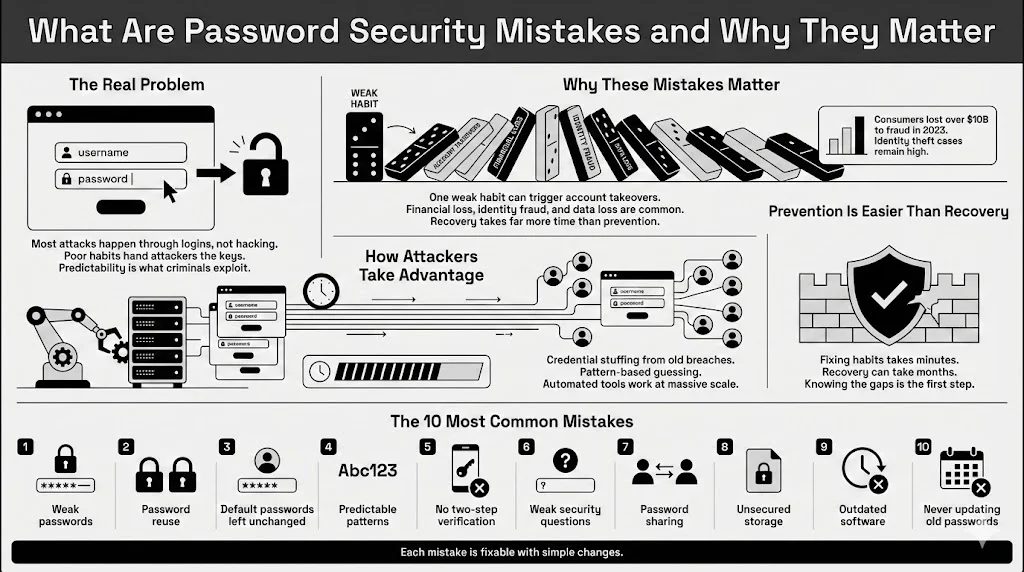
Here are the ten most common errors people make and the simple steps you can take to fix them.
1. Using Weak Passwords
The most fundamental error is using a credential that is simply too easy to guess. Despite years of warnings, “123456,” “password,” and “admin” still appear on lists of the most commonly used passcodes every year.
What qualifies as weak? Anything short, simple, or derived from personal information is vulnerable. A standard computer can crack a lowercase, eight-character password in nearly zero time. If you use a single word found in the dictionary, automated “dictionary attacks” will find it instantly.
Many people believe that adding a number to the end of a word makes it strong. Unfortunately, attackers know this trick. “Sunshine” is weak, but “Sunshine1” is barely any better. Current cracking hardware can guess billions of combinations per second.
Why Short or Simple Fails Fast: Length is the most critical factor in strength. Every character you add exponentially increases the number of possibilities an attacker must guess. A seven-character code might take minutes to crack, but a 15-character phrase could take centuries. When you use short strings, you are essentially gambling that an attacker won’t get to your combination before you change it.
Safer Alternatives and Basic Rules: The National Institute of Standards and Technology (NIST) updated its guidelines to favor length over complexity. Instead of a gibberish string like “P@$$w0rd!”, try a passphrase. A passphrase consists of four or more random words strung together, such as “Correct-Horse-Battery-Staple” (a famous example) or “Purple-Elephants-Singing-Loudly.”
These are easier for you to retain but much harder for a computer to guess due to their length. A good rule of thumb: make it at least 12 characters long, and avoid common phrases or famous quotes.
2. Password Reuse Across Multiple Accounts
If you are guilty of this, you are not alone. Recent surveys suggest that nearly 65% of people use the same password for multiple accounts, or even all of them. This is widely considered the single most dangerous of all password security mistakes.
The danger here is a concept called “credential stuffing.” Let’s say you use the same email and password for a low-security hobby forum and your primary bank account. If that hobby forum gets breached—which happens frequently because they often lack military-grade security—hackers will take that email/password combo and immediately try it on Amazon, PayPal, Gmail, and major banks.
How One Breach Leads to Many: You might have a strong lock on your front door (your bank), but if you use the same physical key for a shed that has no lock (the forum), and someone steals that key, they now have access to your house.
This risk is realistic and constant. Billions of credentials are currently floating around the dark web. If you reuse passwords, your security is only as strong as the weakest site you have ever visited.
Safer Ways to Manage Unique Passwords: The only solution is to ensure every single account has a unique login. Since memorizing 100 different complex strings is impossible for the human brain, this is where a secure vault becomes helpful. Tools like WhiteVault allow you to save, recall, and protect these unique credentials without the mental strain. You only need to memorize one strong master code, and the vault handles the rest.
3. Leaving Default Passwords Unchanged
When you buy a new Wi-Fi router, a smart camera, or a connected printer, it often comes with a preset login, usually printed on a sticker on the bottom. Manufacturers do this for easy setup, often setting the username to “admin” and the password to “password” or “admin.”
One of the most overlooked password security mistakes is plugging these devices in and never changing those details. Attackers know the default logins for almost every device on the market. They scan the web for connected devices and try these defaults automatically.
Devices and Services Most Affected: This issue is rampant in the “Internet of Things” (IoT). Baby monitors, smart thermostats, and home routers are frequent targets. If an attacker accesses your router, they can intercept traffic from every device in your home. If they access a camera, they invade your privacy directly.
Why Attackers Look for These First: It is the path of least resistance. Why spend days trying to crack a code when the manufacturer published the answer in the user manual? Botnets—massive networks of infected devices—often spread by hunting for these default credentials.
When and How to Change Them: Change the default login the moment you take a device out of the box. Do this before you even connect it to the internet if possible. Check the settings menu for “Administration” or “Security” and create a unique, strong passphrase. If the device doesn’t allow you to change the password, consider it insecure and return it.
4. Poor Password Complexity
Even when people try to make their logins unique, they often fall into predictable patterns. We mentioned adding a “1” to the end of a word, but the patterns go deeper.
Predictable Patterns People Rely On: A very common structure is: Capital letter at the start, a word, and a number or symbol at the end. For example, “Welcome123!” or “Monday2025?”.
Hackers program their cracking tools to guess these patterns first. They know you likely capitalized the first letter. They know you likely used a year (1990, 2024, 2025) at the end. They know that if you are forced to use a special character, you probably chose an exclamation mark.
Why Mixing Characters Matters: While length is the most critical factor, complexity still plays a role, especially for shorter codes. “Complexity” means using a mix of character types: uppercase, lowercase, numbers, and symbols. This increases “entropy,” or the amount of randomness in the string.
How Length Beats Clever Tricks: However, don’t rely on “clever” substitutions like swapping an “a” for an “@” or an “o” for a “0.” These are well-known to attackers (a technique called Leetspeak) and offer little protection. Instead of trying to outsmart the machine with substitutions, outlast it with length. A 20-character phrase of random words is generally more secure than an 8-character string full of symbols.
5. Lack of Two-Factor Authentication
Relying solely on a password, no matter how strong, is a risk. If a website you use gets breached and stores your data in plain text (which shouldn’t happen, but does), your password is stolen. This is where Two-Factor Authentication (2FA) or Multi-Factor Authentication (MFA) comes in.
What Two-Factor Authentication Does: 2FA requires two types of evidence to prove you are who you say you are.
- Something you know: Your password.
- Something you have: Your phone, a security key, or an email account.
Why Passwords Alone Are No Longer Enough: With 2FA enabled, even if a hacker steals your login details, they cannot access your account because they don’t have your phone to receive the verification code. Microsoft has stated that MFA can block over 99.9% of account compromise attacks.
Common Excuses for Skipping It: “It takes too long” or “I don’t have my phone on me” are common refrains. While it adds five seconds to the login process, that friction is exactly what keeps attackers out.
Simple Options That Work Without Hassle: SMS text messages are the most common form of 2FA. While better than nothing, they can be intercepted via “SIM swapping” attacks. A better option is an authenticator app (like Google Authenticator or Authy) which generates codes locally on your device. For the highest security, physical hardware keys (like YubiKeys) offer robust protection. Enable 2FA on every account that supports it, particularly email, banking, and social media.
6. Relying on Weak Security Questions
“What is your mother’s maiden name?” “What was the name of your first pet?” “What high school did you attend?”
We have all answered these. They seem like safe backups, but relying on honest answers here is one of the classic password security mistakes.
Why Security Questions Fail: The problem is that the answers to these questions are often public record or easily found on social media. Your mother’s maiden name is likely in birth records or genealogy sites. Your high school is probably listed on your LinkedIn or Facebook profile. Your pet’s name might be in your Instagram posts.
Reused Answers Across Sites: Just like passwords, people tend to reuse these answers. If an attacker figures out your high school for one site, they can likely reset your password on three others.
Better Ways to Handle Account Recovery: Treat security questions like secondary passwords. If a bank asks for your mother’s maiden name, lie. Give a fake answer that is impossible to research, such as “PurpleSubmarine.”
The trick, of course, is recalling your lie. This is where a secure personal vault like WhiteVault becomes essential. You can store your “security answers” alongside your login details so you never get locked out by your own cleverness.
7. Password Sharing
Sharing access is sometimes necessary. You might share a streaming account with a spouse, a Wi-Fi code with guests, or a project management login with a colleague. However, the way we share these credentials often leaves gaping holes in our security.
Common Reasons People Share: Convenience drives this habit. It is easier to shout a code across the room or text it to a friend than to set up proper delegated access.
Risks Tied to Trust and Convenience: The risk isn’t necessarily that your friend will hack you. The risk is loss of control. If you text a password, that record lives on your phone, their phone, and the carrier’s logs. If they write it on a sticky note and lose it, your account is compromised. In addition, if you reuse that password (see mistake #2), you have just given them the access to your entire internet identity.
Work, Family, and Shared Account Issues: In workplace settings, shared accounts prevent accountability. If five people use the same “admin” login, it is impossible to know who made a change or caused an error.
Safer Alternatives for Access Sharing: Never send credentials via text or unencrypted email. If you must share, use a password manager that supports secure sharing. This allows you to grant access to an account without the other person necessarily seeing or being able to copy the password. Even better, use family plans or enterprise features that give everyone their own unique login for a shared service.
8. Unsecured Storage of Passwords
Where do you keep your passwords? If the answer is “in my head,” you are likely using weak or reused codes. If the answer is “on a sticky note” or “in a notebook,” you are vulnerable to physical theft or loss.
But the most dangerous version of these password security mistakes is storing them in an unencrypted file on your computer—like a Word document or Excel spreadsheet named “Passwords.”
Saving Them in Plain Text Files: Malware specifically scans computers for files with names like “passwords,” “login,” or “accounts.” If your computer gets infected with a virus, that file is the first thing attackers will steal. It requires zero effort to open and read.
Browser Autofill Risks: Many people rely on their web browser to save credentials. While convenient, browsers are often not as secure as dedicated vaults. If someone gains access to your unlocked computer, they can often reveal all your saved passwords in plain text with just a few clicks in the settings menu.
Safer Storage Options Explained Simply: The gold standard is an encrypted password manager or a secure personal vault. These tools encrypt your data so that even if the file is stolen, it looks like scrambled nonsense to the thief. WhiteVault, for example, uses strong encryption to ensure that you are the only person who can access your data. It allows you to save, recall, and protect not just passwords, but also images of critical documents like passports or wills, keeping everything in one secure place.
9. Using Outdated Software
You might wonder what software updates have to do with passwords. The answer is: everything. Operating systems (like Windows, macOS, Android, iOS) and browsers (Chrome, Safari, Edge) are complex. They often contain “bugs” or vulnerabilities that hackers discover.
Known Flaws Attackers Rely On: When a company like Apple or Microsoft releases an update, it often includes “security patches.” These are fixes for known holes in the armor. If you delay that update, you are leaving the hole open.
How Outdated Software Affects Safety: Attackers can exploit these unpatched vulnerabilities to install “keyloggers” on your device. A keylogger records every keystroke you make—including the perfect, 20-character unique password you just typed.
Why Updates Protect More than Features: Many people ignore the “Update Available” notification because they are busy. Treat those notifications as urgent. By keeping your phone and computer updated, you ensure the underlying platform handling your credentials is secure. Enable automatic updates whenever possible to remove the burden of recalling.
10. Failure to Update Passwords Over Time
Years ago, security advice was to change your password every 60 or 90 days. We now know that this often leads to “password fatigue,” where users just change “Summer2024” to “Summer2025.” NIST no longer recommends arbitrary rotation for this reason.
However, never changing your passwords is also one of the major password security mistakes.
Why Old Passwords Become Risky: If you have been using the same password since 2018, it is highly likely that it has appeared in a data breach somewhere along the way. Companies get breached constantly. If you don’t update your credentials, you are relying on a secret that isn’t secret anymore.
Breaches Users Never Hear About: Not every breach makes the nightly news. Smaller sites and services are compromised daily.
Signs It’s Time for a Change: You should change your password immediately if:
- You hear news of a breach at a service you use.
- You suspect unauthorized activity on your account.
- You realize you have reused that password elsewhere.
Reasonable Update Habits That Stick: Adopt a “spring cleaning” mindset. Once a year, review your most critical accounts (email, banking, medical). If those passwords are old or reused, update them. It doesn’t have to be a daily chore, but an occasional review keeps your security hygiene fresh.
How to Build Better Password Habits Going Forward
Reading this list might feel overwhelming. If you recognize five or six of these password security mistakes in your own life, don’t panic. Security is not about being perfect instantly; it is about making progress.
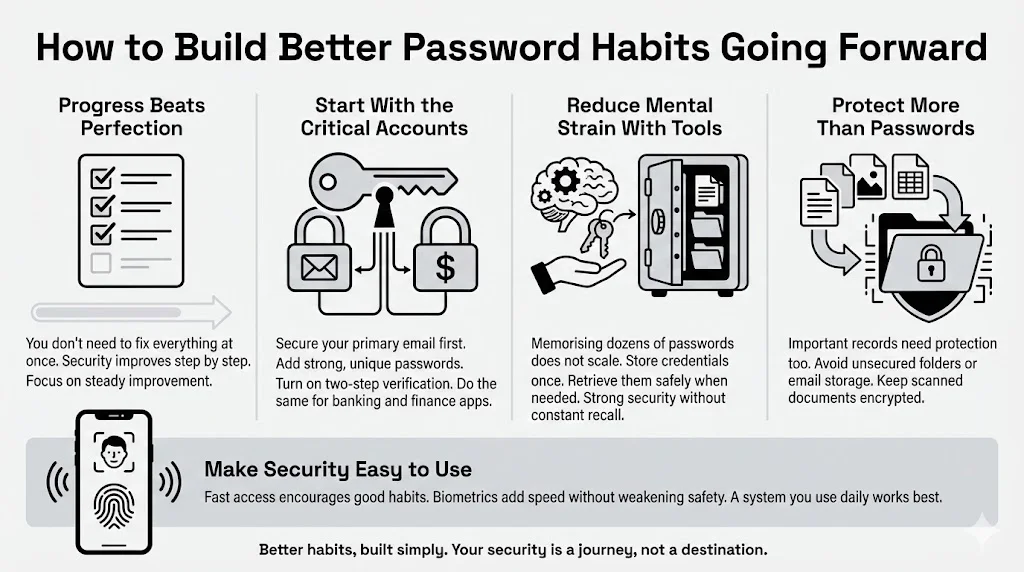
One-Time Fixes vs. Long-Term Habits: Start with the critical “triage.”
- Secure your primary email: Your email is the master key to your internet life because it is where password reset links are sent. Make sure your email has a unique, strong password and 2FA enabled.
- Secure your money: Do the same for your banking apps.
Once those are safe, you can tackle the rest over time.
Tools That Reduce Mental Load: The human brain wasn’t designed to memorize 100 random alphanumeric strings. Stop trying to force it. Using a tool like WhiteVault allows you to offload that mental burden. You save the information once, and the vault retains it forever. This bridges the gap between high security (complex, unique codes) and high convenience (accessing them when you need them).
Keeping Personal Data and Documents Safer: Password security is just one part of the puzzle. We also have critical documents—birth certificates, insurance policies, deeds—that need similar protection. The same habits apply: don’t leave them in unsecured folders or email them to yourself. Store scanned copies in an encrypted environment.
Balancing Security with Daily Use: The best security system is the one you will actually use. If a system is too complex, you will bypass it (back to the key under the mat). Find a balance. Use biometrics (FaceID, fingerprint) to access your secure vault quickly on your phone. This gives you speed without sacrificing safety.
Conclusion
We often assume that cyberattacks happen to “other people”—high-profile CEOs or celebrities. But automated attacks don’t discriminate. They look for open doors, regardless of who owns the house.
The most damaging password security mistakes—using weak passwords, reusing them across accounts, and skipping two-factor authentication—are easy to fix. By addressing these, you move yourself out of the “easy target” category.
You don’t need to change everything overnight. Start today by downloading a secure vault or password manager. Update your email password. Turn on 2FA for your bank. These small actions create layers of defense that keep your identity, your money, and your personal memories safe.
Take control of your internet security. It is your information; you should be the only one who holds the keys.
Frequently Asked Questions (FAQ)
1) What is the biggest password security mistake people make?
The single biggest mistake is password reuse. Using the same password for your email, bank, and social media means that a breach on one insecure site exposes your entire internet identity. Always use unique credentials for every account.
2) How often should passwords be updated?
Modern guidelines suggest you don’t need to change passwords on a set schedule (like every 90 days) unless you suspect a breach. However, if you are using old passwords that you have reused in the past, you should update them immediately to unique, strong passphrases.
3) Are password managers safe to use?
Yes. Reputable password managers and secure vaults use military-grade encryption (like AES-256). This means that even if the company’s servers were hacked, the attackers would only see encrypted gibberish, not your passwords. Your data is decrypted only on your device using your master code.
4) Is two-factor authentication worth the extra step?
Absolutely. It is the single most effective measure to stop account takeovers. Even if a hacker has your password, 2FA prevents them from logging in. It adds a negligible amount of time to your login for a massive increase in protection.
5) What should I do if I think my password was exposed?
First, change the password on that specific account immediately. Second, if you reused that password anywhere else, change it on those sites too. Finally, enable two-factor authentication on the affected account to lock out any intruders who might still be trying to access it.
6) Can strong passwords still be cracked?
Theoretically, yes, but practically, it depends on time. A truly strong, long passphrase (15+ characters) would take current computers centuries to crack using brute force. While nothing is 100% unhackable, a strong password makes you such a difficult target that attackers will move on to someone easier.


