
Music feels personal. It is the soundtrack to our morning commutes, our workout sessions, and our quiet evenings at home. Because streaming platforms like Spotify feel so integrated into our daily routines, it is easy to forget that they are also data hubs. Your profile holds more than just playlists; it contains payment methods, email addresses, and a history of listening habits that hackers find surprisingly valuable.
We have all been there—using the same login for five different apps because remembering unique credentials for everything feels impossible. In fact, recent data suggests the average person manages over 100 web accounts. Trying to memorize that many unique combinations is a recipe for frustration. However, reusing credentials is like using a single physical pass for your house, your car, and your office. If someone copies that pass, they have access to everything.
Taking control of your internet safety does not require you to be a tech wizard. It starts with small, manageable actions. One of the most effective steps you can take today is a simple Spotify change password update. Whether you suspect unauthorized access or just want to freshen up your security, this guide will walk you through the process, explain why it matters, and show you how to manage your credentials without the stress.
Understanding Spotify Account Security
Before we dive into the “how-to,” it is helpful to understand the “why.” Authentication on streaming platforms works similarly to your banking or email apps, though we often treat it with less caution.
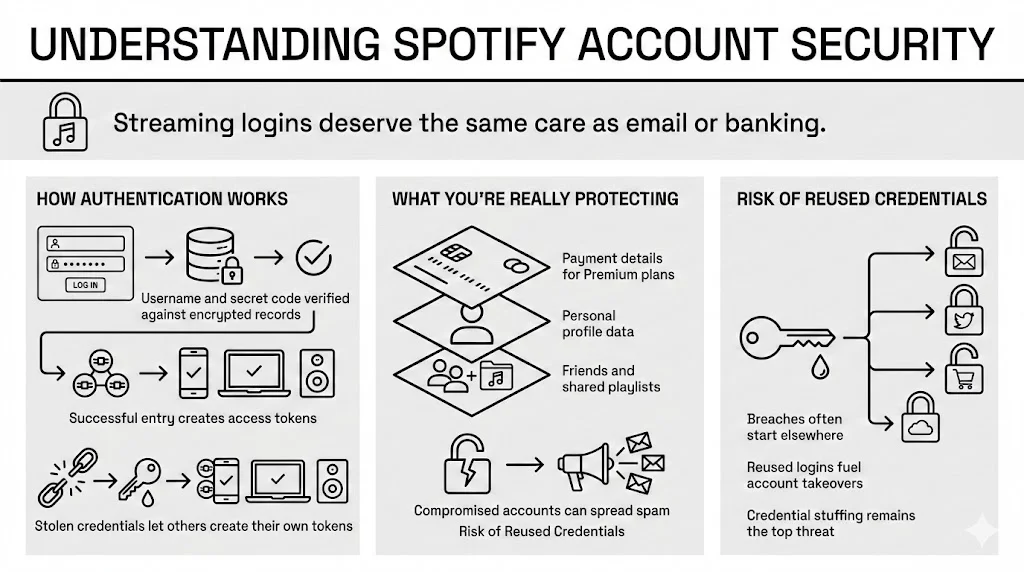
How Authentication Works
When you enter your username and secret code, Spotify verifies those details against its encrypted database. If they match, you are granted entry. This authentication token allows you to move between your phone, laptop, and smart speaker without logging in every time. However, if that initial entry point is compromised, a stranger can generate their own tokens on their devices, effectively cloning your access.
What You Are Actually Protecting
You might think, “So what if someone uses my account? They’ll just mess up my Daily Mix.” While a ruined algorithm is annoying, the stakes are higher.
- Payment Information: Many users have credit cards or PayPal accounts linked for Premium subscriptions.
- Personal Data: Your email, birth date, and region are stored in your profile.
- Social Connections: If you connect with friends or share playlists, a compromised account can be used to send spam or phishing links to people you know.
The Risk of Reused Credentials
The biggest threat to your streaming account often isn’t a direct hack of Spotify itself, but rather “credential stuffing.” This happens when a different, less secure website suffers a data breach. Hackers take those exposed email-and-password combinations and try them on major platforms like Spotify, betting that users have reused the same login. According to 2024 cybersecurity reports, this remains the primary method for account takeovers.
When You Should Change Your Spotify Password
Knowing when to update your credentials is just as important as knowing how. While some security experts used to recommend arbitrary changes every 90 days, organizations like NIST (National Institute of Standards and Technology) now suggest focusing on specific triggers.
Signs of Unusual Activity
Trust your instincts. If you notice any of the following, perform a Spotify change password action immediately:
- Unexpected Playback: Music starts playing on your phone when you aren’t listening, or you see “Listening on Unknown device” in your connect menu.
- New Playlists: You see libraries or “liked” songs you do not recognize.
- Plan Changes: Your subscription moves from Individual to Family, or free to Premium, without your input.
New Login Alerts
Spotify generally sends an email when a new device logs into your profile. If you receive one of these alerts and you are not currently setting up a new tablet or phone, consider it a red flag. Do not click links inside the email if you are unsure; go directly to the website to investigate.
Post-Sharing or Public Use
We often log in on a friend’s TV for a party or a hotel lobby computer to check a playlist. It is easy to forget to log out. If you suspect you left a session active on a device you no longer control, updating your credentials is the surest way to force a logout everywhere.
Routine Management
Even without suspicious activity, refreshing your credentials once a year is a healthy habit. It ensures that any old data breaches involving your information become irrelevant. Think of it like spring cleaning for your cyber life.
Things to Do Before Updating Your Password
Rushing into a reset can sometimes lead to getting locked out. A few minutes of preparation ensures the process goes smoothly.
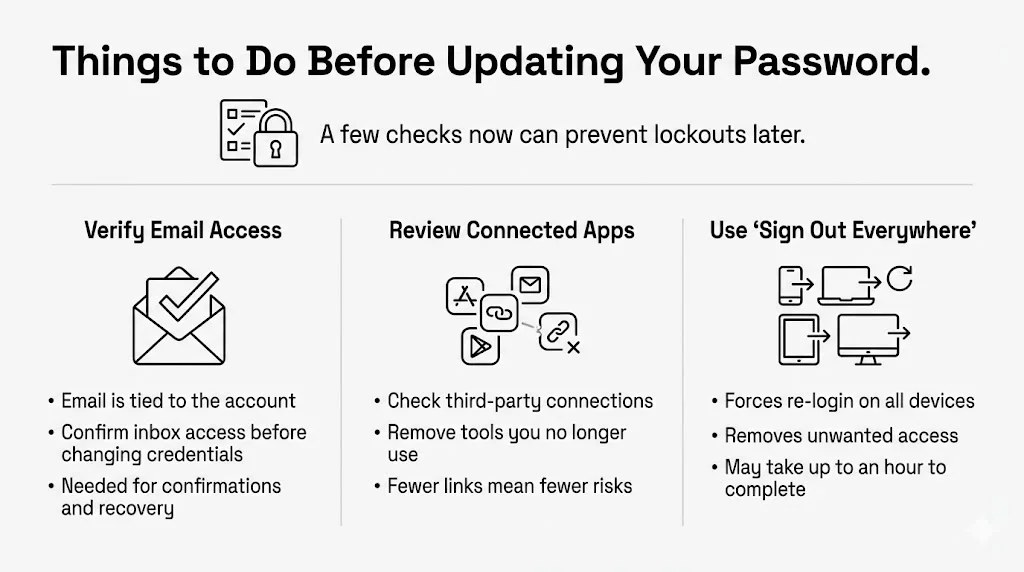
1. Verify Email Access
Your Spotify profile is tethered to your email address. If you cannot access that email inbox, you will not be able to confirm the change or recover the account if something goes wrong. Log into your email provider first to ensure your entry is working.
2. Audit Connected Apps
Over the years, you may have granted access to third-party tools—like playlist analyzers, dating apps, or smart home devices.
- Go to your Spotify account page.
- Look for “Apps” or “Connections.”
- Review the list. If you see services you no longer use, revoke their access. This simplifies your security footprint before you make changes.
3. The “Sign Out Everywhere” Safety Net
If you are updating because of a security concern, you will want to use the “Sign out everywhere” feature. This option is located on your account overview page. It may take up to an hour to take effect, but it ensures that anyone currently using your subscription is booted off, requiring them to enter the new credentials you are about to create.
Step-by-Step: Spotify Change Password on Desktop or Mobile Browser
Spotify does not currently allow you to change your credentials directly inside the mobile app (iOS or Android). You must use a web browser. Whether you are on a laptop, a tablet, or a smartphone using Chrome or Safari, the steps remain consistent.
Step 1: Log In Safely
Open your preferred web browser and type spotify.com directly into the address bar. Avoid searching for “spotify login” and clicking the first ad, as phishing sites often mimic login pages.
- Select Log In from the top menu.
- Enter your current details.
Step 2: Access Account Overview
Once inside, click on your profile picture or the “Profile” text in the top right corner. From the dropdown menu, select Account. This will open your dashboard, where you can manage plans, payments, and security.
Step 3: Locate the Security Section
On the account overview page, look for a sidebar menu (on desktop) or a dropdown menu (on mobile). Find and select Change password.
Step 4: Update Credentials
You will see three boxes:
- Current password: Prove it is really you by entering what you use now.
- New password: Enter your fresh, strong string of characters.
- Repeat new password: Type it again to ensure no typos.

Pro Tip:
If you are using a tool like WhiteVault, you can generate a random, complex string here without worrying about memorizing it. We will discuss why this helps in a later section.
Step 5: Confirm and Save
Click the green Set new password button. You should see a confirmation banner stating the update was successful.
Step 6: Re-authenticate
Once the change is complete, you may be logged out of the browser session. Log back in with your new credentials to verify everything is working correctly. You will also need to update the login on your phone app and any other connected devices like Sonos or Alexa speakers.
How to Change Your Spotify Password If You Signed Up With Facebook or Apple
Many users skip the email signup and use “Continue with Facebook” or “Continue with Apple.” This is convenient, but it creates confusion when you want to secure your account.
Why You Don’t Have a Spotify Password
Technically, if you sign in via a partner service, Spotify does not hold your password—Facebook or Apple does. Spotify trusts their verification. Therefore, you cannot perform a standard Spotify change password action because one does not exist for that specific profile yet.
Securing a Third-Party Account
If your Facebook or Apple ID is compromised, your music profile is too. To secure your streaming:
- Change the password at the source: Update your Facebook or Apple ID credentials directly on their respective platforms.
- Transition to Direct Login (Optional): You can create a direct Spotify login to separate the two.
- Use the “Forgot your password?” link on the Spotify login page.
- Enter the email address associated with your Facebook or Apple account.
- Spotify will send you an email to create a new dedicated password.
- Once set, you can log in with your email and this new code, independent of the social platform. This adds a layer of redundancy and safety.
Password Recovery If You Forgot Your Spotify Password
We have all stared at a login screen, mind going completely blank. If you cannot remember your current credentials, you cannot use the standard change form. You need the recovery flow.
Initiating the Reset
- Go to the login page.
- Click the link that says Forgot your password?
- Enter your email address or username.
The Email Verification
Check your inbox for a message from Spotify. It usually arrives within minutes.
- Subject Line: Usually “Reset your password.”
- Action: Click the green link inside.
- Valid Time: These links often expire after 24 hours for security.
Troubleshooting Missing Emails
If the email does not appear:
- Check Spam/Junk folders: Automated security emails often get filtered.
- Verify the Address: Did you sign up with an old university email or a secondary account?
- Wait: Sometimes email servers have delays. Wait 15 minutes before requesting a new one.
Once you click the link, you will be taken to a page to create a new entry. This effectively acts as a Spotify change password action, bypassing the need for the old one.
Creating a Strong and Secure Spotify Password
When the empty box asks for your new credentials, the temptation to use “Music123!” or your dog’s name is strong. Our brains crave patterns. However, patterns are exactly what hacking software predicts.
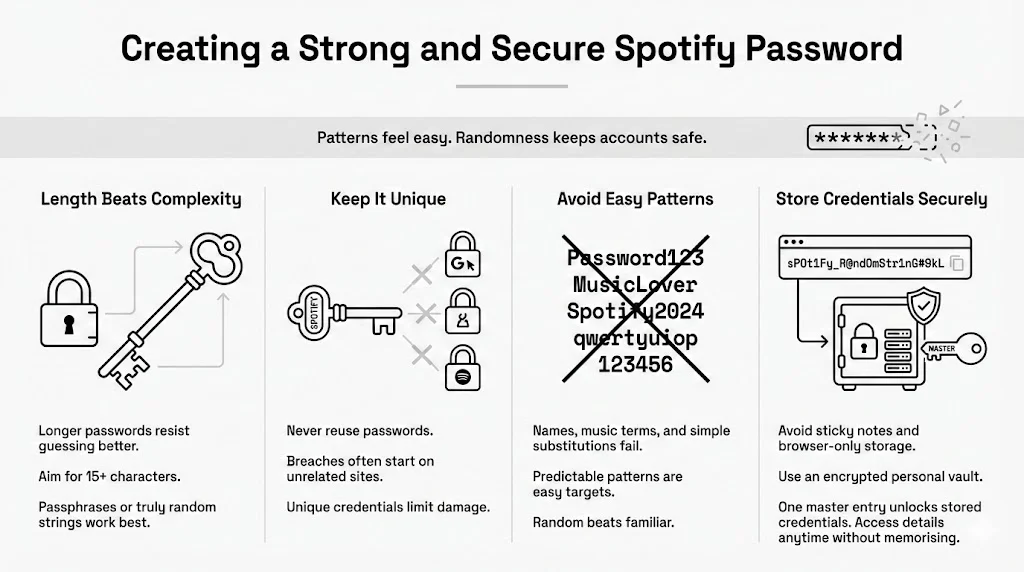
Length Over Complexity
Current guidance from security researchers suggests that length is the most critical factor. A 15-character phrase is generally harder to crack than an 8-character word with one symbol. Aim for a “passphrase”—a string of random words—or a truly random mix.
The Uniqueness Rule
This is the golden rule of cyber safety: Never use the same password twice. If your Spotify code is unique, a breach at a retailer or a forum won’t put your music collection (or payment data) at risk.
Storing Credentials Safely
This is where the “too many accounts” problem hits. How do you remember a unique, 16-character string for Spotify, another for email, and another for banking?
This is where WhiteVault steps in.
Instead of writing codes on sticky notes (which can be lost or seen) or saving them in a browser (which can be accessed if your laptop is stolen), a secure personal vault offers a better way. You can generate a strong, complex password for Spotify—something like Tr8#vK9$mP2!xL—and save it directly into your WhiteVault.
Because WhiteVault uses high-level encryption, you only need to remember one master entry to access all your credentials. It allows you to protect what matters without needing a photographic memory. You can view your credentials whenever you need to log in, ensuring you never get locked out again.
Extra Security Measures to Protect Your Spotify Account
Updating your credentials is a powerful step, but it is part of a broader safety net.
1. Enable Two-Factor Authentication (2FA) if Available
As of 2025, Spotify has begun rolling out 2FA options for many users, though it may not be universal yet. Check your account settings. If available, turn it on. This requires a code sent to your phone whenever a new login attempts to occur, adding a massive barrier to intruders.
2. Review Your Receipts
Keep an eye on the email associated with your account. Spotify sends receipts for every monthly payment. If you see a receipt for a subscription type you didn’t buy (like upgrading to Family), investigate immediately.
3. Beware of Phishing
“Your account is suspended! Click here to fix it.” These messages create panic. Phishing scams try to trick you into handing over your login details by creating fake emergency scenarios.
- Never click links in urgent text messages or emails claiming to be support.
- Always go to the website manually to check your status.
4. Secure the Email
Your Spotify account is only as safe as the email connected to it. If a hacker gets into your email, they can request a password reset for Spotify and lock you out. Ensure your email provider account is protected with a strong, unique password and 2FA.
Common Spotify Password Issues and How to Fix Them
Even with the best intentions, technology sometimes hiccups. Here are solutions to common friction points.
“Password Reset Token Invalid”
If you click a reset link and get an error:
- You may have clicked it too late (expired).
- You may have requested multiple resets. Always use the most recent email; the older links are voided the moment a new one is sent.
Locked Accounts
“Too many failed attempts.” If you try to guess your credentials too many times, Spotify will temporarily lock the account to prevent brute-force attacks.
- Solution: Stop guessing. Wait 30 minutes. Then use the “Forgot password” flow.
Sync Delays
After a Spotify change password success, your phone might still play music for a while before asking for the new login. This is due to the authentication token we mentioned earlier. It might take a few hours for the system to invalidate the old token. If you are worried, use the “Sign out everywhere” button in your account settings to force the update immediately.
Interface Glitches
Sometimes, the “Save” button remains greyed out.
- Check that your new entry meets the minimum requirements (usually 8+ characters).
- Ensure the “New” and “Repeat” fields match exactly.
- Try a different browser or disable ad-blockers temporarily, as they can sometimes interfere with form scripts.
Conclusion
Securing your streaming profile might seem like a small detail in the grand scheme of life, but it is a fundamental part of modern privacy. Your music habits, payment details, and personal preferences deserve protection. By performing a Spotify change password update, checking your connected apps, and using strong, unique credentials, you are closing the door on potential intruders.
Remember, security is not about being paranoid; it is about being prepared. It is about organizing your cyber life so that when a data breach hits the news, you don’t panic—you know you are safe.
Whether you are using a dedicated tool like WhiteVault to store your new, complex credentials or just taking ten minutes today to audit your account, every step counts. You are taking control. So go ahead, update that login, put on your favorite playlist, and enjoy the music with total peace of mind.
Frequently Asked Questions (FAQ)
1) How often should I change my Spotify password?
Unless you suspect a breach, changing it once a year is a good standard. However, if you hear about a major security incident at another service where you used the same login, change your Spotify credentials immediately.
2) Does changing my password log me out of all devices?
Not always instantly. It creates a new requirement for future logins. To ensure immediate removal of unauthorized users, use the “Sign out everywhere” function in your account settings right after updating your credentials.
3) Can I reuse an old Spotify password?
It is technically possible, but highly discouraged. Reusing old credentials defeats the purpose of the update. If an old code was compromised in a past breach, reusing it opens the door to hackers again. Always generate a fresh, unique sequence.
4) What should I do if someone else accessed my account?
First, change your password. Second, use “Sign out everywhere.” Third, check your “Apps” section to remove unknown connections. Finally, verify no playlists were deleted. If data is lost, Spotify support can sometimes restore playlists if contacted quickly.
5) Is it safe to save Spotify login credentials in a browser?
Browser storage is convenient but offers thinner protection than a dedicated vault. If someone gains access to your unlocked computer, they can often reveal browser-saved passwords in plain text. A dedicated secure vault like WhiteVault adds an encryption layer that keeps specific entries hidden even if the device is shared.
6) Why does Spotify ask me to reset my password unexpectedly?
If Spotify detects credentials on the dark web (from a breach elsewhere) that match your account, they may force a reset to protect you. This is a proactive safety measure. Always verify the request by logging in directly at the official site rather than clicking email links.

