
We all have that moment of panic. You attempt to open your bank account to transfer money, or perhaps access an encrypted file with your tax returns, and your mind goes blank. Was the code your dog’s name with a “1” at the end? Or was it the street you grew up on with an exclamation point?
With the average person now managing over 100 web-based accounts—from banking and shopping to streaming and social media—keeping track of a unique, strong code for each one is nearly impossible. So, we compromise. We reuse credentials, write them on sticky notes, or choose simple phrases that are easy to guess.
But in 2025, the stakes are higher than ever. Fraud and identity theft losses topped $12.5 billion recently, making these everyday realities that affect our finances, reputation, and peace of mind. Protecting your accounts and sensitive documents is no longer optional.
This brings us to the great debate: Is it safer to trust a code you memorize, or a fingerprint you carry?
While traditional codes have been the standard for decades, biometric authentication security is rapidly becoming the norm on our phones and laptops. But is it actually safer? Or does it just trade one set of risks for another?
In this guide, Team WhiteVault will walk you through exactly how these methods work, where they fail, and how you can use them to save, recall, and protect what matters most to you.
What Authentication Really Means
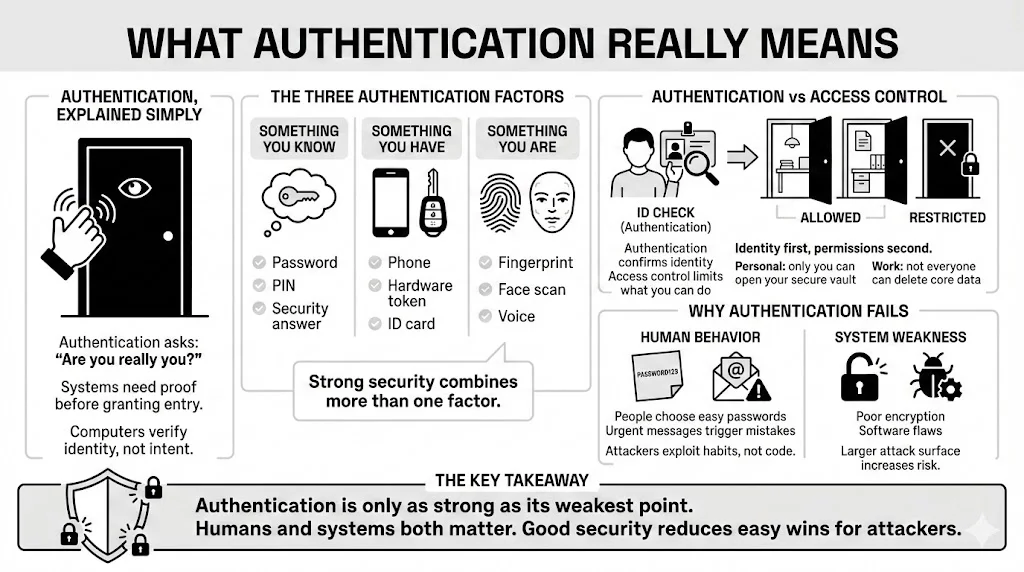
At its core, authentication is just a fancy way of a system asking, “Are you really who you say you are?”
Imagine knocking on a friend’s door. They look through the peephole (visual verification) or ask for a secret knock (knowledge verification) before they let you in. Computers do the same thing, but they need strict proof.
Identity verification usually relies on three factors:
- Something you know: Like a passphrase, PIN, or the name of your first pet.
- Something you have: Like a smartphone, a hardware token, or an ID card.
- Something you are: Your fingerprint, face, or voice.
Access control is the gatekeeper. Once identity is verified, access control decides what you can touch. In your personal life, this means ensuring only you can see your medical records or open your WhiteVault. In professional systems, it ensures an intern can’t accidentally delete the company database.
Why Authentication Fails
If these systems are so smart, why do hackers still get in? The answer often lies with us—humans.
Human Behavior: We are built for efficiency, not security. We choose “Password123” because it is easy to type. We click links in emails that look urgent. We write PINs on the back of debit cards. Attackers know this. They usually don’t “hack” into systems by writing complex code; they simply trick people into handing over the credentials.
System Vulnerability: Sometimes, the flaw is in the technology itself. A website might store your data without proper encryption, or a software bug might leave a back door open. This creates an “attack surface”—places where a thief can try to break in. The larger the attack surface, the harder it is to defend.
Password Authentication Explained
How Password-Based Systems Work
When you create an account and type in a new secret code, the website doesn’t (or at least, shouldn’t) save it as plain text. If they did, anyone working there could read it.
Instead, they use a process called hashing. Think of hashing like putting your text through a one-way blender. “MySecretCode” goes in, and a long string of random characters comes out. When you log in later, the system blends your input again. If the resulting mix matches the stored mix, you get in.
Because the process is one-way, a hacker who steals the database only sees the blended mess, not your actual credentials. However, weaker systems still exist, and many older sites fail to protect this data correctly.
Strengths of Password Authentication
Despite the criticism, text-based codes remain the backbone of internet security for a few reasons:
- Easy to Setup: You don’t need a scanner, a camera, or a microphone. Every device with a keyboard supports them.
- Familiar: Everyone from a teenager to a grandparent understands the concept of a secret word.
- Changeable: If you think someone knows your code, you can change it in seconds. This is a massive advantage that biological methods lack.
- Hardware Independent: You can log into your email from a library computer, a friend’s tablet, or a smart TV without needing your specific phone to scan your face.
Weaknesses of Password Authentication
The biggest weakness of passwords is that they rely on human memory. Because we can’t retain 100 different complex strings, we fall into dangerous habits:
- Reuse: According to recent security reports from 2025, nearly 65% of people reuse the same password across multiple sites. If one site gets breached, hackers try that same email and code combination on banking and shopping sites. This is called “credential stuffing.”
- Phishing: Attackers send fake emails pretending to be your bank. If you type your credentials into their fake site, they have them. No amount of complexity helps here; if you hand it over, it is gone.
- Poor Creation Habits: We use birthdays, pet names, and sports teams. Attackers use “dictionary attacks”—programs that cycle through millions of common words and dates to guess your login.
This is why purely memory-based protection is struggling to keep up with modern threats.
Biometric Authentication Explained
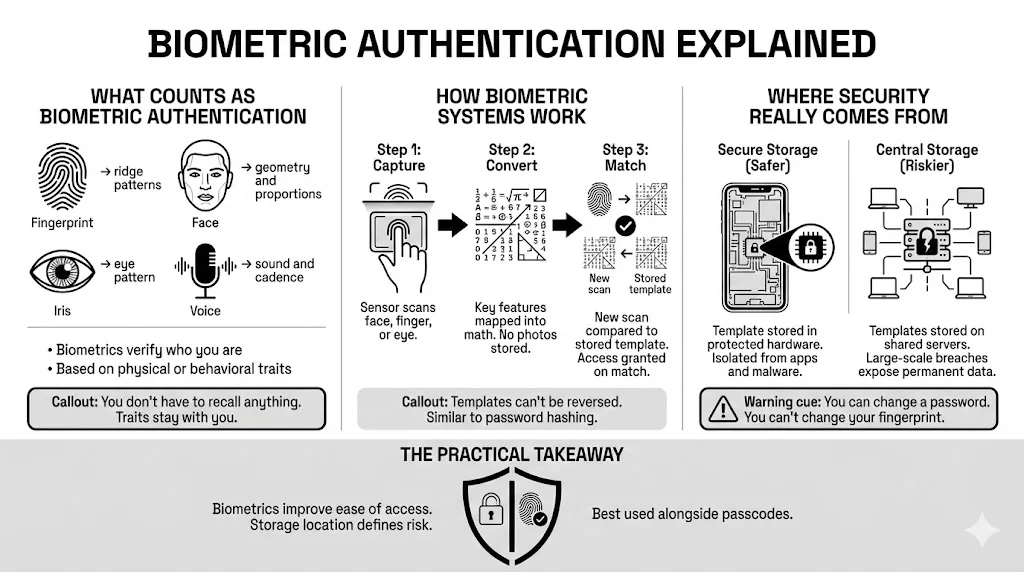
What Counts as Biometric Authentication
Biometrics move away from what you know to who you are. These are physical or behavioral traits unique to you.
- Fingerprints: The ridges and whorls on your fingertips are the most common form.
- Facial Recognition: Maps the geometry of your face—distance between eyes, depth of nose, jawline shape.
- Iris Scanning: Analyzes the complex patterns in the colored ring of your eye.
- Voice Recognition: Measures the sound waves, pitch, and cadence of your speech.
Because these traits are physically part of you, they solve the “I forgot my login” problem instantly. You can’t leave your thumb at home (hopefully).
How Biometric Authentication Systems Work
Many people believe their iPhone or Android stores a photo of their face or fingerprint. This is a myth. Storing actual images would be a privacy nightmare.
Instead, the system functions like this:
- Capture: The sensor scans your finger or face.
- Conversion: The software maps specific points (minutiae) and converts them into a mathematical code or “template.”
- Matching: When you try to access your phone later, it scans you again, creates a new temporary code, and checks if it matches the stored template.
Crucially, you can’t reverse the math to get the fingerprint back. It is a one-way street, similar to password hashing.
The Role of Biometric Authentication Security
It is vital to understand that the scan itself is only half the battle. Biometric authentication security relies heavily on where that mathematical template is stored.
In secure devices (like modern smartphones), this data lives in a “Secure Enclave” or “Trusted Execution Environment.” This is a separate chip isolated from the rest of the phone’s operating system. Even if your phone is infected with a virus, the malware typically can’t reach into that secure vault to steal your face data.
However, risks rise when biometric data is stored on a central server (like a company database of employee fingerprints) rather than on your personal device. If that server is hacked, millions of permanent templates could be exposed.
Security Strengths of Biometrics
1) Reduced Reliance on Memory
The most immediate benefit is removing the human brain from the equation. You don’t need to write anything down. There is nothing to guess.
For access to a secure personal vault like WhiteVault, this removes the friction of security. You are more likely to secure your sensitive documents if opening them takes a split-second glance rather than typing a 16-character string.
2) Improved Authentication Accuracy
Biometrics provide a high level of distinctiveness. The chance of two random people having a partial fingerprint match is low; the chance of a Face ID mismatch is often cited as one in a million.
Compare this to a 4-digit PIN (10,000 combinations) or a common code like “password” (which is on every hacker’s first-try list). The mathematical complexity of your biological traits offers a much higher barrier to entry for a brute-force attacker.
3) Liveness Detection and Sensor Security
Early biometric scanners were easy to fool. You could sometimes hold up a high-resolution photo to trick a facial scanner.
Modern systems use “Liveness Detection.” They check for:
- Depth: using infrared dots to map 3D shape (so a flat photo fails).
- Attention: checking if your eyes are looking at the screen.
- Micro-movements: subtle shifts that prove you are a living, breathing person, not a mask.
This makes biometric authentication security far more resilient against casual spoofing attempts than it was just five years ago.
Security Risks and Privacy Concerns with Biometrics
1) Biometric Data Protection Challenges
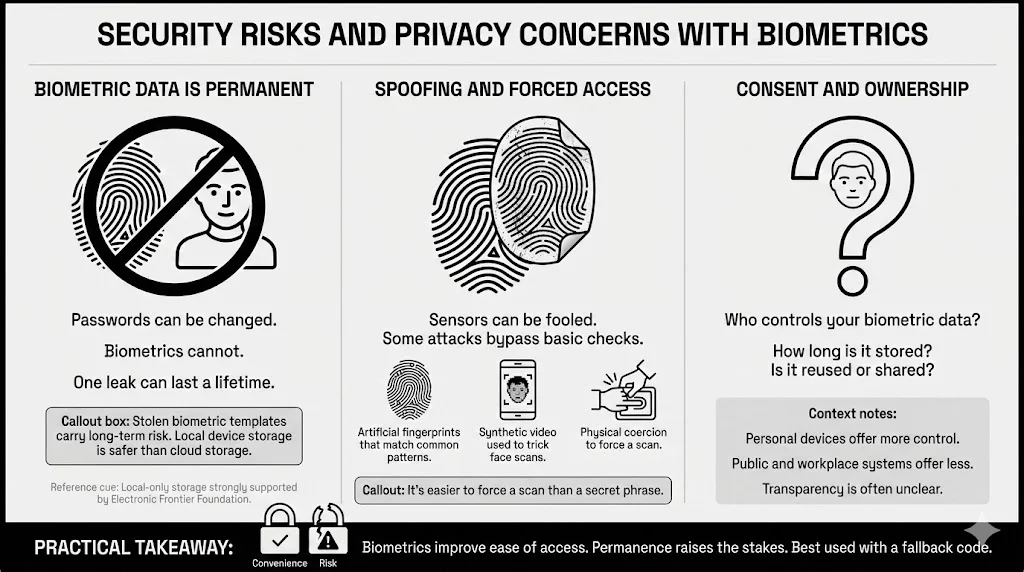
Here is the scary part: You have only one face.
If a hacker steals your code, you reset it. You create a new one, and the old one becomes useless. But if a hacker manages to steal your biometric template and finds a way to use it, you can’t get a new fingerprint. You can’t change your iris pattern.
This permanence makes biometric authentication security a high-stakes game. While the data is encrypted, the consequences of a breach are lifelong. This is why organizations like the Electronic Frontier Foundation (EFF) argue strictly for local storage (on your device) rather than cloud storage of biometric data.
2) Biometric Spoofing and Advanced Attacks
While liveness detection is good, it is not perfect. Researchers and determined criminals are constantly finding ways to bypass sensors.
- MasterPrints: Artificial fingerprints designed to contain common features found in many people’s prints, capable of fooling less sensitive scanners.
- Deepfakes: As Artificial Intelligence video generation improves, there is a growing fear that video-based verification could be tricked by synthetic faces.
- Coercion: A criminal can force you to look at your phone or press your finger against a sensor against your will. It is much harder to force someone to reveal a complex code inside their mind.
3) User Consent and Ethical Questions
There is also the question of who owns your face. When you upload a selfie to a fun aging filter app, are you training their facial recognition AI? Transparency is often lacking.
Informed consent means knowing exactly how your data is used, where it is stored, and when it is deleted. For personal use, you generally control the data on your phone. But in public spaces or corporate environments, that control diminishes.
Passwords vs Biometrics – Direct Comparison
Let’s look at how they stack up against specific threats.
Resistance to Common Attacks
- Phishing: Biometrics win hands down. You can’t accidentally “type” your face into a fake website. A hacker can’t call you and ask for your fingerprint over the phone.
- Brute Force: Biometrics usually win. Most devices block access after 5 failed face attempts. A remote server might allow thousands of password guesses before flagging suspicious activity.
- Social Engineering: Passwords are weak here. People can be manipulated into giving up codes. You can’t be talked into giving up your iris scan remotely.
Recovery and Revocation
- Passwords: Excellent for recovery. If you forget it, you verify your identity another way and make a new one.
- Biometrics: Poor for recovery. If the sensor breaks or your finger is injured, you are unable to access the system unless you have a backup (usually a PIN or passphrase).
Long-Term Risk Exposure
- Passwords: High risk of poor hygiene (reuse), but low consequence if managed well (unique codes for every site).
- Biometrics: Low risk of “guessing,” but catastrophic risk if the underlying data is permanently compromised.
The Case for Multi-Factor Authentication
Why One Method Alone Falls Short
Relying on just a password is like securing your front door but leaving the window open. Relying on just a fingerprint is secure, until you cut your finger or the sensor fails.
Single points of failure are the enemy of security. This is why the industry standard—and what we suggest at WhiteVault—is Multi-Factor Authentication (MFA).
Combining Biometrics and Passwords
MFA combines two different types of evidence.
- Example: To access your bank, you use your face (Something you are) AND enter a one-time code sent to your phone (Something you have).
- Example: To open your secure document vault, you type a master passphrase (Something you know) AND scan your fingerprint (Something you are).
This layering creates a safety net. If a hacker steals your password, they still can’t get in because they don’t have your face. If they spoof your fingerprint, they are still stuck without the password. This is the gold standard for biometric authentication security.
Legal and Regulatory Considerations
Regulatory Compliance Around Biometric Data
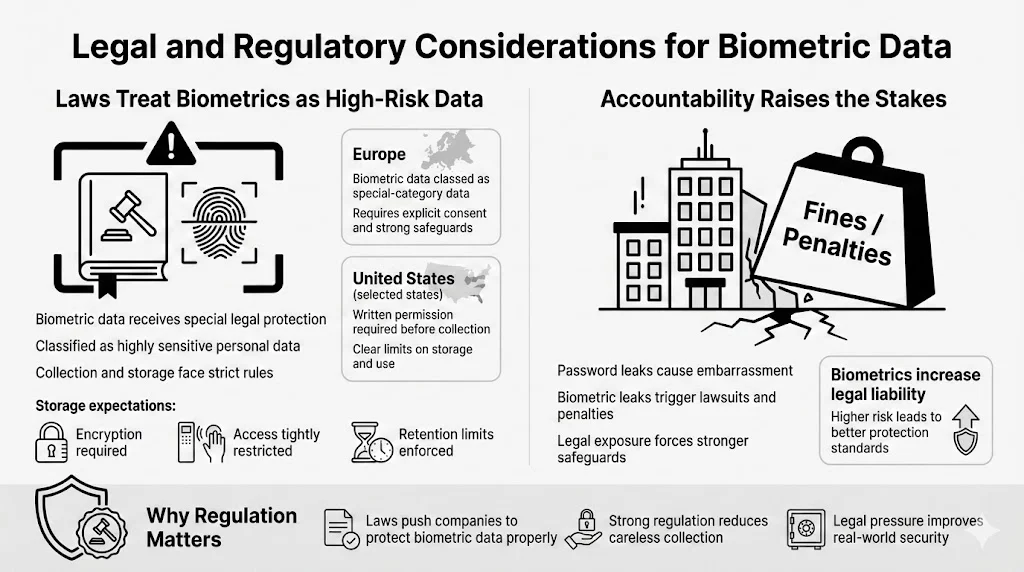
Governments are catching up to technology. In Europe, the GDPR classifies biometric data as “special category data,” requiring the highest level of protection. In the US, states like Illinois have the Biometric Information Privacy Act (BIPA), which prevents companies from collecting your prints without written permission.
These laws mandate that biometric authentication security must include strict storage protocols—usually encryption and limited access.
Accountability for Data Handlers
If a company loses your password, they face bad press. If they lose your biometric data, they face massive lawsuits and fines. This legal pressure forces companies to take biometric storage seriously, often leading to better security practices than we see with standard login databases.
Choosing the Safer Option for Personal Use
So, what should you do today?
Use Cases Where Biometrics Make Sense
- Device Access: Use Face ID or Touch ID to open your phone and laptop. It keeps prying eyes out and prevents “shoulder surfing” (people watching you type your PIN).
- Banking Apps: The convenience and phishing resistance make biometrics ideal for checking balances on mobile.
- Secure Document Access: When you store critical files—like your will, passport scans, or insurance policies—in a tool like WhiteVault, biometrics offer a fast, secure way to view them without typing a long code in public.
Situations Where Passwords Still Matter
- Initial Setup & Backups: You always need a strong passphrase as a fallback. If the technology fails, this is your only way back in.
- Shared Devices: If you share a tablet with a spouse or child, a shared passcode is often more practical than registering multiple faces.
- Anonymity: Sometimes, you may not want a service to link your identity to your physical self. A pseudonym and a password provide privacy that biometrics can’t.
Practical Safety Tips for Everyday Users
- Enable MFA Everywhere: Turn on multi-factor authentication for email, banking, and social media.
- Use a Password Manager: Stop trying to recall complex codes. Let a secure app generate and store them for you.
- Keep Devices Updated: Security updates often include patches for biometric sensors.
- Organize Your “Break Glass” Info: Ensure your family knows how to access your accounts if something happens to you. WhiteVault is designed exactly for this—allowing you to designate trusted individuals who can access specific documents only when necessary.
Conclusion
The question isn’t really “Biometrics OR Passwords.” It is about how we use them together.
Safety relies on implementation, not labels. A weak password (“123456”) is dangerous. A fingerprint stored on an insecure server is also dangerous. But when handled correctly, biometric authentication security offers a level of protection and ease that old-school methods can’t match.
Passwords alone struggle against the modern wave of phishing and breaches. Biometrics offer a shield that is uniquely yours, tied to your physical being.
For the everyday user, the best path is clear: Use biometrics for the speed and protection of your daily devices, but back them up with strong, unique passphrases stored in a secure vault. By combining these tools, you move away from the chaos of sticky notes and panic, and toward a virtual life that is organized, protected, and peaceful.
FAQ: Biometric vs Password Authentication
Q1: What is biometric authentication security?
This refers to the systems, encryption, and protocols used to protect your biological data (like fingerprints or face scans) during the capture, storage, and matching process. It ensures that attackers can’t steal or copy your physical traits.
Q2: Can biometric data be stolen like passwords?
Yes, but it is much harder. Hackers can’t just “guess” it. They would need to breach a highly secure database or trick a sensor. The main difference is that if stolen, biometric data can’t be changed, which makes protecting it critical.
Q3: Is biometric authentication safer than passwords for personal files?
Generally, yes. For accessing apps or a personal vault on your phone, biometrics are safer because they are immune to phishing and shoulder-surfing. However, they should always be paired with a strong backup code.
Q4: How does liveness detection stop fake biometric attacks?
Liveness detection uses technology to verify that the source is a real, living person. It might check for blinking, 3D facial depth, or blood flow changes in a finger to ensure the input isn’t a photo, mask, or silicone mold.
Q5: Are biometrics safe from privacy risks?
They are safest when the data stays on your device (local storage) rather than in the cloud. Always check if an app stores your face/fingerprint data on their servers or just uses the verification from your phone.
Q6: Should biometrics be used alone?
No. We suggest Multi-Factor Authentication (MFA). Using a biometric scan combined with a strong password or a trusted device creates the strongest barrier against fraud.
Q7: What happens if a biometric system fails?
You should always have a backup entry method, such as a master PIN or passphrase. This ensures you are never permanently locked out of your own accounts due to a technical glitch or injury.


